

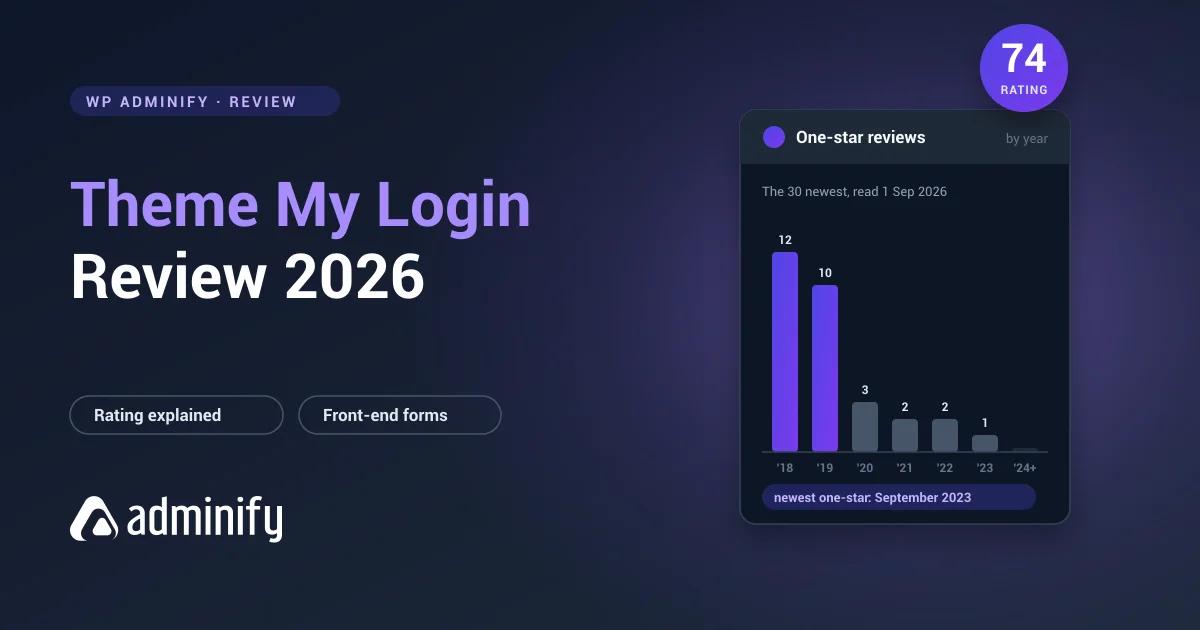

Theme My Login sits at 74 out of 100, the lowest score of any plugin in this comparison set, with 120 one-star reviews out of 460. That number is the first thing anyone sees and it's the reason most people never install it.
It's also, on inspection, mostly a scar from 2018. We read the one-star filter on 1 September 2026, and the thirty newest one-star reviews run from September 2023 back to August 2018, with twenty-two of them landing in 2018 and 2019. The most recent one dates from 2023. This review is about what the plugin does now, and whether the rating still tells you anything useful. If you're here because you want a login page inside your site rather than a prettier admin screen, creating a WordPress login page for users is the build, and the best WordPress login page plugins is the wider field.

The short version
| Best for | Sites that need login, registration and password reset as real pages inside the theme |
| Free version | The whole core plugin. Placement, routing and flow |
| What you pay for | Extensions, individually, from $15 a year each |
| The rating | 74/100, and almost every one-star review predates 2020 |
| Weakest point | It is not a design tool, and the per-extension pricing adds up fast |
| Skip it if | What you actually wanted was wp-login.php restyled |
The numbers
All from the WordPress.org Plugin API, re-pulled 1 September 2026.
| Metric | Value |
|---|---|
| Active installs | 60,000 |
| Rating | 74/100 from 460 ratings |
| Five-star | 277 |
| One-star | 120 |
| On WordPress.org since | 13 March 2009 |
Seventeen years on the repository and a release three days before we re-checked. Whatever the rating says, this isn't an abandoned plugin.
The rating needs a date on it
A 26 per cent one-star rate is alarming in the abstract and much less so once you look at when those reviews were written.
We opened the one-star filter on the WordPress.org support forum on 1 September 2026. Page one holds the thirty newest. Here's how they fall:
| Year | One-star reviews on page one |
|---|---|
| 2018 | 12 |
| 2019 | 10 |
| 2020 | 3 |
| 2021 | 2 |
| 2022 | 2 |
| 2023 | 1 |
| 2024 to 2026 | 0 |
The titles tell you what happened without needing to open a single one. "Update broke several sites." "Last Update broke all my sites." "New update completely broke my website." "Used to be good but its broken now." "Shady update tactic." "Una tontería cobrar por la redirección y el recaptcha."
Two events, both in 2018. A major version rewrite broke existing installations, and features that had been part of the free plugin moved into paid extensions. People were angry about both, they said so, and WordPress.org keeps ratings forever.
What that means for you in 2026. The rating is a permanent record of a bad year, not a live signal about current quality. It's fair to weigh it as evidence that this developer has shipped a release that broke sites before. It isn't fair to read it as "this plugin breaks sites today", because the people who would be saying so haven't said it since 2023.
Read it the way you would read a company's worst year: relevant, dated, and not the whole story.
What it actually does
This is the part people get wrong, and it accounts for a good share of the disappointment in that forum.
Theme My Login does not style wp-login.php. It replaces the login, registration, lost-password and reset-password screens with pages rendered inside your active theme, with your header, your navigation, your sidebar and your widgets around them.
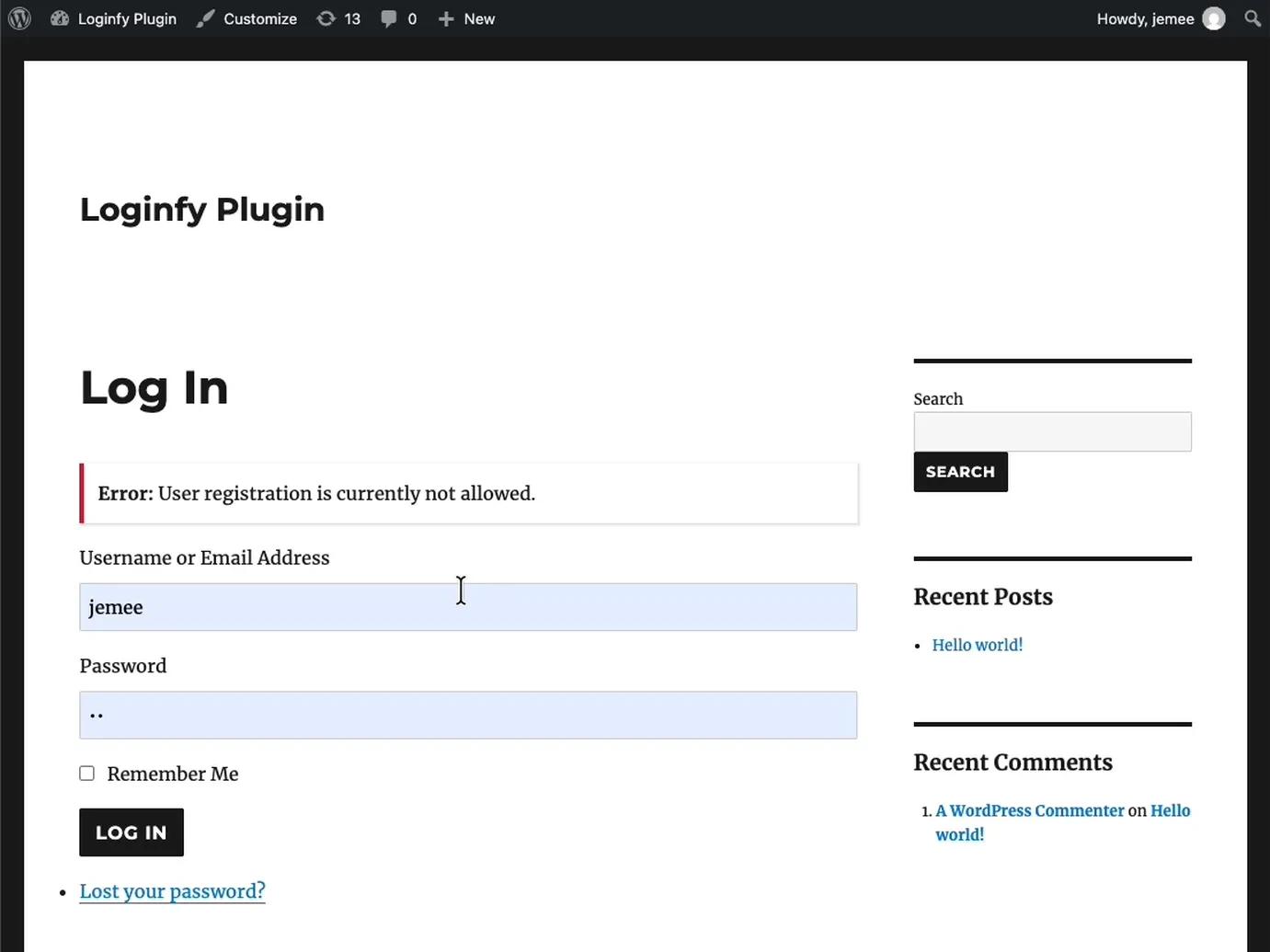
Look at that screenshot honestly, because it's the whole point of the plugin and also the whole complaint. Theme My Login handled the flow correctly: it put the form on a real page inside the template and wired the actions properly. What it didn't do is make it attractive. On a well-designed theme that's exactly right. On a default theme, you get a plain form with a widget sidebar next to it. Restyling the admin login screen instead is a different job with different tools, covered in how to customize the WordPress login page.
Any tutorial showing a beautiful "Theme My Login" login page is showing you a theme. That was true of 7.1.15. It's slightly less true of 7.2.0, which added default field and button styling; see the version note below.
The settings that matter
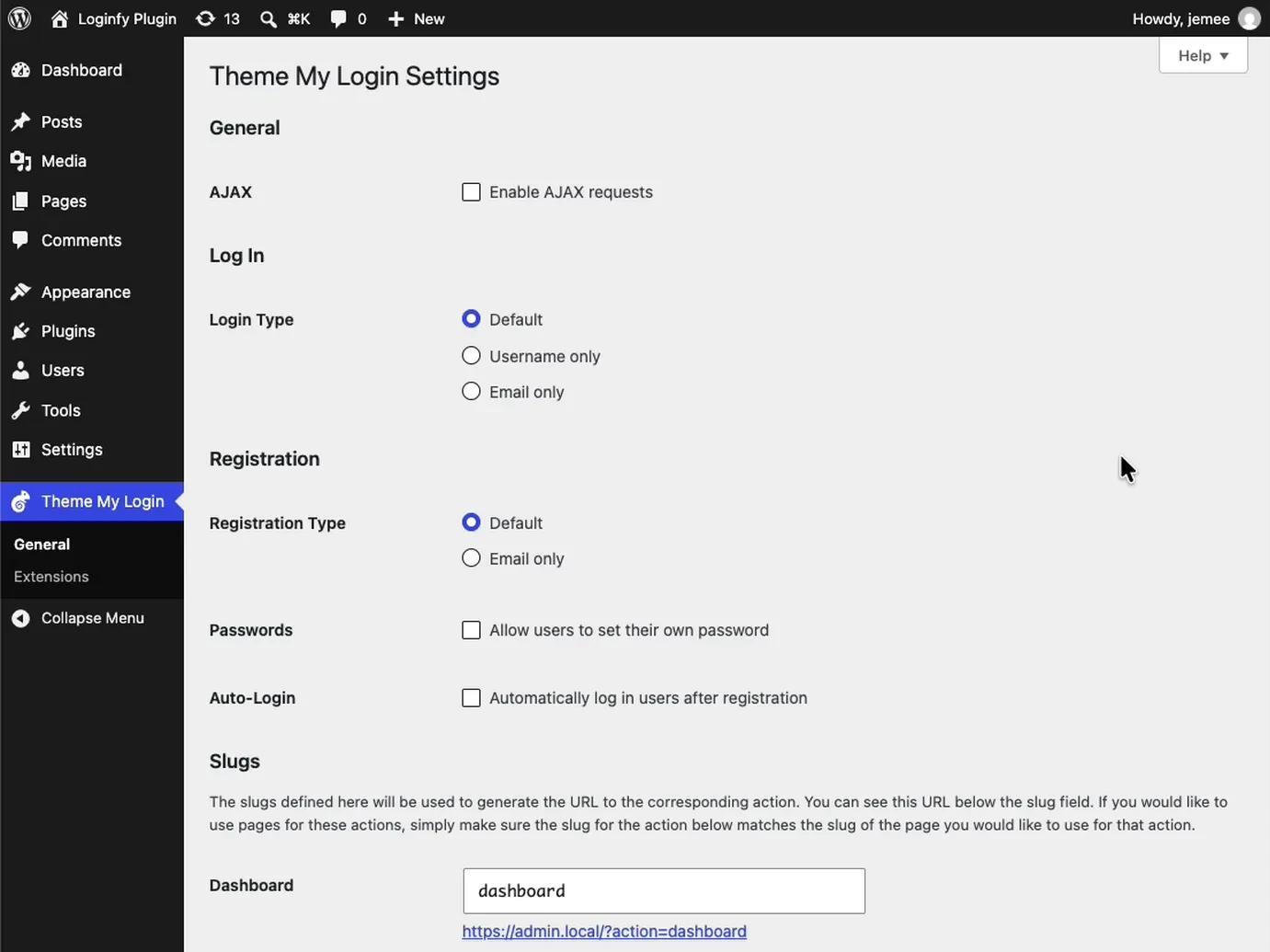
- Login Type. Default, Username only, or Email only. On a member site, Email only removes a decision your users should never have to make. Almost nobody remembers the username they picked.
- Registration Type. Default or Email only. Same reasoning, more strongly, because it's the first form a new user meets.
- Passwords. Let users set their own at registration instead of receiving a generated one by email. This is the setting that most reduces abandoned signups, because the generated-password flow requires the user to leave your site, find an email that may be in spam, and come back.
- Auto-Login. Log the user in immediately after registering. Removes a step that loses people.
- AJAX. Submits without a page reload. Pleasant, and worth testing against your theme's JavaScript before you rely on it.
Action slugs
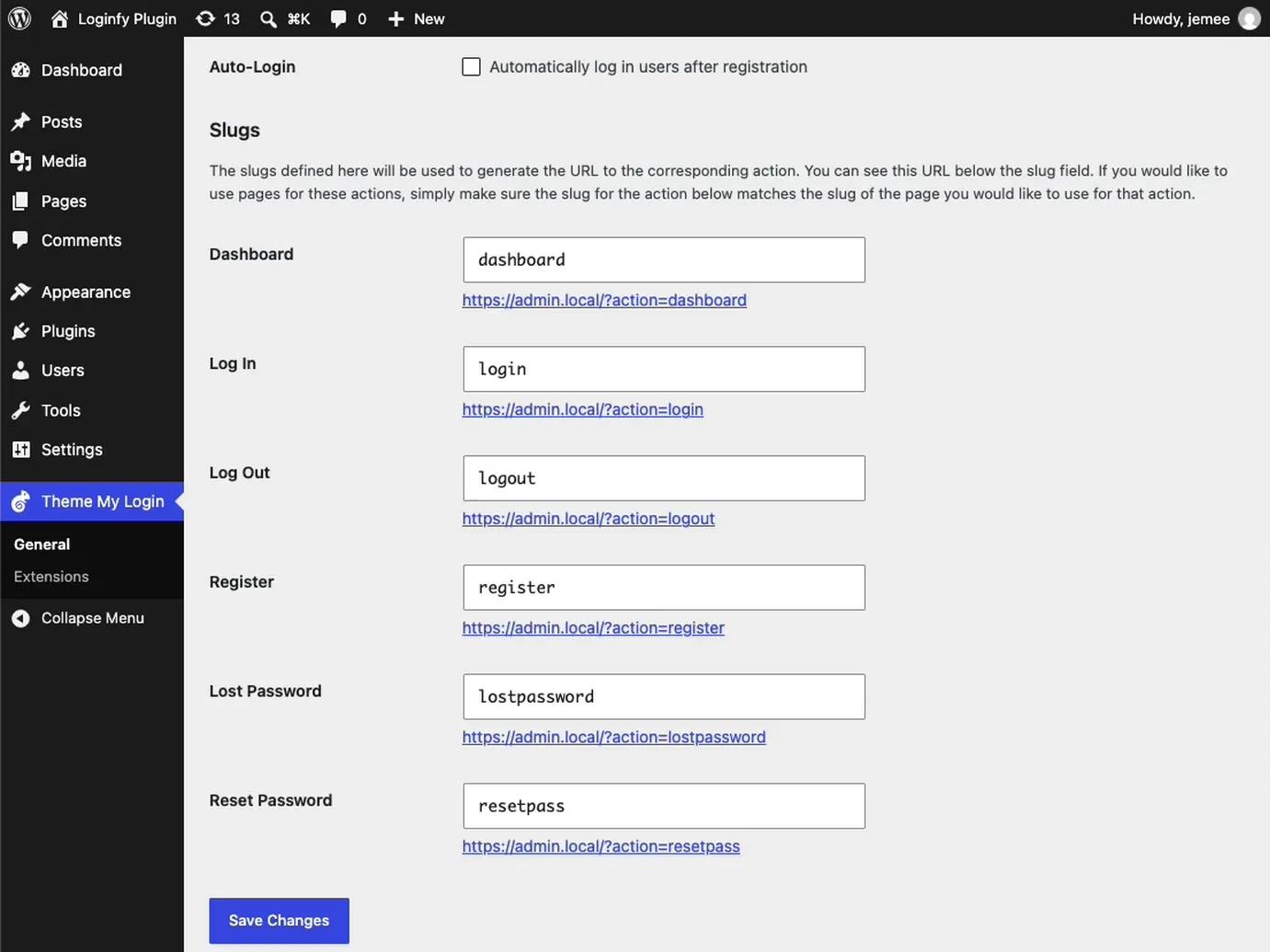
Dashboard, login, logout, register, lostpassword, resetpass. Each generates a URL in the form yoursite.com/?action=login, and each slug is yours to change.
Change them to language your members recognise. ?action=resetpass is a developer's phrase. ?action=new-password isn't. This is a small thing that makes a member area feel like a product rather than a WordPress install, and it's free.
The error that catches everyone
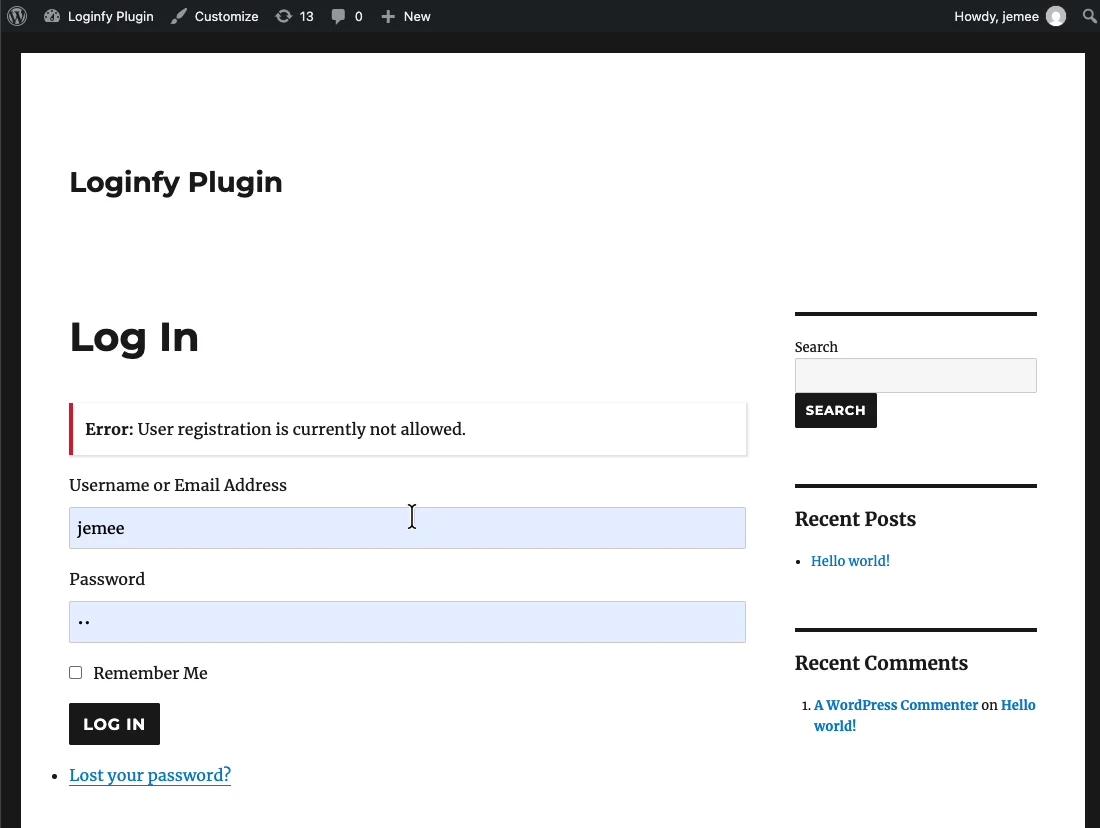
If your registration page shows this, the plugin is working and WordPress is refusing. Go to Settings > General and tick Membership: Anyone can register, then set New User Default Role deliberately, because it should be Subscriber or a custom role and never anything with editing capability.
Do the CAPTCHA before you open registration, not after. Open signup without one attracts bots within days: adding reCAPTCHA to the WordPress login page.
What changed in August 2026
Two releases are worth knowing about, and they point in opposite directions from the plugin's reputation.
7.1.15 was a security-hardening release. Its changelog lists two stored XSS fixes, one in textarea form fields and one in unescaped settings field attributes, a CSRF nonce check on extension licence activation requests, sanitisation of multisite network settings on save, and a PHP 8.5 deprecation fix. That's a developer going through the codebase properly rather than shipping a feature.
7.2.0, on 28 August 2026, added default field and button styling and a show or hide toggle on password fields, plus a filter to disable autofocus and updated alert styling to match current WordPress admin notices.
That first item matters for this review specifically. Our hands-on ran 7.1.15 on 25 August, three days before 7.2.0 shipped, so every screenshot above shows the unstyled behaviour. If you install it today you may get something that looks better out of the box than the screenshots suggest. It's still not a design tool, but "applies no styling of its own" is now a sentence with a version number attached to it.
Extensions, and how the bill adds up
The core plugin is free and complete. Everything else is sold separately, per extension, per year. Prices verified on thememylogin.com on 25 August 2026.
| Licence | Price, per extension |
|---|---|
| Single site | $15/yr |
| 2 to 5 sites | $30/yr |
| Unlimited sites | $45/yr |
Extensions include Mailchimp, Favorites, Avatars, Social, 2FA, Restrictions, Moderation, Security, Redirection, reCAPTCHA, Profiles and Notifications. There's a Legacy Bundle of six at 30 per cent off.
Two of those names are the ones that generated the 2018 anger: Redirection and reCAPTCHA. If you want members sent somewhere sensible after login, and you want a CAPTCHA on the registration form, that's two extensions, which on a single site is $30 a year and on five sites is $60 a year. Add Security and 2FA and you're at $60 or $120.
Compare that against a single licence elsewhere before you commit. LoginPress is $99 a year for two sites with its whole add-on set included. Loginfy is $49 a year for five sites, though it does a completely different job. And the two features people most often buy here are both available free from other plugins: redirecting users after login by role is a filter or a settings screen, and reCAPTCHA has free implementations.
The per-extension model is honest, in that you only pay for what you use. It's also the model that punishes you hardest for wanting three ordinary things.
What Theme My Login does well
It solves a problem nothing else on this list solves. If you want login, registration, lost password and reset as real pages inside your theme, with correct routing, this is the tool. Login customizers can't do it because they style a screen that lives outside your theme.
The flow settings are well judged. Email-only login, self-service passwords and auto-login after registration are the three settings that most affect whether people finish signing up, and all three are free and one click each.
Editable action slugs. Free, and the difference between member-facing URLs and developer-facing ones.
It is still maintained, properly. A security-hardening release and a feature release in the same month, seventeen years after first publication.
The core is genuinely free. No locked panels, no upgrade prompts inside the settings screen. The commercial layer is entirely optional extensions.
Where it falls short
It is not a design plugin, and half its audience wanted one. That mismatch is the source of most of the disappointment around it.
The rating will scare people, fairly or not. 74/100 next to LoginPress's 96 and Colorlib's 98 is the number a client will find if they look, and "the one-star reviews are from 2018" is a conversation you'll have to have.
Per-extension pricing compounds. Three ordinary features on five sites is $90 a year before you've styled anything.
There is a history of a breaking release. That was back in 2018, and the changelog since then reads carefully, but if you're putting this on a client site, stage the updates rather than auto-updating. That's good practice anyway and it's better practice here, and it's worth confirming you can still reach the login URL if a release misbehaves.
No design controls at all. Your theme is the design. If your theme's form styling is poor, that's what members get.
Who should install it
Membership, course and community sites where members should never see wp-login.php and should never land in /wp-admin. This is the plugin's purpose and it does it well, though you'll still want to hide the admin bar from member roles and give people somewhere sensible to land.
Sites with a good theme. The better your theme's typography and form styling, the better this plugin looks, because it's your theme doing the work.
Anyone who wants login flow control without writing code. Email-only login, self-service passwords and auto-login are three settings that would otherwise be three snippets.
Who should look elsewhere
Anyone who wanted wp-login.php to look better. That's a login customizer's job. LoginPress, Custom Login Page Customizer (Colorlib) and Loginfy all do it, and none of them can do what Theme My Login does.
Anyone building a whole membership product. A membership plugin will ship its own front-end login, registration and account pages, and running both creates two login pages and a support question about which is correct.
Anyone who wants redirects and CAPTCHAs included. Those are extensions here and free elsewhere, and neither belongs to this plugin's core job.
Anyone who does not want a plugin at all. Core's wp_login_form() in a shortcode is about eight lines, covered in creating a custom WordPress login form, with the surrounding routing in the front-end login guide.
Frequently asked questions
Why does Theme My Login have so many one-star reviews?
Almost all of them date from 2018 and 2019, when a major version broke existing installations and several features moved into paid extensions. Reading the one-star filter on 1 September 2026, the thirty newest run from September 2023 back to August 2018, with 22 in 2018 and 2019 and none since 2023. The rating is a permanent record of that period rather than a current signal.
Is Theme My Login still maintained?
Yes. Version 7.2.0 shipped on 28 August 2026, and 7.1.15 before it was a security-hardening release fixing two stored XSS issues and adding CSRF nonce checks. The plugin has been on WordPress.org since March 2009.
Does Theme My Login style the WordPress login page?
No. It replaces the login, registration, lost-password and reset screens with pages rendered inside your active theme, so your theme provides the design. Version 7.2.0 added default field and button styling, but it's still not a design tool. Styling wp-login.php itself needs a login customizer.
Is Theme My Login free?
The core plugin is entirely free, with no locked panels. Extensions are sold individually at $15 a year for one site, $30 for two to five and $45 unlimited, per extension. Redirection and reCAPTCHA are two of the most commonly wanted, and both have free alternatives from other plugins.
Does it work with any theme?
Yes, and that's both the feature and the catch. It renders inside whatever theme is active, so a well-designed theme produces a good-looking login page and a plain one produces a plain page. Test it on your actual theme before deciding.
Should I use Theme My Login or a login customizer?
They do different jobs, so the answer is which problem you've. Use Theme My Login if members should log in on a page of your site. Use a login customizer if staff and clients log in at wp-login.php and you want that screen branded. Plenty of sites legitimately run one of each.
The verdict
Theme My Login is a good plugin with a bad number attached to it, and the number was earned in 2018.
If you need front-end login, registration and password reset as real pages in your theme, install it. Nothing else in this comparison does that job, the core is free, the flow settings are well judged, and the recent changelog reads like careful maintenance rather than neglect.
Go in knowing three things. It won't make anything look better; that's your theme's job. The features you probably want next, redirects and a CAPTCHA, are paid extensions here and free elsewhere. And stage your updates on client sites, because this developer has shipped a release that broke things before, even if it was a long time ago.
If what you actually wanted was a prettier admin login, you want a different plugin entirely: the best WordPress login page plugins. For the full reference, the WordPress login page white-label guide, and for the build this plugin exists to serve, building a WordPress login and registration page.

Your email address will not be published