
White Label WordPress So Clients See Your Branding
Replace the WordPress logo, the "Howdy" greeting, the admin footer, and the wp-login screen with your own brand. One plugin rebrands every screen a client touches. No code, no functions.php edits, and it's role-based, so only the users you pick see the change.
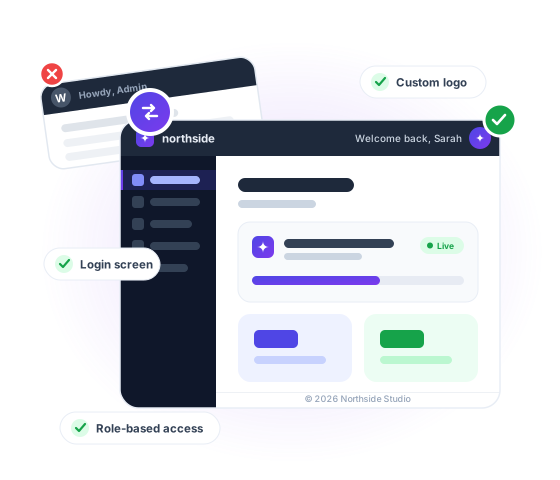
You built the site. So you should take the credit.
You spend weeks building a polished site for a client, then hand them a dashboard that still screams "generic WordPress install."


WordPress logo greets your client
You uploaded version 3. Marketing team wanted version 4. Your logo now appears 47 places across the site. Replace your main logo with updated one now.


"Howdy, Admin" Text control
Your pricing brochure is in 12 email signatures and 3 partner sites. Re-uploading creates a new URL. Every link breaks.


The login page is pure WordPress
Same dimensions, fresher photo. Default WordPress wants you to upload, edit every page, then delete the old. That's an hour of busywork on a 30-page site.


Clients go looking for "WordPress support"
The new file is uploaded. Cached. Indexed by Google. And it's the wrong version. Most replace plugins have no way back.


The dashboard hands over your build recipe
WooCommerce stores updating product photography. Keep SKU image references. No broken thumbnails.


System emails arrive from a stranger
Replace MP4s with better-encoded versions. The post embed URL never changes.
White Label WordPress Features That Help You Deliver a Premium Client Experience
Want your client dashboard to feel clean, premium, and fully on-brand? These white label features help you remove WordPress clutter, customize the admin experience, and deliver a backend that feels polished, professional, and built by your agency.
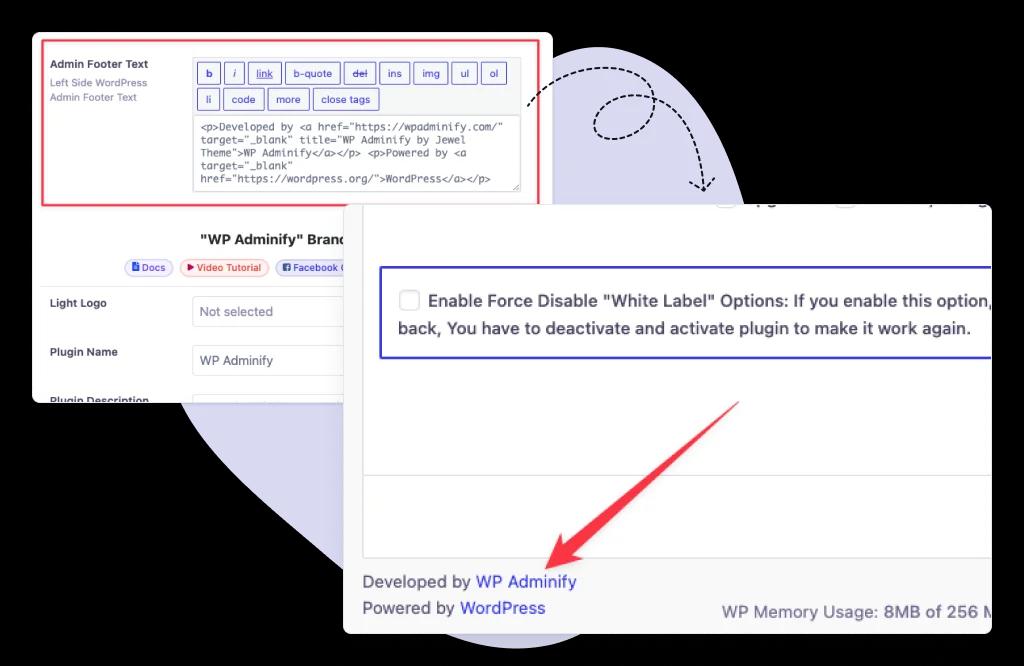
Customize the Admin Footer with Your Brand
Replace generic WordPress footer text with your own brand message, support details, or client-facing notes to make every login feel more professional.
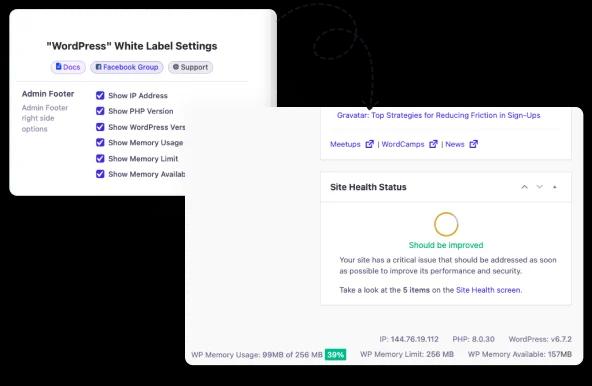
Show Only the Admin Footer Elements You Want
Keep the dashboard distraction-free by showing only the footer links and details that matter to your team or your clients.
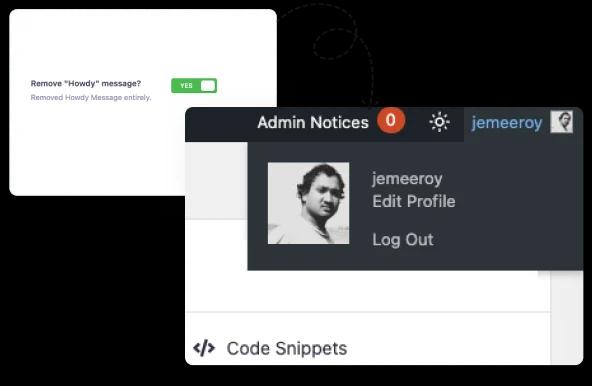
Remove the Default Howdy Message for a Cleaner Brand Experience
Swap WordPress default greetings for a cleaner, more polished admin experience that feels tailored to your brand.
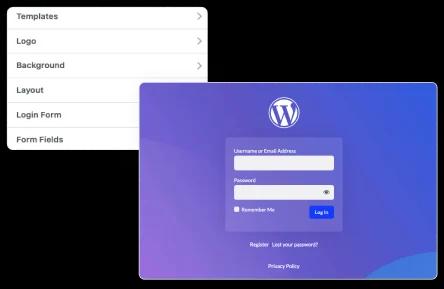
Custom Login Page for WordPress White Label
Design a professional login screen with a custom login page. Use your colors, logo for admin areas, and branding to offer a seamless entry to your custom dashboard and client dashboard.
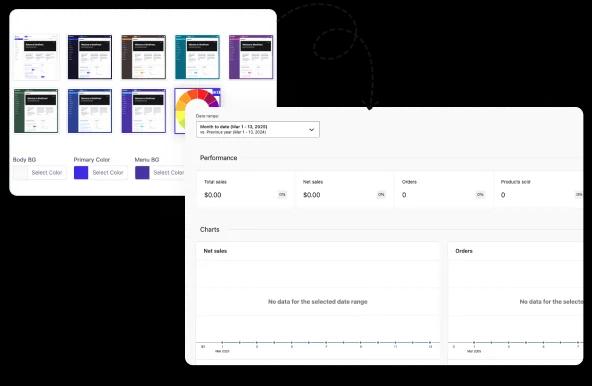
Custom Dashboard
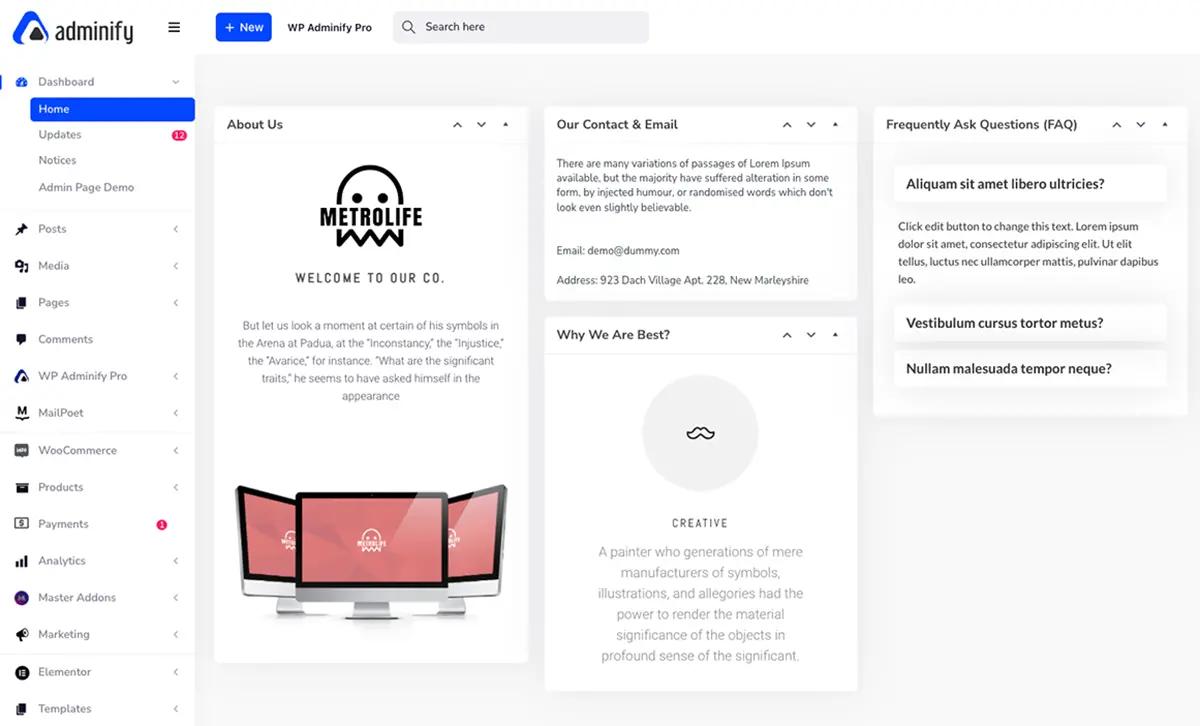
Create a fully customizable WordPress admin dashboard with WP Adminify. Rearrange widgets, add important updates, and optimize dashboard layout for a streamlined experience.
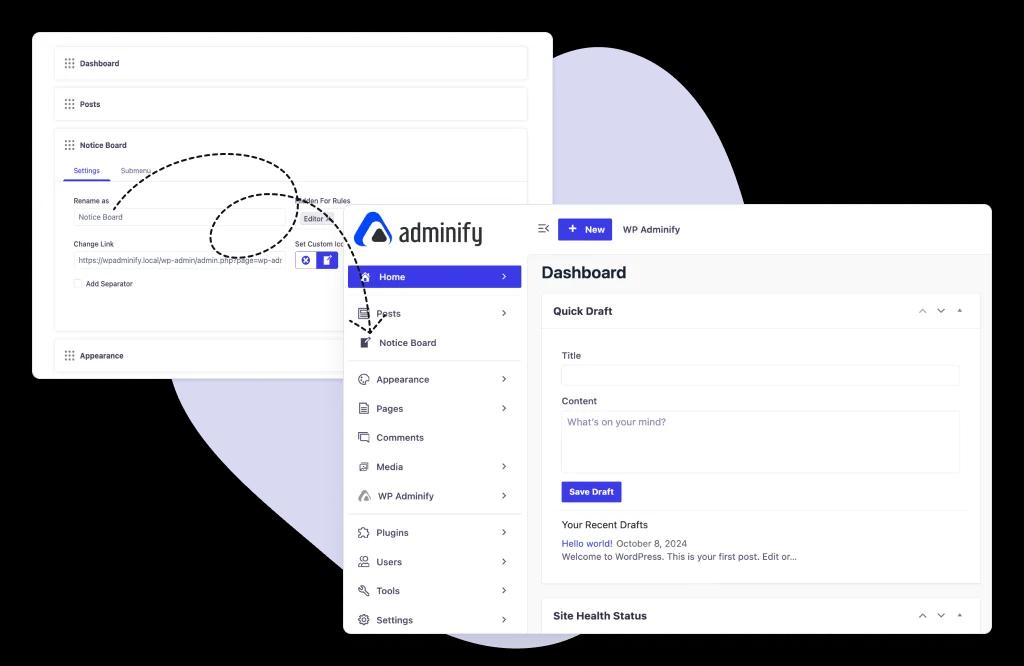
Admin Menu Customization
Simplify navigation with WordPress menu management options. Modify, hide, or reorder admin menus to deliver an intuitive WordPress dashboard for different user roles.
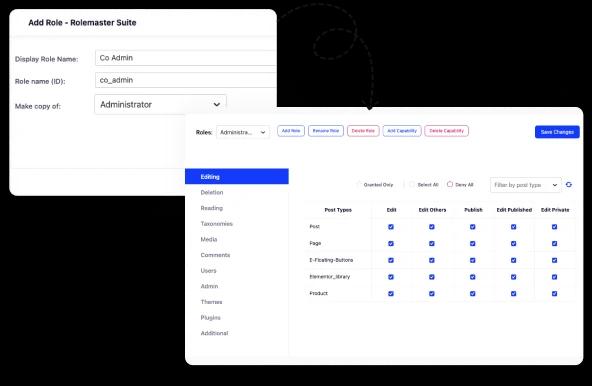
User Role Management
Manage user access smartly by assigning permissions based on roles. Customize dashboard visibility, secure sensitive settings, and improve WordPress dashboard customizations for clients and internal teams.
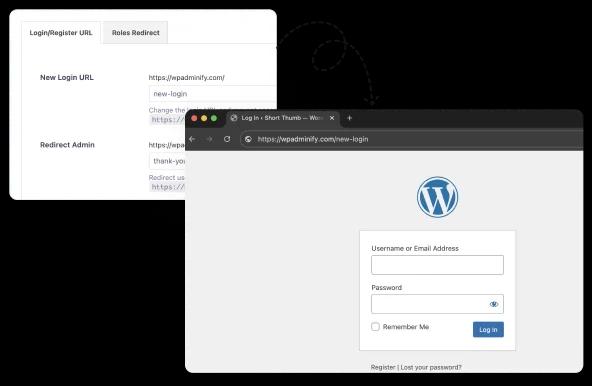
Login URL Customization
Secure and brand your site by customizing the login URL. Add your brand identity and protect the WordPress client dashboard. Hide the default login path from crawlers and unauthorized access.
Enhanced User Experience
Deliver a professional and fully branded WordPress admin layout. Remove distractions, boost usability, and ensure your dashboard provides a seamless experience overall.
How It Works
White label WordPress in under 5 minutes
Skip functions.php entirely. Brand the dashboard and the login screen from one settings panel.
One rule: the new file must match the original's MIME type. JPG → JPG. PDF → PDF. To change format, upload as new media.
Most "white label" plugins stop at the logo.
Real white labelling means every screen carries one brand: login, dashboard, admin bar, footer.
WP Adminify covers all of them in a single plugin.
One plugin, every branded touchpoint
Logo-only tools leave the "Howdy" text, the version string, and the wordpress.org login link untouched. Clients still see the seams. WP Adminify closes all of them, role by role, so your team keeps the native WordPress they need for maintenance.
Branding lives in the same plugin as your admin menu, dashboard, and security settings. That's one plugin to update instead of five, and five fewer chances for a conflict.
What complete white label covers
Comparison
WP Adminify vs White Label CMS vs custom code
White Label CMS handles basic branding.
Custom code handles anything, until WordPress updates and you're back in functions.php. Where each one falls short (full breakdown in our WP Adminify vs White Label CMS comparison):
| Capability | WP Adminify | White Label CMS | Custom Code |
|---|---|---|---|
| Custom admin & login logo | ✓ Yes | ✓ Yes | ~ Hooks required |
| Separate light & dark mode logos | ✓ Yes | ✗ No | ~ Complex |
| Rewrite "Howdy" & footer text | ✓ Yes | ✓ Yes | ~ Filters required |
| Role-based branding | ✓ Per role | ✗ Limited | ~ Custom checks |
| Branding cleanup (widgets, version, panel) | ✓ Built in | ✗ Partial | ~ Many snippets |
| Admin menu + dashboard customization | ✓ Included | ✗ No | ~ Not possible without more code |
| Survives WordPress core updates | ✓ Yes | ✓ Yes | ✗ Breaks / needs review |
| All-in-one plugin (no bloat) | ✓ 60+ features | ✗ Branding Only | ✗ N/A |
White label WordPress without a plugin
You can hand-code branding in functions.php. Here's the catch, and why a settings panel wins for client work. The hooks, the trade-offs, and the agency workflow are covered in the white label WordPress guide.
1
2// functions.php, the manual way
3// Replace the login logo
4add_action('login_head', function() {
5  echo '<style>.login h1 a{
6    background-image:url(/logo.svg)}</style>';
7});
8
9// Point the logo at your own site
10add_filter('login_headerurl', function() {
11  return 'https://yoursite.com';
12});
13
14// Rewrite the "Howdy" greeting
15add_filter('admin_bar_menu', function($bar) {
16  // ...node lookup + str_replace...
17}, 25);
18
19// Replace the admin footer
20add_filter('admin_footer_text', function() {
21  return '© 2026 Your Agency';
22});
23
Why the GUI wins for client sites
- No code to audit after each WordPress core update
- Role-based branding without writing capability checks
- Visual preview before changes go live to clients
- Revert in one click, no hunting through functions.php
- Every site you manage uses the same settings panel
See the official filters: login_headerurl and admin_footer_text in the WordPress Developer Resources.

“The plugin is stable and does not affect performance, which is a significant advantage. ”

@gdimitrov
WordPress.org
"This plugin is very great: works fine, gives a very nice look to the WordPress Dashboard”

@peopleinside
WordPress.org
"This plugin lets me transform the UI, user-friendly, and fast, essential for a modern website backend."

Sascha Donelasci
Web Design Agency
“Support has been responsive and helpful, truly putting the customer first” , a rare quality these days.

Louis J Gleason
Developer & Creator
“I am totally blown away with all that WPAdminify can do! ALREADY WAY BEYOND EXPECTATIONS!!"

@shezoom
Startup
“Lot of functionalities and ability to, customize admin & login on WordPress, active support & updates.”

@Myllio
WordPress.org
Personal
47.40
/ Year- 1 Website
- Multisite Support
- "WP Adminify" Branding Removal
- Replace 50+ Plugins
- Client-Ready Dashboard
- 1 Year Support and Updates
- Custom Dashboard Widget
- Easy Menu Search
- Admin Menu Editor
Business
77.40
/ Year- 5 Websites
- Multisite Support
- "WP Adminify" Branding Removal
- Replace 50+ Plugins
- Client-Ready Dashboard
- 1 Year Support and Updates
- Custom Dashboard Widget
- Easy Menu Search
- Admin Menu Editor
Agency
- Multisite Support
- "WP Adminify" Branding Removal
- Replace 50+ Plugins
- Client-Ready Dashboard
- 1 Year Support and Updates
- Custom Dashboard Widget
- Easy Menu Search
- Admin Menu Editor
Lifetime Bundle
799.00
/ Lifetime- Use on up to Unlimited Websites
- Lifetime Updates and Support
 WP Adminify
 Loginfy
 WP Spotlight
 Header and Footer Scripts
 Quick Menu
 Admin Bar Editor
 Admin Columns Editor
White labeling works on any WordPress site and touches only the back end, your visitors see nothing different, while everyone who logs in sees your brand instead of WordPress. Combine it with the admin menu editor to hide menus your clients shouldn't touch, and the finished dashboard looks purpose-built rather than assembled from plugins.
White Label WordPress FAQs
We have mentioned some questions and our answers for WordPress white label.
How to use WordPress white label (especially for clients)?
WordPress white labeling refers to rebranding the WordPress Admin area to conceal WordPress logos, links, and docs. Replacing the default branding with your own brand is called WordPress White Label. With the help of the WP Adminify plugin, you can rebrand the entire WordPress Dashboard for your personal or a client's website. Use this to present a professional experience to your clients, which increases trust and removes the admin footer copyright "Powered by WordPress" and version text.
Can I add my own custom admin dashboard welcome panel or help content?
Yes, of course! WP Adminify lets you replace the default WordPress welcome widget with your own text, and it supports any page builder like the default WordPress editor, Elementor, and much more. Add custom text, support links, tutorial videos, or branded onboarding messages for better navigation. On the other hand, you can add a custom dashboard widget too.
Can I use White Label on a multisite network?
It’s 100% WordPress multisite network compatible. You can apply the white labeling settings network-wide or customize branding per subsite based on your preference. It gives you flexible control over large client networks.
How do I white label the WordPress login page?
It’s super easy. Just install the Loginfy Addon and you will get the visual login page customizer. Just replace the links and logo of your login page and you are done. Also, you can add background images/videos, change the form styles, remove lost password links, even change the page title and description too. Adding custom fonts from the Google Font library can enhance the typography of your login page.
Does White Label affect site performance or security?
Not at all. WP Adminify’s white labeling feature is optimized, and it doesn’t load too many scripts or stylesheets. It only modifies the admin interface, so there is no issue regarding site performance or security.
Can I completely remove all WordPress logos and branding?
Yes. You can remove every trace of WordPress logos, Admin Footer text ("Thank you for creating with WordPress"), admin bar WordPress logo, howdy text, and much more.
Can I customize the WordPress admin dashboard and menu for different user roles?
Yes, of course, you can customize the admin menu. Rename or reorder the admin menu items, hide specific menus/widgets for specific user roles, and create custom admin menu items when necessary. You can hide your menu items for a specific user too. For example, you can hide the WP Adminify plugin menu for your clients.
How do I revert back to the default WordPress branding?
Inside the white label option, there is a button called “Reset section settings.” Clicking on this button will reset your white labeling option and then save the setting. After saving the settings, you will get the default WordPress branding.
Is white labeling WordPress legal?
Definitely yes! White labeling WordPress only changes the visual presentation of WordPress (which is GPL-licensed). You are not claiming ownership of WordPress core. You are just customizing the interface for a smoother client experience.
Does Adminify allow me to white label other plugins and themes?
You can white label the WP Adminify plugin itself (rename it in menus/plugins list). However, Adminify does not currently support renaming third-party plugins or themes. But you can hide plugins by following the steps in our Hide WordPress Plugins blog post. On the other hand, you can hide plugin options and rename the plugins or themes admin menu items.
What is white label WordPress?
White label WordPress means replacing the default WordPress branding across the admin so the dashboard looks like your own product. You swap the WordPress logo, the Howdy greeting, the admin footer, and the wp-login screen for your brand, then hide anything a client does not need. WP Adminify does all of it from one plugin, with no code and no functions.php edits.
Is there a free white label WordPress plugin?
The free version of WP Adminify lets you customize the WordPress admin, and the full White Label module, logo replacement, admin footer branding, and login page control, is part of WP Adminify Pro. Compared with a standalone free white label plugin, you also get an admin menu editor, dark mode, and role controls in the same toolkit.
White label WordPress plugin vs a white-label WordPress agency: what is the difference?
A white label WordPress plugin like WP Adminify rebrands the admin of sites you already build. A white-label WordPress agency (or white label partner) is a separate service where another team builds or maintains WordPress sites under your brand. Many agencies use both: the plugin to brand the client dashboard, and a white-label WordPress development partner for overflow work.
Which is the best white label WordPress plugin for agencies?
For agencies managing multiple WordPress sites, WP Adminify is one of the best white label WordPress plugins because it rebrands every screen a client touches, runs on unlimited sites on the Agency plan, and can even white label the plugin itself. See how it stacks up against White Label CMS in our detailed comparison.
Get Started with WP Adminify Today
We offer the best WordPress Dashboard Customization and maintenance feature to our users.
Rebrand the admin panel of personal or clients Dashboard within minutes.