



LoginPress is the default answer to "which login customizer should I use", and it has earned that on volume: 200,000 active installs and 1,075 ratings averaging 96 out of 100. When a plugin is that far ahead, the useful review isn't "is it good". It's "where exactly does the free version stop, and is the licence priced for your situation".
We installed LoginPress on a clean WordPress 7.0.4 site on 25 August 2026 and went through every panel. Some of what we found contradicts what we expected, including one thing that works against our own plugin. It's all below. If you're still deciding between tools rather than evaluating this one, the best WordPress login page plugins is the wider comparison, and how to customize the WordPress login page covers the methods before you pick any plugin at all.
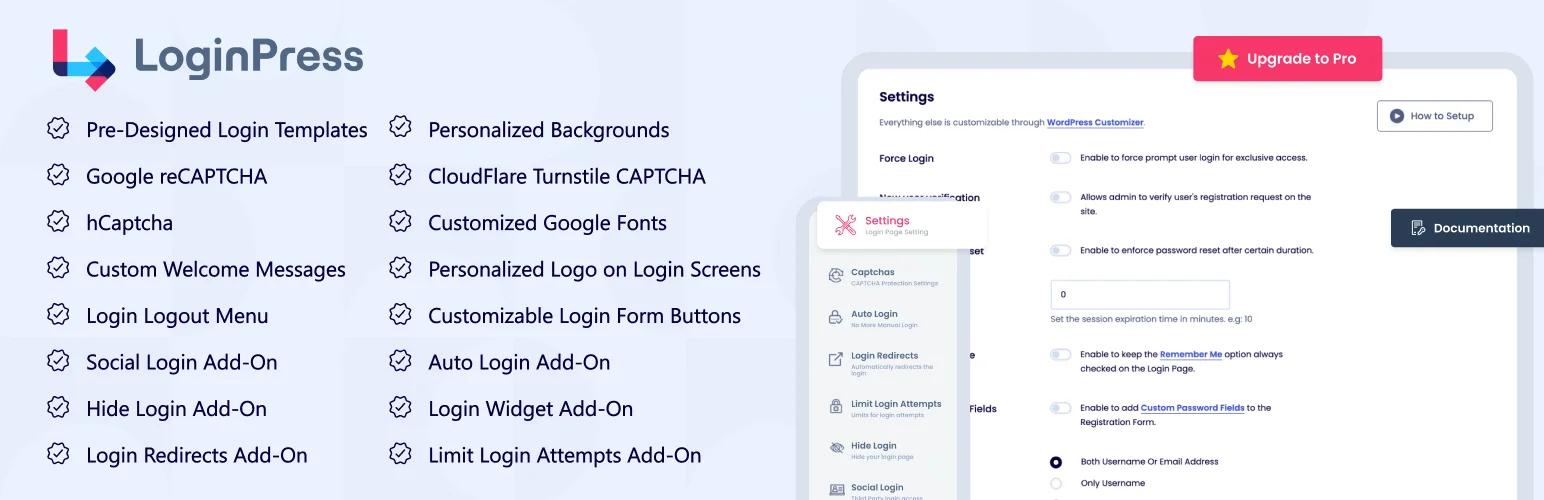
The short version
| Best for | A single site, or an agency that wants unlimited sites on one licence |
| Free version | Genuinely capable. Two themes, and almost every styling control unlocked |
| What you pay for | Themes, and a set of add-ons that are mostly security and routing features rather than design |
| Weakest point | Entry pricing. $99 a year covers two sites |
| Strongest point | Unlimited-site licensing at $199 a year, and a track record nothing else in this category matches |
| Skip it if | You run five to twenty client sites and only need the design half |
The numbers
All from the WordPress.org Plugin API, 25 August 2026.
| Metric | LoginPress |
|---|---|
| Active installs | 200,000 |
| Rating | 96/100 from 1,075 ratings |
| Five-star ratings | 1,006 |
| One-star ratings | 23 |
| Requires | WordPress 4.0 |
Twenty-three one-star ratings out of 1,075 is a two per cent complaint rate, which for a plugin at this scale is unusually clean. For contrast, Theme My Login carries 120 one-star ratings out of 460. Whatever else is true, LoginPress doesn't have a reputation problem.
The update cadence is the number worth watching over time rather than today. Six weeks between the last release and our test is normal maintenance, not neglect.
What you get, panel by panel
LoginPress lives in the WordPress Customizer, which is the right home for this kind of tool: you change a colour and the login screen next to you updates, no save-and-reload cycle.

Twelve sections: Themes, Logo, Background, Customize Login Form, Customize Forget Form, reCAPTCHA, Button Beauty, Error Messages, Welcome Messages, Form Footer, Google Fonts and Custom CSS/JS.
Themes

Default and Minimalist are yours. Everything else in the grid is greyed, and hovering one produces an "Unlock Premium Feature" prompt.

This is the single clearest free-versus-paid line in the plugin, and it's worth understanding what it does and doesn't cost you. A theme here's a preset: a background, a form position, some colours. You can rebuild most of what the locked tiles show using the free controls in the panels below it, given twenty minutes. What you're paying for is the twenty minutes, not a capability. Whether that's worth $99 depends entirely on how many sites you're doing it on.
Logo

Disable Logo, Logo Image, Logo Width, Logo Height, Space Bottom, Mobile Logo Width, Mobile Logo Height, Logo URL. All free.
Separate desktop and mobile logo sizing is a genuinely thoughtful inclusion and one that plenty of paid competitors don't offer. A logo sized for a 1440px screen is usually wrong at 375px, and the alternative is a media query in a custom CSS box. Worth calling out. Our own walkthrough of the underlying problem is in changing the WordPress login logo.
Background

Then, scrolling down that same free panel, the part we didn't expect.

Two sections sit at the bottom of the free Background panel: Random Background Images, and Background Video. Both are plain toggles. Neither carries the "Unlock Premium Feature" treatment that the theme grid uses so freely, and neither carries the red badge used elsewhere in the panel, which in any case reads "New" rather than "PRO".
We're going to be precise about what that does and doesn't prove, because this is the kind of claim reviews get wrong in both directions. The controls exist and are not gated. We did not switch them on and load the login page, so we cannot tell you they produce output. Vendor comparison tables overstate free tiers routinely, and a toggle that sets an option nothing reads wouldn't be the first in WordPress history. What we can say is that LoginPress's own comparison table claims video background support on the free tier, and the free build's UI is consistent with that claim rather than contradicting it.
Why does this matter enough to spend three paragraphs on? Because video and slideshow backgrounds are commonly sold as premium features across this category, including by us. If LoginPress genuinely ships them free, that's a real point in its favour and anyone comparing plugins deserves to know. The background options in general, and whether a video background is a good idea on a login screen at all, are covered in changing the WordPress login page background.
Customize Login Form

Enable Form Transparency, Form Background Image, Form Background Colour, Form Width, Mobile Form Width, Form Minimum Height, Form Radius, Form Shadow, Form Shadow Opacity.
Again, separate mobile sizing, with a note under the field explaining that it applies below 767px and that zero inherits the desktop value. That's a small thing done properly.
Customize Forget Form

A separate background image and background colour for the password recovery screen. It sounds trivial. It's the screen a locked-out user sees at the exact moment they're most frustrated, and on most sites it's a grey box that looks nothing like the login page they just came from.
Button Beauty

Hover states included, which is more than the panel name suggests and more than several paid competitors provide.
The rest
- Error Messages. Rewrite the text WordPress shows on a failed login. Worth doing for reasons beyond tone: the defaults tell an attacker whether a username exists. That argument in full is in customizing WordPress login error messages.
- Welcome Messages. The text above the form.
- Form Footer. The "Back to site" area.
- Google Fonts. A full section in the free sidebar. Same caveat as the background video: the section is there and ungated, and we didn't verify the rendered output.
- Custom CSS/JS. An escape hatch for everything the panels don't cover.
The reCAPTCHA question
Here's a contradiction we could not resolve from the video, and we're flagging it rather than guessing.
A reCAPTCHA section sits in the free customizer sidebar, between Customize Forget Form and Button Beauty. Meanwhile, on LoginPress's own Settings screen, Captchas is listed as a paid add-on.

Both are true at once, which usually means the free section handles standard Google reCAPTCHA while the paid add-on adds other providers, or adds it to more forms than the login. We aren't going to state which without configuring a real site key and testing it. If reCAPTCHA on the login page is the reason you're considering LoginPress, budget for the add-on and treat a free version as a bonus if it works.
Where the free line actually falls
Put the customizer and the Settings screen side by side and the licensing model becomes clear, and it isn't the one most people assume.
| Free, in the customizer | Paid add-on |
|---|---|
| Logo, including mobile sizing | Themes beyond Default and Minimalist |
| Background colour, image, mobile image | Captchas |
| Background video toggle (untested output) | Auto Login |
| Random background images (untested output) | Login Redirects |
| Form width, height, radius, shadow, transparency | Limit Login Attempts |
| Button colours, hover states, shadow, padding | Hide Login (custom login URL) |
| Lost-password screen styling | Social Login |
| Error and welcome messages | Login Widget |
| Google Fonts section (untested output) | Integrations |
| Custom CSS and JS |
Read the right-hand column again. Apart from the themes, almost nothing you pay LoginPress for is a design feature. Captchas, limit login attempts, hide login, social login, auto login, redirects: these are security and authentication features. LoginPress's free tier is a login page designer, and its paid tier is a login page security and routing suite that happens to include some presets.
That has a practical consequence. If what you want is a branded login screen, LoginPress free may genuinely be all you need, and you shouldn't let a pricing page talk you out of that. If what you want is to lock down the login, you're comparing LoginPress's licence against dedicated security plugins, several of which are free. The best WordPress login security plugins covers that field, and changing your WordPress login URL covers the Hide Login feature specifically, including with free tools.
The pricing question
Prices verified on loginpress.pro on 25 August 2026. LoginPress shows a struck-through list price beside each tier; the figures below are what you actually pay.
| Tier | Price | Sites | Per site |
|---|---|---|---|
| Startup | $99/yr | 2 | $49.50 |
| Agency | $199/yr | Unlimited | None |
| Lifetime | $499 once | Unlimited | None |
The shape of that table is unusual and it's the most useful thing in this review. The gap between two sites and unlimited sites is $100. There's no middle. That produces two very different verdicts depending on who you're:
If you run one site, $99 a year for a login customizer is a lot, and the free version is good enough that most single-site owners should stay on it.
If you run thirty client sites, $199 a year for unlimited is close to unbeatable, and the $499 lifetime is better still. Nothing else in this category prices unlimited that low.
If you run five to twenty sites, you're the customer this pricing serves worst. You're paying the unlimited price for a fraction of unlimited, and this is the band where alternatives matter. For comparison, Loginfy starts at $49 a year for five sites and $149 a year for a hundred, which works out at $9.80 and $1.49 per site respectively against LoginPress's $49.50 at the entry tier. LoginPress wins outright at genuinely unlimited scale; below that, the per-site maths runs the other way. Both numbers are list prices, verified 25 August 2026.
One thing not to do: compare a competitor's price against LoginPress's struck-through $199 and $399. Those are marketing anchors, the discount has been standing for a long time, and a reader who clicks through sees the real price in one second.
What LoginPress does well
The free tier is not a trailer. Plenty of freemium plugins ship a free version that exists to frustrate you into upgrading. This isn't one. You can brand a login page properly without paying, and the pro upsell is confined almost entirely to one panel.
Mobile is treated as a first-class case. Separate mobile logo sizing, separate mobile form width, separate mobile background image. Most competitors give you one set of numbers and a media query in a CSS box.
The lost-password screen exists. It has its own panel. That reflects someone having watched a real user get locked out.
Unlimited-site licensing is real and cheap. At $199 a year, or $499 once, an agency stops thinking about it entirely.
Track record. 200,000 installs, six years of releases, 96/100 from over a thousand ratings. That isn't nothing when you're picking something to run on client sites.
Where it falls short
Entry pricing is punishing. $99 for two sites is the highest per-site entry price in this category by a distance.
The free-versus-paid line is confusing. A reCAPTCHA section in a free customizer and a Captchas add-on on the pricing page is the kind of thing that generates support tickets, and it made this review harder to write than it should have been.
Themes are the upsell, and themes are the least defensible thing to sell. Every locked tile is reproducible with the free controls given enough patience. You're buying convenience, which is fine, but it's worth knowing that's what you're buying.
The add-on bundle is a different product. Half of what a licence buys, limiting login attempts, hiding the login URL, social login, is available free elsewhere from plugins that specialise in it. Paying a design plugin for security features is a defensible convenience and a poor value calculation.
Who should buy it
Buy the Agency or Lifetime tier if you're an agency or freelancer with more than about ten sites, you want one login tool everywhere, and you would rather not think about site counts again. At $199 a year this is straightforwardly good value.
Stay on free if you run one or two sites and want a branded login screen. You won't hit a wall that matters.
Who should look elsewhere
The five-to-twenty-site agency. You're paying unlimited money for non-unlimited scale. Compare per-site pricing before you renew.
Anyone buying this for security. Buy a security plugin. The tested comparison covers the field, and two-factor authentication for WordPress admin covers the measure that matters most.
Anyone who wants no plugin at all. A branded login screen is roughly forty lines of CSS and one hook. Customizing the WordPress login page without a plugin has the whole thing, and creating a custom WordPress login form covers the markup underneath.
Frequently asked questions
Is LoginPress free?
Yes, and the free version is substantial. It covers logo, background, form and button styling, error and welcome messages, the lost-password screen, Google Fonts and custom CSS. What's paid is the theme presets beyond Default and Minimalist, plus add-ons for captchas, limiting login attempts, hiding the login URL, social login, auto login and redirects.
How much does LoginPress cost?
$99 a year for two sites, $199 a year for unlimited sites, or $499 once for a lifetime unlimited licence, verified on loginpress.pro on 25 August 2026. The site count is the only difference between tiers, and there's no middle tier between two sites and unlimited.
Does LoginPress free include video backgrounds?
The free Background panel exposes a Background Video toggle and a Random Background Images toggle, neither locked or badged as premium, and the vendor's own comparison table claims video support on the free tier. We saw the controls but didn't verify the rendered output, so treat it as available rather than confirmed working, and test it before you rely on it.
Can LoginPress change the WordPress login URL?
Only with a paid licence. Hide Login is a premium add-on, and the free version can't change the login URL. Free plugins do this on its own, and the methods are covered in our guide to changing the WordPress login URL.
Is LoginPress better than a code-based approach?
It depends on how often you do this. A branded login screen in code is one hook and some CSS, which is faster than installing anything if you write CSS comfortably. A customizer with a live preview is faster if you don't, and much faster when a client is sitting next to you changing their mind about the shade of blue.
Does LoginPress slow down a site?
Its styling only loads on wp-login.php, which visitors don't request, so the front-end impact is effectively nil. The paid add-ons that hook into authentication and the admin are a different question and worth measuring individually if you run several of them.
The verdict
LoginPress is a good plugin with a pricing model that suits two audiences very well and one audience badly.
The free version is more generous than its reputation suggests and, for a single site, is likely all you need. The Agency and Lifetime tiers are strong value for anyone genuinely running unlimited sites. The gap in the middle, the five-to-twenty-site agency, is where the maths stops working and where it's worth looking at what else is available.
And the surprise from the test bench stands: the free build exposes background video, random background images and Google Fonts with no lock on any of them. If those work as the controls suggest, LoginPress free is doing more than most of the category's paid tiers.
For the wider field, the best WordPress login page plugins. For the agency-handover angle specifically, white-labelling the WordPress login page for clients, and for the full reference, the WordPress login page white-label guide.
Your email address will not be published