
Speed Up Your WordPress Admin Without a Caching Plugin
Control the Heartbeat API, disable embeds, strip Dashicons and jQuery Migrate, and turn off Gutenberg site-wide. Every wp-admin performance control sits in one panel. It's not a caching plugin, so there's no page cache to flush, and you don't edit functions.php to get a faster dashboard.
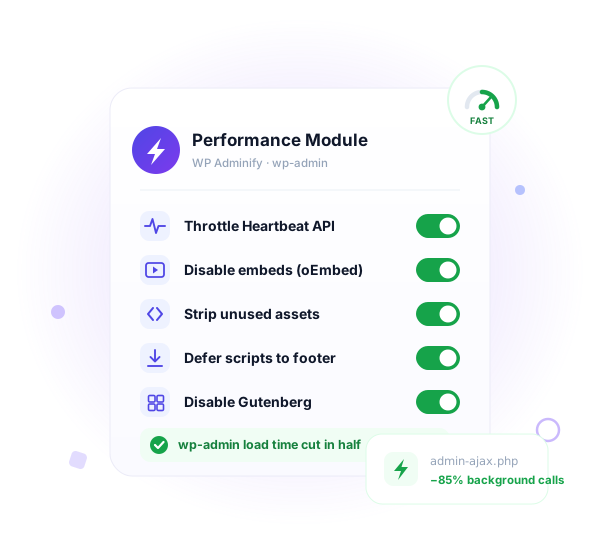
Everyone optimizes the front end. wp-admin stays slow.
You cache pages, lazy-load images, and chase a green PageSpeed score. Then you open the dashboard and it crawls. WordPress ships no admin performance settings at all. Six reasons the back end drags.


The Heartbeat API polls admin-ajax.php nonstop
Every open editor tab fires a request every 15 to 60 seconds. Leave a few tabs open and the server handles hundreds of background calls an hour, all for autosave you barely notice.


Gutenberg ships ~100KB of CSS and JS you may not use
If you build with Elementor, Bricks, or the Classic Editor, the block editor still loads its assets on edit screens and the front end. Dead weight on every page.


Dashicons and jQuery Migrate load for logged-out visitors
Two scripts most public visitors never need still get enqueued on the front end. Extra requests and extra bytes, for a slower first paint.


oEmbed scripts load on every post
WordPress injects embed discovery scripts and the wp-embed.js file site-wide, even on pages with no embedded content at all.


Version query strings block caching
The ?ver=6.5 string on scripts and styles, plus Gravatar query strings, stop some proxies and CDNs from caching those assets cleanly.


WordPress gives you no admin performance settings
There's no native screen for any of this. Tuning the back end means hunting for hooks, editing functions.php, or stacking three single-purpose plugins.
What Performance features do you get?
We always care about our frontend pagespeed, but hardly do optimization in our WordPress Dashboard. WP Adminify plugin brings some option that can be optimized and boost your Dashboard performance.
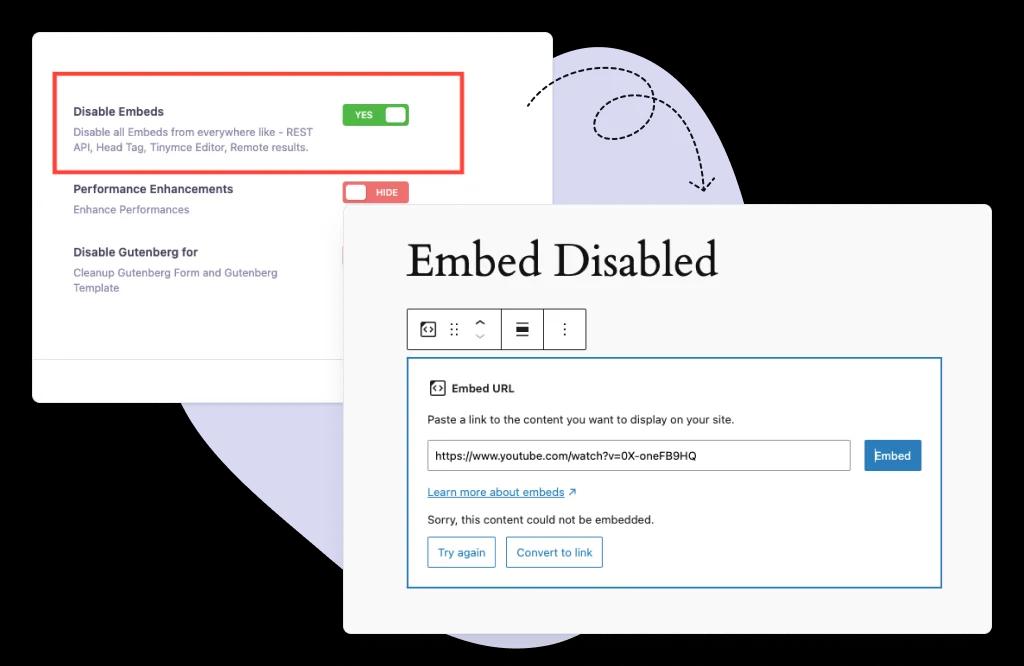
Disable Embeds
Speed up your WordPress custom dashboard by blocking oEmbed options,and disabling embeds across the TinyMCE editor and REST API. Create a faster, more secure WordPress dashboard while keeping your dashboard clean and optimized.
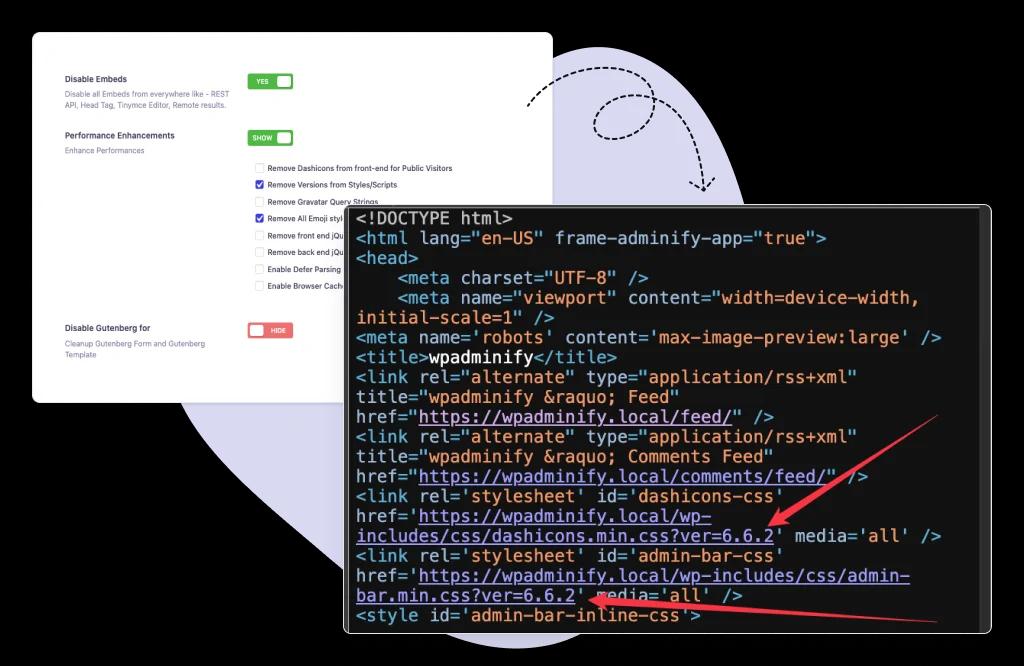
Enhance Dashboard Performance
Boost your custom WordPress dashboard by removing Dashicons for public visitors, eliminating Gravatar query strings, and moving JavaScript to the footer. WP Adminify helps you customize dashboard performance so your WordPress client dashboard stays fast, lightweight, and responsive.
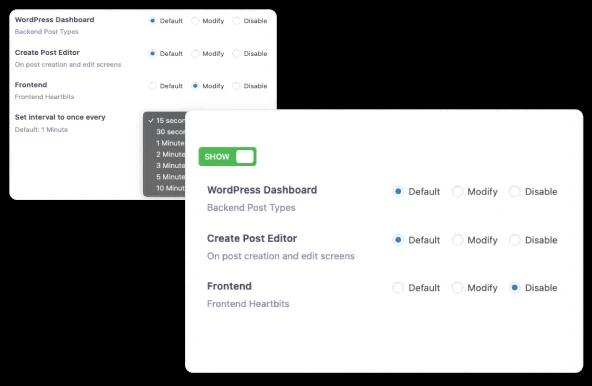
Control WordPress Heartbeat API
Optimize your custom dashboard by controlling WordPress Heartbeat API settings. Reduce server load, manage autosave intervals, and prevent excessive admin-ajax.php requests. Create a Client-ready Dashboard without interruptions.
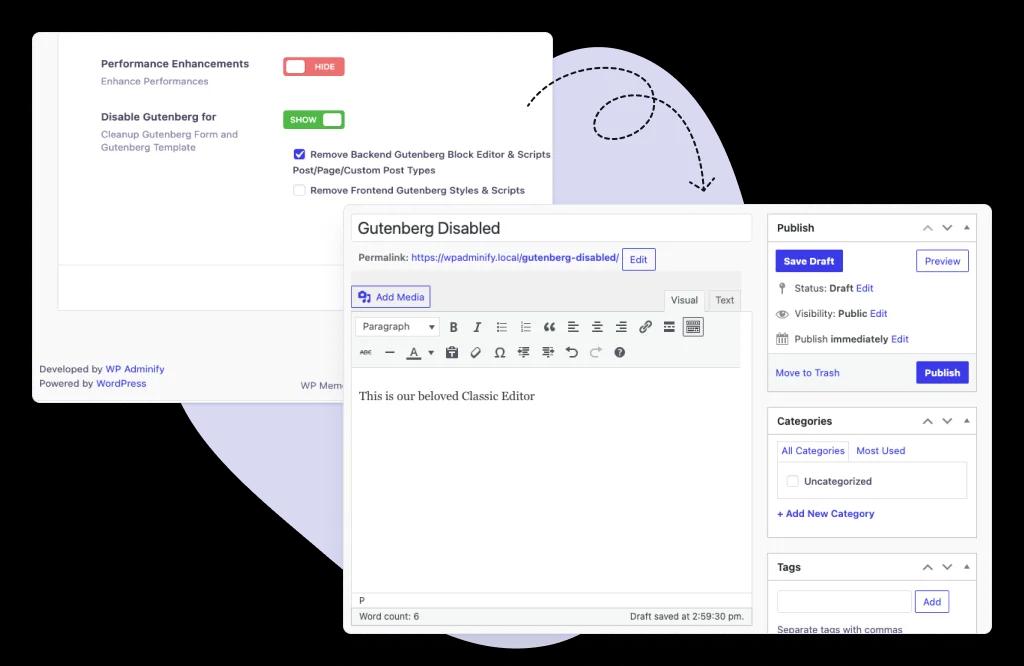
Disable WordPress Gutenberg
Take full control of your WordPress dashboard by removing Gutenberg scripts and styles site-wide. Restore the Classic Editor or your preferred page builder. Advanced editing for your WordPress dashboard, and a fully customized dashboard experience for all users and post types.
How It Works
Tune wp-admin performance in minutes
Every control lives in one Performance tab inside WP Adminify. No config files to edit and no extra plugin per tweak.
From the WP Adminify Performance tab
One panel, grouped toggles, changes apply on save.
Optimize in the right sequence
Some tweaks have dependencies. Work through them this way.
Every setting is a single toggle, and every toggle is reversible. Nothing here touches WordPress core files.
Per-context Heartbeat control. Most plugins give one switch.
A typical Heartbeat plugin lets you slow or kill the API everywhere. WP Adminify splits it by context, so you keep what each screen actually needs and cut the rest.
The dashboard, the editor, and the front end are not the same.
The post editor genuinely needs Heartbeat for autosave and post-locking, so keep it there at a sensible interval. The dashboard rarely needs frequent polling, so slow it down. The front end almost never needs it, so switch it off entirely.
Set all three in Performance → Heartbeat. One blunt site-wide switch either breaks autosave or leaves load on the table. Per-context control gives you both speed and a working editor.
What you can tune per context
Comparison
WP Adminify vs other WordPress performance tools
How the Performance module compares with Heartbeat Control, an asset optimizer like Perfmatters, hand-written code, and default WordPress.
| Feature | WP Adminify Pro | Heartbeat Control | Perfmatters | Manual / Code |
|---|---|---|---|---|
| Heartbeat API control | ✓ Yes | ✓ Yes | ✓ Yes | ~ Custom filter |
| Per-context Heartbeat (dashboard/editor/front) | ✓ Yes | ✗ Limited | ✗ Limited | ~ Custom code |
| Disable embeds (oEmbed) | ✓ Yes | ✗ No | ✓ Yes | ~ Multiple hooks |
| Remove Dashicons & jQuery Migrate | ✓ Yes | ✗ No | ✓ Yes | ~ Custom code |
| Disable Gutenberg site-wide | ✓ Yes | ✗ No | ✓ Yes | ~ Separate plugin |
| Move scripts to footer | ✓ Yes | ✗ No | ✗ No | ~ Custom code |
| Front-end page caching | ✗ Not a cache plugin | ✗ No | ✗ Performance only | ✗ No |
| Replaces multiple plugins | ✓ 60+ features in one | ✗ Heartbeat only | ~ |
⚠ Read this before you flip these switches
Performance tweaks change what WordPress loads and when. Three of them have dependencies, and knowing that up front saves you a broken editor or a styling glitch.
Disabling Gutenberg breaks block themes and Full Site Editing
Block themes (Twenty Twenty-Two and newer defaults) and Full Site Editing rely on the block editor. If your theme is a block theme, don't disable Gutenberg, because the Site Editor and theme templates depend on it. This setting is for sites on the Classic Editor or a page builder like Elementor or Bricks.
Removing jQuery Migrate can break older plugins
jQuery Migrate patches deprecated jQuery calls. Some older themes and plugins still depend on those calls. After removing it, click through your site with every plugin active. If something breaks, re-enable jQuery Migrate and update or replace the offending plugin.
Don't fully disable Heartbeat in the editor
Heartbeat powers autosave and post-locking. If you switch it off entirely in the post editor, you lose autosave, and two authors can overwrite each other's work. Throttle the editor interval instead of disabling it. Disabling Heartbeat on the front end is safe.

“The plugin is stable and does not affect performance, which is a significant advantage. ”

@gdimitrov
WordPress.org
"This plugin is very great: works fine, gives a very nice look to the WordPress Dashboard”

@peopleinside
WordPress.org
"This plugin lets me transform the UI, user-friendly, and fast, essential for a modern website backend."

Sascha Donelasci
Web Design Agency
“Support has been responsive and helpful, truly putting the customer first” , a rare quality these days.

Louis J Gleason
Developer & Creator
“I am totally blown away with all that WPAdminify can do! ALREADY WAY BEYOND EXPECTATIONS!!"

@shezoom
Startup
“Lot of functionalities and ability to, customize admin & login on WordPress, active support & updates.”

@Myllio
WordPress.org
Personal
47.40
/ Year- 1 Website
- Multisite Support
- "WP Adminify" Branding Removal
- Replace 50+ Plugins
- Client-Ready Dashboard
- 1 Year Support and Updates
- Custom Dashboard Widget
- Easy Menu Search
- Admin Menu Editor
Business
77.40
/ Year- 5 Websites
- Multisite Support
- "WP Adminify" Branding Removal
- Replace 50+ Plugins
- Client-Ready Dashboard
- 1 Year Support and Updates
- Custom Dashboard Widget
- Easy Menu Search
- Admin Menu Editor
Agency
- Multisite Support
- "WP Adminify" Branding Removal
- Replace 50+ Plugins
- Client-Ready Dashboard
- 1 Year Support and Updates
- Custom Dashboard Widget
- Easy Menu Search
- Admin Menu Editor
Lifetime Bundle
799.00
/ Lifetime- Use on up to Unlimited Websites
- Lifetime Updates and Support
 WP Adminify
 Loginfy
 WP Spotlight
 Header and Footer Scripts
 Quick Menu
 Admin Bar Editor
 Admin Columns Editor
Frequently Asked Question (FAQ)
Questions people actually ask about WordPress Admin Performance
What performance features does WP Adminify offer?
WP Adminify provides WordPress admin performance controls: Heartbeat API tuning with per-context intervals, disable embeds (oEmbed), remove Dashicons and jQuery Migrate, eliminate Gravatar query strings, hide script and style version numbers, move JavaScript to the footer, and disable Gutenberg site-wide. It optimizes wp-admin and your asset payload. It's not a page-caching plugin.
Is WP Adminify a replacement for WP Rocket or a caching plugin?
No. WP Adminify trims what WordPress loads (Heartbeat traffic, unused assets, embed scripts, Gutenberg), but it doesn't generate a page cache. For front-end page caching, run WP Rocket, LiteSpeed Cache, or your host's cache. WP Adminify works alongside them and handles the admin side they don't touch.
Are the performance features available in the free version?
The free WP Adminify plugin on WordPress.org includes core performance controls like Heartbeat tuning and embed disabling. Advanced options such as per-context Heartbeat control and full asset management are part of WP Adminify Pro. Install the free version first to confirm it fits your workflow.
Will controlling the Heartbeat API break autosave?
No, if you throttle rather than fully disable it. The Heartbeat API powers autosave and post-locking, so raising the interval keeps both working while cutting admin-ajax.php load. Only disable Heartbeat completely on the front end, where autosave isn't needed. Keep it active in the post editor.
Can I disable Gutenberg without breaking my site?
Yes, if you use the Classic Editor or a page builder. Disabling Gutenberg removes its scripts and styles and restores classic editing. The exception is block themes and Full Site Editing, which need the block editor. If your theme is a block theme, leave Gutenberg enabled.
Does removing Dashicons or jQuery Migrate break anything?
It can, on older sites. Dashicons removal only affects logged-out visitors, so the admin toolbar is unaffected. Removing jQuery Migrate is riskier, because some older plugins still rely on deprecated jQuery. After enabling it, test your site with every plugin active and re-enable it if something breaks.
Does WP Adminify performance work with WooCommerce?
Yes. WooCommerce stores generate heavy admin traffic, so throttling Heartbeat and trimming embeds and version strings frees server headroom. Keep the Heartbeat interval reasonable in the editor, since WooCommerce uses it for some live order updates, and test the Orders screen after changing settings.
Do these performance settings survive a WordPress core update?
Yes. WP Adminify stores every setting in the WordPress options table, not in core files or functions.php. You can update WordPress, PHP, your theme, and other plugins without losing your Heartbeat intervals or asset settings. Hand-written code, by contrast, gets overwritten when a theme update lands.
How much faster will my dashboard get?
It depends on your starting point. The biggest win is usually Heartbeat throttling, which can cut admin-ajax.php requests by 80% or more on tab-heavy workflows. Asset trimming and disabling Gutenberg shave bytes and requests off the front end. Measure before and after with a tool like Query Monitor.
How do I undo a performance change?
Every control is a reversible toggle. Open WP Adminify → Performance, switch the setting off, and save. The change reverts immediately. Deactivating the plugin restores stock WordPress behavior, including default Heartbeat polling and Gutenberg. Nothing is written to core files, so there's no leftover code to clean up.
Get Started with WP Adminify Today
We offer the best WordPress Dashboard Customization and maintenance feature to our users.
Rebrand the admin panel of personal or clients Dashboard within minutes.