

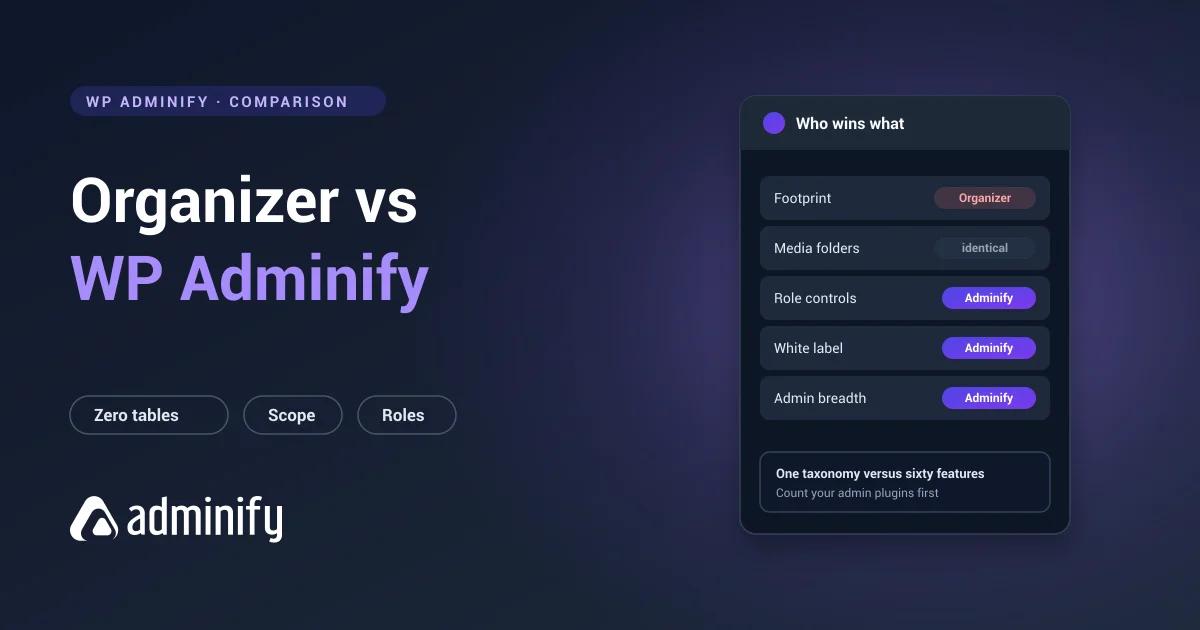

These two solve media folders identically. We activated each one alone on a clean WordPress 7.0.3 install and found the same thing both times: a hierarchical attachment taxonomy, no custom tables. Media Library Organizer calls it mlo-category, WP Adminify calls it media_folder.
Same architecture, same portability, same nesting, and neither one does manual folder ordering. So the question that usually settles this category never comes up.
What's left is a question about size. Do you want a plugin that does one thing, or one that does sixty?
We publish one half of this comparison: media folders inside WP Adminify. The best WordPress media folder plugins roundup sets both against the rest of the field, and the Media Library Organizer review covers that plugin alone.
Quick verdict
Choose Media Library Organizer if media folders are genuinely all you need and you want the smallest plugin that delivers them.
Choose WP Adminify if your media library is one of several admin frustrations, and fixing the rest would mean installing four more plugins.
Both are legitimate. Installing a sixty-feature toolkit to get one feature isn't obviously smart, and we're not going to pretend it is just because it's our plugin.
Comparison table
| Media Library Organizer | WP Adminify | |
|---|---|---|
| Primary purpose | Media folders | Admin toolkit including media folders |
| Developer | Themeisle | Jewel Theme |
| Active installs | 20,000 | 7,000+ |
| Rating | 94/100 from 147 ratings | 86/100 from 108 ratings |
| Folder storage | mlo-category taxonomy | media_folder taxonomy |
| Custom tables | None | None |
| Nested subfolders | Yes | Yes |
| Manual folder ordering | No | No |
| Portable folder data | Yes | Yes |
| Plugin footprint | Minimal | Large |
| Admin menu editor | No | Yes |
| White label | No | Yes |
| Login customizer | No | Yes |
| Admin columns editor | No | Yes |
| Role-based controls | No | Yes |
| Files move on disk | No | No |
Media folders: a genuine draw
Both register a hierarchical taxonomy against the attachment post type. Both give you a folder tree in the Media Library, drag-and-drop assignment, nested subfolders, bulk moving and folder filtering in the media modal.
Both keep the structure in wp_term_taxonomy and wp_term_relationships, which is ordinary WordPress data you can read with wp term list and export with anything. Neither locks you in.
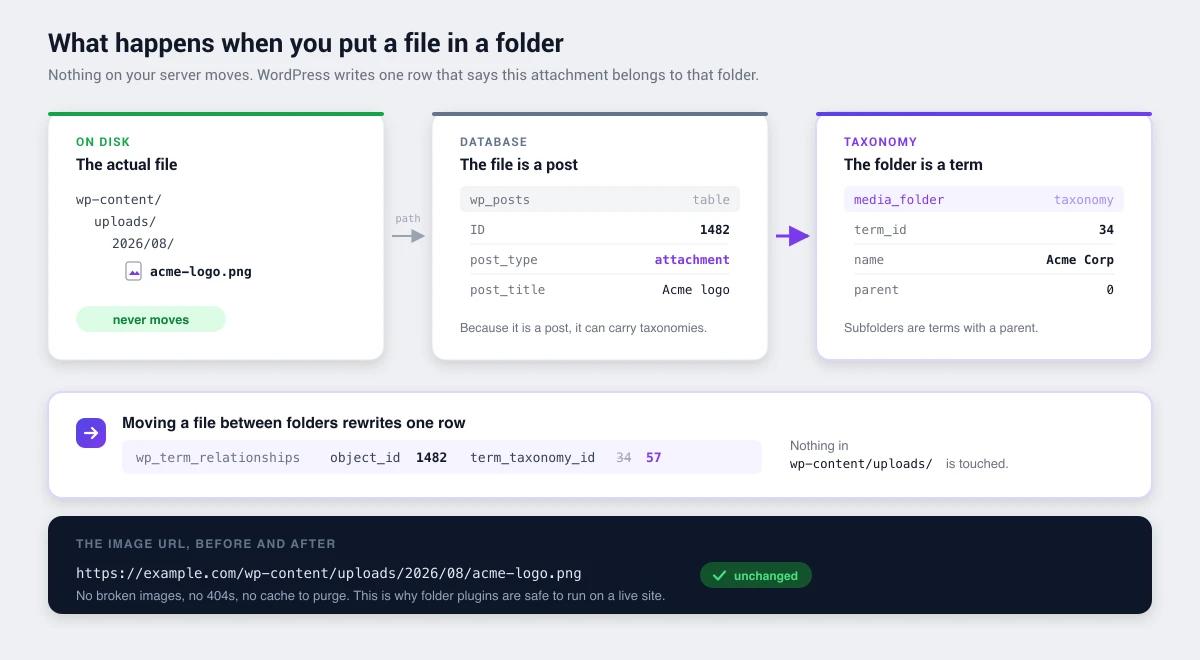
And neither supports manual folder ordering, for the same underlying reason: WordPress terms sort by name or ID. If you want to drag folders into an arbitrary order, look at FileBird instead. Its wp_fbv table has a dedicated ord column, and you pay for it with proprietary storage.
Any preference between these two on folders alone is about interface, which you should test on staging rather than take on faith from a comparison page.
Footprint: Media Library Organizer wins
This needs saying plainly, because roundups usually treat "more features" as automatically better.
Media Library Organizer registers one taxonomy and stops. That's the whole plugin. Less code loading on every admin request, a smaller settings surface, less to break on a WordPress update, and nothing to learn beyond folders.
WP Adminify is a much larger plugin covering sixty-odd features. If folders are all you want, you're loading a great deal you'll never open.
The counter-argument is real but conditional. If you'd otherwise install separate plugins for menu editing, white labelling, login customization and admin columns, one larger plugin is less total weight than five smaller ones. If you wouldn't, the lighter plugin is simply the better engineering call, and that's the end of it.
Breadth: WP Adminify wins
Watch what happens to a WordPress install over a couple of years. A folder plugin. Something to hide menu items from clients. Something to rebrand the dashboard. Something for the login page. Something for admin columns. Something to switch off comments. Six plugins, six update cycles, six settings screens, and no shared permissions model between any of them.
WP Adminify covers that list in one tool with role-based controls running through all of it, so a client sees a different admin from an editor, who sees a different admin from you. The full case is in replacing 50+ plugins with one.
Media Library Organizer attempts none of this, and isn't worse for it. It's a different product answering a different question.
| Your situation | Better fit |
|---|---|
| Media folders are the only gap | Media Library Organizer |
| Running 4+ small admin plugins | WP Adminify |
| Minimal plugin footprint is a priority | Media Library Organizer |
| Building white-labelled client sites | WP Adminify |
| Need role-based admin restrictions | WP Adminify |
| Simple site, one administrator | Media Library Organizer |
Track record
Media Library Organizer: 20,000 installs, 94/100 from 147 ratings, updated 23 July 2026, from Themeisle, an established vendor with a wide portfolio behind it.
WP Adminify: 7,000+ installs, 86/100 from 108 ratings, from Jewel Theme.
Media Library Organizer is ahead on both adoption and rating. Worth noting that its score covers one feature while ours covers sixty, which makes the two numbers hard to compare directly, but we'd rather state that than bury it.
Pricing
Both have free versions. The honest comparison is the total cost of your stack. If WP Adminify removes four paid plugins, compare it against their combined renewals. If it removes none, compare the folder features alone, and on those the two are level. WP Adminify pricing is published per tier.
Choose Media Library Organizer if…
- Media folders are genuinely all you need
- You want the smallest plugin that solves the problem
- You dislike large multi-purpose plugins on principle
- Your site has one administrator and nothing client-facing
Choose WP Adminify if…
- Media folders are one of several admin problems
- You're consolidating single-purpose plugins
- You build client sites that need white labelling and menu control
- You need role-based restrictions across the admin
- You want dashboard, login and admin column customization too
Media Library Organizer vs WP Adminify FAQs
Which has better media folders, Media Library Organizer or WP Adminify?
Neither, in any way that matters. Both register a hierarchical attachment taxonomy with no custom tables, both nest, and neither supports manual folder ordering. The folder capability is effectively equivalent. The difference is everything else each plugin does.
Is WP Adminify too heavy just for media folders?
If folders are truly your only need, yes. Media Library Organizer registers one taxonomy and nothing else. WP Adminify only makes sense when it takes plugins off your site rather than adding to the pile.
Do both keep my folder data portable?
Yes, equally. Both keep folders as standard WordPress taxonomy terms in wp_term_taxonomy, under mlo-category and media_folder respectively. Either exports with wp term list and survives deactivation as ordinary data, which custom-table plugins can't manage.
Can I run both at the same time?
Technically yes, because they use different taxonomy names, unlike WP Adminify and Folders by Premio which both claim media_folder and genuinely conflict. But there's no reason to. You'd be maintaining two separate folder structures over the same files and guessing which is current.
Which supports manual folder ordering?
Neither. Both are taxonomy-based, and WordPress terms sort by name or ID. FileBird and Real Media Library support manual ordering through dedicated columns in their own tables, and portability is the price.
Can I migrate between them?
Yes, and it's straightforward. Both use standard taxonomy terms, so it's a term copy from mlo-category to media_folder or the reverse, parents first. Far less work than migrating to or from a custom-table plugin.
Final verdict
On media folders these two are equivalent. Same architecture, same portability, same limitations. Anyone claiming a big gap hasn't looked at the database.
Media Library Organizer wins on: footprint, focus and simplicity.
WP Adminify wins on: breadth, consolidation, role-based control and client-facing features.
So count your admin plugins. If media folders are the only gap, take the lighter tool. If you're running four or five small plugins to keep the admin usable, that's when the toolkit earns its size, and not before.
More detail: WP Adminify's media folders and their setup documentation, or background on how WordPress media folders work.
Your email address will not be published