

Jemee
Published: Apr 8, 2026
Updated: Aug 13, 2026
Every plugin you install on a WordPress site adds weight - extra database queries, HTTP requests, potential security vulnerabilities, and update fatigue. If you manage client sites, the problem multiplies fast. A typical agency WordPress install stacks 8-12 admin-focused plugins just to customize the dashboard, secure the login page, organize media, and clean up notices.
What if you could replace over 50+ of those plugins with a single, actively maintained solution?
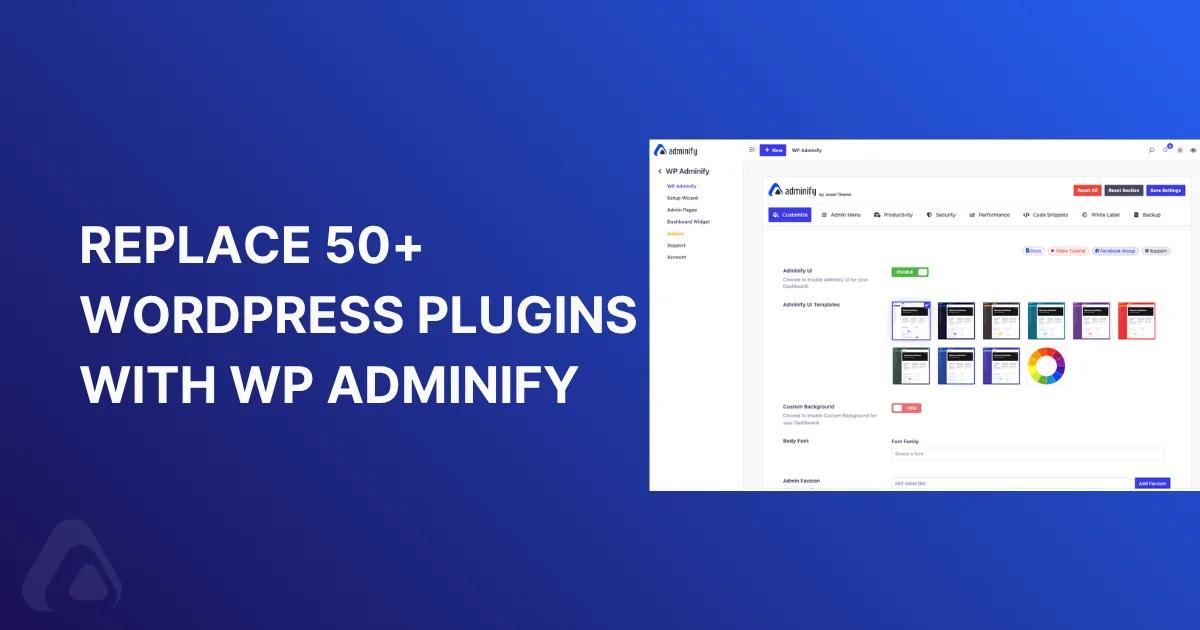
WP Adminify consolidates 60+ admin customization, security, and productivity features into one plugin - eliminating plugin conflicts, reducing server load, and giving you a single settings panel instead of a dozen. In this guide, we break down exactly which plugins WP Adminify replaces, feature by feature, with real comparisons.
- 50+ Plugins Replaced by WP Adminify
- Security Plugins Replaced by WP Adminify
- Productivity plugins Replaced by WP Adminify
- Performance plugins Replaced by WP Adminify
The Real Cost of Plugin Bloat
Plugin bloat is more than a performance issue - it is a compounding maintenance and security risk. Every active plugin on your WordPress site introduces:
Additional database queries on every page load, even in the admin area
JavaScript and CSS files that queue up and slow down the dashboard
Security surface area - each plugin is a potential entry point for attackers. According to Patchstack's 2024 WordPress Security Report, 97% of WordPress vulnerabilities originate from plugins
Update fatigue - more plugins means more updates to track, test, and deploy. Miss one critical update and you're exposed
Plugin conflicts - the more plugins interacting with the same WordPress hooks (like `admin_menu`, `login_head`, or `wp_dashboard_setup`), the higher the chance of incompatibility
Licensing overhead - if even 5 of your admin plugins are premium, you're managing 5 separate licenses, renewal dates, and support channels
For agencies managing 10, 20, or 50+ client sites, this problem doesn't scale. You need fewer moving parts, not more.
The math is simple: If each plugin adds an average of 2 database queries and 1 CSS/JS file to the admin, 50 plugins means 100 extra queries and 50 additional file requests on every dashboard page load. Consolidating to one plugin cuts that dramatically.
Customization Plugins WP Adminify Replaces
Dashboard customization is where most WordPress sites start accumulating single-purpose plugins. You install one for dark mode, another for custom fonts, a third for color-coded post statuses, and before long, your plugin list has grown by half a dozen entries - each doing one small thing.
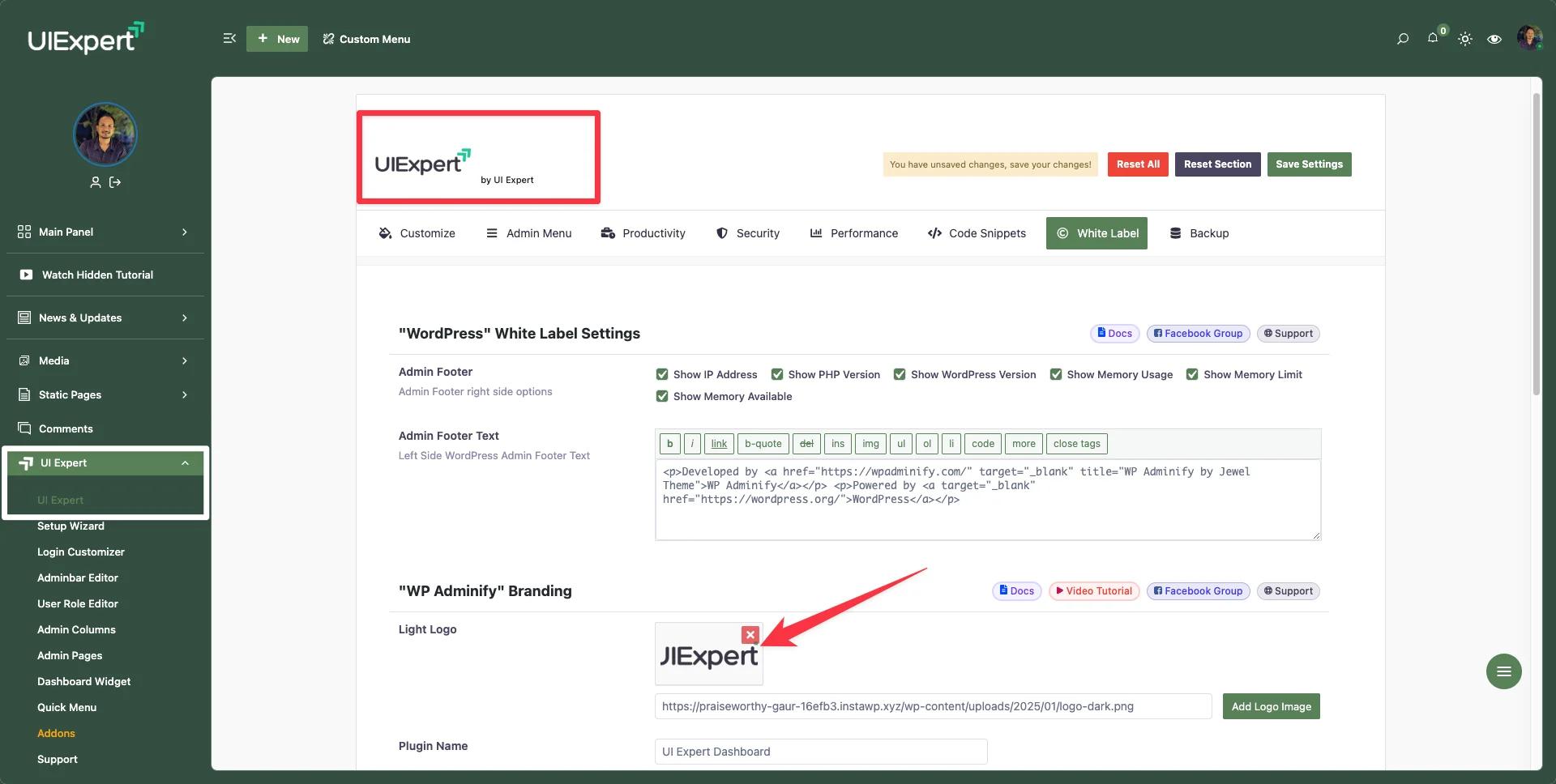
WP Adminify's Dashboard Customization feature and White Label WordPress features cover all of this in a single settings panel.
Dark Mode & Light Mode Toggle
Plugin it replaces: Darklup – Dark & Light Mode
Many site owners want a dark mode for the WordPress admin - especially developers who spend hours in the backend. Darklup is a popular standalone plugin for this.
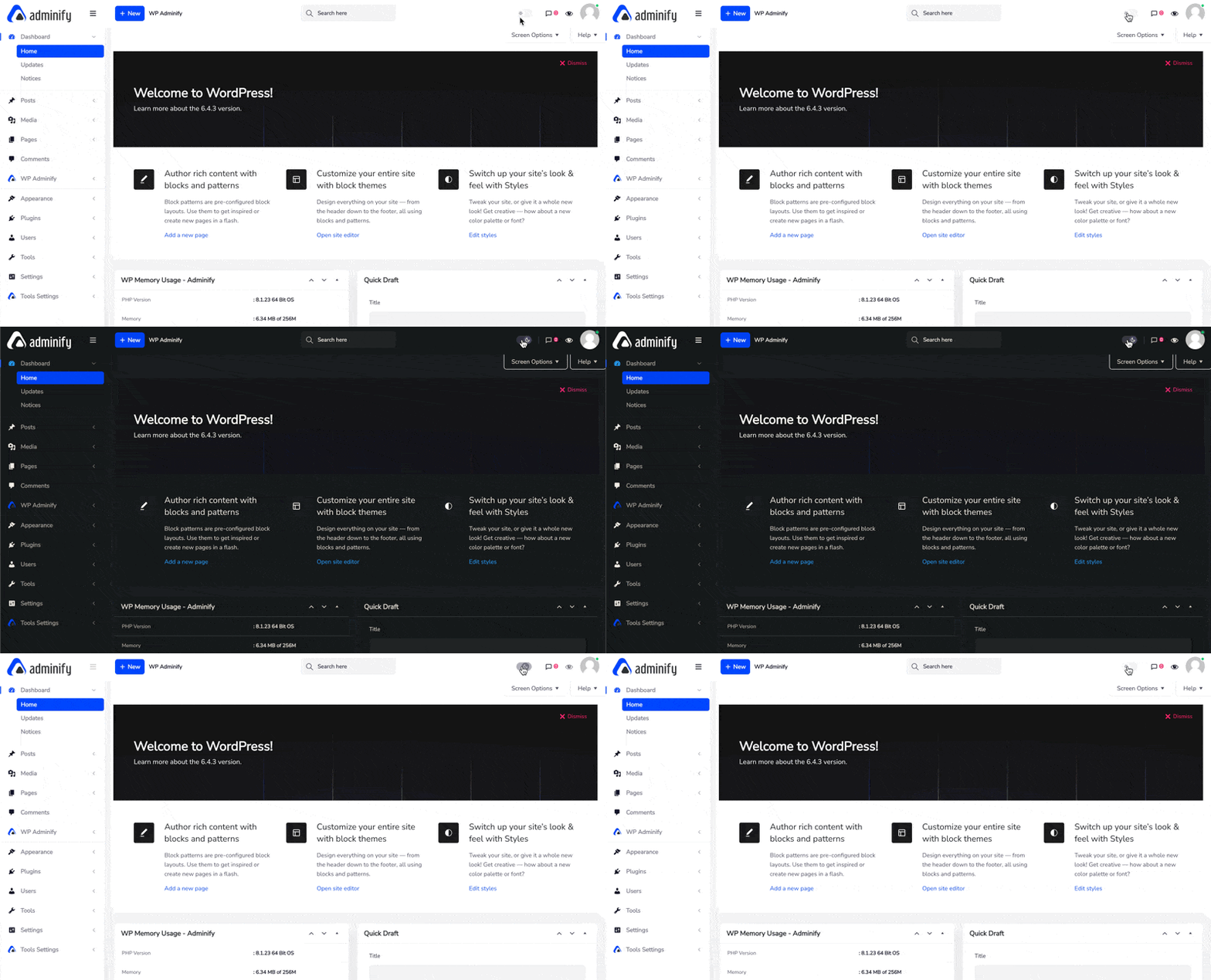
WP Adminify includes a built-in Light and Dark Mode toggle with auto-scheduling. You can set the dashboard to automatically switch between light and dark modes based on time of day. It also supports independent logo uploads for each mode, so your white-label branding looks correct regardless of the active theme.
Navigate to WP Adminify > Customize > Dark Mode to enable it.
Custom Admin Fonts
Plugin it replaces: Custom Fonts (400,000+ active installs)
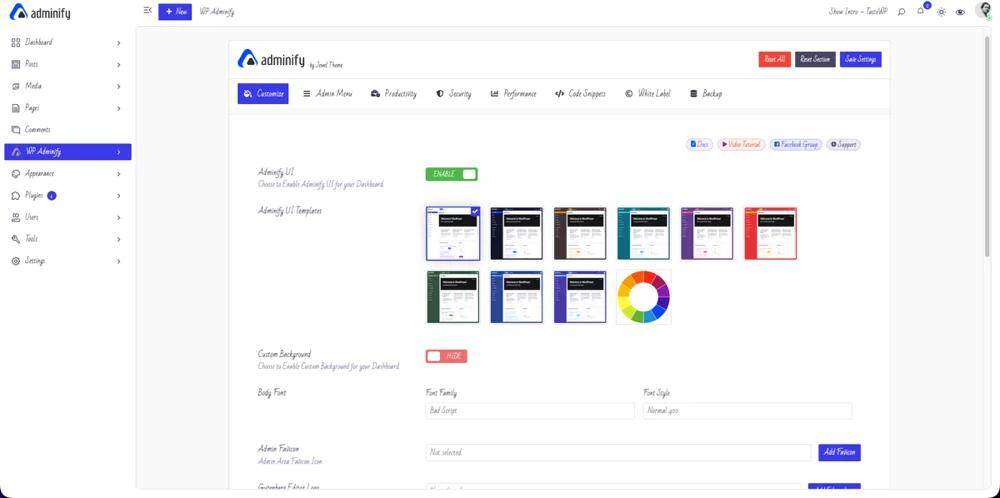
The Custom Fonts plugin by Brainstorm Force lets you host Google Fonts locally or upload custom font files. For the admin area specifically, WP Adminify lets you change dashboard typography directly through its UI Customization settings - no separate plugin needed.
Navigate to WP Adminify > Customize > Body Font to choose your admin font family, size, and weight.
Media & Folder Plugins WP Adminify Replaces
Organizing the WordPress media library has been a pain point since the platform's inception. The default media library is a flat, date-based structure with no folders - leading to the rise of several popular folder organization plugins.
Plugins it replaces:
| Plugin | Active Installs | Rating |
|---|---|---|
| Folders | 90,000+ | 5.0/5 |
| FileBird | 200,000+ | 4.7/5 |
| Media Library Folders | 10,000+ | 4.3/5 |
| Media Library Enable Infinite Scrolling | 8,000+ | 5.0/5 |
WP Adminify's Media Library Folders module provides:
- Drag-and-drop folder creation with unlimited nesting
- Subfolder support for organizing media by project, client, or content type
- Folder-based filtering to quickly locate files
- Bulk move - select multiple files and drop them into a folder
This eliminates the need for dedicated media organization plugins like FileBird (200,000+ installs) or Folders (90,000+ installs).
For sites with large media libraries (5,000+ images), having the folder functionality integrated into the same plugin that handles your admin menu, dashboard, and security means fewer plugin interactions competing for the same WordPress hooks - reducing the chance of conflicts.
Post Status Background Colors
Plugin it replaces: Colored Admin Post (500+ active installs)
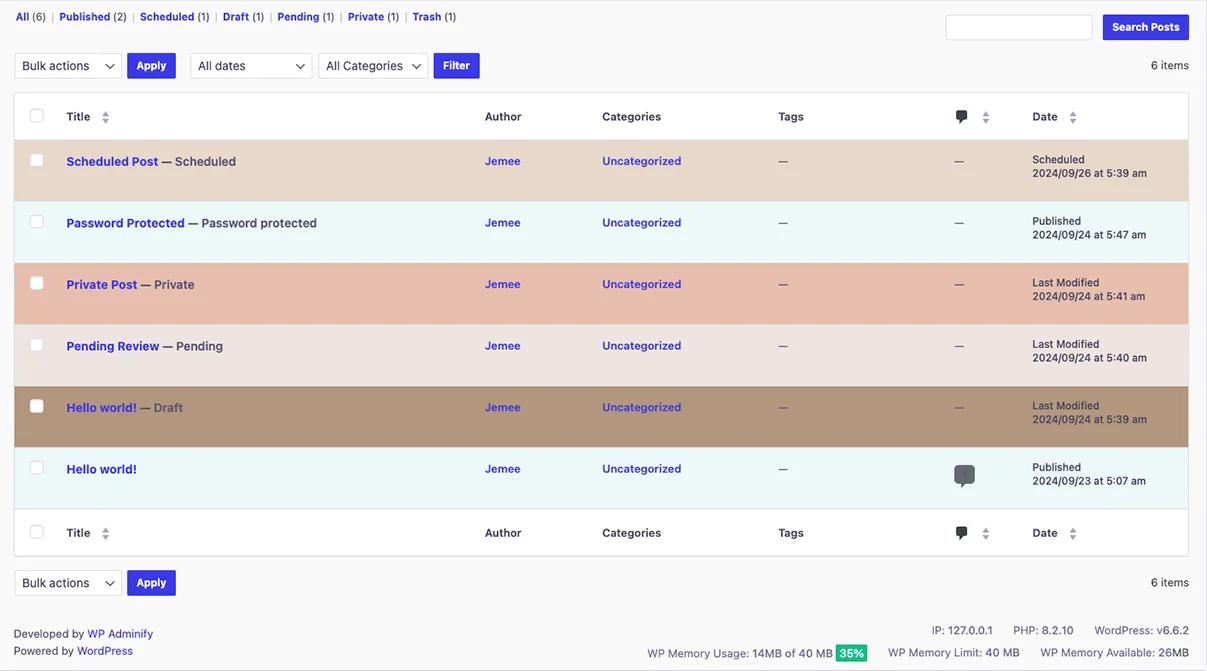
This niche plugin highlights rows in the post list with background colors based on status (Draft = yellow, Pending = orange, Published = green). WP Adminify includes post status color customization as part of its admin UI enhancements, giving you the same visual cues without a dedicated plugin.
Full Admin Interface Customization
Plugins it replaces:
| Plugin | Active Installs | Rating | What It Does |
|---|---|---|---|
| WP Custom Admin Interface | 30,000+ | 4.7/5 | Customize admin menu, toolbar, login page |
| AGCA – Custom Dashboard & Login Page | 20,000+ | 4.5/5 | Customize admin panel, login page, admin bar |
| White Label CMS | 200,000+ | 4.7/5 | White label branding for client dashboards |
These three plugins each offer partial admin customization. White Label CMS handles branding, AGCA handles granular admin element hiding, and WP Custom Admin Interface covers menu and toolbar tweaks.
WP Adminify replaces all three with its White Label module - covering custom logo, favicon, admin footer text, "Howdy" replacement, WordPress branding removal, admin bar customization, and full UI templating (Light, Dark, Modern, Glass morphism styles).
The key difference: These plugins were last updated 10-11 months ago (tested only up to WP 6.8.5), while WP Adminify receives monthly updates and is tested with the latest WordPress releases.
For developers who prefer code-level control, you can achieve basic white labeling with functions.php:
1
2// Replace "Howdy" text in admin bar
3function adminify_replace_howdy( $wp_admin_bar ) {
4  $my_account = $wp_admin_bar->get_node( 'my-account' );
5  $new_title  = str_replace( 'Howdy,', 'Welcome,', $my_account->title );
6  $wp_admin_bar->add_node( array(
7    'id'    => 'my-account',
8    'title' => $new_title,
9  ) );
10}
11add_filter( 'admin_bar_menu', 'adminify_replace_howdy', 25 );
12
But once you need logo replacement, footer customization, UI templates, and role-based visibility - managing all of that through code snippets becomes impractical. That's where WP Adminify's GUI saves hours.
Security Plugins WP Adminify Replaces
WordPress security is a domain where plugin stacking gets out of hand fast. One plugin to hide the login URL, another to disable XML-RPC, a third for REST API restrictions, and so on. Each addresses a single hardening measure.
WP Adminify's Security feature bundles the most commonly needed hardening features into one place.
Hide Login URL & Login Redirects
Plugins it replaces:
| Plugin | Active Installs | Rating | What It Does |
|---|---|---|---|
| WPS Hide Login | 2,000,000+ | 4.8/5 | Changes the login page URL from `/wp-admin` to a custom slug |
| LoginWP | 90,000+ | 4.8/5 | Role-based login/logout redirects |
WPS Hide Login is one of the most popular security plugins in the WordPress ecosystem with over 2 million active installs. It does exactly one thing: change the login URL.
WP Adminify includes Change Login URL functionality plus role-based login and logout redirects - combining what both WPS Hide Login and LoginWP do separately. You can send administrators to the dashboard, customers to their account page, and editors to the post list - all from a single settings screen.
Navigate to WP Adminify > Security > URL Redirection to configure both.
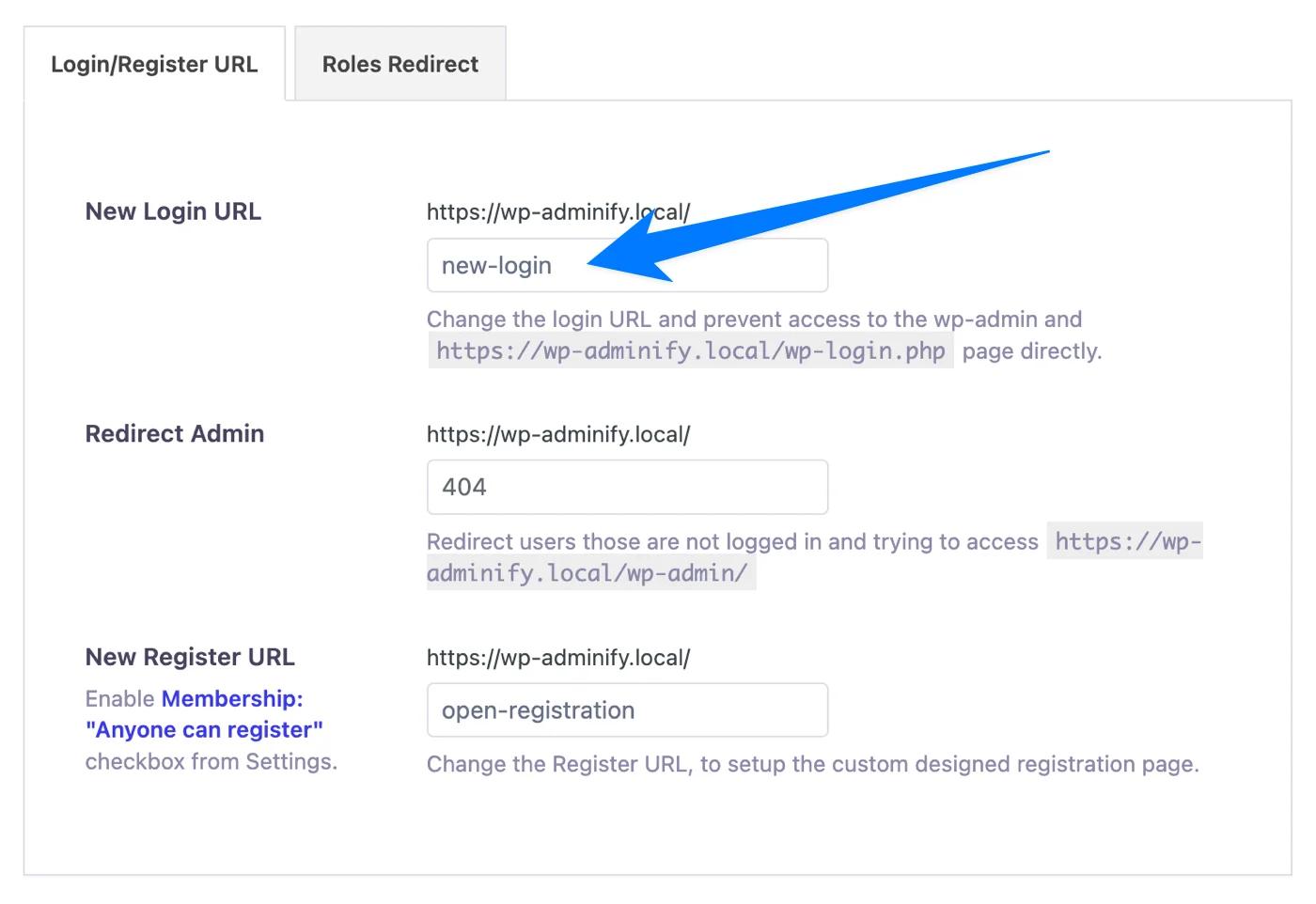
Pro Tip: When changing your login URL, always test it in an incognito browser window before logging out. If you forget your custom URL, you can deactivate WP Adminify via FTP/SFTP to restore the default /wp-login.php path.
Disable XML-RPC
Plugin it replaces: Disable XML-RPC-API (100,000+ active installs)
The XML-RPC protocol is a legacy WordPress interface that's frequently exploited for brute-force amplification attacks and DDoS. Most modern WordPress sites don't need it - the REST API handles remote communication now.
WP Adminify includes a Disable XML-RPC toggle in its Security module. One click, done.
For developers, the manual approach:
1
2// Disable XML-RPC completely
3add_filter( 'xmlrpc_enabled', '__return_false' );
4// Also remove the X-Pingback header
5add_filter( 'wp_headers', function( $headers ) {
6unset( $headers['X-Pingback'] );
7return $headers;
8});
9
Disable Self-Pings
Plugin it replaces: No Self Ping (10,000+ active installs)
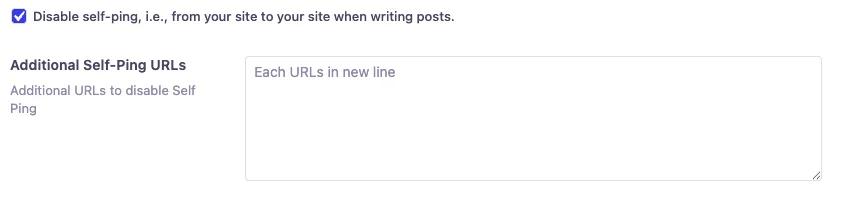
When you link to your own posts, WordPress sends itself a pingback request - cluttering your comments with self-referential notifications. WP Adminify eliminates this with a simple toggle.
Remove Meta Generator & Version Info
Plugin it replaces: Meta Generator and Version Info Remover (10,000+ active installs, 5.0/5 rating)
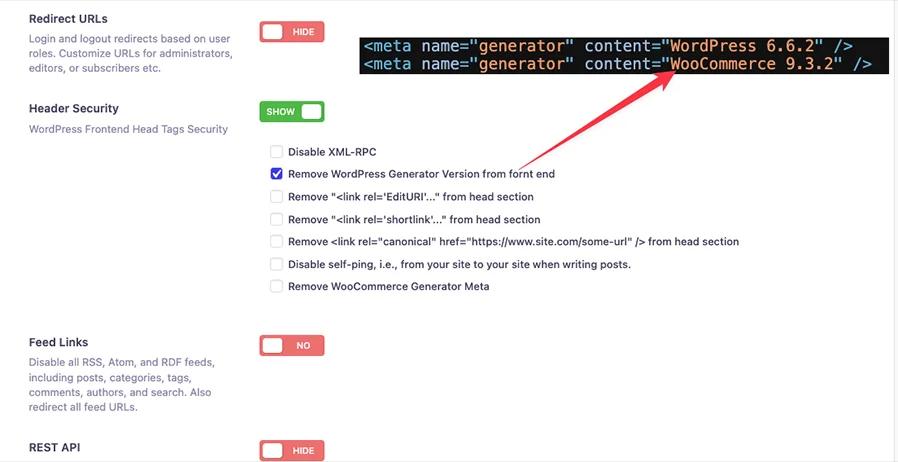
Exposing your WordPress version number in the HTML source (`<meta name="generator" content="WordPress 6.9.4" />`) gives attackers a quick way to identify which known vulnerabilities apply to your site. WP Adminify's Clean Up Head Section feature removes the generator tag, RSD link, WLW Manifest, shortlinks, and version strings from enqueued scripts and stylesheets.
Disable RSS Feeds
Plugin it replaces: Disable Feeds WP (10,000+ active installs)
Some sites - particularly client portals, membership sites, and internal tools - have no use for RSS feeds. Leaving them active exposes content to scrapers. WP Adminify can disable all RSS/Atom/RDF feeds and redirect feed URLs to the homepage.
Disable REST API for Logged-Out Users
Plugin it replaces: Disable WP REST API (30,000+ active installs)
The WordPress REST API exposes endpoints like /wp-json/wp/v2/users/ that can leak author usernames to unauthenticated visitors. WP Adminify's Restrict REST API feature blocks access for non-authenticated users while keeping it functional for logged-in administrators and editors.
Disable Comments Globally
Plugin it replaces: Disable Comments (1,000,000+ active installs, 4.7/5 rating)
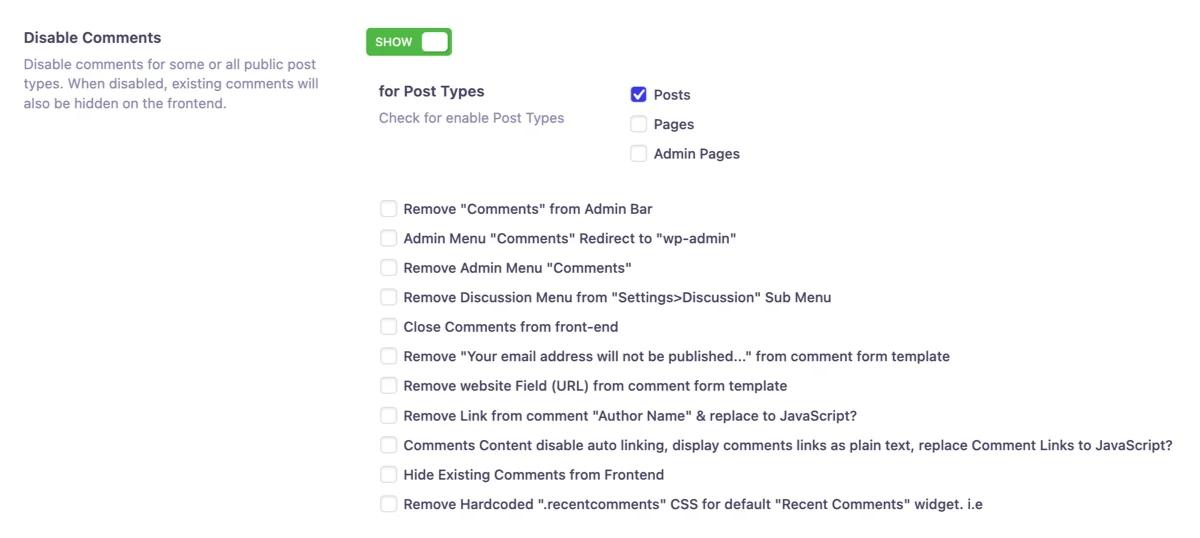
Disable Comments by developer Flavor is one of the most widely used utility plugins, with over 1 million installs. It removes the entire comment system - comment forms, admin menu items, dashboard widgets, and toolbar links.
WP Adminify includes a Disable Comments toggle that does the same thing: removes comment fields globally, hides related admin menu items, and closes comments on all existing posts and pages.
Admin Menu Plugins WP Adminify Replaces
The WordPress admin sidebar is the primary navigation interface - and it's one of the first things agencies customize for clients. Hiding complex options, reordering items, and adding custom links typically requires multiple plugins.
WP Adminify's [Admin Menu Editor](https://wpadminify.com/features/admin-menu-editor) handles all of this with a visual drag-and-drop interface.
Admin Menu Editor
Plugin it replaces: Admin Menu Editor (400,000+ active installs, 4.6/5 rating)
The standalone Admin Menu Editor plugin is the most popular in this category. WP Adminify offers the same drag-and-drop reordering, plus additional capabilities:
| Feature | Admin Menu Editor (Free) | WP Adminify |
|---|---|---|
| Drag & drop reorder | Yes | Yes |
| Hide menu items | Yes | Yes |
| Rename menu items | Yes | Yes |
| Custom SVG icons | No | Yes |
| Role-based visibility | Limited | Full (per role, User name) |
| Custom menu items (external URLs) | Pro only | Pro only |
| Menu separators | No | Yes |
| Admin bar editing | No | Yes (addon) |
| White label integration | No | Yes |
| Custom icons (Dashicons) | Yes | Yes |
Hide Admin Menu by Role
Plugin it replaces: Hide Admin Menu (20,000+ active installs)
WP Adminify's menu editor includes role-based visibility built directly into the drag-and-drop interface. Select a user role, then toggle which menu items that role can see. No separate plugin required.
Menu Separators
Plugin it replaces: Add Menu Separators (900+ active installs)
WP Adminify lets you insert custom separators and dividers between menu groups, improving the visual organization of the sidebar.
Set Width to Admin Menu
Plugin it replaces: Wider Admin Menu (2,000+ active installs)
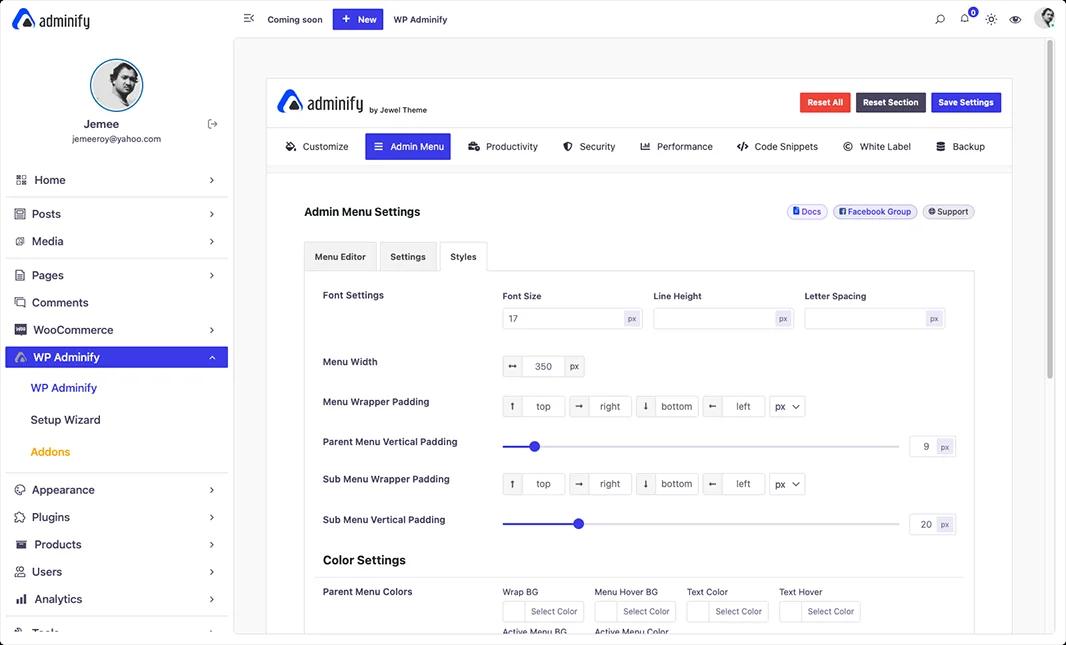
WP Adminify's admin UI customization includes menu width controls, so you can adjust the sidebar width from the default 160px to whatever suits your workflow.
Activity Log Plugins WP Adminify Replaces
Plugins it replaces:
| Plugin | Active Installs | Rating | What It Does |
|---|---|---|---|
| WP Activity Log | 300,000+ | 4.75 | Comprehensive activity logging for all WordPress events |
| User Login History | 10,000+ | 4.6/5 | Tracks login/logout times, IP addresses, browsers |
WP Adminify's Activity Logs addon tracks user actions across your WordPress site logins, logouts, post changes, option updates, and plugin activity. It provides the core functionality that most site managers need: knowing who did what and when.
For enterprise-grade audit requirements (compliance logging, email notifications, external log storage), WP Activity Log's premium tier offers more advanced features. But for the majority of WordPress sites that need basic activity tracking and user login monitoring, WP Adminify's built-in addon eliminates the need for two additional plugins.
Productivity Plugins WP Adminify Replaces
This is the category where plugin sprawl hits hardest. Every small annoyance in the WordPress admin - unwanted notices, the welcome panel, update nags, missing dashboard widgets - typically gets solved with a micro-plugin. WP Adminify's Productivity module consolidates all of these.
Enable Media Replace
Now you can replace existing media file with WP adminify plugin. It supports Gutenberg editor plus WordPress list + Grid media view. You can replace similar type of media file like jpg with jpg. Even you can undo your replacement that other plugin hardly offers.
This feature replace the "Enable Media replace" plugin. If you are a WP Adminify plugin user you don't need to install this plugin.
Admin Notice Management
Plugins it replaces:
| Plugin | Active Installs | Rating |
|---|---|---|
| Disable Admin Notices | 100,000+ | 4.7/5 |
| Hide Admin Notices – Admin Notification Center | 8,000+ | 5.0/5 |
| No Update Nag | 1,000+ | 5.0/5 |
WordPress admin notices are one of the most complained-about UX issues. Plugin authors use them for promotions, upsells, review requests, and update warnings. On a site with 20+ plugins, logging into the dashboard can mean scrolling past a wall of notices before reaching actual content. WP Adminify lets you disable admin notices per plugin and per role, so the update warnings survive and the upsells do not.
WP Adminify's Admin Notices Manager lets you disable all notices globally, hide them per plugin, or collect them into a notification center. It also removes the WordPress core update nag that appears at the top of all admin pages.
Dashboard Widgets & Welcome Panel
Plugins it replaces:
| Plugin | Active Installs | Rating |
|---|---|---|
| Dashboard Welcome for Elementor | 20,000+ | 4.1/5 |
| Dashboard Widgets Suite | 4,000+ | 4.9/5 |
| Remove Site Health From Dashboard | 1,000+ | 4.0/5 |
WP Adminify gives you full control over the WordPress dashboard:
- Remove the Welcome Panel with a single toggle
- Add custom dashboard widgets - text widgets, RSS feed widgets, or iframe widgets to display client instructions, support links, or analytics
- Hide default widgets like Site Health, Quick Draft, WordPress Events and News, or At a Glance
- Create branded welcome panels without needing a page builder plugin
Update Management & Version Info
Plugins it replaces:
| Plugin | Active Installs | Rating |
|---|---|---|
| Webcraftic Updates Manager | 9,000+ | 4.5/5 |
| Version Info | 10,000+ | 5.0/5 |
WP Adminify provides environment info display (PHP version, WordPress version, MySQL version) in the admin footer and can control update visibility per user role.
Header & Footer Scripts
Plugin it replaces: Code Snippets (1,000,000+ active installs, 4.7/5 rating)
Code Snippets is a powerhouse plugin with 1 million+ installs - and for good reason. It's a full code snippet manager that replaces functions.php editing.
WP Adminify's Header & Footer Scripts addon handles the most common use case: injecting tracking codes (Google Analytics, Facebook Pixel, custom CSS/JS) into the header or footer without editing theme files. If your needs are limited to script injection rather than full code snippet management, WP Adminify covers it. Want the exact steps? Our guide on how to add code to the WordPress header and footer walks through the whole setup.
Honest note: If you heavily rely on Code Snippets for dozens of PHP snippets across your site, it serves a broader purpose than what WP Adminify's Header & Footer Scripts addon is designed for. WP Adminify replaces the script injection use case, not the full code management platform.
Floating Quick Menu
Plugin it replaces: Float Menu (30,000+ active installs)
WP Adminify includes a Quick Menu feature - a floating action panel providing shortcuts to frequently used admin pages. Instead of navigating through the sidebar for common actions (new post, new page, settings), you can access them from a floating button anywhere in the admin.
Admin Column Plugins WP Adminify Replaces
Plugin it replaces: Admin Columns (100,000+ active installs, 4.9/5 rating)
The default WordPress post list shows a limited set of columns - Title, Author, Categories, Tags, Date. If you need to see featured images, custom fields, SEO scores, or WooCommerce product data at a glance, you typically need the Admin Columns plugin.
WP Adminify's Admin Columns Editor provides:
| Feature | Admin Columns (Free) | WP Adminify |
|---|---|---|
| Add/remove columns | Yes | Yes |
| Reorder columns | Yes | Yes |
| Custom field support (ACF, MetaBox, Pods) | Pro only ($89/yr) | Included |
| WooCommerce columns (SKU, stock, price) | Pro only | Included |
| Featured image thumbnail | Limited | Yes |
| Post ID display | No | Yes |
| Slug column | No | Yes |
| Last login column | No | Yes |
This also replaces several micro-plugins:
- Featured Image Admin Thumb (20,000+ installs) - Shows featured image thumbnails in the post list
- When Last Login (50,000+ installs) - Adds a "Last Login" column to the Users list
- Admin Slug Column (5,000+ installs) - Shows URL slugs in the post list
- Reveal IDs (40,000+ installs) - Displays post/page/user IDs in admin lists
That's 5 plugins - Admin Columns plus 4 micro-plugins - replaced by a single WP Adminify module.
Performance Plugins WP Adminify Replaces
Plugins it replaces:
| Plugin | Active Installs | Rating | Last Updated |
|---|---|---|---|
| Disable Embeds | 10,000+ | 4.3/5 | 12 months ago |
| Heartbeat Control | 80,000+ | 4.2/5 | 3 years ago (WP 6.3) |
| Disable Gutenberg | 600,000+ | 5.0/5 | 2 weeks ago |
Heartbeat API Control
The WordPress Heartbeat API sends AJAX requests every 15–60 seconds to keep sessions alive and autosave content. On shared hosting or high-traffic sites, this creates significant server load.
Heartbeat Control is one of the most commonly recommended performance plugins - but it hasn't been updated in 3 years and is only tested up to WordPress 6.3. That's a major red flag.
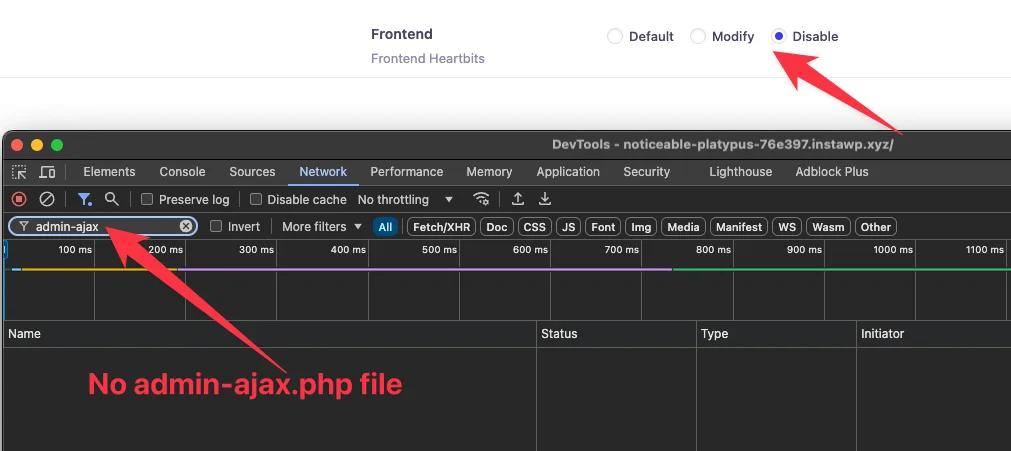
WP Adminify's Control Heartbeat API feature lets you modify the interval or disable the heartbeat entirely in specific areas (dashboard, post editor, frontend). It's actively maintained and tested with current WordPress releases.
Disable Embeds
WordPress oEmbeds allow external sites to embed your content - and vice versa. This loads an additional JavaScript file (wp-embed.min.js) on every page. If you don't need embed functionality, WP Adminify can disable it entirely from the Security module.
Disable Gutenberg (Classic Editor)
WP Adminify includes options to disable the Gutenberg block editor and revert to the Classic Editor for specific post types, user roles, or globally. This replaces the dedicated Disable Gutenberg plugin (600,000+ installs).
Post & Content Management Plugins WP Adminify Replaces
Several single-purpose plugins handle post ordering, duplication, and content management tweaks. WP Adminify bundles these commonly needed features.
Post & Taxonomy Ordering
Plugins it replaces:
| Plugin | Active Installs | Rating |
|---|---|---|
| Post Types Order | 600,000+ | 4.5/5 |
| Intuitive Custom Post Order | 400,000+ | 4.4/5 |
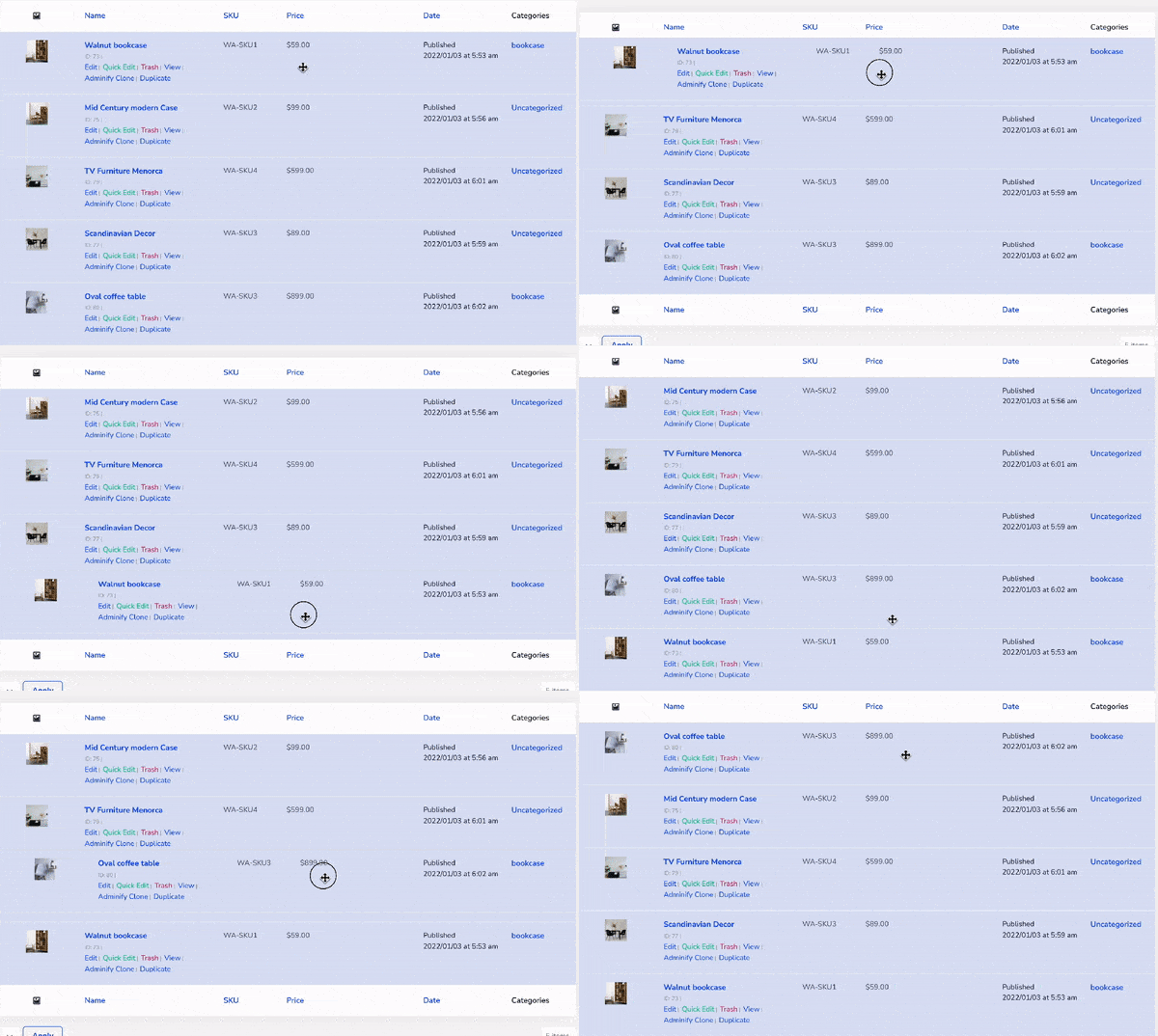
WP Adminify includes drag-and-drop post ordering for posts, pages, and custom post types - letting you rearrange content directly from the post list screen without a separate plugin.
Post & Menu Duplication
Plugins it replaces:
| Plugin | Active Installs | Rating |
|---|---|---|
| Yoast Duplicate Post | 4,000,000+ | 4.7/5 |
| Menu Duplicator | 10,000+ | 4.7/5 |
WP Adminify's Duplicate Posts, Pages, & CPTs feature adds a "Duplicate" action to the post list for any post type. One click creates a draft clone of the selected content - no additional plugin needed.
Honest note: Yoast Duplicate Post (4M+ installs) offers advanced features like Rewrite & Republish (edit a published post as a draft without affecting the live version). If you rely on that specific workflow, Yoast's plugin serves a broader purpose. For standard post cloning, WP Adminify covers the use case.
RSS Feed Thumbnails
Plugin it replaces: WP Feed Post Thumbnail (2,000+ active installs)
WP Adminify can include featured images in your RSS feed output via MRSS namespace - useful for email marketing tools and feed readers that display thumbnails.
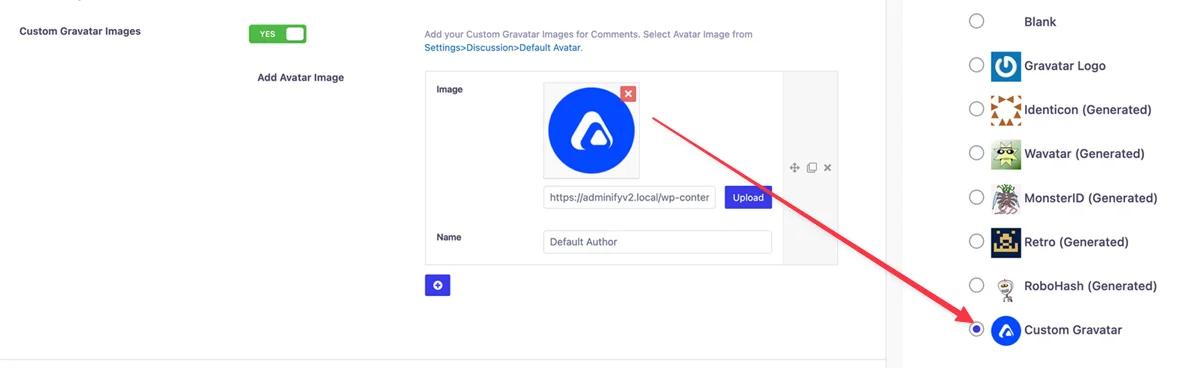
Custom Gravatar
Plugin it replaces: Gravatar Enhanced (100,000+ active installs)
WP Adminify allows you to set a custom default Gravatar image for users who haven't configured one - maintaining brand consistency across the admin area and frontend comments.
Display Last Updated Date
Plugin it replaces: WP Last Modified Info (40,000+ active installs)
WP Adminify can display the last modified/updated date on posts and pages, both in the admin list view and on the frontend - providing content freshness signals important for SEO.
RoleMaster Suite (User Role Editor)
Plugin it replaces: PublishPress Capabilities (100,000+ active installs, 4.7/5 rating)
WP Adminify's RoleMaster Suite addon is a comprehensive user role editor. Create custom roles, edit capabilities, clone existing roles, and manage fine-grained permissions - all integrated with WP Adminify's role-based menu visibility and dashboard customization.
Full Replacement Table: 50+ Plugins at a Glance
Here's every plugin WP Adminify can replace, organized by category:
Customization (6 plugins replaced)
| # | Plugin | Active Installs | WP Adminify Feature |
|---|---|---|---|
| 1 | Darklup – Dark & Light Mode | 1000+ | Dashboard UI > Dark Mode |
| 2 | Custom Fonts | 400,000+ | Dashboard UI > Typography |
| 3 | Colored Admin Post List | 500+ | Admin UI Post Status Colors |
| 4 | WP Custom Admin Interface | 30,000+ | White Label + Admin Menu Editor |
| 5 | AGCA – Custom Dashboard & Login | 20,000+ | White Label + Loginfy |
| 6 | White Label CMS | 200,000+ | White Label Module |
Security (8 plugins replaced)
| # | Plugin | Active Installs | WP Adminify Feature |
|---|---|---|---|
| 7 | WPS Hide Login | 2,000,000+ | Security > Change Login URL |
| 8 | LoginWP (Peter's Login Redirect) | 90,000+ | Security > Login/Logout Redirects |
| 9 | Disable XML-RPC-API | 100,000+ | Security > Disable XML-RPC |
| 10 | No Self Ping | 10,000+ | Security > Disable Self-Pings |
| 11 | Meta Generator & Version Info Remover | 10,000+ | Security > Clean Head Section |
| 12 | Disable Feeds WP | 10,000+ | Security > Disable RSS Feeds |
| 13 | Disable WP REST API | 30,000+ | Security > Restrict REST API |
| 14 | Disable Comments | 1,000,000+ | Security > Disable Comments |
Admin Menu (4 plugins replaced)
| # | Plugin | Active Installs | WP Adminify Feature |
|---|---|---|---|
| 15 | Admin Menu Editor | 400,000+ | Admin Menu Editor (Drag & Drop) |
| 16 | Hide Admin Menu | 20,000+ | Admin Menu Editor > Role Visibility |
| 17 | Add Menu Separators | 900+ | Admin Menu Editor > Separators |
| 18 | Wider Admin Menu | 2,000+ | Dashboard UI > Menu Width |
Activity & Logging (2 plugins replaced)
| # | Plugin | Active Installs | WP Adminify Feature |
|---|---|---|---|
| 19 | WP Activity Log | 300,000+ | Activity Logs Addon |
| 20 | User Login History | 10,000+ | Activity Logs Addon |
Productivity (10 plugins replaced)
| # | Plugin | Active Installs | WP Adminify Feature |
|---|---|---|---|
| 21 | Disable Admin Notices | 100,000+ | Admin Notices Manager |
| 22 | Admin Notification Center | 8,000+ | Admin Notices Manager |
| 23 | No Update Nag | 1,000+ | Admin Notices Manager |
| 24 | Dashboard Welcome for Elementor | 20,000+ | Custom Dashboard Widgets |
| 25 | Dashboard Widgets Suite | 4,000+ | Custom Dashboard Widgets |
| 26 | Remove Site Health From Dashboard | 1,000+ | Dashboard Widget Control |
| 27 | Updates Manager | 9,000+ | Update Visibility Controls |
| 28 | Version Info | 10,000+ | Admin Footer Info |
| 29 | Code Snippets (script injection use case) | 1,000,000+ | Header & Footer Scripts Addon |
| 30 | Float Menu | 30,000+ | Quick Menu Feature |
| 31 | Enable Media Replace | 600,000+ | Media Replace feature |
Media & Folders (4 plugins replaced)
| # | Plugin | Active Installs | WP Adminify Feature |
|---|---|---|---|
| 32 | Folders | 90,000+ | Media Library Folders |
| 33 | FileBird | 200,000+ | Media Library Folders |
| 34 | Media Library Folders (Plus) | 10,000+ | Media Library Folders |
| 35 | Media Library Infinite Scrolling | 8,000+ | Media Library Enhancements |
Admin Columns (5 plugins replaced)
| # | Plugin | Active Installs | WP Adminify Feature |
|---|---|---|---|
| 36 | Admin Columns | 100,000+ | Admin Columns Editor |
| 37 | Featured Image Admin Thumb | 20,000+ | Admin Columns > Image Column |
| 38 | When Last Login | 50,000+ | Admin Columns > Last Login |
| 39 | Admin Slug Column | 5,000+ | Admin Columns > Slug Column |
| 40 | Reveal IDs | 40,000+ | Admin Columns > ID Column |
Performance (3 plugins replaced)
| # | Plugin | Active Installs | WP Adminify Feature |
|---|---|---|---|
| 41 | Heartbeat Control | 80,000+ | Security > Control Heartbeat |
| 42 | Disable Embeds | 10,000+ | Security > Disable Embeds |
| 43 | Disable Gutenberg | 600,000+ | Classic Editor Toggle |
Post & Content Management (8 plugins replaced)
| # | Plugin | Active Installs | WP Adminify Feature |
|---|---|---|---|
| 44 | Post Types Order | 600,000+ | Post Type Ordering |
| 45 | Intuitive Custom Post Order | 400,000+ | Post Type Ordering |
| 46 | Yoast Duplicate Post | 4,000,000+ | Duplicate Posts & Pages |
| 47 | Menu Duplicator | 10,000+ | Menu Duplication |
| 48 | WP Feed Post Thumbnail | 2,000+ | Feed Thumbnail Support |
| 49 | Gravatar Enhanced | 100,000+ | Custom Gravatar |
| 50 | WP Last Modified Info | 40,000+ | Last Updated Date Display |
| 51 | PublishPress Capabilities | 100,000+ | RoleMaster Suite Addon |
Combined active installs of plugins replaced: 11,000,000+
Frequently Asked Question before migrate to WP Adminify
Can WP Adminify really replace 50+ plugins?
Yes. WP Adminify consolidates 60+ features across dashboard customization, white labeling, admin menu editing, security hardening, media organization, admin columns, and productivity tools. Each feature listed in this guide maps to a specific WP Adminify module or addon that performs the same function as the standalone plugin it replaces.
Will my site speed improve by switching to WP Adminify?
In most cases, yes. Each WordPress plugin loads its own CSS, JavaScript, and runs database queries. Consolidating 10-15 admin plugins into one reduces the total number of enqueued assets and database calls. The impact is most noticeable in the admin dashboard, where multiple plugins compete for the same hooks.
Is WP Adminify free or do I need the Pro version?
WP Adminify offers a generous free version with core features including the admin menu editor, white label basics, security tools, media folders, and dashboard customization. Pro unlocks advanced features like the Admin Columns Editor, Activity Logs, RoleMaster Suite, and priority support. Check the pricing page for current plans.
How do I migrate from my existing plugins to WP Adminify?
The migration is straightforward - install WP Adminify, configure the equivalent feature, verify it works, then deactivate and delete the old plugin. We recommend migrating one category at a time (start with security, then admin menu, then productivity) rather than replacing everything at once. This lets you isolate any issues.
What if WP Adminify conflicts with one of my existing plugins?
WP Adminify is designed to coexist with other plugins. If you encounter a conflict - typically caused by two plugins hooking into the same WordPress action (like admin_menu) - deactivate the conflicting plugin since WP Adminify likely already covers its functionality. For unresolved conflicts, contact WP Adminify support - their team is known for fast, hands-on assistance.
Does WP Adminify work with WooCommerce, ACF, and Elementor?
Yes. WP Adminify is compatible with WooCommerce (custom admin columns for products, orders, and customers), Advanced Custom Fields (display ACF field values in admin columns), Elementor, and all major WordPress plugins. The Admin Columns Editor specifically supports ACF, MetaBox, and Pods custom field plugins.
Conclusion
Plugin bloat isn't just a performance issue - it's a maintenance burden, a security risk, and a workflow killer. Every additional plugin is another update to track, another potential conflict, another license to manage.
Here's what consolidating to WP Adminify gives you:
- 50+ fewer plugins to update, monitor, and troubleshoot
- One settings panel instead of a dozen scattered settings pages
- Reduced server load from fewer enqueued scripts, styles, and database queries
- Smaller attack surface - one well-maintained plugin vs. 50 with varying update cadences (some not updated in 3+ years)
- Consistent role-based controls across all features - menu visibility, dashboard widgets, admin notices, and security settings all respect the same user role configuration.
Download WP Adminify free from WordPress.org and start consolidating today. For agencies and developers managing multiple client sites, the Pro version unlocks the full 60+ feature set.
Your email address will not be published