


I started hiding plugins on client sites for boring reasons. Clients updated plugins without telling me and broke the site, a few asked why I'd installed each plugin, and on some builds I didn't want the name of a paid tool on display. Taking the plugin off the Plugins screen dealt with all of it, and the plugin kept running in the background like nothing happened.
Below is the code I use now, tested on WordPress 7.1: a must-use plugin that hides the plugins you pick from everyone but you. After that come the plugins_list filter for must-use plugins, the places a hidden plugin still gives itself away, and how to get it back when you need it. If you're preparing the whole admin area for a client, it fits with customizing the WordPress dashboard and white labeling wp-admin.
Quick answer: hook a function to the all_plugins filter and unset() the plugin's basename (folder/main-file.php, for example woocommerce/woocommerce.php). Put the code in a must-use plugin in wp-content/mu-plugins/. The plugin keeps running; it just disappears from Plugins > Installed Plugins, including every tab and count.
Step 1: Find the Plugin's Basename
WordPress identifies each plugin by its basename: the plugin's folder, a slash, and its main PHP file. WooCommerce is woocommerce/woocommerce.php. WP Adminify is adminify/adminify.php.
The quickest way to read it is on the Plugins screen. Hover over a plugin's Deactivate link and look at the URL in your browser's status bar: the part after plugin= is the basename, with the slash written as %2F. If you have WP-CLI, wp plugin list --fields=name,file,status prints the basename in the file column.
Watch for single-file plugins. Hello Dolly is hello-dolly/hello.php when installed from WordPress.org, but plain hello.php on sites where it shipped with core. If a plugin won't hide, the basename is almost always the reason.
Step 2: Hide Plugins from Everyone Except You
On a client site, "hide it from users" nearly always means "hide it from the other administrator". Editors, Authors and Subscribers can't open the Plugins screen at all, because it needs the activate_plugins capability that only Administrators have. So the code below hides plugins from every account except the user IDs you list.
Create a file at wp-content/mu-plugins/hide-plugins.php (create the mu-plugins folder if it doesn't exist) and paste this in:
1
2<?php
3/**
4 * Plugin Name: Hide Plugins From Clients
5 * Description: Hides selected plugins from Plugins > Installed Plugins for everyone except the listed admins.
6 */
7
8// 1. Plugins to hide, as folder/main-file.php basenames.
9function adminify_hidden_plugins() {
10	return array(
11		'woocommerce/woocommerce.php',
12		// Add more basenames here.
13	);
14}
15
16// 2. User IDs that still see every plugin (find yours under Users > Profile).
17function adminify_can_see_hidden_plugins() {
18	$allowed_user_ids = array( 1 );
19	return in_array( get_current_user_id(), $allowed_user_ids, true );
20}
21
22// 3. Remove the plugins from the list, every tab and the tab counts.
23function adminify_hide_plugins( $plugins ) {
24	if ( adminify_can_see_hidden_plugins() ) {
25		return $plugins;
26	}
27
28	foreach ( adminify_hidden_plugins() as $plugin_file ) {
29		unset( $plugins[ $plugin_file ] );
30	}
31
32	return $plugins;
33}
34add_filter( 'all_plugins', 'adminify_hide_plugins' );
35
Swap in your own basenames in step 1 and your user ID in step 2. To find the ID, edit your account from Users > All Users and check the address bar (user_id=1). If a colleague needs the full list too, add their ID.
I'd skip functions.php for this. Code in functions.php belongs to the theme, so the day someone switches themes or rebuilds the child theme, every hidden plugin quietly comes back. A must-use plugin loads on every request whatever the theme, and nobody can deactivate it from the dashboard.
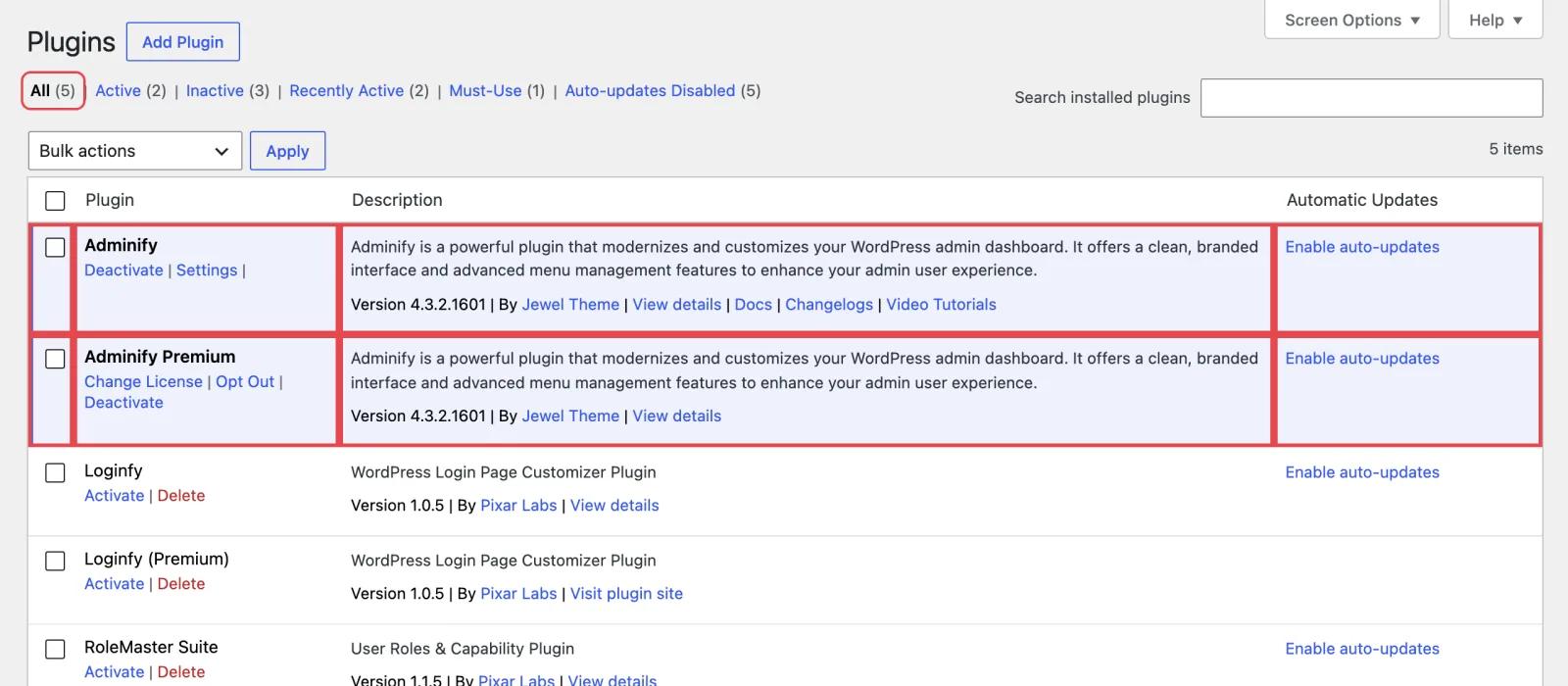
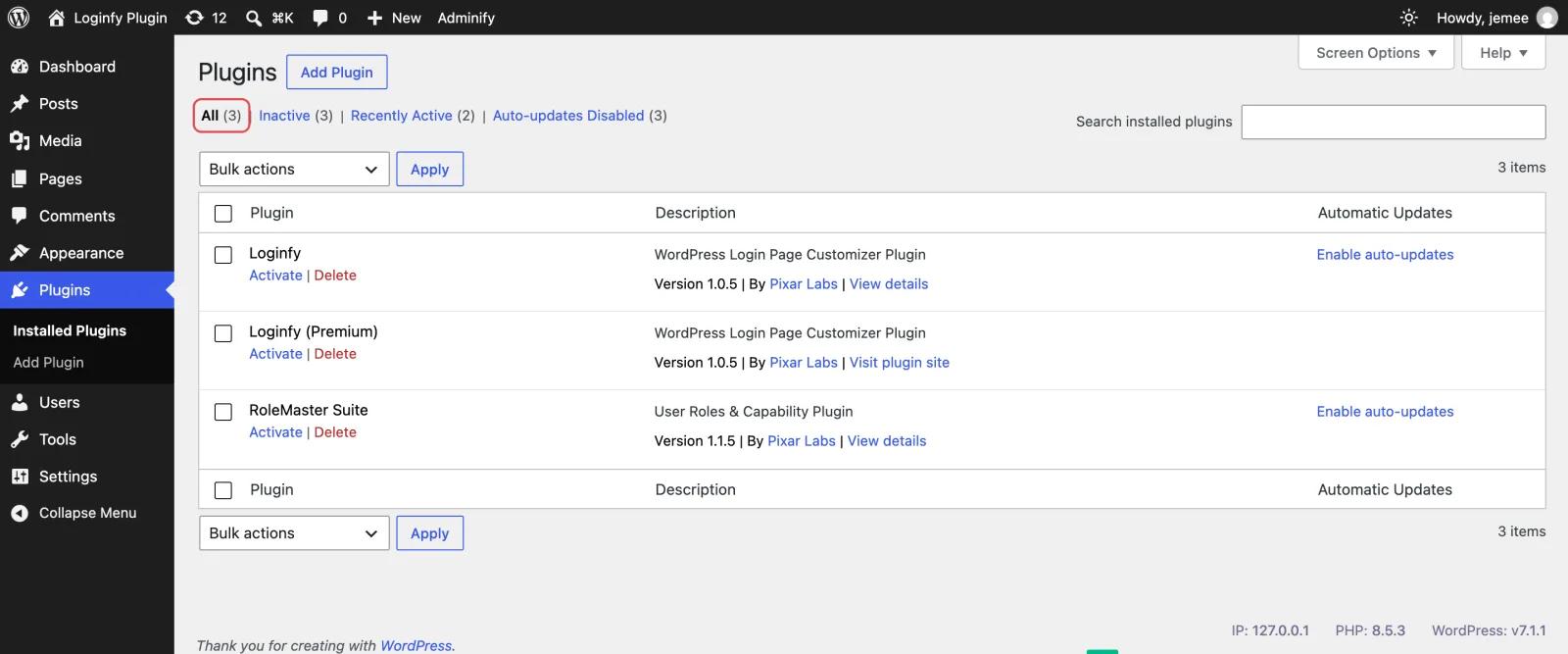
Because all_plugins runs before WordPress sorts plugins into tabs, the hidden plugins drop out of All, Active, Update Available and the auto-update tabs in one go, and every count updates to match. The one thing you've added is visible: the new file sits under the Must-Use tab. Step 4 deals with that.
Step 3 (Optional): Hide a Plugin from Everyone, Including You
If you never need a plugin in the list at all (say, a company helper plugin you only ever touch over SFTP), the snippet gets shorter:
1
2// Hide plugins from every user, including you.
3function adminify_hide_plugins_for_everyone( $plugins ) {
4	unset( $plugins['woocommerce/woocommerce.php'] );
5	return $plugins;
6}
7add_filter( 'all_plugins', 'adminify_hide_plugins_for_everyone' );
8
Be careful with this one. It hides the plugin from you as well, so there's no updating or deactivating it from the dashboard. On most client sites I'd stick with Step 2.
Step 4: Hide Must-Use Plugins with the plugins_list Filter
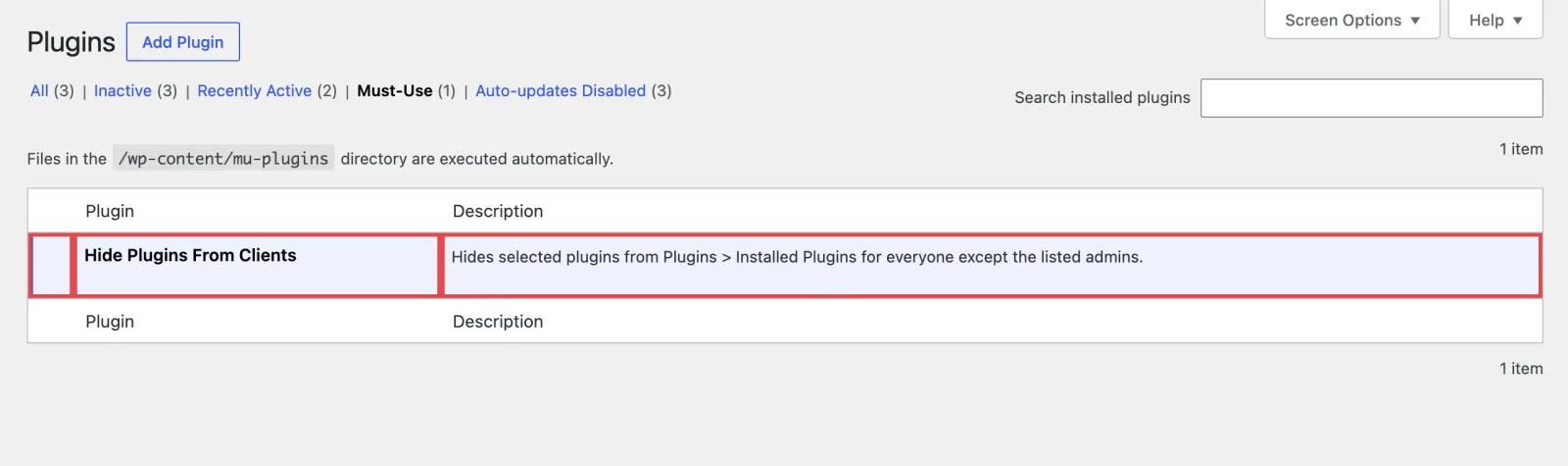
all_plugins only covers regular plugins. Must-use plugins and drop-ins such as object-cache.php come from a different source, so they need the plugins_list filter added in WordPress 6.3. It receives every tab as a separate group (all, active, inactive, mustuse, dropins, upgrade and so on) after WordPress has sorted the plugins.
Because the sorting has already happened, removing a plugin from one group doesn't remove it from the others. A snippet that only unsets $groups['all'][...] (several tutorials do this, and so does Google's AI answer) clears the All tab and leaves the plugin sitting under Active:
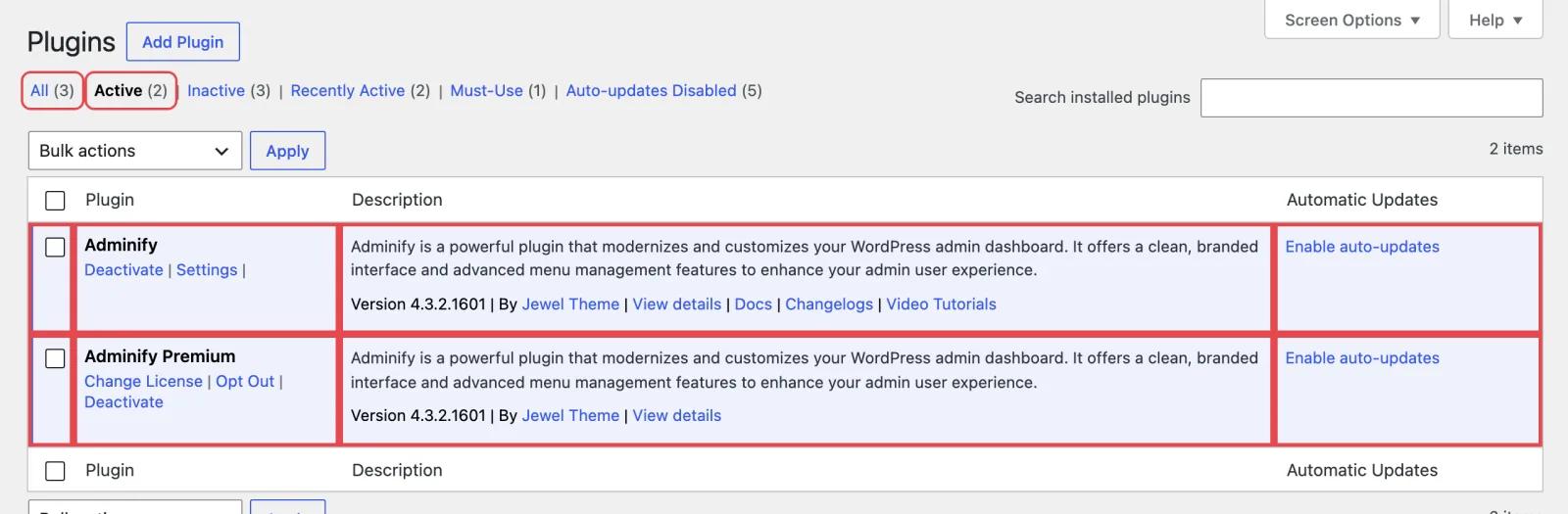
Loop over every group instead. This goes in the same hide-plugins.php file and hides the mu-plugin itself:
1
2// Hide this must-use plugin itself (WordPress 6.3+).
3function adminify_hide_mu_plugins( $groups ) {
4	if ( adminify_can_see_hidden_plugins() ) {
5		return $groups;
6	}
7
8	foreach ( array_keys( $groups ) as $group ) {
9		unset( $groups[ $group ]['hide-plugins.php'] );
10	}
11
12	return $groups;
13}
14add_filter( 'plugins_list', 'adminify_hide_mu_plugins' );
15
Once the only must-use plugin is hidden, the Must-Use tab disappears completely. The same loop works for drop-ins: use the drop-in's file name, such as object-cache.php, as the key.
What Hiding a Plugin Doesn't Hide
These filters only touch the Plugins list. A client who goes digging can still find a hidden plugin, and it's better to know where before they ask you about it:
- A plugin with a settings page keeps its own admin menu item. The snippet below removes it.
- When a hidden plugin has an update, it shows on Dashboard > Updates and the update badge, because that screen reads plugins with
get_plugins()rather than the filtered list. - The Active Plugins section of Tools > Site Health > Info lists every active plugin, hidden or not.
- It's in the dropdown on the Plugin File Editor, if file editing is enabled on the site.
- This one surprised me: WP-CLI applies
all_pluginstoo. Without a user,wp plugin listskips hidden plugins andwp plugin getreports the plugin "could not be found". Pass--user=with an allowed ID and it's back.
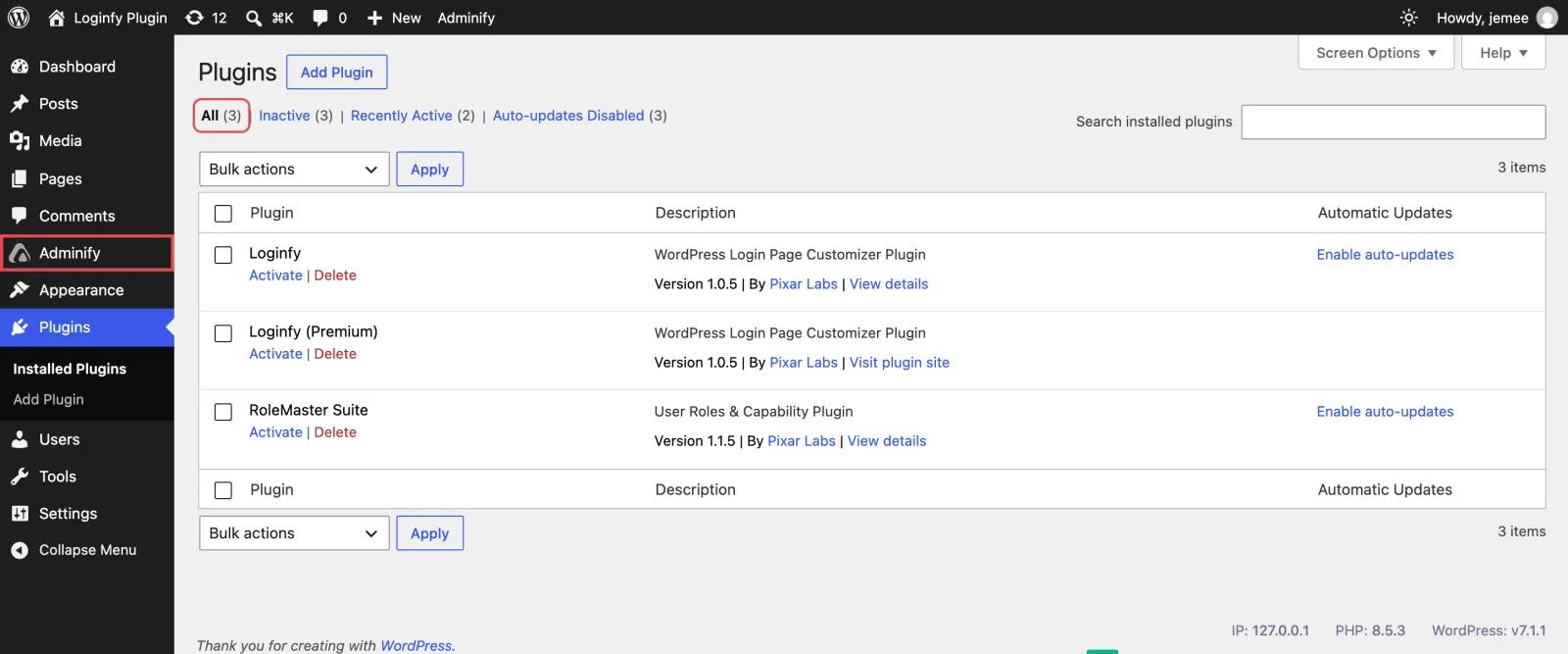
To remove the menu for everyone except your allowed users, add this to the same file. The menu slug is the page= value in the plugin's settings URL:
1
2// Hide a hidden plugin's own admin menu too.
3function adminify_hide_plugin_menus() {
4	if ( adminify_can_see_hidden_plugins() ) {
5		return;
6	}
7
8	remove_menu_page( 'woocommerce' ); // The menu slug from the page URL: admin.php?page=woocommerce
9}
10add_action( 'admin_menu', 'adminify_hide_plugin_menus', 999 );
11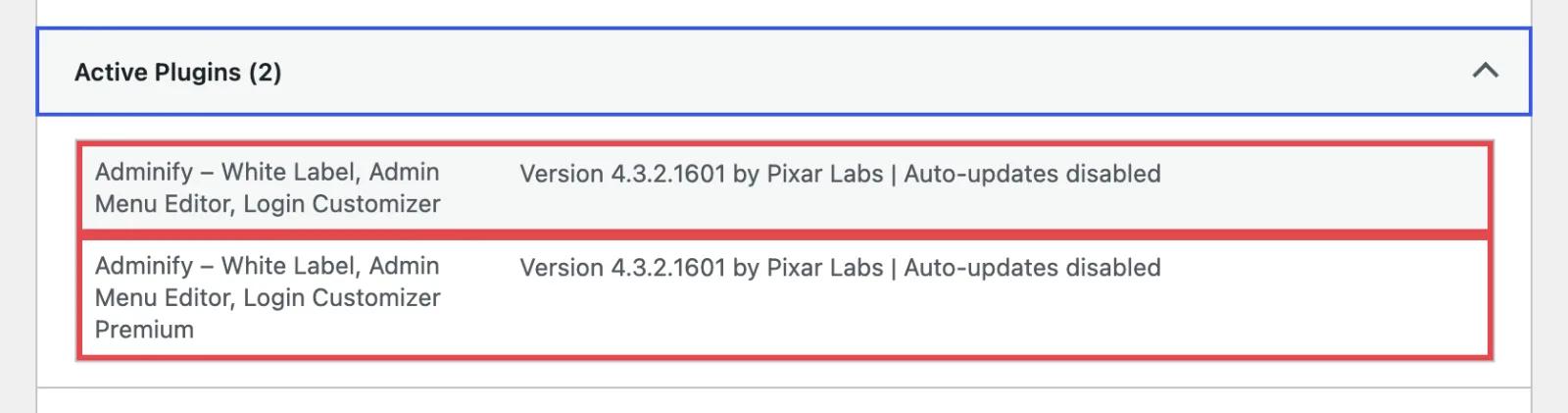
Leave the updates alone. The only way to get a plugin off the Updates screen is to strip it from the update data, and then WordPress stops updating it. I'd much rather a client spot a plugin name than have a hidden plugin that never gets security fixes. Update it yourself, or switch on auto-updates for it before you hide it.
How to Find, Update or Deactivate a Hidden Plugin
Write down what you hid. Six months on, a plugin that's invisible in wp-admin but still loading is miserable to debug, and whoever is debugging it might not be you. To get it back:
- Log in as an allowed user. Anyone in
$allowed_user_idsgets the full list with the usual Deactivate and update links. - Use WP-CLI with
--user. Pass an allowed user ID and the hidden plugins are back in every command (examples below). - Rename or delete the mu-plugin file over SFTP. Once
hide-plugins.phpis gone, everything reappears on the next page load.
1
2# List every plugin with its basename (run as an allowed user)
3wp plugin list --fields=name,file,status --user=1
4
5# Deactivate a hidden plugin
6wp plugin deactivate woocommerce --user=1
7
Hiding Plugins from Visitors Is a Different Job
A lot of people searching "hide WordPress plugin" are after something else: stopping visitors and theme detectors from seeing which plugins a site runs. Hiding a plugin in wp-admin won't help there. Its files still load, its readme is still public, and a scanner can often pick it out of the page source.
That's what security plugins like WP Hide & Security Enhancer and WP Ghost (formerly Hide My WP) are for; they rewrite plugin and theme paths. WPS Hide Login moves the login page. None of them stand in for updates, strong passwords and sensible roles. If the login page is your worry, start with changing the WordPress login URL and the rest of WP Adminify's security features.
Make the Rest of the Dashboard Client-Ready
Hiding plugins is only part of handing a site over. The rest is usually the menu, the branding and the toolbar:
- Use the admin menu editor to hide or rename menu items by role without code.
- Hide the admin bar by user role for accounts that only edit content.
- If WP Adminify is in your toolkit, you can rebrand WP Adminify itself (its name, logo and description on the Plugins screen) rather than hide it. That only works for WP Adminify; it won't rename third-party plugins.
- For logos, footer text and the login page, follow the white label WordPress guide.
Hide WordPress Plugins FAQ
How do I hide a plugin from the WordPress plugins list?
Add a function to the all_plugins filter that unsets the plugin's basename, such as woocommerce/woocommerce.php, and save it as a must-use plugin in wp-content/mu-plugins/. The plugin keeps working; it just disappears from Plugins > Installed Plugins, including every tab and count.
Will a hidden plugin still update?
Yes. Hiding it from the list doesn't touch updates. The update still appears on Dashboard > Updates and in the update count, and auto-updates run if you turned them on. Don't strip a hidden plugin from the update data, because that stops its security updates too.
How do I hide plugins from other administrators but not from me?
Check the current user ID inside your all_plugins function and return the full list for the IDs you allow. Everyone else gets the filtered list. Editors and Authors don't need this, because they can't open the Plugins screen at all.
How do I deactivate a plugin that is hidden?
Log in as an allowed user and deactivate it normally, or run wp plugin deactivate with --user set to an allowed user ID. As a last resort, rename the hide-plugins.php file over SFTP so every plugin reappears.
Can I hide must-use and drop-in plugins?
Yes, with the plugins_list filter from WordPress 6.3. Loop over every group and unset the file name, such as hide-plugins.php or object-cache.php. Unsetting only the all group leaves the plugin visible in other tabs.
Does hiding a plugin make WordPress more secure?
No. It only tidies the admin screen. The plugin's files still load and can be detected from the front end. Use it to prevent accidental changes on client sites, and rely on updates, roles and security tools for actual protection.
Does this work on WordPress Multisite?
Yes. The all_plugins filter runs on each site's Plugins screen and on Network Admin > Plugins, so one must-use plugin covers the whole network. Use super admin user IDs in the allowed list.
How do I turn off plugins in WordPress?
Go to Plugins > Installed Plugins and click Deactivate under the plugin, or run wp plugin deactivate plugin-name. If a plugin is hidden, do it as an allowed user or add --user to the WP-CLI command.
Wrapping Up
A single filter in a must-use plugin keeps the plugins you choose off a client's Plugins screen, and you still see all of them. Use all_plugins for regular plugins and loop over every group if you reach for plugins_list. Take the plugin's menu out too if it has one, and keep updating anything you hide. If you want the rest of the admin area just as tidy, WP Adminify's white label tools handle the branding side.
Your email address will not be published