

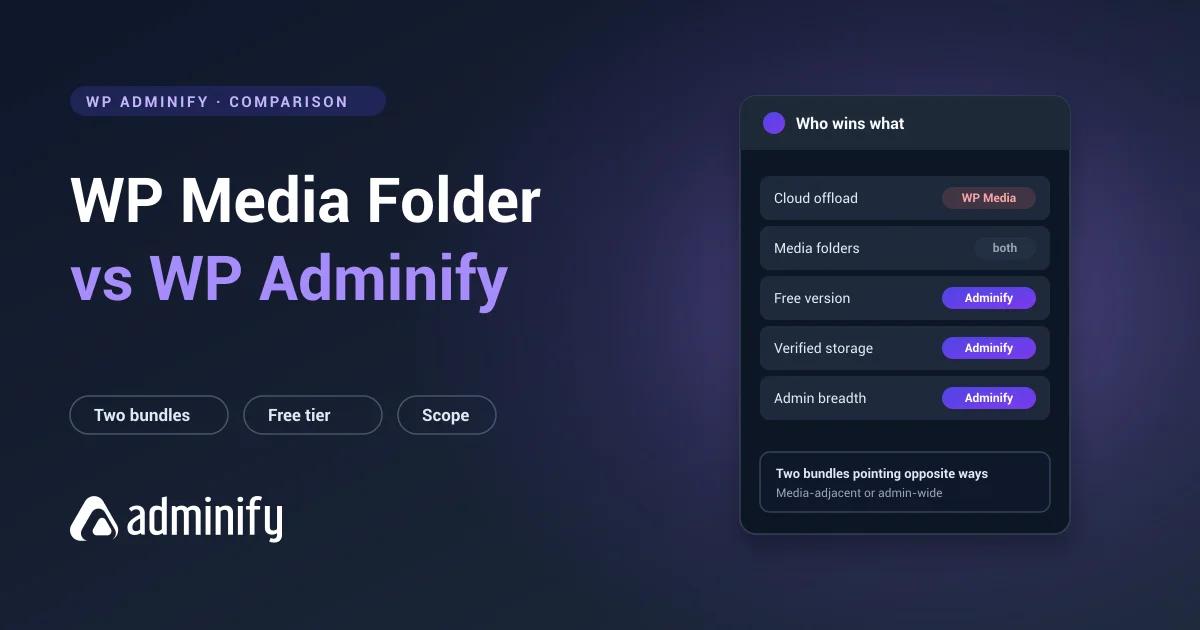

Both of these are bundles, which makes this more interesting than most comparisons. They just bundle in opposite directions.
WP Media Folder groups media-adjacent capabilities: folders, cloud storage, galleries, image processing. WP Adminify groups admin-wide ones: media folders, menu editing, white labelling, login customization, admin columns.
Neither is a superset of the other. Which one fits depends entirely on where your problems actually sit.
The folder module inside WP Adminify is ours, so treat this comparison as an interested one. The best WordPress media folder plugins roundup covers the wider field, and our WP Media Folder review handles that plugin on its own.
Disclosure on testing
We tested nine media folder plugins on a clean WordPress 7.0.3 install for this series. WP Media Folder isn't one of them, because it's premium-only and unavailable through WordPress.org, so we couldn't install it without buying a licence.
WP Adminify is our own product, and its half of this comparison went through the same test bench as everything else: it registers media_folder as a hierarchical attachment taxonomy and creates no custom tables.
Everything below about WP Media Folder comes from its public documentation and is marked as such. We'd rather flag that than dress an untested comparison up as a fair fight on our own website.
Quick verdict
Choose WP Media Folder if you need cloud storage offloading, folder-driven galleries, or built-in compression and watermarking sitting alongside your folders.
Choose WP Adminify if your problems span the admin rather than the media library: cluttered menus, unbranded client dashboards, missing admin columns.
Comparison table
| WP Media Folder | WP Adminify | |
|---|---|---|
| Bundle direction | Media-adjacent features | Admin-wide features |
| Developer | JoomUnited | Jewel Theme |
| On WordPress.org | No | Yes |
| Free version | No | Yes |
| Media folders | Yes | Yes, verified |
| Folder storage model | wpmf-category taxonomy (vendor docs); physical folders optional | media_folder taxonomy, no tables |
| Cloud storage integration | Add-on tier, $69/yr | No |
| Galleries | Base plugin, $49/yr | No |
| Image compression | Documented, not tested | No |
| Watermarking | Base plugin, $49/yr | No |
| Admin menu editor | No | Yes |
| White label | No | Yes |
| Login customizer | No | Yes |
| Admin columns editor | No | Yes |
| Role-based controls | Documented, not tested | Yes |
Where WP Media Folder wins
Everything in its bundle that WP Adminify doesn't attempt, and there's no point being coy about it.
Cloud storage offloading is the big one. Past a certain library size, moving media to object storage stops being optional: backups outgrow the maintenance window, migrations time out, the storage bill keeps climbing. WP Adminify doesn't do this at all. If you need folders and offloading together, one plugin covering both is genuinely appealing.
Galleries, compression and watermarking the same. If those are on your list, WP Adminify isn't a substitute and we're not going to suggest it is.
Worth knowing before you budget: the cloud integrations are the add-on tier, $69 a year against $49 for the plugin alone. Galleries, watermarking and media replacement are in the base plugin. We have not tested any of them, and we are reporting the vendor’s documented split rather than our own measurements.
Where WP Adminify wins
Everything outside the media library, equally plainly.
Look at what accumulates on an ordinary WordPress site: something to hide menu items from clients, something to rebrand the dashboard, something for the login page, something for admin columns, something to switch off comments. WP Media Folder addresses none of it, because it isn't trying to.
WP Adminify covers that list in one tool with role-based controls running through it, so a client sees a different admin from an editor. The full case is in replacing 50+ plugins with one.
It also has a free version on WordPress.org, so you can put it on a staging copy of your real site and see how it behaves before paying anyone. You can't do that with WP Media Folder.
Folder storage: an open question
For every other plugin in this series we established the storage model, because it decides whether you can leave later. FileBird uses wp_fbv. Real Media Library uses four tables. WP Adminify, Folders and Media Library Organizer all use WordPress taxonomy terms.
We verified WP Adminify registers media_folder as a hierarchical taxonomy with no custom tables, so folder data is ordinary WordPress terms, readable with wp term list and exportable with anything.
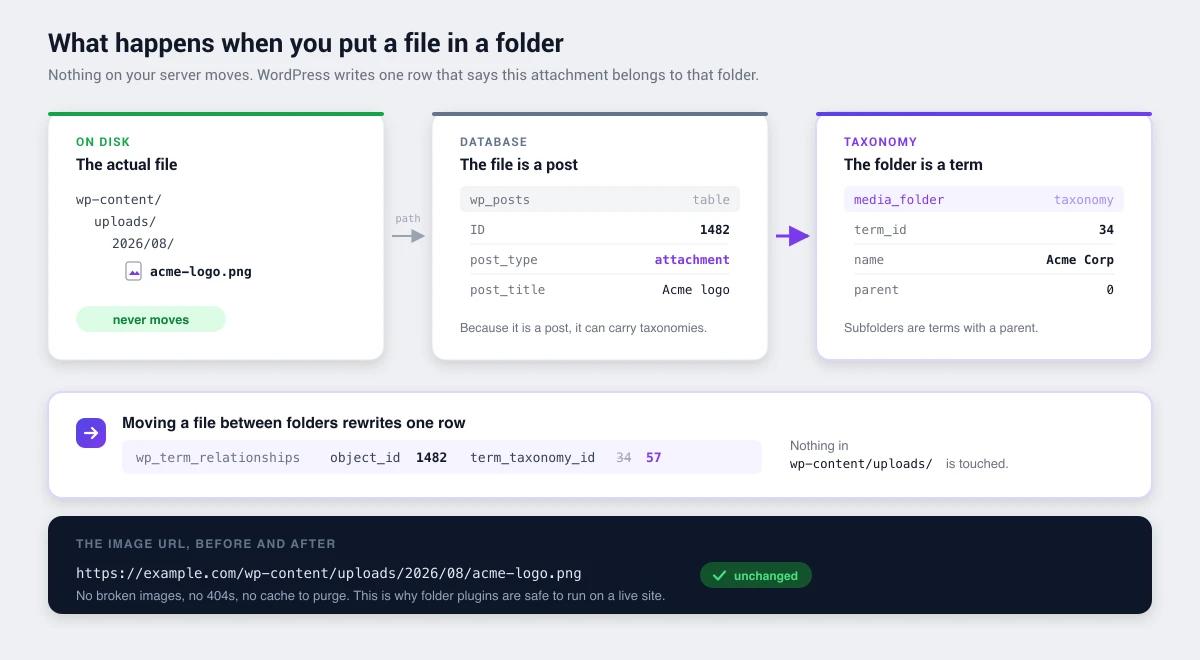
We don't know what WP Media Folder does. If you're evaluating it, that's the first thing to check once it's installed:
wp db query "SHOW TABLES;"
wp db query "SELECT taxonomy, COUNT(*) FROM wp_term_taxonomy GROUP BY taxonomy;"
Custom tables aren't a flaw. They buy performance and features that taxonomies handle awkwardly. But they change your exit cost, and that's worth knowing before you organize fifteen thousand files rather than after.
The real question
Both are bundles, so ask what each one replaces on your site rather than which has the longer feature list.
| Your situation | Better fit |
|---|---|
| Need cloud offloading plus folders | WP Media Folder |
| Running several small admin plugins | WP Adminify |
| Need galleries built from media folders | WP Media Folder |
| Building white-labelled client sites | WP Adminify |
| Want to trial before paying | WP Adminify |
| Need image compression and watermarking | WP Media Folder |
| Need role-based admin restrictions | WP Adminify |
There's a third answer worth naming: if folders are all you need, neither bundle is the right shape. FileBird with 200,000 installs and Folders by Premio with a perfect 100/100 from 1,514 ratings both do folders better than either bundle, for free.
Pricing
The meaningful comparison is total stack cost. If WP Media Folder replaces a separate offload plugin and a gallery plugin, compare it against those combined. If WP Adminify replaces four admin plugins, compare it against those. JoomUnited lists $49 a year for WP Media Folder, $69 with every add-on, and $199 for its full WordPress bundle, with cloud storage sitting in the add-on tier rather than the base one. The WP Adminify plans are published the same way.
WP Media Folder vs WP Adminify FAQs
Is WP Adminify an alternative to WP Media Folder?
Only partly. Both include media folders, but WP Media Folder adds cloud storage, galleries and image processing, while WP Adminify adds admin menu editing, white labelling and login customization. They overlap on folders and diverge on everything else.
Does WP Adminify support cloud storage offloading?
No. If offloading media to S3, Google Drive or similar is a requirement, WP Adminify doesn't cover it. You'd need a dedicated offload plugin alongside it, or a bundle like WP Media Folder that includes one.
Which has a free version?
WP Adminify has one on WordPress.org. WP Media Folder doesn't, since it's premium-only and absent from the repository, which we confirmed on 9 August 2026. That means no trial on a staging copy of your real library before you buy.
Which stores media folders more portably?
WP Adminify's folders are standard WordPress taxonomy terms with no custom tables, verified on a clean install, so the structure reads with normal tools and survives deactivation as ordinary data. WP Media Folder's storage model is unverified. Check it yourself with wp db query "SHOW TABLES;".
Can I use both together?
Technically possible, practically pointless. You'd maintain two folder structures over the same files. If you need cloud offloading plus admin management, pair a dedicated offload plugin with WP Adminify instead.
Final verdict
These two bundle in different directions, so the comparison resolves by asking where your problems are rather than which has more boxes ticked.
WP Media Folder wins on: cloud integration, galleries and image processing, none of which WP Adminify attempts.
WP Adminify wins on: admin-wide consolidation, white labelling, role-based control, a free version you can trial, and verified portable folder storage.
If the honest answer is "I just want folders," buy neither bundle. The dedicated free plugins do that job better than either of these. If you genuinely need one of these bundles, pick the one whose extras you'll actually open.
More detail: WP Adminify's media folders, or background on how WordPress media folders work.
Your email address will not be published