


Key Takeaways
- The free Admin Menu Editor plugin was at version 1.15.2 with 300,000+ active installs on WordPress.org on 9 November 2026, while WP Adminify was at 4.3.4 with 6,000+ installs and a 4.3 out of 5 rating from 109 reviews.
- Admin Menu Editor Pro versions 2.35 and 2.36 were shipped with a web shell after an attacker got into adminmenueditor.com on 14 September 2026; the vendor says version 2.34 should be clean.
- In the free Admin Menu Editor, per-role menu permissions, hiding a menu from everyone except one user and menu import/export are Pro features.
- WP Adminify's Menu Editor sits under Adminify > Admin Menu and gives each item six fields: Rename as, Hidden For Roles or Users, Change Link, Set Custom Icon, New Window?, and Add Separator.
- Admin Menu Editor Pro listed three plans on adminmenueditor.com on 9 November 2026: $49 for 1 site, $99 for 5 sites and $179 for unlimited sites, each with 1 year of updates.
Admin Menu Editor Pro and WP Adminify both let you reorder, rename and hide items in the WordPress admin menu. Admin Menu Editor by Janis Elsts focuses on the menu and access rules. WP Adminify by Pixar Labs puts a menu editor inside a wider admin customization plugin. We installed Admin Menu Editor 1.15.2 and WP Adminify 4.3.4 on the same WordPress 7.1.4 test site to compare them.
This comparison covers menu editing, role rules, styling, prices, the September 2026 security incident that hit Admin Menu Editor Pro, how to switch, and when it makes sense to stay with Admin Menu Editor. We make WP Adminify, so we stick to facts you can check. For a general walkthrough of either tool, see our WordPress menu editor guide. Our own tool is WP Adminify's Admin Menu Editor.
Quick Verdict
Choose Admin Menu Editor if you only need menu changes and per-post access rules, and you trust its long track record on 300,000+ sites. Choose WP Adminify if you also want menu styling, an admin theme, login redirects, white label and productivity tools in one plugin. If you only edit the menu, either plugin does the job.
Feature Comparison Table
Each row shows what the plugin documents or what we saw on our test site on 9 November 2026. "Pro" means the vendor lists that feature as paid. For WP Adminify, "free" and "Pro" follow the plan badges in its 4.3.4 settings panel.
| Factor | Admin Menu Editor | WP Adminify |
|---|---|---|
| Where it lives | Settings > Menu Editor | Adminify > Admin Menu > Menu Editor |
| Reorder by drag and drop | Yes (free) | Yes (free) |
| Rename items | Yes (free) | Yes (free, Rename as) |
| Change icons | Yes (free) | Yes (free, Set Custom Icon) |
| Change the link | Yes (free) | Yes (free, Change Link) |
| Open in a new window | Pro | Yes (free, New Window?) |
| Separators | Yes | Pro (Add Separator) |
| Hide items | Free: hide from everyone or set a capability/role; Pro: per-role permissions | Yes (free, Hidden For Roles or Users) |
| Hide from everyone except one user | Pro | Free: hide per user via Hidden For Roles or Users |
| Menu colours and styling | Pro | Yes (Styles sub-tab: fonts, width, padding and colours are free; a few extra options are Pro) |
| Export/import | Pro (menu export) | Free: Backup tab exports and imports all Adminify settings |
| Login/logout redirects | Yes (Redirects tab) | Pro (Security > Redirect URLs > Roles Redirect) |
| Per-post access by role | Yes | Not covered in this comparison |
| Other admin tools | Plugins tab (hide plugins, edit plugin details) | Admin theme, dark mode, notices, folders, security, performance, white label |
Sources: the Admin Menu Editor page on WordPress.org, its in-plugin Upgrade to Pro box, and the WP Adminify settings panel on our test site.
Menu Editing Compared
Both plugins let you drag items into a new order and edit each item's label, icon and link. Admin Menu Editor shows the menu and submenu as two columns with a toolbar of icons above them. WP Adminify shows one list with drag handles, and each item opens into a Settings tab and a Submenu tab with labelled fields.
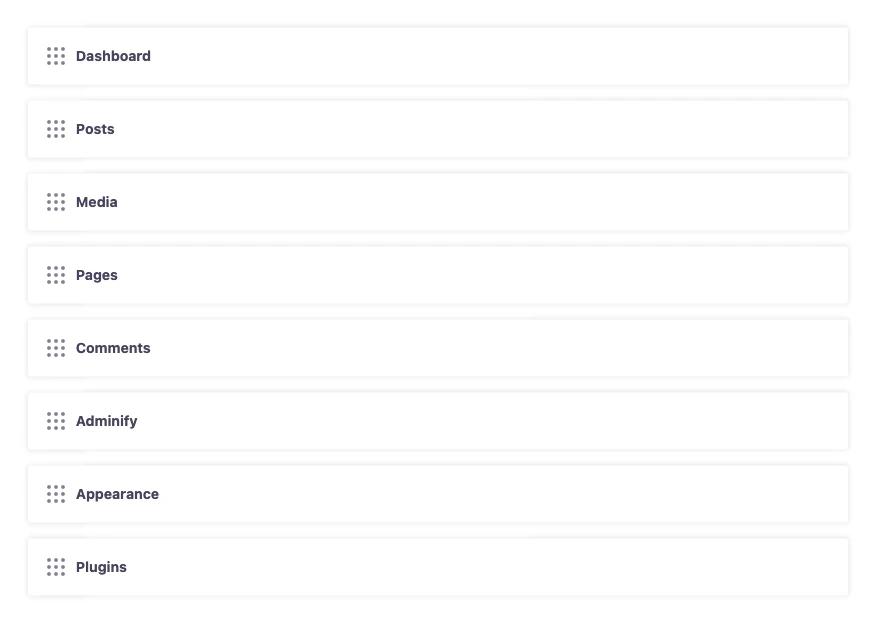
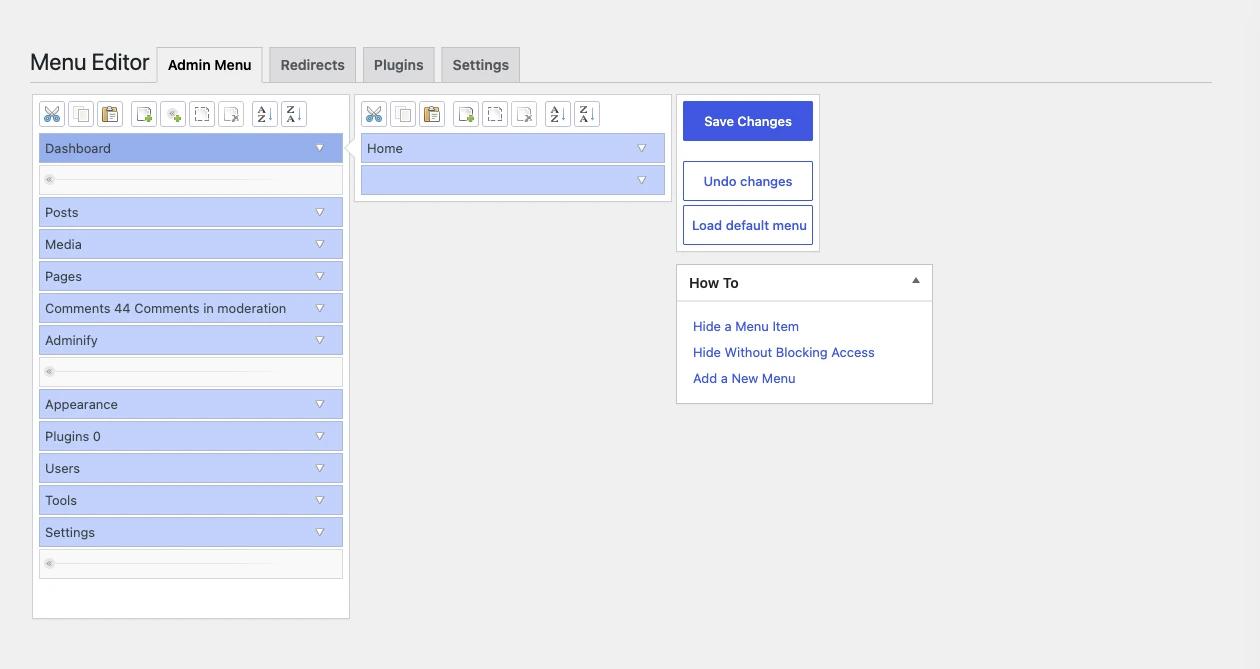
Admin Menu Editor's screen has tabs for Admin Menu, Redirects, Plugins and Settings, plus a "How To" box with short guides. If a menu change locks you out, the plugin documents a reset URL, /wp-admin/?reset_admin_menu=1, for administrators.
WP Adminify's item fields have plain names, so there is less to learn. The Admin Menu tab also holds menu type and mode settings and a WordPress admin menu search box, which helps on sites with long plugin menus. You can read more about the Admin Menu Editor feature on its page.
Role Rules Compared
The free Admin Menu Editor can hide an item from everyone or tie it to a capability or role, but it can only restrict access. It cannot grant access a role does not already have. Per-role permissions and "everyone except one user" rules are Pro. WP Adminify uses one field, Hidden For Roles or Users, to pick the roles or single users who should not see an item.
Admin Menu Editor goes further in one area: its WordPress.org page says it can allow or deny access to specific posts by role. That is a content permission feature, and WP Adminify's Menu Editor does not try to do it. If you use it today, plan for that before you switch.
In both plugins, hiding a menu item does not block the page behind it. A user who knows the URL can still open a page their role has the capability for. To block access, change the role's capabilities with a role editor.
Styling Compared
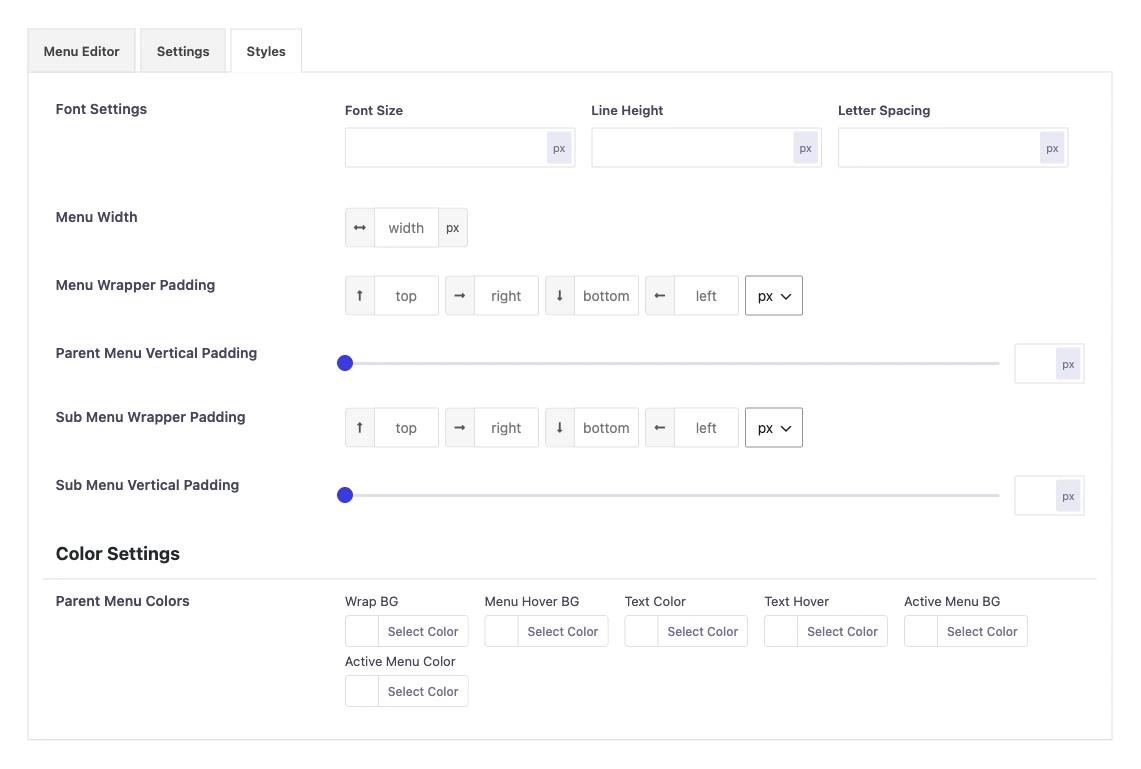
WP Adminify styles the admin menu from its Styles sub-tab: font size, line height, letter spacing, menu width, wrapper and item padding, and colours for parent menus, submenus, notification bubbles and the user info box. Admin Menu Editor lists menu colours as a Pro feature in its Upgrade to Pro box.
Price Compared
On 9 November 2026, adminmenueditor.com listed Admin Menu Editor Pro at $49 for 1 site, $99 for 5 sites and $179 for unlimited sites, each with 1 year of free updates. WP Adminify's list prices on wpadminify.com were $79, $129 and $249 per year, or $159, $329 and $439 for lifetime plans.
| Plan | Admin Menu Editor Pro | WP Adminify |
|---|---|---|
| 1 site | $49 (Personal) | $79/year or $159 lifetime (Personal) |
| 5 sites | $99 (Plus) | $129/year or $329 lifetime (Business) |
| Top plan | $179, unlimited sites, includes the Toolbar Editor and Branding add-ons (Agency) | $249/year or $439 lifetime (Agency) |
Prices change, so check both pricing pages on the day you buy. The adminmenueditor.com home page also said the site was being rebuilt after the incident, so some pages may be missing. If you only want menu features, Admin Menu Editor Pro costs less. WP Adminify's price also covers its other admin tools. In WP Adminify, white label branding needs the Agency plan.
September 2026 Admin Menu Editor Pro Incident: Facts and Cleanup
On 14 September 2026, an attacker got into adminmenueditor.com and published Admin Menu Editor Pro 2.35 as an update with a web shell inside it. Some downloads of 2.36 were also malicious. The vendor says 2.34 should be clean. BleepingComputer reported that the free Admin Menu Editor on WordPress.org does not appear to be affected.
Supply-chain attacks can reach any plugin vendor, ours included. The details below come from the vendor's own notice and one news report.
What the vendor says
The vendor's notice, Security Incident Affecting Customers 2026-09-14, was published on 14 September 2026 and last updated on 31 October 2026. It says:
- If you installed version 2.35, treat the site as compromised.
- Version 2.36 is potentially compromised. Some downloads were malicious, especially those made after 19:00 UTC on 14 September.
- The malicious file,
includes/wp-user-consent.php, installs a web shell, so you should assume the attacker had full control of the site. - Version 2.34 should be clean. Version 2.37 is 2.34 with a new version number. Version 2.37.1 is based on 2.34 and adds optional update verification.
What BleepingComputer reported
BleepingComputer's report by Bill Toulas, published on 15 September 2026, said at least 230 customers installed the malicious update, affecting at least 1,500 sites. It said several hundred more customers downloaded the plugin around that time, and that the free Admin Menu Editor does not appear to be affected. The vendor's notice itself only covers the Pro plugin.
What to do if you ran version 2.35 or 2.36
The vendor's notice lists these steps:
- If you can, restore the site from a backup made before 14 September 2026. The vendor says the other steps may not be enough because the full payload is not yet understood.
- Delete Admin Menu Editor Pro 2.35 and 2.36.
- Delete the
/wp-content/object-cachedirectory. Do not delete a file namedobject-cache.phpunless you know your caching plugin does not need it. - In the database, remove the hidden user whose login starts with
wp_plus hex characters, the options that start withwp_ocacheor_wp_ocache_, the_wp_cconsent_tickcron event, and any must-use plugins namedwp-plus hex characters. - Change every WordPress password, regenerate the keys and salts in
wp-config.php, and rotate database, FTP/SFTP, hosting panel and third-party API credentials. - Run a full malware scan and review files changed since 14 September.
Read the vendor's notice in full before you start, because it is still being updated.
How to Switch From Admin Menu Editor to WP Adminify
To switch, write down your current menu setup, rebuild it in WP Adminify's Menu Editor, test it as each role, then deactivate Admin Menu Editor. WP Adminify's Backup tab imports Adminify settings only, so you rebuild the menu by hand once. If you ran Pro 2.35 or 2.36, clean up first.
- Take screenshots of your Admin Menu Editor screen, including any hidden items, renamed labels, custom icons and redirects.
- Install WP Adminify from WordPress.org and activate it.
- Open Adminify > Admin Menu > Menu Editor. Drag items into your order, then fill in Rename as, Set Custom Icon and Hidden For Roles or Users for each item.
- Rebuild login and logout redirects under Adminify > Security > Redirect URLs > Roles Redirect.
- Log in as a test user for each role and check the menu.
- Deactivate Admin Menu Editor, so two plugins are not changing the same menu, and check the menu once more.
If you manage many sites, set up one site, then export the settings from the Backup tab and import them on the rest.
When to Stay With Admin Menu Editor
Stay with Admin Menu Editor if the menu is all you want to change, if you use its per-post access rules or Plugins tab, or if the $49 single-site price fits better. If you use Pro, move to a clean build (2.37 or 2.37.1, per the vendor) and do the cleanup steps if you ever ran 2.35 or 2.36.
Switching also costs time, because your team already knows the Admin Menu Editor screen. For a wider look at the options, our list of the best WordPress admin menu plugin choices compares more tools side by side.
Frequently Asked Questions
Is the free Admin Menu Editor plugin safe to use?
The September 2026 incident affected Admin Menu Editor Pro, which is sold from adminmenueditor.com. BleepingComputer reported that the free version on WordPress.org does not appear to be affected. The free plugin's last update before our check was version 1.15.2 on 19 August 2026.
Which Admin Menu Editor Pro versions were affected?
The vendor says any site that installed version 2.35 should be treated as compromised, and some downloads of 2.36 were also malicious. Version 2.34 should be clean. Version 2.37 is 2.34 renumbered, and 2.37.1 is based on 2.34 with optional update verification.
Can WP Adminify import my Admin Menu Editor settings?
No. WP Adminify's Backup tab imports WP Adminify settings, not Admin Menu Editor settings. You rebuild the menu once in WP Adminify's Menu Editor. After that, the Backup tab can export the whole Adminify setup and import it on other sites.
Can I use Admin Menu Editor and WP Adminify together?
You can install both, but we do not recommend editing the menu with both at once. Each plugin changes the same admin menu, so the result depends on which one runs last. Use one plugin for menu editing and turn the other feature off or deactivate the plugin.
Final Thoughts
Admin Menu Editor is a focused menu tool with 300,000+ installs and it has features like per-post access that WP Adminify does not try to copy. WP Adminify puts a menu editor with six item fields and a Styles sub-tab inside a wider admin toolkit. If you ran Admin Menu Editor Pro 2.35 or 2.36, follow the vendor's cleanup steps first, whichever plugin you choose next.
For a step-by-step tour of menu editing, read our guide to the WordPress Admin Menu editor. To see what WP Adminify adds on top, visit the menu editor in WP Adminify page.

Your email address will not be published