



Key Takeaways
- Yoast Duplicate Post 4.7 has more than 3 million active installs and a 4.7 out of 5 rating, and it adds Clone, New Draft and Rewrite & Republish links to the WordPress posts list.
- Duplicate Page by mndpsingh287 also has more than 3 million active installs, but on 9 November 2026 wordpress.org listed it as tested only up to WordPress 6.9.11.
- Post Duplicator 3.0.18 can create up to 50 copies of one post at once and can change the post type of the copy, for example from a post to a page.
- The Duplicate Post plugin by Inisev has the most reviews in this group, 1,627 ratings at 4.9 out of 5, and it can bulk delete posts as well as copy them.
- WP Adminify's Post Duplicator lives at Adminify > Productivity > Post Duplicator and adds an "Adminify Clone" link under each post or page title.
Yoast Duplicate Post is the most installed way to clone a post or page in WordPress, with more than 3 million active sites on wordpress.org. Yoast maintains it, it costs nothing, and it is tested with WordPress 7.1.4. People still look for a replacement when they want fewer settings, bulk copies, a different post type for the copy, or one plugin that handles more than cloning.
This post compares six plugins that copy posts and pages: what each one copies, where its button shows up, and its install count and rating from wordpress.org on 9 November 2026. If you only need the manual steps, read our guide on how to duplicate a page in WordPress first. WP Adminify is on the list for people who want cloning inside a wider admin toolkit.
Quick Comparison of Yoast Duplicate Post Alternatives
All six plugins below are free on wordpress.org, and each one clones posts and pages from the posts list. They differ in what they copy, how many copies they make at once, and what else they do. Install counts and ratings come from the wordpress.org plugin API on 9 November 2026, and we tested each plugin on WordPress 7.1.4.
| Plugin | Active installs | Rating | Tested up to | Stand-out feature |
|---|---|---|---|---|
| Yoast Duplicate Post | 3,000,000+ | 4.7 (538 ratings) | 7.1.4 | Rewrite & Republish for live posts |
| Duplicate Page | 3,000,000+ | 4.8 (467 ratings) | 6.9.11 | Choose the status of the copy |
| Duplicate Post (Inisev) | 300,000+ | 4.9 (1,627 ratings) | 7.1.4 | Copy and bulk delete in one plugin |
| Post Duplicator | 200,000+ | 4.8 (80 ratings) | 7.1.4 | Up to 50 copies at once, change post type |
| Duplicate Page and Post | 70,000+ | 4.6 (29 ratings) | 7.1.4 | Prefix or suffix for copied titles |
| WP Adminify (Post Duplicator) | 6,000+ | 4.3 (109 ratings) | 7.1.4 | Cloning as one module of an admin toolkit |
The install count for WP Adminify is for the whole plugin, not only its cloning module. The other five plugins do one job, so their numbers are for cloning alone.
1. Yoast Duplicate Post
Yoast Duplicate Post is where most sites start. It clones any post type and copies items to a new draft. Its Rewrite & Republish option lets you edit a copy of a live post and then merge the changes back into the original. In the settings you choose exactly which parts of a post get copied.
After you activate it, you get several ways to copy a post:
- Clone under the title in Posts or Pages makes a copy and keeps you on the list.
- New Draft makes a copy and opens it in the editor.
- Bulk Actions > Clone copies several posts at once.
- Copy to a new draft sits on the edit screen and in the admin bar.
The settings live at Settings > Duplicate Post and have three tabs: What to copy, Permissions and Display. On our test site, the What to copy tab had Title, Excerpt, Content, Featured Image, Template, Post format and Menu order ticked. Date, Status, Slug, Author, Password, Attachments, Children and Comments were not.
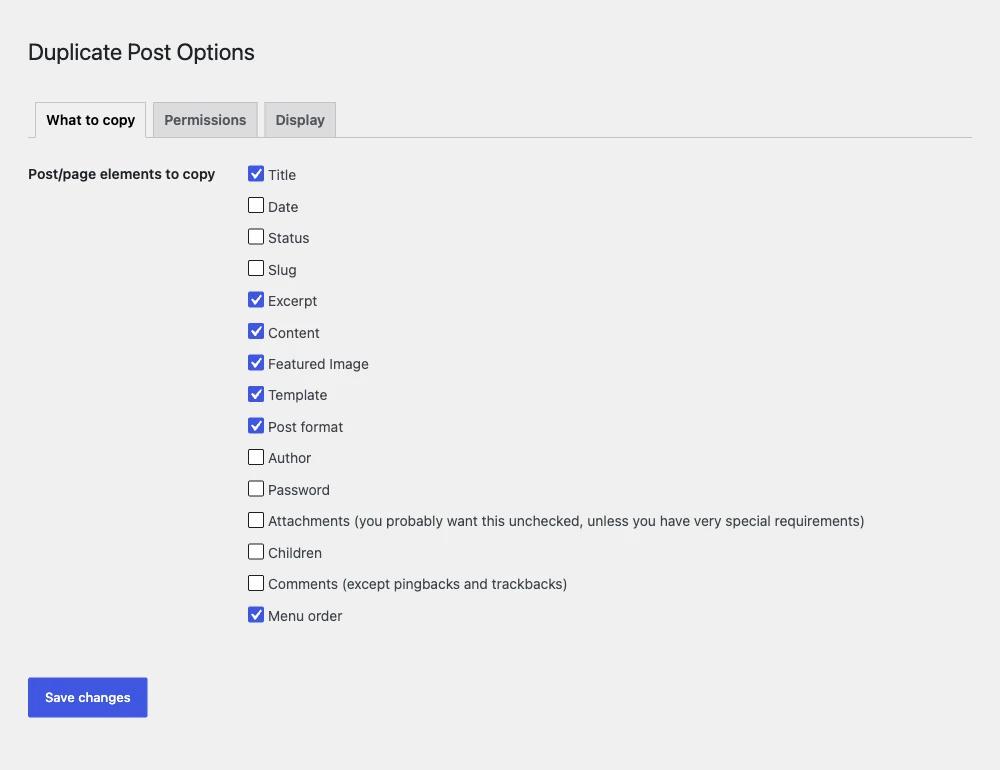
It suits editors who update live posts and want Rewrite & Republish, and teams that need role limits on who can clone. If three tabs of settings feel like too much for a simple copy button, one of the smaller plugins below will suit you better. Plugin page: Yoast Duplicate Post on wordpress.org.
2. Duplicate Page
Duplicate Page by mndpsingh287 is the other plugin with more than 3 million installs. It clones posts, pages and custom post types with one click and saves the copy with the status you pick in its settings: draft, private, public or pending. Pick it if you want a single button and very few options.
The free version has one settings screen under the Settings menu. Role limits, a choice of where the clone link shows, title prefixes and suffixes, and redirect rules are listed as Pro features on its wordpress.org page.
Check its compatibility before you install. On 9 November 2026, wordpress.org listed Duplicate Page 4.5.9 as tested up to WordPress 6.9.11, with the last update in May 2026. It may still work on WordPress 7.x, but test it on a staging site first. Plugin page: Duplicate Page on wordpress.org.
3. Duplicate Post by Inisev
The Duplicate Post plugin by Inisev (slug copy-delete-posts, also called Copy Page) has more than 300,000 installs and the most reviews here, 1,627 at 4.9 out of 5. It copies posts and pages with options for each copy. It can also bulk delete posts and pages, which is handy when you clean up test content.
Hover over its copy button and a tooltip with options appears. One click makes a copy, or you can expand the options and choose which elements go into that one copy. The button appears on the All Posts and All Pages screens, on edit screens, in the admin bar and in the block editor, and you can hide it from any of those places.
It works well if you often copy page builder layouts and want to pick elements per copy. If you prefer a plain text link with no pop-up, the tooltip will get in your way. Plugin page: Duplicate Post by Inisev on wordpress.org.
4. Post Duplicator
Post Duplicator by metaphorcreations is the best fit for bulk work. It copies taxonomies, custom fields, metadata and featured images, and it can make up to 50 copies of a single post at once. Before it creates a copy, you can change its title, slug, status, author, date, parent and post type.
The copy options open in a modal window, so you set them for each copy. The plugin also has role-based permissions and a setting that controls which post types can be copied. Developers use it to build test content fast. Shop owners use it for products that are almost the same. Plugin page: Post Duplicator on wordpress.org.
5. Duplicate Page and Post
Duplicate Page and Post by Arjun Thakur is a small plugin with about 70,000 installs. It clones pages, posts and custom post types, and lets you add text before or after the copied title. You can also choose the status of the copy, set the redirect after copying, and pick whether the copy opens in the Classic or block editor.
It has fewer features than Post Duplicator, but its settings are easy to scan. If you want copies called "Copy of About Us" so nobody confuses them with the original, the title prefix option does that. Plugin page: Duplicate Page and Post on wordpress.org.
6. WP Adminify Post Duplicator
WP Adminify, by Pixar Labs, includes a Post Duplicator module in its Productivity tab. It makes sense if you already use Adminify for the admin menu, dashboard or login page and would like to skip a separate cloning plugin. It has fewer cloning options than Yoast or Post Duplicator, so heavy cloning work is better done elsewhere.
To turn on the duplicate post and page tool:
- Go to Adminify > Productivity.
- Switch on Post Duplicator.
- Under Enable for Post Types, tick Posts, Pages or both.
- Under Enable for Taxonomies, tick any of Categories, Tags, Link Categories and Pattern Categories if you need them.
- Save the settings.

After that, each post or page in the list shows an Adminify Clone link under its title. We tested it next to Yoast Duplicate Post on the same site. The two plugins ran together without trouble, and each row showed both sets of links.
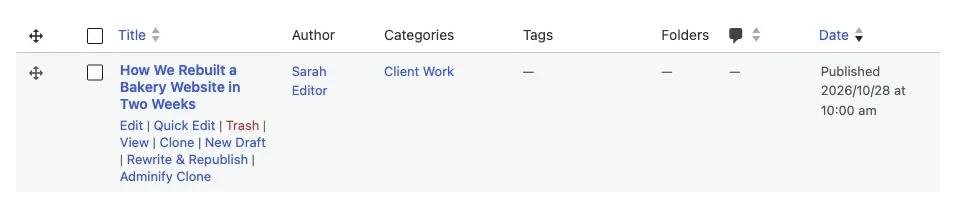
The cloning module is one part of the WP Adminify Productivity tools, which also include folders, admin notice hiding and a menu duplicator. WP Adminify has more than 6,000 active installs and a 4.3 out of 5 rating from 109 reviews.
What to Check Before You Pick a Cloning Plugin
A cloning plugin is only useful if it copies everything your posts contain. Before you choose, check whether custom fields and SEO data come along, whether categories and tags are kept, and what slug and status the copy gets. If you skip these checks, a careless copy can go live as duplicate content.
Custom fields and page builder data
Page builders such as Elementor store layouts in post meta, and plugins like ACF store field values there too. When a plugin skips meta, the clone opens empty or broken. Make one test copy of your most complex page and open it in the editor before you trust any plugin with real work.
Categories, tags and custom taxonomies
A copy without its categories is easy to miss until it shows up in the wrong archive. Post Duplicator says it copies all taxonomies, and Yoast Duplicate Post has a setting for taxonomies you do not want copied. Check that custom taxonomies, such as product categories, are copied as well.
SEO title, meta description and slug
SEO plugins save the SEO title and meta description as post meta too, so a full copy gives you two posts with the same SEO title and description. Change both on the copy before you publish it, and make sure the copy gets its own slug. On our test site, Yoast had Slug unticked, so its copies get a new slug.
Status of the copy
Most plugins save the copy as a draft, which is safe. Duplicate Page and Duplicate Page and Post let you pick another status. Avoid "publish" as the default unless you are sure every copy is ready to go live.
Which One Should You Use?
Pick the plugin that matches the job you do most often. Yoast Duplicate Post is still the best tool for editing live posts safely. Post Duplicator handles bulk copies and post type changes. If you already run WP Adminify, its built-in cloner saves you one plugin.
| If you... | Use |
|---|---|
| Need to edit a published post and republish it without taking it offline | Yoast Duplicate Post |
| Want one button and almost no settings | Duplicate Page (test it on WordPress 7.x first) |
| Copy page builder pages and want to pick elements per copy | Duplicate Post by Inisev |
| Need many copies at once or a different post type for the copy | Post Duplicator |
| Want "Copy of" in front of every copied title | Duplicate Page and Post |
| Already use WP Adminify and want fewer plugins | WP Adminify Post Duplicator |
Frequently Asked Questions
Is Yoast Duplicate Post free?
Yes. Yoast Duplicate Post is free on wordpress.org and has no paid version. It works without Yoast SEO, so you can install it on any site. Version 4.7 is tested with WordPress 7.1.4 and has more than 3 million active installs.
Does Yoast Duplicate Post copy custom fields?
Yoast Duplicate Post copies post meta, which includes most custom fields. You can exclude specific fields by name in its What to copy settings. Always test one copy of a complex page, such as a page builder layout, before you clone your whole site.
Can I use two duplicate post plugins at the same time?
Yes, two cloning plugins can run together. On our WordPress 7.1.4 test site, Yoast Duplicate Post and WP Adminify both added their links to the same row with no errors. Most sites only need one, so keep the one you use and remove the other.
Does duplicating a post hurt SEO?
A draft copy does not affect SEO because it is not public. Problems start only when you publish a copy with the same content, title and meta description as the original. Change the content, SEO title, description and slug before you publish any copy.
What is Rewrite and Republish in Yoast Duplicate Post?
Rewrite and Republish makes a private copy of a live post. You edit the copy while the original stays online. When you republish, the changes are merged into the original post, so the URL stays the same and the copy is removed.
Final Thoughts
Yoast Duplicate Post, with more than 3 million installs and Rewrite & Republish, is still the safe default. Post Duplicator is better for bulk copies and post type changes. Inisev's Duplicate Post has the most reviews, and Duplicate Page needs a staging test on WordPress 7.x before you rely on it. For the manual and plugin methods side by side, see How to Duplicate a Page or Post in WordPress (4 Ways).
If you want cloning in the same plugin that runs your admin menu and dashboard, try the duplicate post plugin built into WP Adminify and see if its Adminify Clone link covers what you need.

Your email address will not be published