
WordPress Redirect URL
Increase branding and security by customizing link redirection
Features like WordPress default login and register URL customization are available in the WP Adminify plugin. Having a personalized login page with a unique URL seems necessary for better exposure. Not only this, but we also offer you control over where you'd like to redirect users on login and logout based on their behavior.

How does our URL Redirection feature help you?
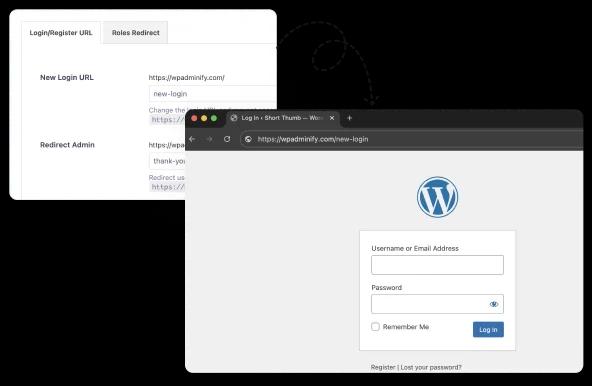
Ever wondered how to change the default WordPress login page URL to something unique that reflects your brand identity? We have made a solution for this that helps you get rid of the default /wp-admin login URL.
Change WordPress login page URL
The default login URL is well-known to hackers. Get rid of a bot or malicious attack on wp-login.php or the wp-admin page when attackers launch a brute force attack. Not only does it improve security, but it also increases your brand identity. While changing the login page URL, you can customize the login page with our Loginfy addon too.
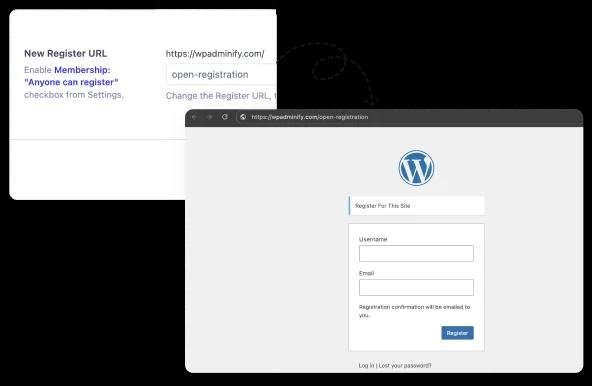
Change WordPress Register Page URL
If you are running a membership, e-commerce, LMS, or content submission platform, then you know the necessity of a proper registration page. Whoever visits your registration page can be a perfect lead for your business. A personalized registration page can increase the chances of getting more registered users.
Redirect User after login
Redirecting the user to a specific page after login can enhance the user experience and increase brand reinforcement. Create a custom admin page with WP Adminify and redirect different types of users to different admin pages when they log in successfully. This is the best personalization opportunity that you can provide to your users.
Redirect User after logout
Logout doesn’t mean that it’s the end of the interaction. Redirecting users to a custom landing page can serve a second chance for re-engagement and conversion. If you don’t think about conversion, still, redirection to a specific page enhances user experience.
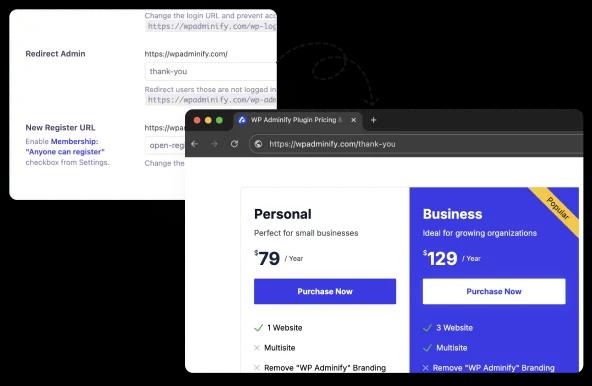
Redirect users from /wp-admin
Decide where you want to redirect users who tried to log in your WordPress dashboard via /wp-admin or /wp-login.php. For example, if you want to redirect all users to your homepage, then input the homepage URL. Instead of showing a 404 page, just redirect them to a specific page and increase your page views.

“The plugin is stable and does not affect performance, which is a significant advantage. ”

@gdimitrov
WordPress.org
"This plugin is very great: works fine, gives a very nice look to the WordPress Dashboard”

@peopleinside
WordPress.org
"This plugin lets me transform the UI, user-friendly, and fast, essential for a modern website backend."

Sascha Donelasci
Web Design Agency
“Support has been responsive and helpful, truly putting the customer first” , a rare quality these days.

Louis J Gleason
Developer & Creator
“I am totally blown away with all that WPAdminify can do! ALREADY WAY BEYOND EXPECTATIONS!!"

@shezoom
Startup
“Lot of functionalities and ability to, customize admin & login on WordPress, active support & updates.”

@Myllio
WordPress.org
Personal
47.40
/ Year- 1 Website
- Multisite Support
- "WP Adminify" Branding Removal
- Replace 50+ Plugins
- Client-Ready Dashboard
- 1 Year Support and Updates
- Custom Dashboard Widget
- Easy Menu Search
- Admin Menu Editor
Business
77.40
/ Year- 5 Websites
- Multisite Support
- "WP Adminify" Branding Removal
- Replace 50+ Plugins
- Client-Ready Dashboard
- 1 Year Support and Updates
- Custom Dashboard Widget
- Easy Menu Search
- Admin Menu Editor
Agency
- Multisite Support
- "WP Adminify" Branding Removal
- Replace 50+ Plugins
- Client-Ready Dashboard
- 1 Year Support and Updates
- Custom Dashboard Widget
- Easy Menu Search
- Admin Menu Editor
Lifetime Bundle
799.00
/ Lifetime- Use on up to Unlimited Websites
- Lifetime Updates and Support
 WP Adminify
 Loginfy
 WP Spotlight
 Header and Footer Scripts
 Quick Menu
 Admin Bar Editor
 Admin Columns Editor
Get Started with WP Adminify Today
We offer the best WordPress Dashboard Customization and maintenance feature to our users.
Rebrand the admin panel of personal or clients Dashboard within minutes.
Total Downloads
Active Installations
Five Star Ratings
Customer Satisfaction
Frequently Asked Question (FAQ)
How is the redirect rule matching engine optimized for speed, and does it impact site performance by frequently querying the database?
WP Adminify is designed to minimize database impact by efficiently executing redirect rules. Instead of querying the database for every single page load, the plugin caches the redirect rules internally. This ensures the look-up for a matching URL is executed very quickly, typically at a low-level WordPress hook. Even for sites with a high volume of active rules, the execution speed remains highly optimized, leading to negligible performance overhead.
Does the system include any safeguards to detect and prevent infinite redirect chains or loops that could crash a user’s browser?
Yes, preventing redirect loops is a priority for a reliable redirection tool. If the loop you are chasing is on the login screen rather than a rule you created, that is a different fault with its own fixes: see wp-admin redirecting to the homepage. WP Adminify incorporates an active loop detection algorithm. If you accidentally create two conflicting rules that redirect users back and forth (an infinite loop), the plugin will recognize the circular redirection after a specific number of steps. It will then immediately halt the process and alert the administrator, preventing browser crashes and ensuring a better user experience.
Does WP Adminify support Regular Expressions (Regex) or wildcard characters for creating complex, pattern-based redirects?
Absolutely. For advanced site migrations or managing URLs with dynamic parameters, WP Adminify supports Regular Expressions. This powerful feature allows you to define flexible rules that match dynamic URL patterns, instead of relying on one-to-one URL matching. Additionally, it supports standard wildcard characters, enabling you to redirect an entire folder or directory structure to a new location with a single, efficient rule.
How does the plugin handle and pass through query string parameters (like UTM codes or tracking IDs) in the redirect process?
WP Adminify provides granular control over query string handling. You can choose one of three options: ignore the query string completely when matching the source URL; match the query string exactly for a precise rule; or, most practically, pass the existing query string parameters from the original URL through to the new target URL. This ensures crucial tracking and user session data is preserved after the redirection occurs.
Does the redirection feature include any logging or monitoring tool to track 404 errors so administrators can easily create fixes?
Yes, a robust 404 monitoring feature is included. The plugin automatically logs all instances where users or bots encounter a 404 "Page Not Found" error on your site. This log provides the exact source URL and the hit count, allowing the administrator to quickly review broken links and generate a specific 301 redirect rule directly from the log entry, transforming lost traffic into successful page views.
Can administrators bulk import or export a large list of redirect rules, especially when performing a major site or domain migration?
Yes, the bulk management functionality is supported and is crucial for professional site management. WP Adminify allows you to easily export your current set of redirect rules, usually in a standardized CSV file format, for backup or review. Conversely, you can prepare a large list of new redirect rules offline using a spreadsheet and then bulk import them, significantly accelerating the process of setting up redirects during a migration.
Does the redirection module work correctly with e-commerce systems, such as handling redirects for sensitive WooCommerce checkout or cart endpoints?
Yes, WP Adminify maintains high compatibility standards, including with major e-commerce platforms like WooCommerce. The redirection engine is carefully designed to avoid conflicting with critical e-commerce endpoints such as the Cart, Checkout, or My Account pages. This ensures that custom login/logout redirects or general 301 rules do not inadvertently break the secure, functional flow of the shopping and payment processes.
Can the system be used to redirect a WordPress URL to an external, non-WordPress URL, such as a SaaS application or a different domain?
Absolutely. WP Adminify is not limited to internal WordPress URLs. You can set up redirect rules that point to any valid destination URL, whether it's another page on your domain, a subdomain, or a completely external website (like a social media profile, a partner site, or a specialized SaaS tool). This flexibility is vital for directing users seamlessly to all your branded online properties.
When multiple redirection rules could potentially apply to a single user (e.g., a username rule and a role rule), how is the conflict resolved?
WP Adminify follows a clear rule of precedence to resolve conflicts. The most specific rule always takes priority over a general one. For login/logout, a username-based redirect is typically prioritized highest, followed by user capability-based redirects, and then finally by the broader user role-based redirects. This ensures that the most precisely defined, customized rule for an individual user is the one that gets executed.