


Most WordPress plugins follow the same playbook: give you just enough in the free version to get hooked, then lock everything useful behind a paywall.
WP Adminify splits its features differently, which is what makes this comparison worth writing. "Should I upgrade to Pro?" is the question we hear most from the WP Adminify community, and the honest answer depends on who you are and what you need.
So instead of guessing, we opened the actual WP Adminify settings panel and went through every tab, noting which features are free, which require Pro, and which sit in the Agency plan. This is what's actually behind each toggle, so you can settle the WP Adminify free vs Pro question for your own situation in one read.
WP Adminify Free vs Pro: The Short Answer
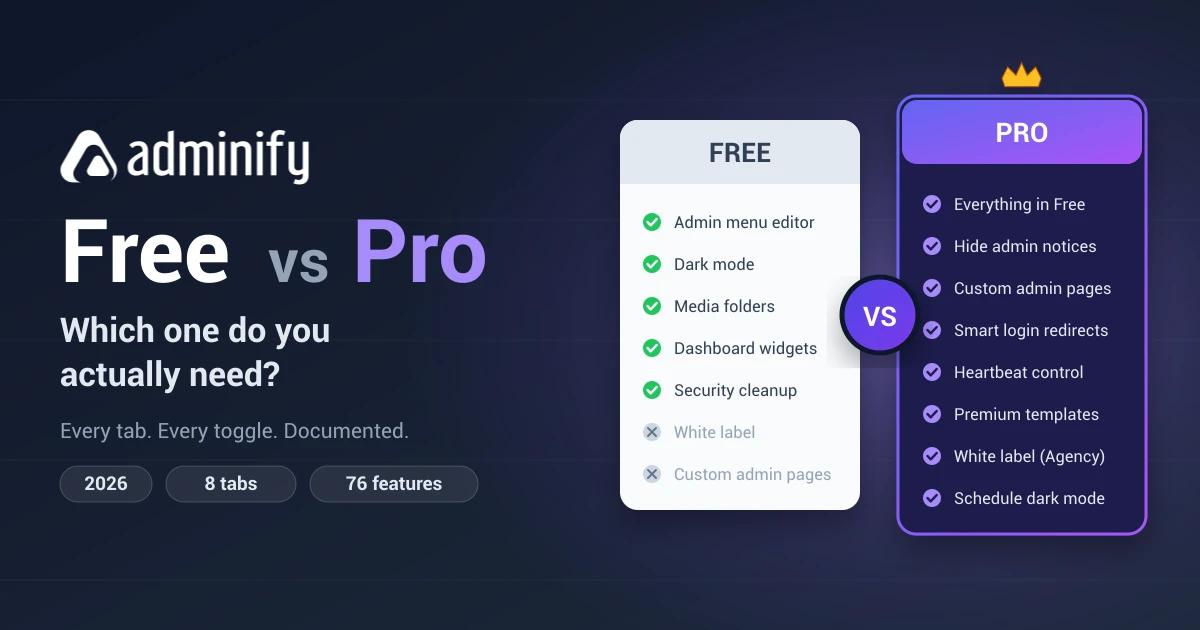
The free version of WP Adminify is enough if you want to customize the WordPress dashboard for yourself. You get the admin menu editor, dark mode, media folders, custom dashboard widgets, and admin columns without paying. You upgrade to Pro when you need the client facing layer: white label branding, custom admin pages, role-based redirects, and hiding admin notices.
| Feature | Free | Pro |
|---|---|---|
| Dashboard UI templates | 2 built-in | 10 (8 premium templates) |
| Light / dark mode + custom logo | ✅ | ✅ |
| Custom background, body font, admin favicon | - | ✅ |
| Admin menu editor: 6 menu styles, full color control | ✅ | ✅ |
| User info block, custom separators, custom menu items | - | ✅ |
| Media folders + post & page folders | ✅ | ✅ |
| Dashboard widget builder & custom dashboard widgets | ✅ | ✅ |
| Custom admin columns | ✅ | ✅ |
| Hide admin notices, screen options & help tab | - | ✅ |
| Custom admin pages (Gutenberg, Elementor, Bricks, Oxygen, Divi) | - | ✅ |
| Infinite scroll for the media library | - | ✅ |
| Control Heartbeat API | - | ✅ |
| Disable embeds | - | ✅ |
| Post status background colors | - | ✅ |
| Smart login redirects (role-based) | - | ✅ |
| Change WordPress login URL | - | ✅ |
| Schedule dark mode | - | ✅ |
| Admin menu search | - | ✅ |
| Security cleanup (REST API, feeds, comments, headers) | ✅ | ✅ |
| Full white label / client rebrand | - | Agency plan |
Everything below is the long answer: a tab-by-tab walkthrough of the entire settings panel, documented in July 2026 against WP Adminify version 4.2.
What Is WP Adminify?
WP Adminify is a WordPress admin dashboard customization plugin built by the team at Jewel Theme. It changes the look, feel, and functionality of your WordPress backend (the dashboard skin, the admin menu, the media library, security hardening, performance cleanup) without you writing a line of code.
The numbers back it up: 324,000+ total downloads and 81 five-star ratings on WordPress.org, with updates still shipping monthly as of July 2026.
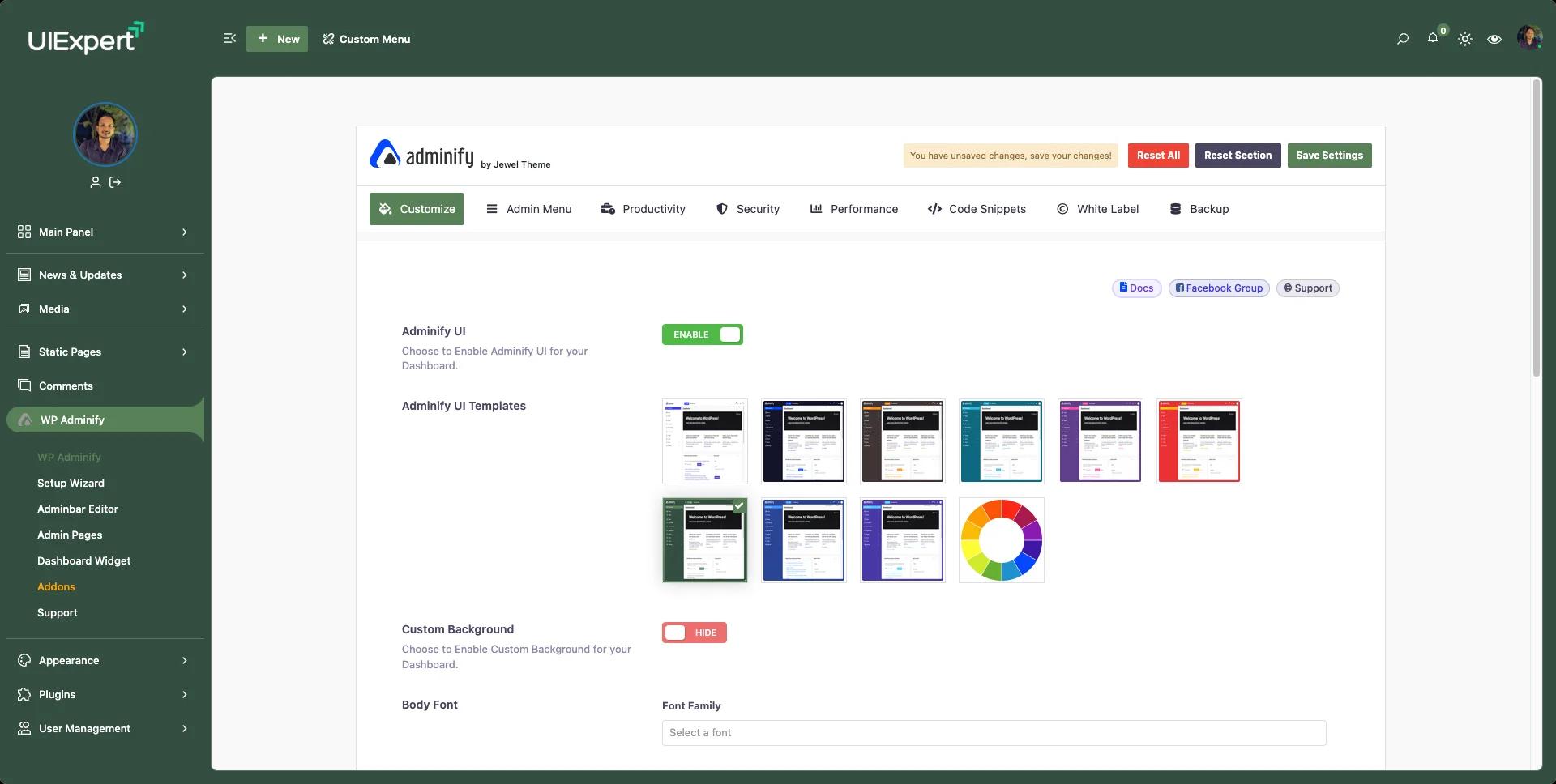
Whether you're a solo blogger who wants a cleaner dashboard, a freelancer handing polished sites to clients, or an agency building white-labeled WordPress sites at scale, the plugin is organized into 8 main settings tabs:
- Customize - dashboard look and feel
- Admin Menu - full menu control
- Productivity - tools that speed up your workflow
- Security - lockdown and cleanup
- Performance - optimize resource usage
- Code Snippets - CSS/JS injection
- White Label - branding and identity
- Backup - import/export settings
Below, each tab gets the same treatment: what's free, what needs Pro, and what's Agency-only.
Plans Overview
Before we get into the tabs, here's how WP Adminify's plans are structured:
| Plan | Best For |
|---|---|
| Free | Individual users, bloggers, developers |
| Pro | Freelancers, site owners, power users |
| Agency | Agencies, white-label client work |
You can install the free version directly from WordPress.org. Pro and Agency plans are on the pricing page.
Pro tip: Start with the free version. It covers more than you'd expect, and depending on your use case you may never need to upgrade. The sections below will help you figure that out.
Customize - Dashboard Look & Feel
This is the first thing you see when you open WP Adminify settings, and it's where the dashboard makeover starts.
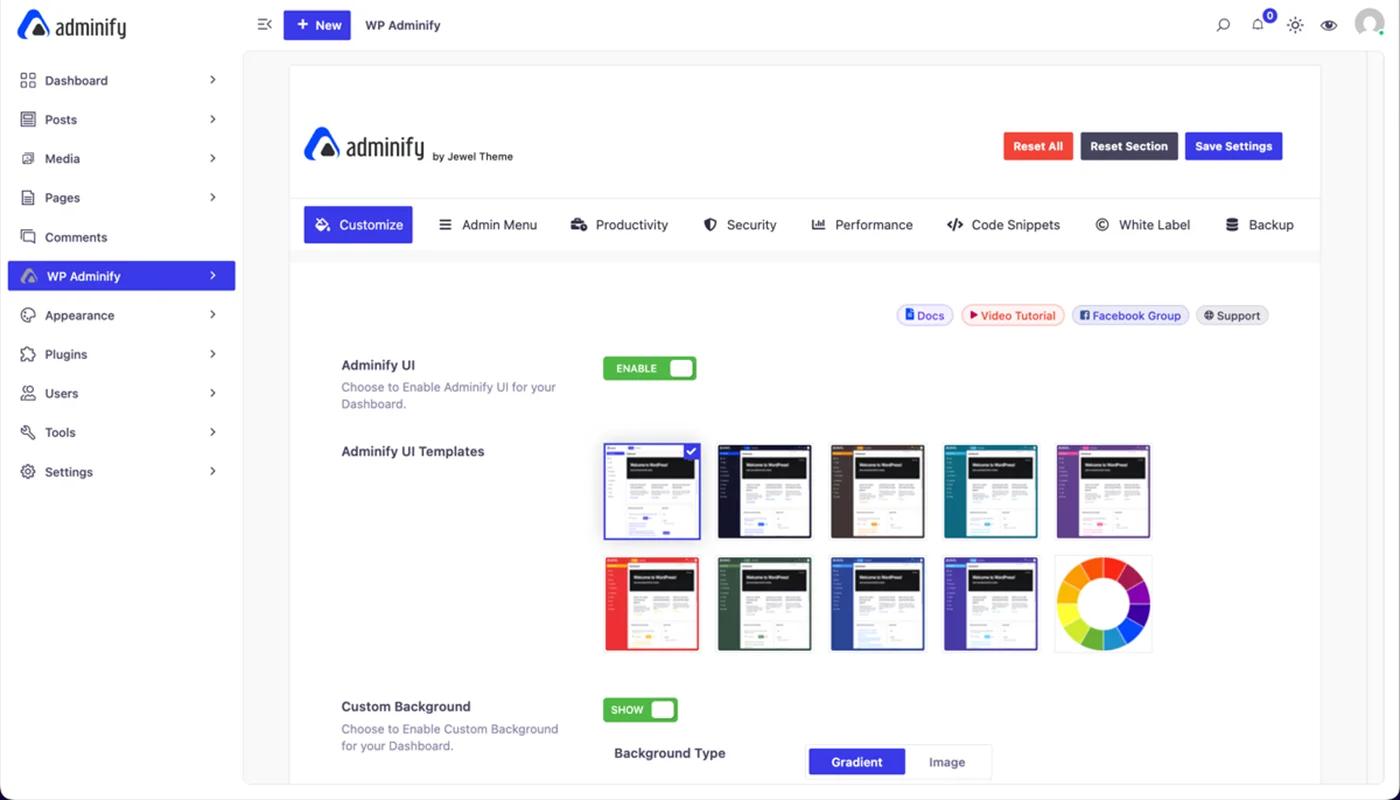
Free Features in the Customize Tab
Adminify UI Toggle
This single toggle is the most useful free option in the plugin. Flip it on and your whole WordPress admin switches from the default look to a clean, modern interface. No configuration needed.
2 Built-in UI Templates
Free users get two dashboard templates: a clean light layout and a dark-themed version. Both look far better than the default WordPress admin and work instantly.
Light/Dark Mode
Enable Light Mode, Dark Mode, or follow the user's OS setting. The Layout Mode toggle, the logo upload fields, and the mini logo for the collapsed sidebar are all free.
Custom Logo
Upload your own logo for the admin dashboard, as an image or text, with full size control (width, height, px/%/em units). You can also set a mini logo that appears when the sidebar is collapsed.
Header Elements
Show or hide the Search Form, Notifications icon, and the light/dark mode switcher in the admin header bar.
Pro Features in the Customize Tab
8 Additional Premium UI Templates
Pro unlocks 8 more dashboard templates: bold accent colors, dark sidebars, and a color wheel picker for building an entirely custom palette.
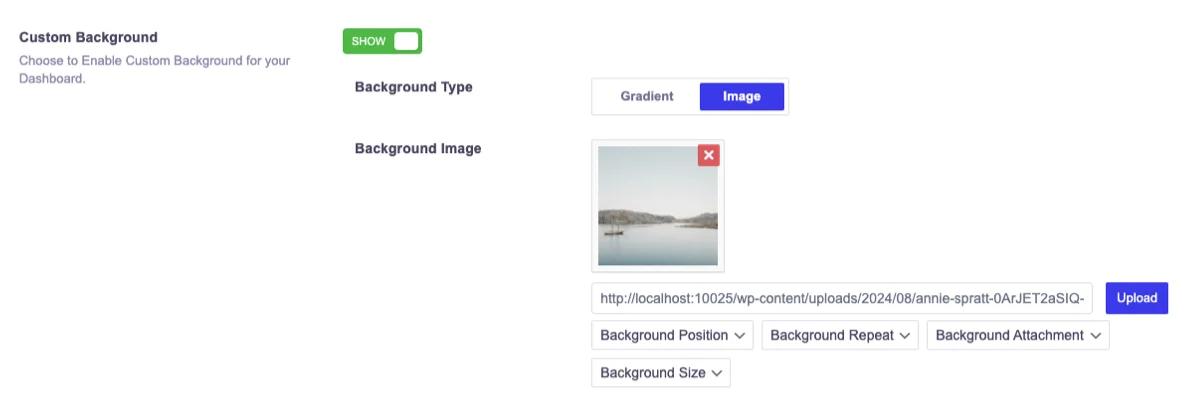
Custom Background
Set a fully custom background for the admin area: solid color, gradient, or image.
Body Font
Change the global font family used across the entire admin dashboard to match your brand or your client's style guide. A small detail that matters a lot in branded setups.
Admin Favicon
Upload a custom favicon for the admin area. When your client opens /wp-admin/, they see your branded favicon in the browser tab, not the WordPress logo.
Gutenberg Editor Logo
Replace the block editor logo with your own, so clients see your agency's mark instead of the WordPress "W" every time they edit a page.
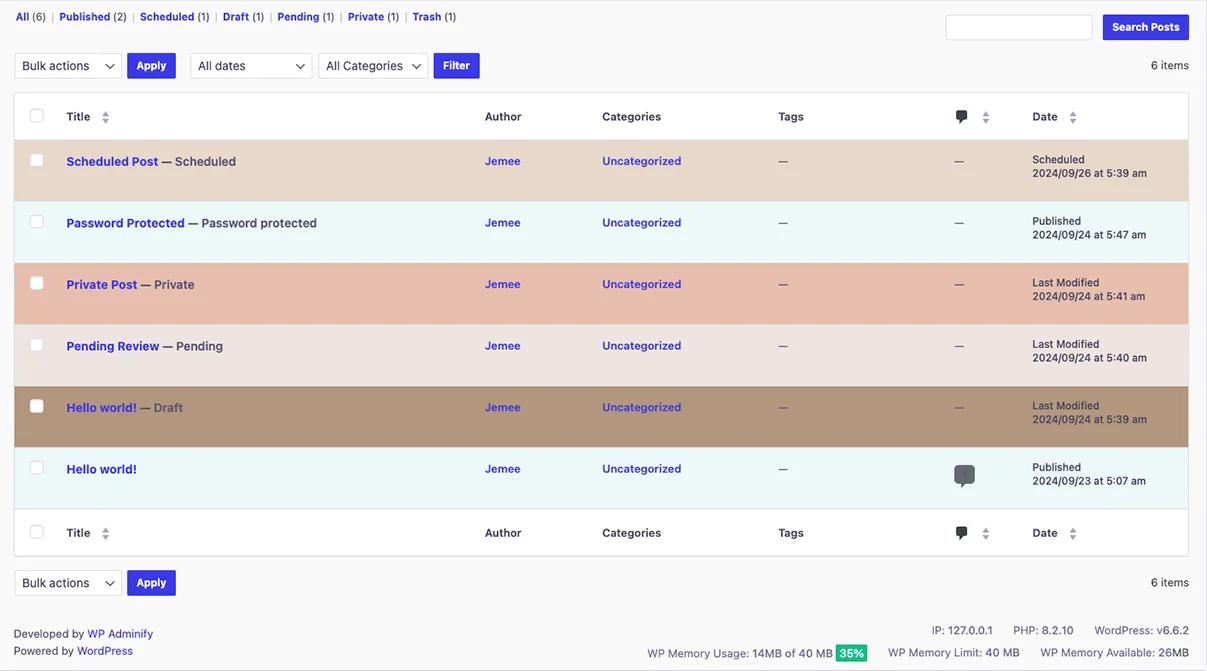
Post Status Background Colors
Color-code post rows by publication status: Published (green), Pending (yellow), Draft (grey), Future (blue), Private (purple), Trash (red). A real workflow improvement on content-heavy sites.
Customize Tab Verdict
Admin Menu - Total Menu Control
The Admin Menu tab is where WP Adminify separates itself from the competition, and what's remarkable is how much of it is completely free, including features other plugins charge for. If you want the deep dive, the admin menu editor feature page covers every option.
Free Features in the Admin Menu Tab
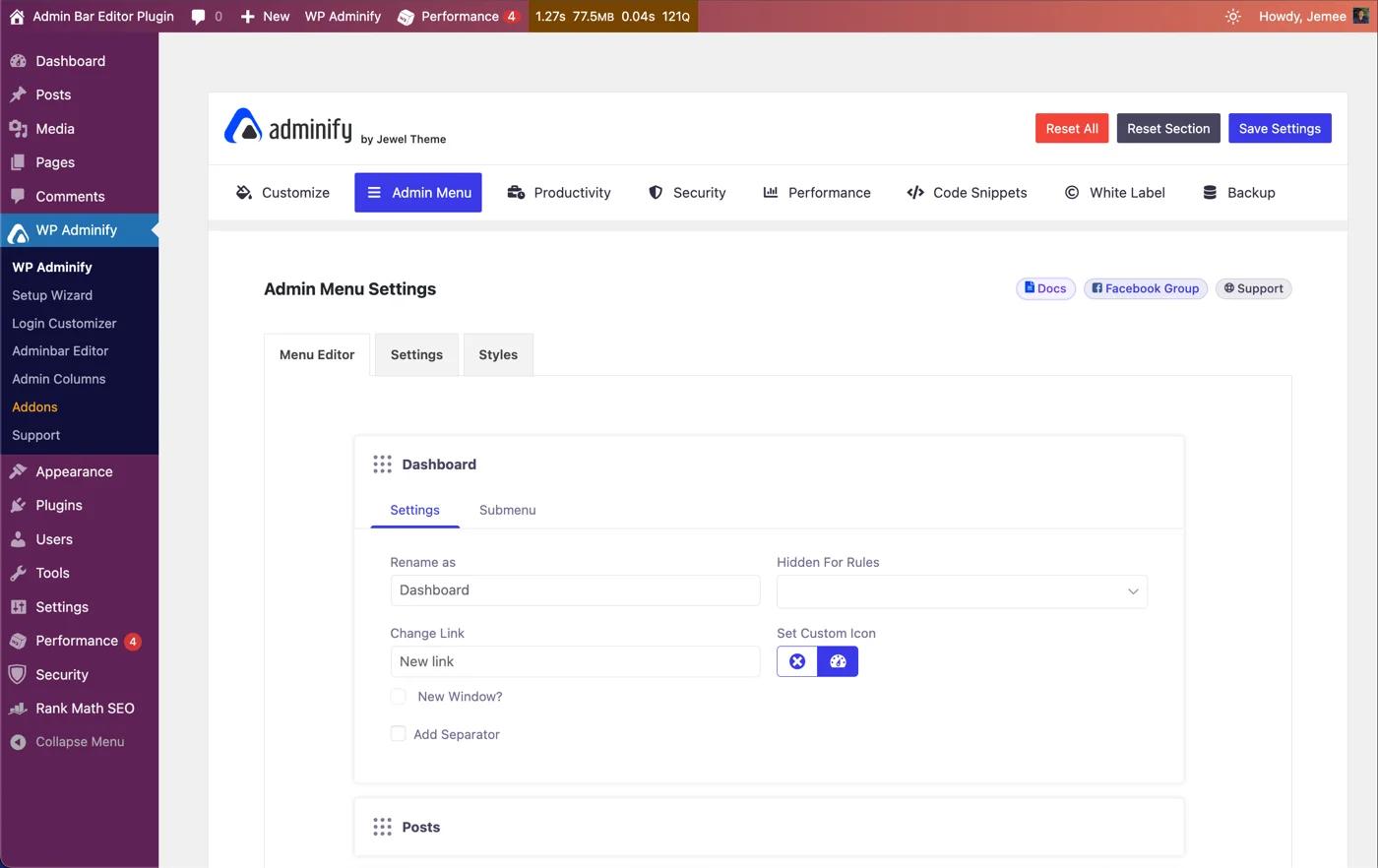
Full Drag-and-Drop Menu Editor
Reorder any admin menu item by dragging it. Rename items, change icons, hide items from specific user roles, all without code. This one feature replaces dedicated admin menu editor plugins entirely.
Menu Type: Vertical or Horizontal
Switch between the classic vertical sidebar and a horizontal navigation bar across the top of the admin area. The horizontal menu gives the dashboard an app-like feel and shows up often in agency client handoffs.
Menu Mode
Three display modes:
- Default - the standard expanded sidebar
- Folded - collapsed to icons-only by default
- Rounded - card-style menu items with a softer aesthetic
Sub Menu Style
Control exactly how submenus behave:
- Two Step - WordPress default behaviour
- Accordion - smooth open/close animation
- Toggle - instant show/hide
Full Typography Controls
Set font size, line height, and letter spacing for all admin menu items. Free.
Menu Width & Padding Controls
Adjust sidebar width, wrapper padding, parent item vertical padding, submenu wrapper padding, and submenu item padding. Granular layout control at no cost.
Full Color Customization
Unusual for a free feature. You get total color control over:
- Parent menu: background, hover background, text, text hover, active background, active text
- Submenu: the same six color states
- Notification badge: background and text color
Pro Features in the Admin Menu Tab
User Info with Avatar
Display the logged-in user's avatar and display name on the admin sidebar. It adds a personalized, polished touch to client dashboards.
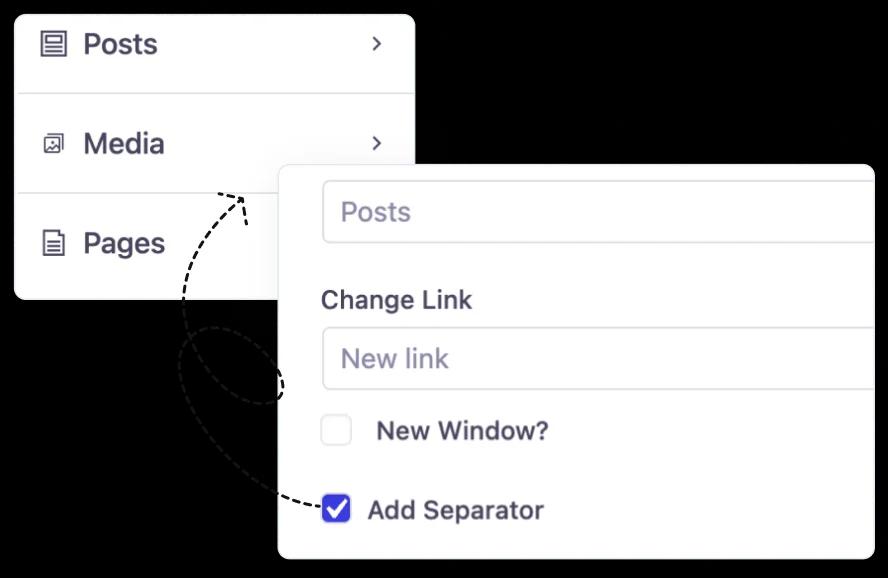
Custom Separators
Add your own separators to replace the default WordPress admin menu dividers and group related menu items visually.
Custom Menu Items
Create your own main menu and submenu items, not just rearrange the existing ones. Point them at any URL or admin page.
Admin Menu Tab Verdict
Ready to try it? Download WP Adminify Free →
Productivity - Work Smarter, Not Harder
The Productivity tab is the most feature-dense tab in the plugin. WP Adminify replaces several separate plugins here with one unified toolset, and the majority of it is free.
Free Features in the Productivity Tab
Media Folders
Organize the media library into folders and subfolders directly from the Media Library screen. Create folders, drag files in, and find assets in seconds instead of scrolling through hundreds of unorganized files. Works with all media file types, and replaces premium media folder plugins.
Post & Page Folders
The same folder system for your Posts and Pages list views. Useful for editorial teams or anyone managing a large content library.
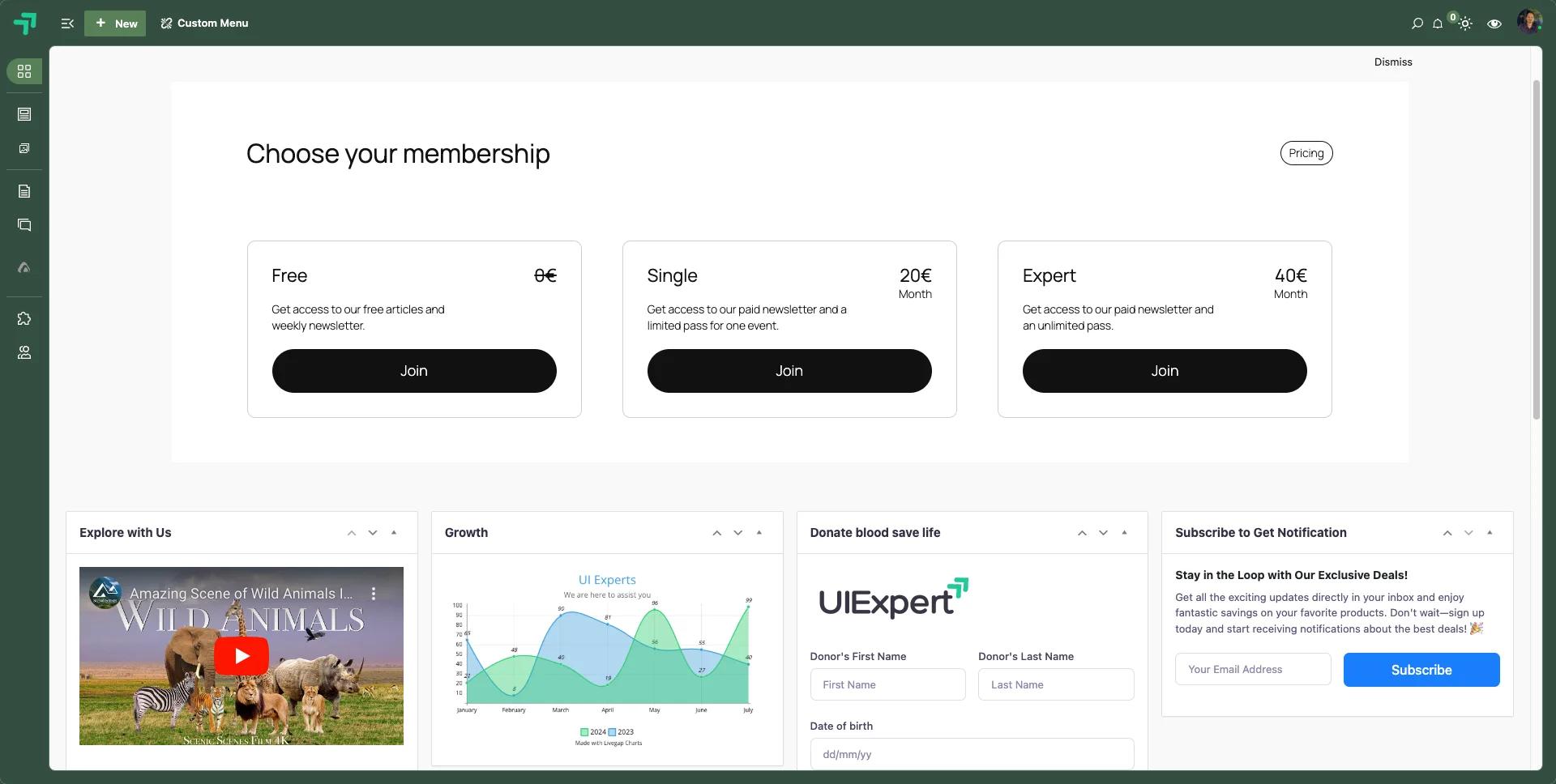
Dashboard & Welcome Widget Builder
Build custom dashboard widgets with a rich text editor. Add welcome messages, embed YouTube videos, display RSS feeds, insert shortcodes, or write onboarding instructions for clients. All free.
Post Types Order
Reorder any post type with drag-and-drop: posts, pages, WooCommerce products, or any registered custom post type.
Menu Duplicator
Duplicate any WordPress navigation menu in one click. Handy when building similar menus for staging and production.
Post Duplicator
Clone posts, pages, and custom post types, including WooCommerce products, in a single click. Compatible with Gutenberg, Elementor, Divi, Bricks, and other major page builders. Draft, published, and pending posts can all be duplicated.
Custom Admin Columns
Add custom columns to any post type list screen to surface extra data (custom field values, ACF fields, metadata) right in the post list.
Media Settings, RSS Thumbnails, Widget Removal, Classic Widgets
Smaller but useful toggles: attachment page control, featured images in RSS feeds, removing unwanted default dashboard and sidebar widgets, and switching the Widgets screen back to the classic interface instead of the block editor.
Pro Features in the Productivity Tab
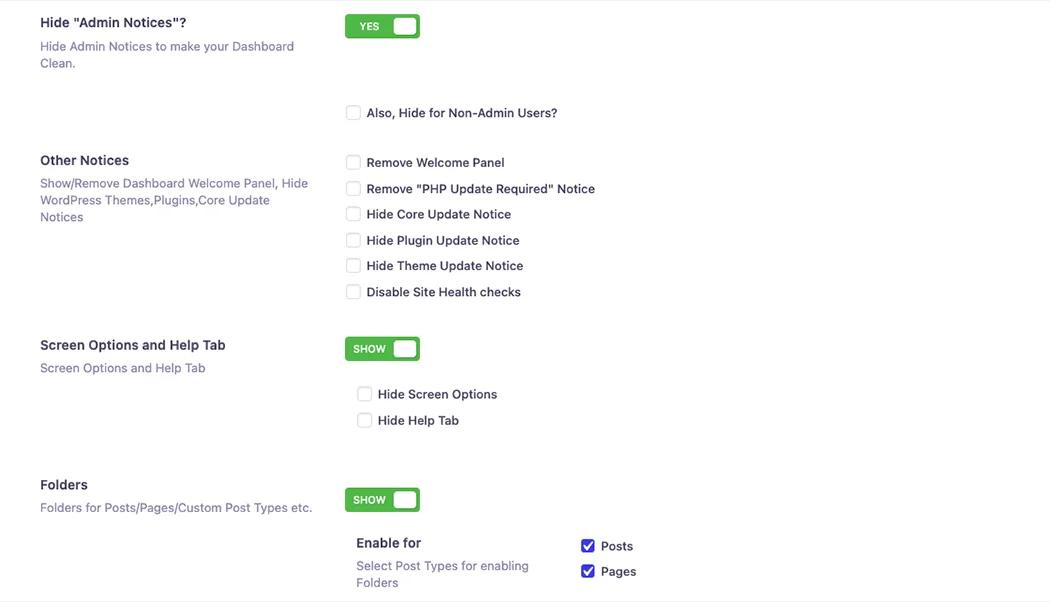
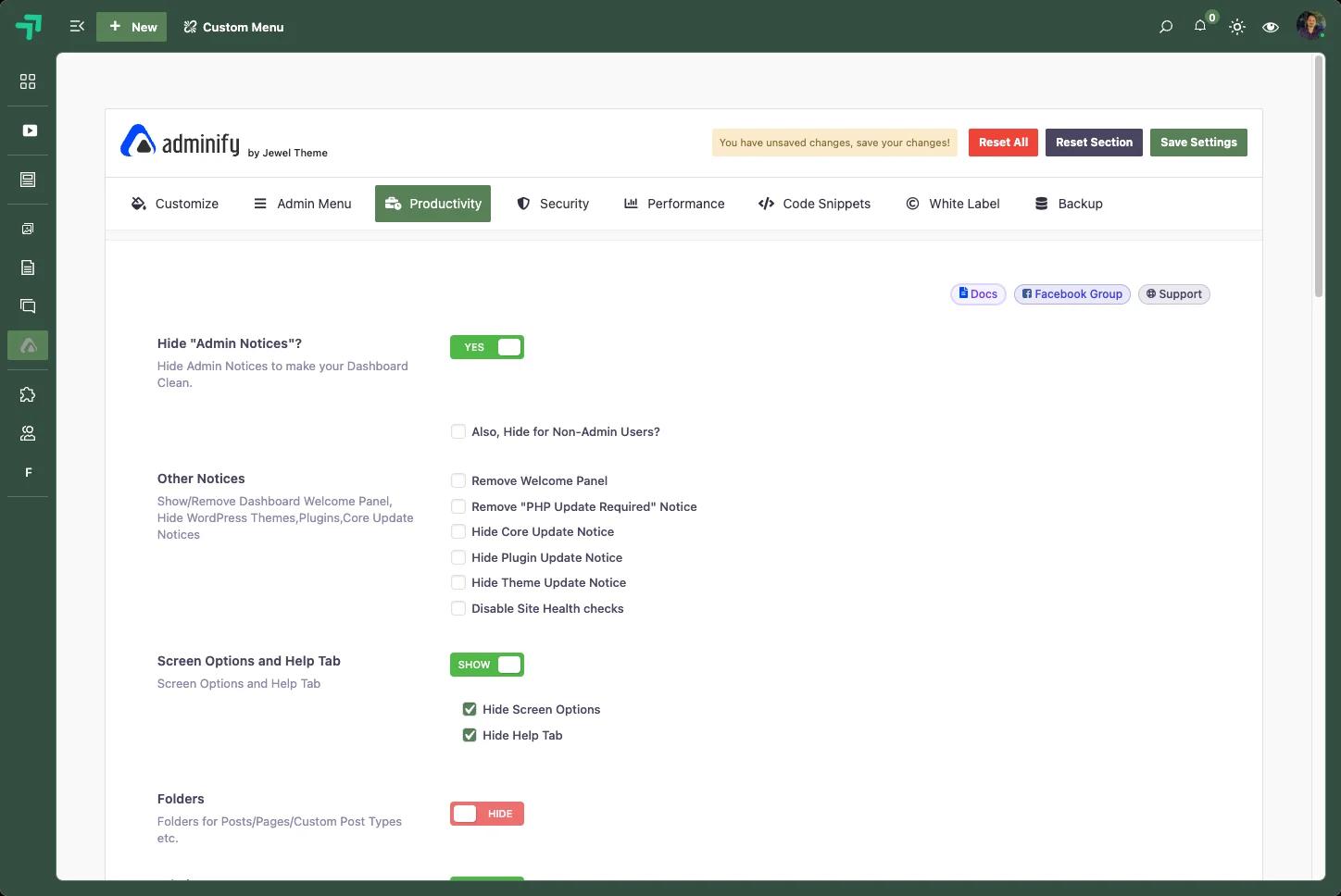
Hide Admin Notices
The Pro feature people mention most. WordPress plugins love to shout at you: update notices, review requests, promotional banners, license reminders. One toggle silences all of it and gives you a clean, distraction-free dashboard.
If you manage sites for clients, this one isn't optional. No client should log in and see a wall of plugin alerts.
Hide Screen Options & Help Tab
Remove the "Screen Options" dropdown and "Help" tab from the top of admin screens. These controls confuse clients and clutter the UI; Pro hides them globally.
Admin Pages (Custom Admin Pages)
Create fully custom admin pages and place them anywhere in the admin menu as top-level or submenu items. Pages support all major page builders: Gutenberg, Elementor, Bricks, Oxygen, and Divi.
Use cases: client onboarding pages, branded help documentation, internal resource libraries, custom tool pages. Things that would otherwise need custom plugin development. See the custom admin page feature for examples.
Action Workflows for Folders
Extend the folder system with automated action workflows for advanced content organization.
Infinite Scroll for Media Library
Re-enable infinite scrolling in the media library grid view. Much smoother than paginating through large collections.
Productivity Tab Verdict
Security - Protect and Clean Up Your Site
Free Features in the Security Tab
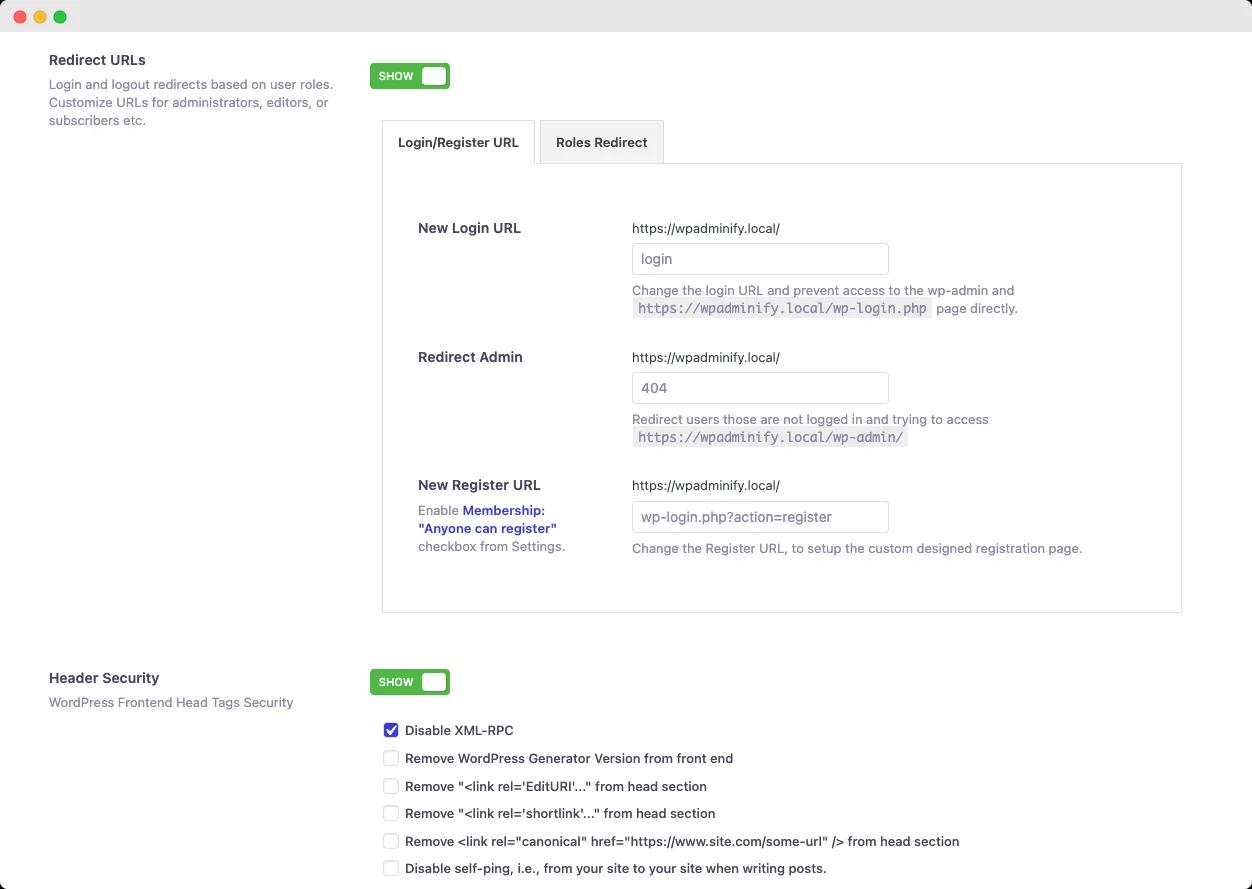
Header Security
Remove WordPress-generated traces from your site's <head>: the generator meta tag, Windows Live Writer manifest, RSD link, and other tags that advertise your site runs WordPress. Hiding these reduces the surface area for bots that target WordPress-specific vulnerabilities.
Disable Feed Links (RSS / Atom / RDF)
One toggle disables all feeds (post, category, tag, comment, author, and search feeds) and redirects the feed URLs so they don't 404. Useful when you don't need RSS, since unused feeds expose your content structure to scrapers.
REST API Restriction
Disable REST API access for logged-out users and remove REST API URL traces from the head tag, HTTP headers, and the RSD endpoint. One of the most important WordPress hardening steps you can take, and it's free here.
Disable Comments
Turn off comments globally or per post type. Existing comments are hidden on the frontend and the Comments menu disappears from the sidebar. Fully replaces the standalone "Disable Comments" plugin.
Post & Archives Redirect
Redirect unused archive pages (date and author archives) to your homepage, so thin, low-value pages stop getting crawled. A minor SEO win included free.
Custom Gravatar Images
Upload your own default avatar for the comments system instead of the mystery-man silhouette. Selected via Settings → Discussion.
Pro Feature in the Security Tab
Redirect URLs (Role-Based Login/Logout Redirects)
After login or logout, WordPress sends everyone to the same place. With Pro, you set custom redirect URLs per user role: administrators to the full dashboard, editors to the post list, subscribers to their profile, clients to your custom onboarding page.
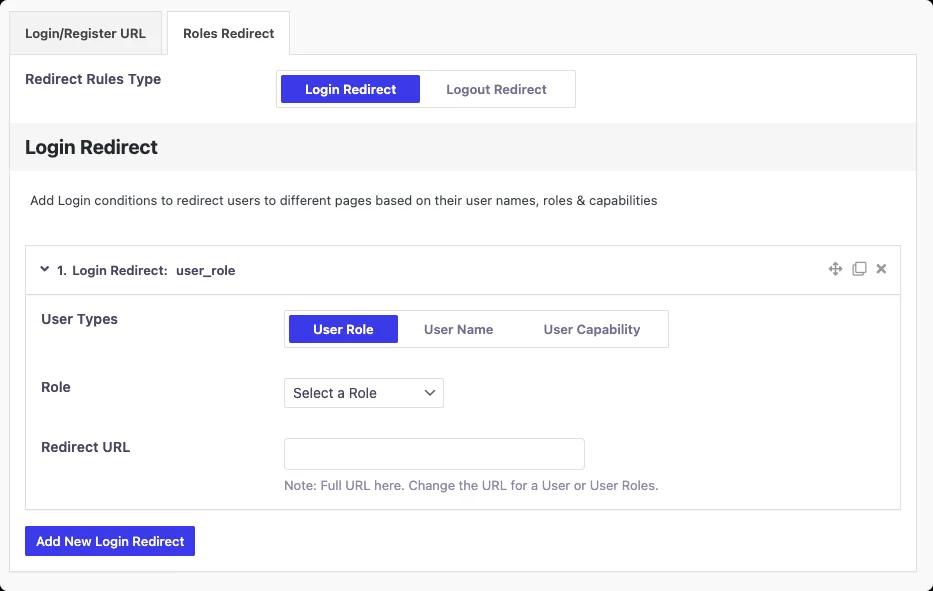
This creates a tailored experience for every type of user on your site, without custom code.
Security Tab Verdict
Performance - Speed Up Your Admin
A slow WordPress admin is frustrating. The Performance tab gives you practical tools to reduce backend load and strip unnecessary scripts, most of them free. (If your dashboard is already crawling, start with our guide on why the WordPress admin gets slow.)
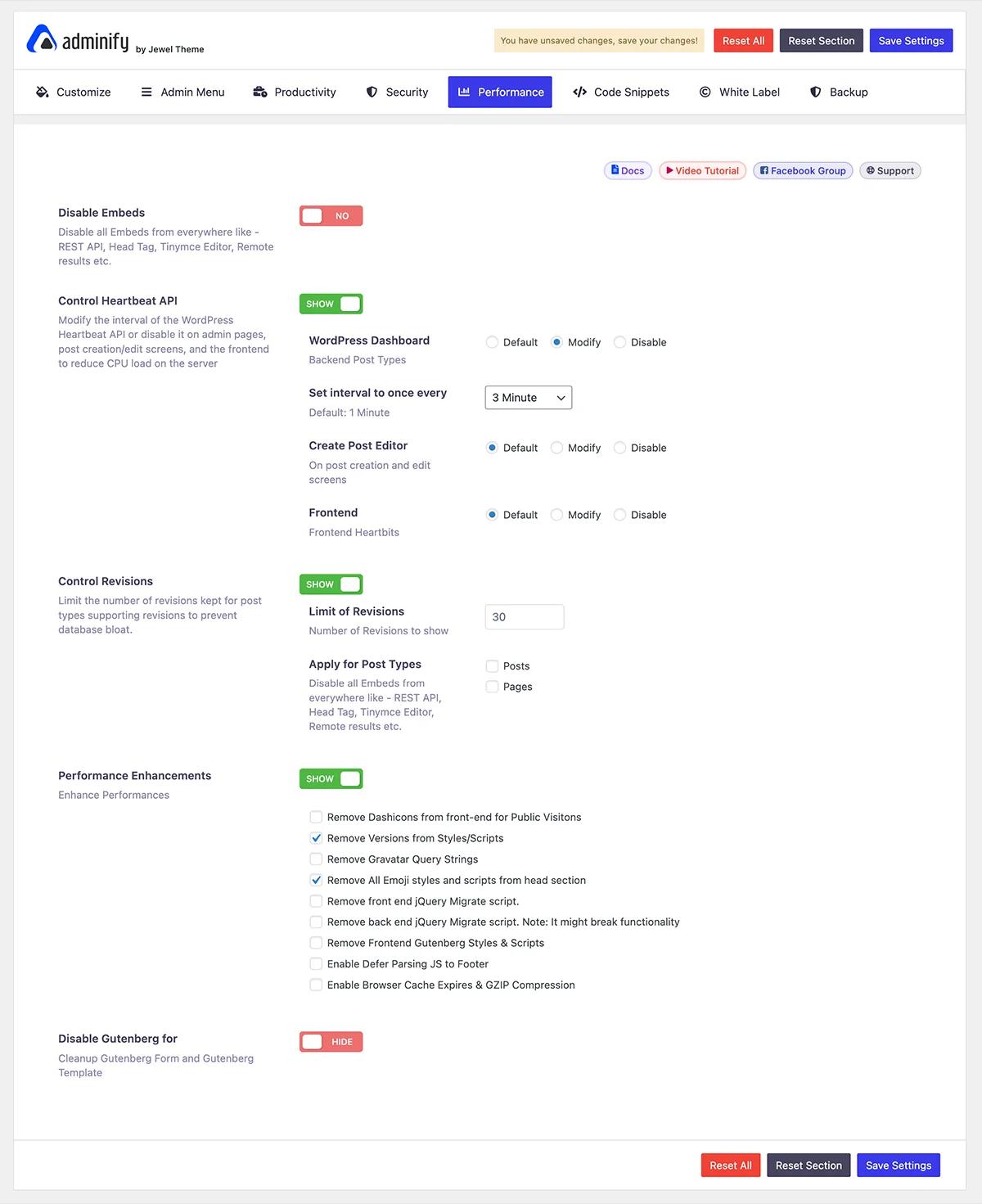
Free Features in the Performance Tab
Performance Enhancements (8 individual checkboxes)
Each one is an independent toggle:
- Remove Dashicons from the frontend for public visitors - WordPress loads its icon font even for logged-out visitors who never see the admin bar. Disabling it saves an HTTP request on every page load.
- Remove version numbers from styles/scripts - strips
?ver=x.x.xquery strings from CSS and JS files, improving caching behavior and reducing version fingerprinting. - Remove Gravatar query strings - cleans up Gravatar image URLs, which some caching systems handle more efficiently.
- Remove all emoji styles and scripts from the head section - WordPress ships a JS file and CSS block just to render emojis. If you don't use them, this removes the weight entirely.
- Remove frontend jQuery Migrate script - Migrate exists for backwards compatibility with old plugins; on modern sites it's usually dead weight.
- Remove backend jQuery Migrate script - same, but for the admin area. (Can occasionally conflict with older plugins. Test before enabling.)
- Enable defer parsing of JS to footer - moves JavaScript execution after the HTML loads, improving perceived page speed.
- Enable browser cache expires & GZIP compression - adds cache headers and GZIP, shrinking transfer sizes for repeat visitors.
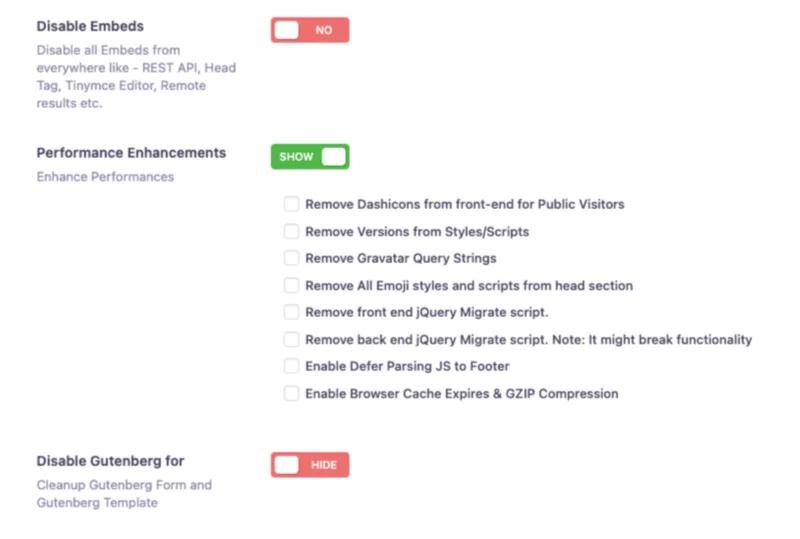
Disable Gutenberg for Specific Post Types
Limit the block editor to only the content types that need it, cutting unnecessary script loading everywhere else.
Pro Features in the Performance Tab
Disable Embeds
WordPress loads oEmbed support everywhere: the REST API, the head tag, TinyMCE, remote results. Unless you rely on embedding external content, that's pure overhead. Pro disables all embeds globally in one click.
Control Heartbeat API
The Pro feature with the biggest server-side payoff, especially on shared hosting or a small VPS.
The WordPress Heartbeat API sends AJAX requests to your server every 15–60 seconds to power autosave, post locking, and login expiry detection. On busy sites or CPU-limited servers, that constant polling adds up fast.
WP Adminify Pro lets you change the Heartbeat interval or disable it completely, configured separately for three contexts:
- Admin pages (dashboard, settings screens)
- Post creation/edit screens (where autosave matters most)
- Frontend (where Heartbeat is almost never needed)
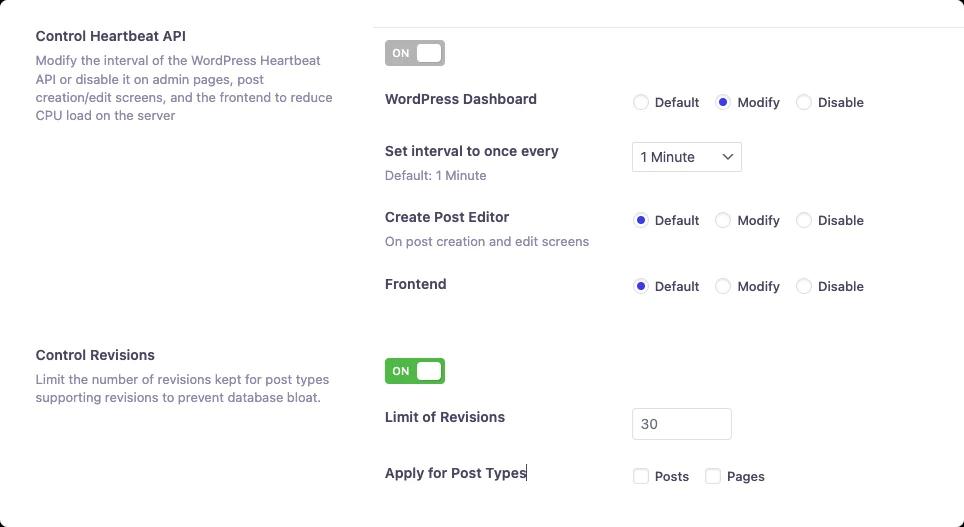
Standalone Heartbeat control plugins exist just for this; Pro includes it at no extra cost. We cover the details in our Heartbeat API control guide.
Performance Tab Verdict
Code Snippets - Add CSS & JS Without a Plugin
The Code Snippets tab is one of WP Adminify's most underrated features, and it's entirely free.
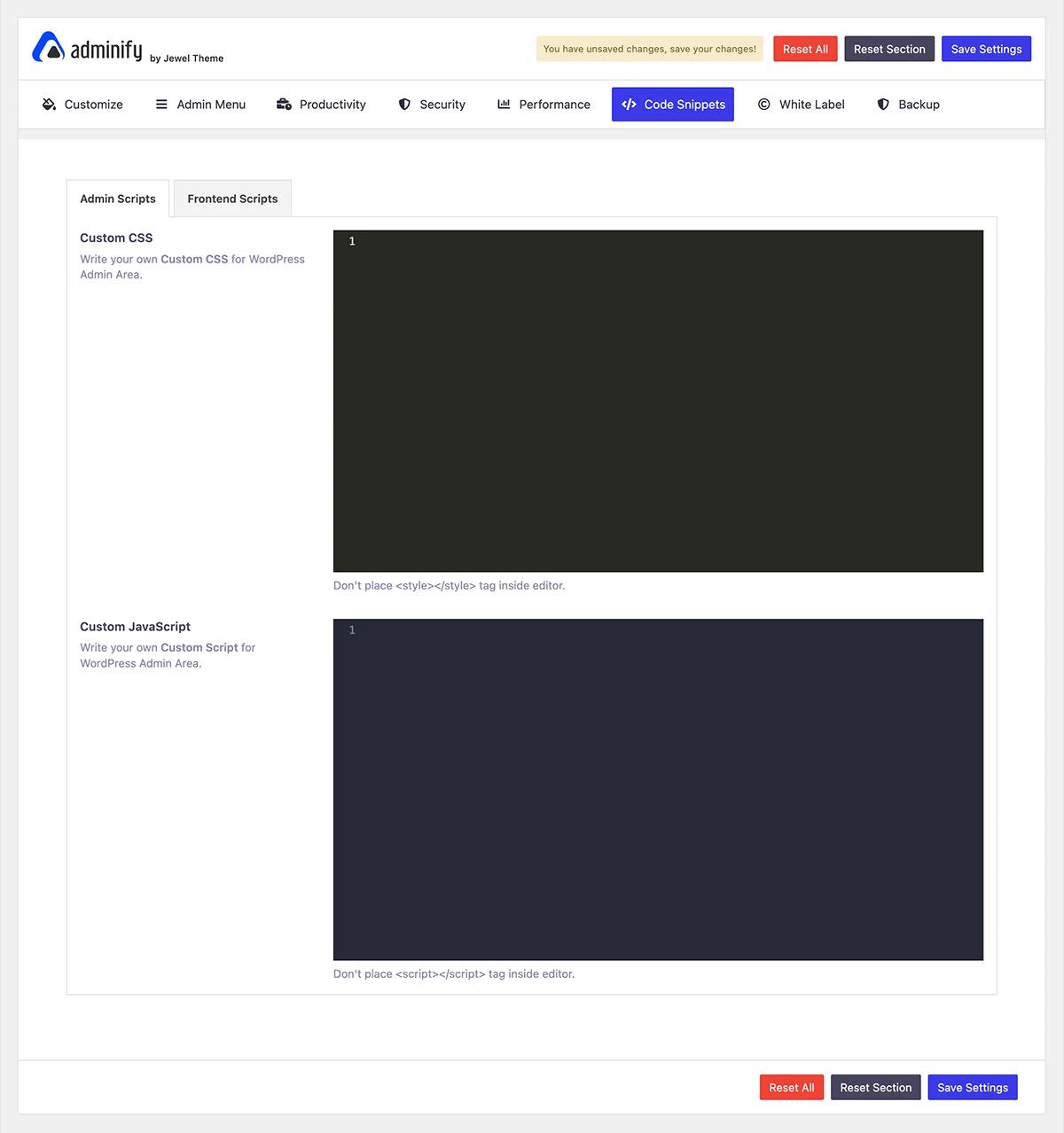
Free Features in the Code Snippets Tab (All Free)
The tab is organized into two sub-tabs: Admin Scripts and Frontend Scripts.
Admin Scripts → Custom CSS
Write and inject your own CSS into the WordPress admin without touching theme or plugin files. Tweak colors, adjust spacing, hide elements, all in a clean, syntax-highlighted editor.
Admin Scripts → Custom JavaScript
Inject custom JavaScript into the admin area: custom interactions, third party scripts, small functionality extensions. No custom plugin required.
Frontend Scripts (via Custom Header & Footer addon)
The Frontend Scripts sub-tab integrates with the Header & Footer Scripts addon to inject CSS and JavaScript into your site's frontend <head> and footer, also free once the companion plugin is active.
Code Snippets Tab Verdict
White Label - Brand the Dashboard as Your Own
The White Label tab is where agencies and freelancers who build sites for clients get their money's worth. (New to the concept? Start with the white label feature overview.)
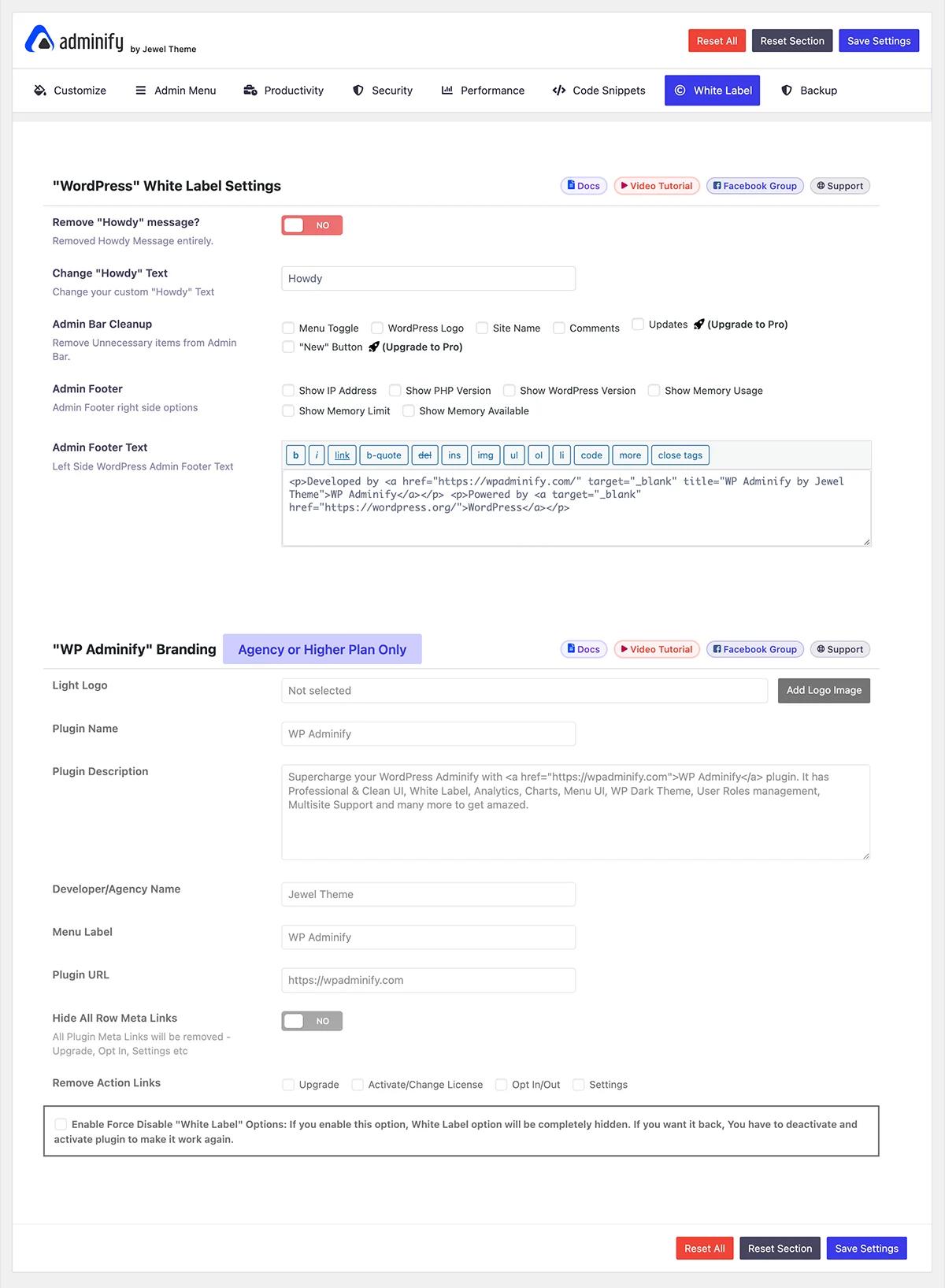
Free Features in the White Label Tab
Admin Footer - Right Side System Info
The bottom-right corner of every admin page normally shows just "WordPress" and a version number. WP Adminify replaces it with a configurable system info bar. Show or hide any of these, free:
- IP Address
- PHP Version
- WordPress Version
- Memory Usage
- Memory Limit
- Memory Available
A useful at-a-glance readout for developers and site managers.
Admin Footer Text - Left Side Custom Text
Replace "Thank you for creating with WordPress" with anything: your agency name, a support link, contact info. Rich text and full HTML supported. Free.
Agency Plan Features in the White Label Tab
The following settings are labeled "Agency or Higher Plan Only":
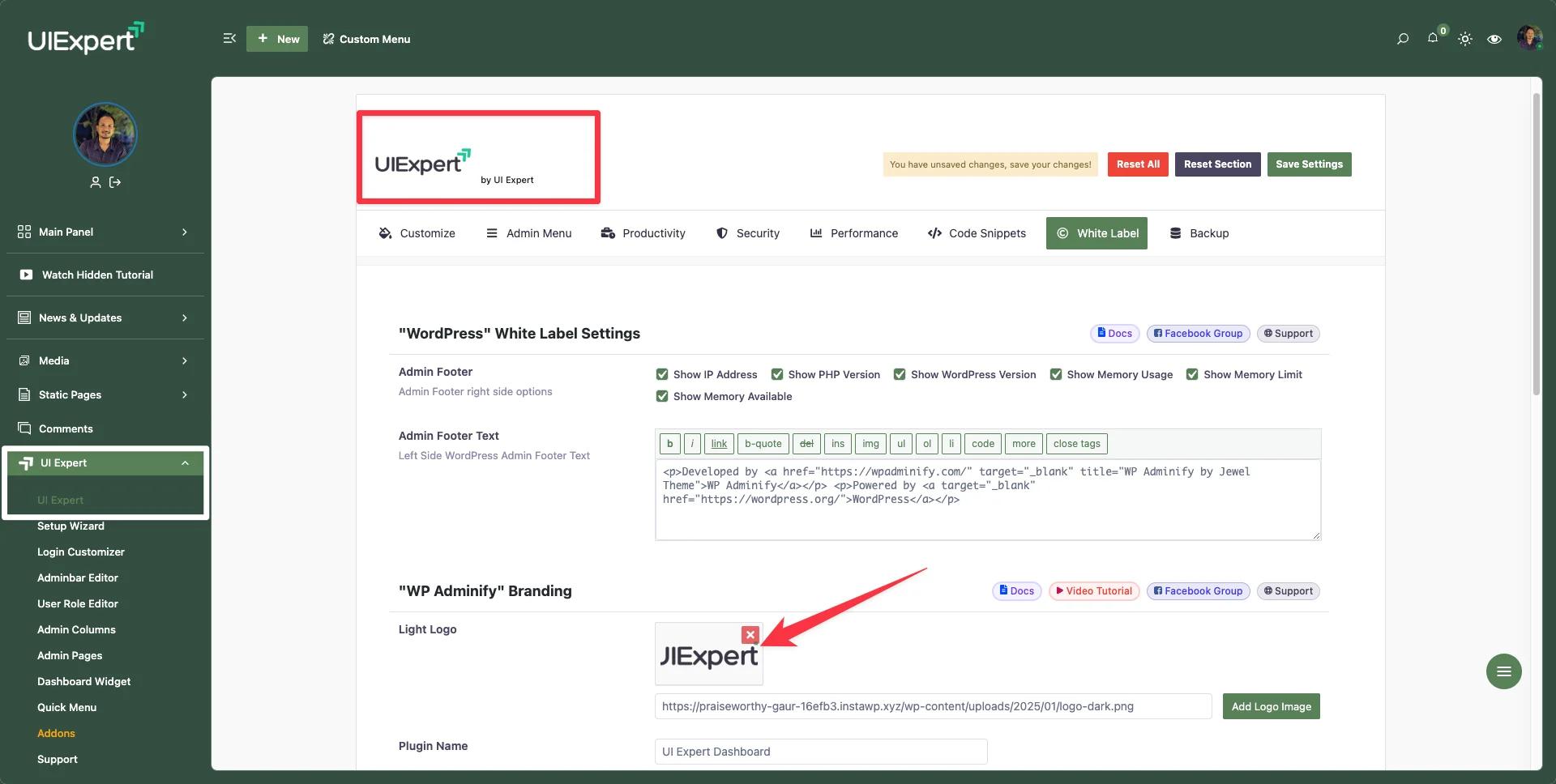
Light Logo & Dark Logo - replace the WP Adminify logo in the settings panel with your agency's, separately for light and dark mode.
Plugin Name - change the display name. Instead of "WP Adminify Pro" in the plugins list and admin menu, clients see your product name, like "Acme Dashboard Pro."
Plugin Description - replace the description shown in the Plugins list with your own.
Developer/Agency Name - set the developer name in the plugin meta.
Menu Label - rename the WP Adminify item in the admin sidebar to anything you choose.
Menu Icon - upload a custom sidebar icon to replace the Adminify one.
Plugin URL - point the plugin name link at your own website or client portal instead of wpadminify.com.
Hide All Row Meta Links - hide all plugin meta links (Upgrade, Settings, Account) from the plugins list row so nothing reveals the plugin's origin.
Remove Specific Action Links - selectively remove individual action links: Upgrade, Activate/Change License, Settings, and Account.
Force Disable White Label - a safety toggle that completely hides the White Label settings from the panel. Getting them back requires deactivating and reactivating the plugin, which stops clients or other admins from stumbling onto your white-label configuration.
White Label Tab Verdict
Backup - Import & Export Settings
Free Features in the Backup Tab (All Free)
Export & Download Settings
Export your entire WP Adminify configuration as a JSON file in one click: dashboard templates, menu settings, productivity toggles, security options, performance settings, code snippets, and white label configuration, all in a single file.
Import Settings
Paste a previously exported JSON config and click Import to restore the whole setup instantly. Perfect for:
- Migrating settings from staging to production
- Replicating your setup across multiple client sites
- Backing up before major changes
- Creating agency templates you apply to every new client build
Both import and export are free for all users, with no plan restriction.
Backup Tab Verdict
Stick with the Free Plan If…
You're a blogger, solo site owner, or developer managing your own WordPress site, and you primarily want:
- A clean, modern dashboard without the clutter
- Full admin menu control: reordering, renaming, hiding items, colors, and typography
- Productivity basics: post duplicator, media folders, custom dashboard widgets
- Security hardening: disabling comments, RSS feeds, REST API for guests, header cleanup
- Performance cleanup: emoji scripts, version strings, jQuery Migrate, and friends
- Custom CSS/JS in the admin area without a separate plugin
- Settings backup and restore across sites
The free version will serve you well. You get 52 of the plugin's 76 features without paying, and for personal sites that covers nearly everything you'll reach for day to day.
→ Download WP Adminify Free from WordPress.org
Upgrade to Pro If…
You're a freelancer, professional developer, or power user who:
- Manages sites for clients and needs a clean, professional backend to hand off
- Is tired of plugin notification banners on every login (Hide Admin Notices)
- Wants custom onboarding or help pages inside the admin, built with your page builder (Admin Pages)
- Needs different user roles redirected to different pages after login (Redirect URLs)
- Is on shared hosting or a budget VPS and wants to stop Heartbeat from hammering the server every 15–60 seconds (Heartbeat API Control)
- Wants premium UI templates, a branded admin favicon, a custom body font, and post status color-coding
- Builds WordPress sites and wants everything from media library UX to admin performance under tight control
Pro is the right toolset for delivering polished, professional WordPress sites, for yourself and for clients, without building anything custom.
→ View WP Adminify Pro Plans & Pricing
Upgrade to Agency If…
You're an agency, studio, or developer building and handing off WordPress sites at scale, and:
- You deliver finished sites under your own brand, not WP Adminify's
- You want clients to see your logo, your plugin name, and your company identity everywhere in the backend, with zero trace of WP Adminify
- You need to fully rebrand the plugin: rename it, replace its logo, change the sidebar icon, set your own plugin URL
- You want the branding settings locked down so clients can never discover or change them (Force Disable White Label)
- You manage 10, 20, or 50+ client sites and want a consistent agency-branded WordPress experience on all of them
For an agency that hands sites to clients under its own brand, the white-label features aren't a nice-to-have; they're the whole point. One client who stays longer because of a great dashboard experience more than covers the cost.
→ Get the WP Adminify Agency Plan
Final Verdict
After going through every option in the WP Adminify settings panel - all 8 tabs, all 76 features - here's our honest conclusion:
WP Adminify's free version is one of the most generous free plans in the WordPress plugin ecosystem. Most admin customization plugins gate everything meaningful behind a paywall. WP Adminify gives you a modern dashboard skin, a full drag-and-drop menu editor with complete color and typography control, a post duplicator, media folders, a dashboard widget builder, security hardening, performance cleanup, and custom CSS/JS injection, all free. That's not common.
The Pro plan is a legitimate upgrade, not a cash grab. The features behind Pro (Heartbeat control, Hide Admin Notices, Admin Pages, role-based redirects, premium templates, Disable Embeds) solve real problems rather than manufacturing artificial scarcity. If you run client sites or a professional WordPress workflow, you'll reach for them regularly.
The Agency plan is built for one specific person: the agency owner who sells WordPress sites. If that's not you, you don't need it. If it is you, it's not optional.
Our Rating
| Free | Pro | Agency | |
|---|---|---|---|
| Value for Money | ⭐⭐⭐⭐⭐ | ⭐⭐⭐⭐⭐ | ⭐⭐⭐⭐⭐ |
| Best For | Solo users & developers | Freelancers & power users | Agencies & client work |
| Features Unlocked | 52 / 76 | 65 / 76 | 76 / 76 |
Try It Yourself
WP Adminify has a free version you can install right now from WordPress.org, with no credit card and no commitment. See the new dashboard in under a minute, then decide whether Pro or Agency fits.
Download Free on WordPress.org → See Pro & Agency Plans →
Want to see every Pro and Agency feature in action first? Explore the live demo - no WordPress install needed.
WP Adminify Free vs Pro FAQs
Can I use WP Adminify on multiple sites with one license?
Yes. WP Adminify offers multi-site licensing options. Check the pricing page for site limits per plan.
Is there a money-back guarantee?
Yes. WP Adminify offers a refund policy. See the refund policy page for full details.
Can I upgrade from Free to Pro later without losing my settings?
Yes. Your settings are preserved when you upgrade. The additional Pro features simply unlock, with no reconfiguration needed.
Does WP Adminify slow down my site?
No. WP Adminify only loads its scripts in the WordPress admin area, and it ships built-in performance tools that help you remove unnecessary WordPress overhead.
What page builders does Admin Pages support?
Admin Pages supports all major page builders: Gutenberg, Elementor, Bricks, Oxygen, and Divi.
Where to Go Next
Still deciding how far to take your dashboard? Start with our WordPress dashboard customization guide - it covers every method, plugin and no-plugin alike. Comparing tools rather than tiers? See the best WordPress dashboard plugins roundup, or go straight to the two modules people upgrade for: the admin menu editor and white label.
Already know you need Pro? The pricing page lists what's in each plan, and every tier is covered by the refund policy.
Your email address will not be published