


Key Takeaways
- WordPress prints an emoji detection script in the head of every front-end page and every admin screen, and you can disable emojis in WordPress with a few remove_action() calls.
- The WordPress wp-embed script only loads on pages that contain an embedded WordPress post, but the oEmbed discovery links and the oEmbed REST route are present on every site.
- WordPress 7.1 registers jQuery as a bundle of jquery-core plus jquery-migrate, so any theme that loads jQuery also loads jQuery Migrate 3.4.1 unless you remove that dependency.
- Removing jQuery Migrate from the WordPress admin can break older plugins, and WP Adminify marks that option with "Note: It might break functionality" for this reason.
- WP Adminify groups eight clean-up switches under Adminify > Performance > Performance Enhancements, and puts Disable Embeds on its own switch on the same tab.
To disable emojis in WordPress, you remove the emoji detection script and the emoji styles that core adds to every page head. The same small clean-up works for embeds, jQuery Migrate and front-end Dashicons. Each fix is a few lines of PHP, or one checkbox if you prefer a settings screen. These files add requests and inline code to pages that often never use them.
Below you will find what each script does, the code to remove it, and the matching switches in WP Adminify's Admin Performance settings. The last section shows how to measure the result. If your main problem is a slow dashboard, start with our guide on how to speed up wordpress admin screens, then come back here for the clean-up.
What Do These Default WordPress Scripts Do?
WordPress loads a few helper files by default for features many sites never use. The emoji script converts emoji into images on old browsers. The embed code lets other sites embed your posts. jQuery Migrate keeps old jQuery code working. Dashicons is the admin icon font, and it can load on the front end too.
Here is how each one behaves in the WordPress 7.1 core files:
| Asset | Where it loads | What it is for | Safe to remove? |
|---|---|---|---|
| Emoji detection script and styles | Front end and admin head | Shows emoji as images when the browser cannot draw them | Yes, on most sites |
| oEmbed discovery links and wp-embed | Front end head; wp-embed only on pages with an embedded WordPress post | Lets other sites embed your posts as cards | Yes, if you never embed WordPress posts |
| jQuery Migrate | Anywhere jQuery loads | Restores jQuery functions that newer jQuery versions removed | Front end: test first. Admin: risky |
| Dashicons | Admin, admin bar, and front end when a theme or plugin asks for it | Icon font for the WordPress interface | For logged-out visitors, usually yes |
Each file is a small cost, but it repeats on every page load. A slow host or a heavy page builder needs other fixes.
How to Disable Emojis in WordPress
WordPress hooks print_emoji_detection_script() into wp_head and admin_print_scripts, and adds emoji CSS through wp_enqueue_emoji_styles(). Remove those hooks and the emoji script is gone from both the site and the dashboard. Emoji still display, because every current browser and operating system draws them without help.
Add this to a small custom plugin or a code snippets tool. It matches WordPress 7.1, where print_emoji_styles() is deprecated:
1
2add_action( 'init', function () {
3    // Front end.
4    remove_action( 'wp_head', 'print_emoji_detection_script', 7 );
5    remove_action( 'wp_enqueue_scripts', 'wp_enqueue_emoji_styles' );
6    remove_action( 'wp_print_styles', 'print_emoji_styles' );
7
8    // Feeds and emails.
9    remove_filter( 'the_content_feed', 'wp_staticize_emoji' );
10    remove_filter( 'comment_text_rss', 'wp_staticize_emoji' );
11    remove_filter( 'wp_mail', 'wp_staticize_emoji_for_email' );
12} );
13
14// Admin screens. WordPress adds these hooks after init, so remove them on admin_init.
15add_action( 'admin_init', function () {
16    remove_action( 'admin_print_scripts', 'print_emoji_detection_script' );
17    remove_action( 'admin_enqueue_scripts', 'wp_enqueue_emoji_styles' );
18    remove_action( 'admin_print_styles', 'print_emoji_styles' );
19} );
20
21// Remove the emoji plugin from the classic (TinyMCE) editor.
22add_filter( 'tiny_mce_plugins', function ( $plugins ) {
23    return is_array( $plugins ) ? array_diff( $plugins, array( 'wpemoji' ) ) : array();
24} );
25
In WP Adminify, the same job is one checkbox: Remove All Emoji styles and scripts from head section.
How to Disable Embeds in WordPress
To disable embeds in WordPress, remove the oEmbed discovery links from the head and the hook that loads the wp-embed script. These parts let other WordPress sites embed your posts as cards. If nobody embeds your posts, and you don't embed posts from other WordPress sites, you can turn them off.
Since WordPress 5.9, the wp-embed script only loads on a page that actually contains an embedded WordPress post. So the gain is smaller than many older guides claim. The discovery links still print on every page, and the oEmbed REST route stays open. This code removes the head output and the script:
1
2add_action( 'init', function () {
3    // Discovery links in the head (core hooks them twice).
4    remove_action( 'wp_head', 'wp_oembed_add_discovery_links', 4 );
5    remove_action( 'wp_head', 'wp_oembed_add_discovery_links' );
6
7    // Stops wp-embed.js from being enqueued for embedded posts.
8    remove_action( 'wp_head', 'wp_oembed_add_host_js' );
9}, 20 );
10
WP Adminify goes further with one switch called Disable Embeds on the Performance tab. Its help text says it disables embeds everywhere: the REST API, the head tag, the TinyMCE editor and remote results. Because that is a full switch-off, open a post that uses a YouTube embed afterwards and check that it still looks right.

How to Remove jQuery Migrate in WordPress
To remove jQuery Migrate in WordPress, take jquery-migrate out of the dependency list of the jquery handle. WordPress 7.1 registers jquery as jquery-core 3.7.1 plus jquery-migrate 3.4.1. Do it on the front end only, and test your theme first, because old scripts may still call removed jQuery functions.
When jQuery drops a function, Migrate adds it back so older themes and plugins keep working. A modern theme does not need it. An old slider or form plugin may need it to work at all.
This code removes it from the front end and leaves the admin alone:
1
2add_action( 'wp_default_scripts', function ( $scripts ) {
3    if ( is_admin() || empty( $scripts->registered['jquery'] ) ) {
4        return;
5    }
6
7    $scripts->registered['jquery']->deps = array_diff(
8        $scripts->registered['jquery']->deps,
9        array( 'jquery-migrate' )
10    );
11} );
12
In the admin, the risk is higher, because many admin screens still run plugin code written years ago. Remove jQuery Migrate there and a settings page, a media button or a meta box can stop working with no clear error. WP Adminify shows the same warning next to the option: Remove back end jQuery Migrate script. Note: It might break functionality. Use the front-end option first. Try the back-end option only on staging, and click through your main admin screens before you keep it.
How to Remove Dashicons From the Front End
To remove Dashicons from the front end, dequeue the dashicons style for visitors who are not logged in. Logged-in users need the icon font for the admin bar, so keep it for them. The font is only loaded for visitors when your theme or a plugin asks for it.
1
2add_action( 'wp_enqueue_scripts', function () {
3    if ( ! is_user_logged_in() ) {
4        wp_dequeue_style( 'dashicons' );
5    }
6}, 100 );
7
If your theme uses Dashicons for menu arrows or social icons, those icons turn into empty boxes for visitors. Check your pages after the change.
WP Adminify's option, Remove Dashicons from front-end for Public Visitors, has the same scope.
Remove WordPress Bloat Without Code in WP Adminify
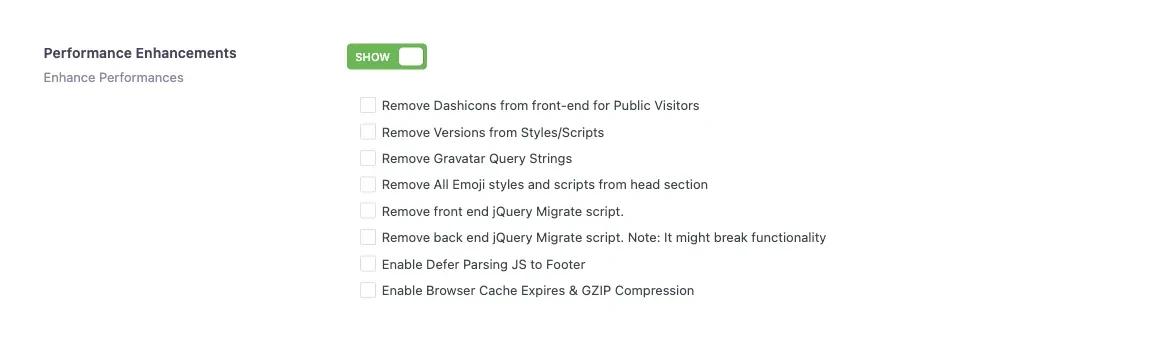
WP Adminify puts these clean-up options in one list at Adminify > Performance > Performance Enhancements. Turn on the section, tick the items you want, and save. You can switch any item off again later, which makes testing one change at a time easy.
- Go to Adminify > Performance in your WordPress admin.
- Turn on Performance Enhancements to show the checklist.
- Tick Remove All Emoji styles and scripts from head section.
- Tick Remove front end jQuery Migrate script. and Remove Dashicons from front-end for Public Visitors.
- Leave Remove back end jQuery Migrate script off until you have tested it on staging.
- If you don't need embeds, turn on Disable Embeds on the same tab.
- Click Save, then check your site in a private browser window.
The other four options are Remove Versions from Styles/Scripts (browsers may then keep an old cached file after an update), Remove Gravatar Query Strings, Enable Defer Parsing JS to Footer (test it, some scripts must run early) and Enable Browser Cache Expires & GZIP Compression (many hosts and cache plugins already do this).
If you want a wordpress performance plugin that also controls the Heartbeat API and can switch off the block editor, the same Performance tab covers both. Our guide to the wordpress classic editor shows the Disable Gutenberg switch step by step.
How to Measure the Gain
Measure before and after with your browser's developer tools. Load the page in a private window, open the Network tab, and note the request count and any files named wp-emoji, jquery-migrate or dashicons. Make one change, reload and compare. Then check the page in PageSpeed Insights.
- In a private window, open DevTools (F12), choose Network and tick Disable cache.
- Reload. Note the request count, then filter for
emoji,migrateanddashicons. - Apply one change, clear any page cache, and repeat step 2.
- Run the page in PageSpeed Insights before and after for a second opinion.
Expect a small difference: a few fewer requests and less inline code. A slow server, large images or a long plugin list will matter more. If the admin feels slow, old post revisions in the database can also be part of it; see our guide to wordpress revisions for how to limit and clean them.
Frequently Asked Questions
Is it safe to disable emojis in WordPress?
Yes, on almost every site. The emoji script only helps very old browsers that cannot draw emoji. Modern browsers and phones show emoji without it, so emoji in your posts and comments still appear after you remove the script and styles.
Will disabling embeds stop YouTube videos from showing?
Removing only the discovery links and the wp-embed script does not affect YouTube. A full switch-off, like the WP Adminify Disable Embeds switch, goes further, so check a post with a video after you enable it.
What happens if I remove jQuery Migrate and something breaks?
Put it back by unticking the option or removing your code. Then find the plugin or theme script that needs it, update it, or replace it. Remove Migrate on the front end first, and test the admin option on a staging copy before using it on a live site.
Why does Dashicons still load after I removed it?
Dashicons is needed for the admin bar, so it still loads when you are logged in. Test in a private window as a visitor. If it still loads there, your theme or a plugin may enqueue it after your code runs, so try a later priority.
Final Thoughts
Emojis, embeds, jQuery Migrate and front-end Dashicons are four small files that many sites load for no reason. Remove the emoji script and styles, turn off embeds if you don't use them, drop jQuery Migrate on the front end after testing, and hide Dashicons from logged-out visitors. Keep back-end jQuery Migrate unless you have tested every admin screen. Measure before and after each change. If you would rather tick boxes than maintain code, the WP Adminify Performance tab has every option in this post. For the bigger causes of a slow dashboard, read Why Is My WordPress Admin So Slow? 15 Fixes to Speed Up wp-admin.
Your email address will not be published