

WordPress Heartbeat Control
Control the AJAX requests and lower the load on the server
Disable the WordPress Heartbeat API where you don’t need it. Behind the scenes it fires AJAX requests to admin-ajax.php on a fixed schedule, and each pulse runs PHP and database queries that can slow your dashboard. You can disable the API entirely, or set a longer polling interval, to control how often WordPress Heartbeat requests fire.

WordPress Heartbeat API Control boosts performance
The Heartbeat API keeps the browser and server in sync at a regular interval. It powers features like post autosave, post-lock detection, and dashboard notifications. Controlling how often it runs helps you lower CPU usage and cut unnecessary database queries - especially valuable on shared hosting.
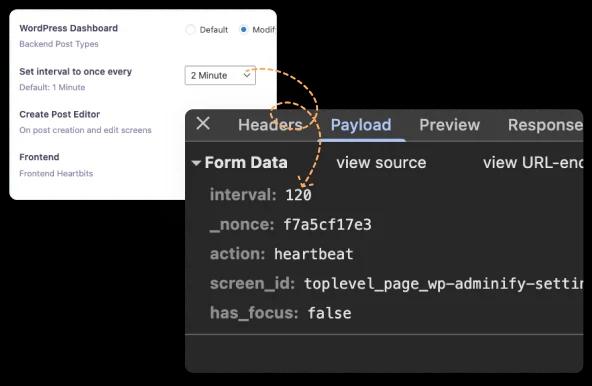
WordPress Dashboard
By default, the WordPress Dashboard heartbeat API request interval is approximately 15 seconds. It means WordPress sends an AJAX request every 15 seconds in the admin area to handle tasks like autosaving, user sessions.
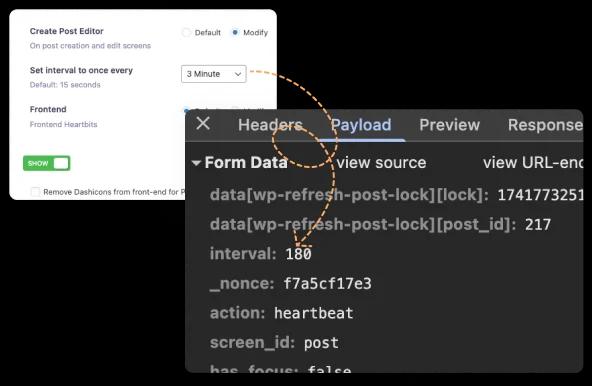
Create Post Editor
If you own a busy site with multiple open editors, reducing the heartbeat frequency can make the post editor feel more responsive. Otherwise, it can send too many requests from the editors to your server, and they may experience lag on the editor.
Website Frontend
By default, it may not activate in the frontend. But if you use any theme or plugin that activated the heartbeat API in the frontend for some live updates or other real time interactions, then you can control the request by using our heartbeat control feature.
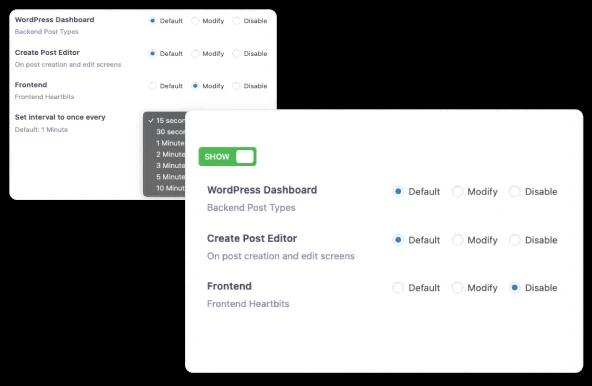
How WP Adminify Controls the WordPress Heartbeat API
The WordPress Heartbeat API works by having your browser POST to admin-ajax.php on a fixed schedule - about every 15 seconds inside the post editor and every 60 seconds on other admin screens. Each pulse runs PHP and database queries, so on shared hosting a handful of open dashboard tabs can push CPU usage high enough for the host to throttle, or even temporarily suspend, your account.
WP Adminify's Heartbeat Control lets you disable the API or set a custom polling interval independently for three places: the WordPress dashboard, the post editor, and the site frontend. Slowing the dashboard and frontend pulses to 60–120 seconds - while keeping a shorter interval in the editor so autosave and post-locking still work - cuts admin-ajax.php load and CPU spikes without breaking any functionality.
Want the full walkthrough of every setting? Read our step-by-step WordPress Heartbeat API guide.
WordPress Heartbeat Control FAQs
Is it safe to disable the WordPress Heartbeat API?
Yes, for most sites. The Heartbeat API only powers convenience features like autosave, post-lock warnings, and dashboard notifications - nothing your site's front end depends on. Disabling it on the dashboard and frontend is safe; the one place to keep it running is the post editor, so autosave and post locking still work.
How does WP Adminify reduce admin-ajax.php server load?
Every Heartbeat pulse is a POST to admin-ajax.php that runs PHP and database queries. WP Adminify lets you slow that pulse from the default 15 to 60 seconds down to a longer interval, or switch it off where it is not needed. Fewer pulses mean fewer admin-ajax requests, lower CPU usage, and fewer queries - the difference that keeps shared hosting from throttling your account.
Can I set different Heartbeat intervals for the post editor and the frontend?
Yes. WP Adminify controls the Heartbeat API separately for three contexts: the WordPress dashboard, the post editor, and the site frontend. A common setup is a short interval in the editor so autosave still fires, a longer 60 to 120 second interval on the dashboard, and disabled on the frontend.
Does controlling the Heartbeat API break autosave?
No, as long as you keep a reasonable interval in the post editor. Autosave and post-lock detection run on the editor's Heartbeat pulse, so leaving that context enabled - even at a slightly longer interval - preserves them. Only disable the Heartbeat entirely in the editor if you do not rely on autosave.

“The plugin is stable and does not affect performance, which is a significant advantage. ”

@gdimitrov
WordPress.org
"This plugin is very great: works fine, gives a very nice look to the WordPress Dashboard”

@peopleinside
WordPress.org
"This plugin lets me transform the UI, user-friendly, and fast, essential for a modern website backend."

Sascha Donelasci
Web Design Agency
“Support has been responsive and helpful, truly putting the customer first” , a rare quality these days.

Louis J Gleason
Developer & Creator
“I am totally blown away with all that WPAdminify can do! ALREADY WAY BEYOND EXPECTATIONS!!"

@shezoom
Startup
“Lot of functionalities and ability to, customize admin & login on WordPress, active support & updates.”

@Myllio
WordPress.org
Personal
47.40
/ Year- 1 Website
- Multisite Support
- "WP Adminify" Branding Removal
- Replace 50+ Plugins
- Client-Ready Dashboard
- 1 Year Support and Updates
- Custom Dashboard Widget
- Easy Menu Search
- Admin Menu Editor
Business
64.50
/ Year- 5 Websites
- Multisite Support
- "WP Adminify" Branding Removal
- Replace 50+ Plugins
- Client-Ready Dashboard
- 1 Year Support and Updates
- Custom Dashboard Widget
- Easy Menu Search
- Admin Menu Editor
Agency
112.05
/ Year- Multisite Support
- "WP Adminify" Branding Removal
- Replace 50+ Plugins
- Client-Ready Dashboard
- 1 Year Support and Updates
- Custom Dashboard Widget
- Easy Menu Search
- Admin Menu Editor
Lifetime Bundle
799.00
/ Lifetime- Use on up to Unlimited Websites
- Lifetime Updates and Support
 WP Adminify
 Loginfy
 WP Spotlight
 Header and Footer Scripts
 Quick Menu
 Admin Bar Editor
 Admin Columns Editor
Get Started with WP Adminify Today
We offer the best WordPress Dashboard Customization and maintenance feature to our users.
Rebrand the admin panel of personal or clients Dashboard within minutes.