


Key Takeaways
- WordPress has no built-in screen for editing roles, so you change role capabilities with a WordPress user role editor plugin, WP-CLI, or the add_cap() and remove_cap() methods.
- WordPress saves every role and capability in the wp_user_roles option, so a capability change stays after you deactivate the plugin or delete the code that made it.
- RoleMaster Suite 1.1.5 shows a toolbar with Select Role, Add Role, Rename Role, Delete Role, Add Capability, Delete Capability and Save Changes.
- The Delete Capability button in RoleMaster Suite 1.1.5 removes the selected capability from every role on the site, including roles you are not editing.
- The WP-CLI command wp role reset restores a default WordPress role, such as Editor, to the capabilities it had on a fresh install.
A WordPress user role editor lets you add or remove capabilities from a role, such as letting Contributors upload images or stopping Editors from deleting other people's pages. WordPress itself has no screen for this, so you use a plugin, WP-CLI or a few lines of PHP. Each method saves the change straight to the database.
Below are all three methods, with steps to back up your roles first and to reset a role you broke. The plugin steps use the free rolemaster suite tool by Pixar Labs on WordPress 7.1. If you are new to user roles in WordPress, with the six default roles and their capabilities, read that guide first.
What Does a WordPress User Role Editor Do?
A WordPress user role editor shows each role's capabilities as a checklist and saves your changes to the database. You can grant or remove single capabilities, create new roles, rename roles and delete custom roles. The users keep their role; only what that role allows changes.
Use one when a default role is close to what you need and only a capability or two must change. Common examples:
- Contributors need to add images to drafts: add
upload_files. - A client account cloned from Editor needs to edit menus: add
edit_theme_options. - Editors should not delete pages written by others: remove
delete_others_pages. - A plugin screen should be open to a non-admin: add the capability that plugin checks.
Before You Edit: Back Up Your Roles
Back up before you change any role, because the change is written to the database at once and there is no undo button. A full database backup works. A faster option is to save the wp_user_roles option on its own with WP-CLI, so you can restore only the roles if something goes wrong.
1
2# Save all roles and capabilities to a file.
3wp option get wp_user_roles --format=json > roles-backup.json
4
5# Restore them later if needed.
6wp option update wp_user_roles --format=json < roles-backup.json
7
If your database uses a table prefix other than wp_, the option name changes with it. For example, the prefix abc_ gives abc_user_roles. Also never remove capabilities from the Administrator role while logged in as that role. If you remove manage_options or edit_users by mistake, you can lock yourself out of the screens you need to fix it.
How to Edit User Roles With a Plugin
To edit user roles with a plugin, open the plugin's role screen, pick a role, tick or untick capabilities and save. RoleMaster Suite, User Role Editor and Members all work this way. The steps below use RoleMaster Suite 1.1.5, which appears at Adminify > User Role Editor when WP Adminify is active.
RoleMaster Suite is free on WordPress.org (600+ active installs on 9 November 2026). On its own it adds a Rolemaster Suite menu item, and with WP Adminify active it moves under the Adminify menu, next to the other admin tools.

Change a role's capabilities
- Go to Adminify > User Role Editor.
- Choose the role in Select Role, for example Contributor.
- Tick Granted Only to see what the role can do now.
- Type a capability in the search box, such as
upload_files, or open a group in the left column (General, Posts, Pages, Media, Taxonomies, Comments, Users, Themes, Plugins, Deprecated). - Tick the capability to grant it, or untick it to remove it.
- Click Save Changes.
- Log in as a test user with that role and check the change.
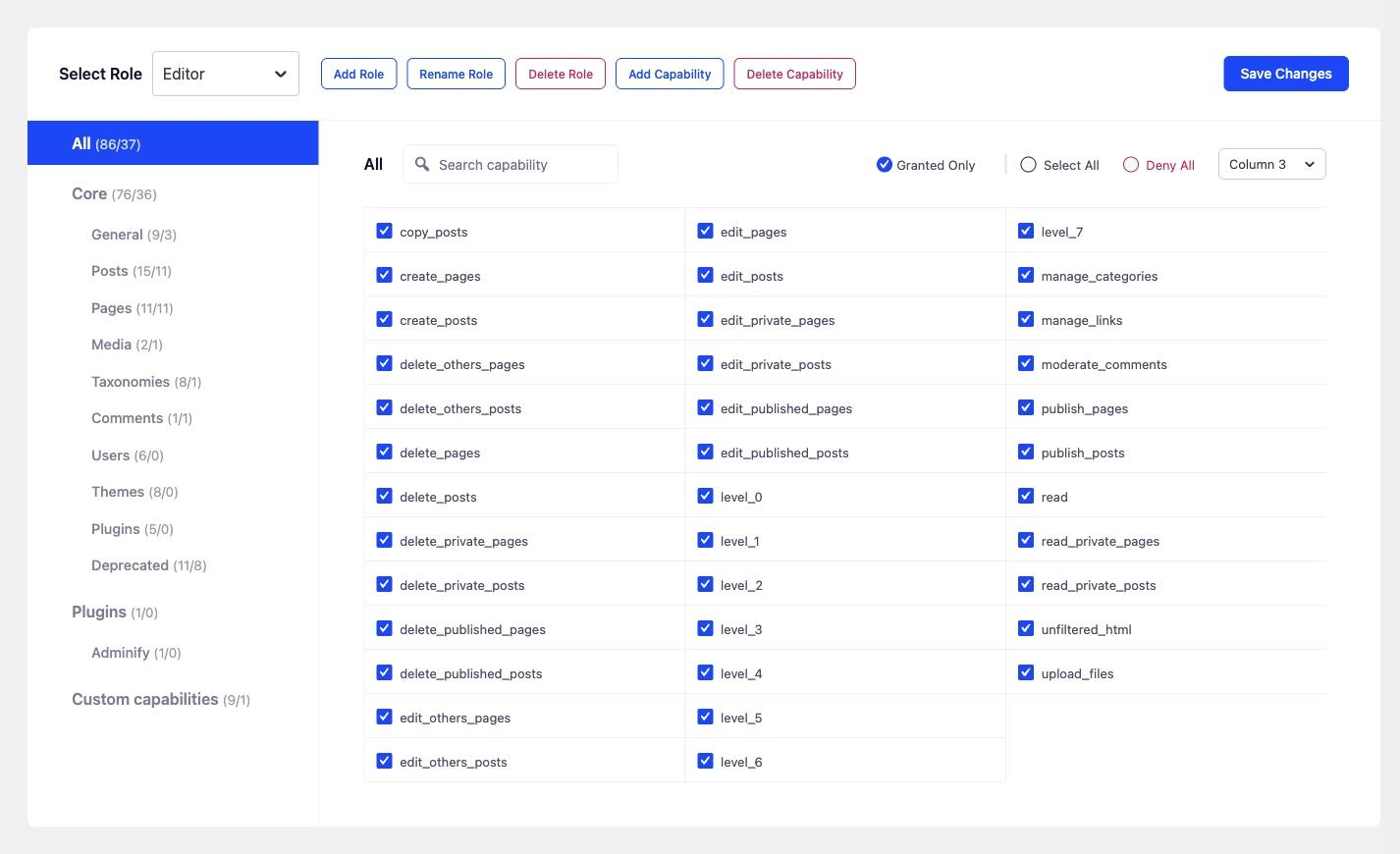
The counts next to each group show granted and total capabilities, so you can spot a role with too much access. Select All and Deny All tick or clear the whole visible list in one click, and the column menu changes how many columns the list uses.
Add, rename or delete roles and capabilities
- Add Role opens a dialog with Display Role Name, Role name (ID) and Make copy of. Copy an existing role to start from its capabilities. The plugin saves the ID with a
rolemaster_prefix, and a role created without a copy starts with onlyread. - Rename Role changes the display name only. Users keep the role.
- Delete Role removes a role. Move its users to another role first.
- Add Capability creates a new custom capability on the selected role and also grants it to Administrator.
- Delete Capability removes the selected capabilities from every role on the site. Use it only for capabilities left behind by plugins you removed.
If you want a wordpress user role editor plugin that sits inside the WP Adminify menu, RoleMaster Suite is the one built for it. Other popular choices are User Role Editor and Members, which the WordPress.org Roles and Capabilities page lists among role plugins.
How to Edit User Roles With Code
In code, get the role with get_role(), then call add_cap() or remove_cap() on it. WordPress saves the result to the database straight away, so run this code once, for example on plugin activation. You do not need it on every page load, because the change is already stored.
1
2// Run once: on activation of your own small plugin.
3function myplugin_edit_roles() {
4    $contributor = get_role( 'contributor' );
5    if ( $contributor ) {
6        $contributor->add_cap( 'upload_files' );
7    }
8
9    $editor = get_role( 'editor' );
10    if ( $editor ) {
11        $editor->remove_cap( 'delete_others_pages' );
12    }
13}
14register_activation_hook( __FILE__, 'myplugin_edit_roles' );
15
If you can't use an activation hook (for example in a theme), store a version number and only run the change when it is missing:
1
2add_action( 'admin_init', function () {
3    if ( '1' === get_option( 'myplugin_roles_version' ) ) {
4        return; // Already done.
5    }
6
7    $contributor = get_role( 'contributor' );
8    if ( $contributor ) {
9        $contributor->add_cap( 'upload_files' );
10    }
11
12    update_option( 'myplugin_roles_version', '1' );
13} );
14
To undo the change later, call the opposite method once (remove_cap( 'upload_files' )). Deleting the code alone does not undo anything.
WP-CLI does the same from the command line:
1
2wp cap list contributor
3wp cap add contributor upload_files
4wp cap remove editor delete_others_pages
5
How to Reset a Role to Its Default Capabilities
To reset a default role, run wp role reset with the role name in WP-CLI, or remove the role and rebuild the defaults with populate_roles() in PHP. Both restore the capabilities WordPress gives on a fresh install. RoleMaster Suite 1.1.5 has no reset button, so keep your backup.
1
2wp role reset editor
3# or every default role at once
4wp role reset --all
5
wp role reset also takes away capabilities that plugins added to a default role. On our test site, wp role reset --all removed 72 of them from the Administrator role. Check your plugin screens afterwards, and restore your roles backup if one stops working.
Without WP-CLI, run this PHP once, then remove it:
1
2// Load one admin page, then delete this code. Rebuilds the Editor role with WordPress defaults.
3add_action( 'admin_init', function () {
4    if ( ! current_user_can( 'manage_options' ) ) {
5        return;
6    }
7    require_once ABSPATH . 'wp-admin/includes/schema.php';
8    remove_role( 'editor' );
9    populate_roles();
10} );
11
populate_roles() adds back every default capability to the five default single-site roles. It does not remove extra capabilities you added to other roles, and it does not touch custom roles. Users who had the Editor role get it back automatically, because their user record still holds the role name. Custom roles have no defaults to restore, so for those use your backup.
Frequently Asked Questions
Does WordPress have a built-in user role editor?
No. WordPress lets you assign a role to a user, but it has no screen to change what a role can do. You need a plugin such as RoleMaster Suite, WP-CLI, or PHP code using add_cap() and remove_cap().
Will my role changes stay if I delete the plugin?
Yes. Role editors write directly to the wp_user_roles option in the database. Deactivating or deleting the plugin leaves the roles as they are. Reset the role or restore your backup if you want the old capabilities back.
Can I edit the Administrator role?
You can, but be careful. Removing manage_options, edit_users or activate_plugins from Administrator can lock you out of the screens you need. Test on staging and keep a backup of your roles before you change it.
Why can my Contributor still not upload images after I added upload_files?
Check that you saved the change and that the user has the Contributor role, not a different one. Then log out and back in. If a security or membership plugin also controls uploads, it may block the capability on its own.
Final Thoughts
Editing a role comes down to three steps: back up the wp_user_roles option, change one capability at a time with a plugin, WP-CLI or add_cap() and remove_cap(), and test with a real user in that role. Run code changes once, since the database keeps them. If a default role goes wrong, wp role reset puts it back. For the full list of roles and what each one can do, see WordPress User Roles and Capabilities: The Complete Guide.

Your email address will not be published