
TL;DR: The website field in WordPress comments is a spam magnet. Remove it in 2 minutes with WP Adminify (no coding) or 5 lines of code. Your SEO and comment quality will thank you.
Here's Why Spammers Love Your Comment Form
You know those irrelevant comments with suspicious links that show up on your blog posts?
90% of them came through the website URL field in your comment form.
Spammers don't care about your content. They care about one thing: getting a dofollow backlink from your site to theirs. And WordPress makes it easy for them by including a website field in every comment form by default.
The brutal reality:
- Spam comments hurt your SEO (Google sees excessive spammy outbound links)
- Negative reputation - visitors lose trust when they see spammy comments
- Wasted time - you spend hours moderating instead of creating content
- Security risk - some spam links lead to malware or phishing sites
The fix is simple: remove the website field from your comment form.
Your genuine commenters don't need it. Your SEO doesn't need it. But spammers? They desperately need it.
Take it away, and watch your spam comments drop by 80-90% overnight.
Two Ways to Remove the Website Field
You have two options:
- Plugin method (recommended): 2 minutes, zero coding, reversible
- Code method (advanced): 5 lines of PHP, requires functions.php access
If you're not a developer, use the plugin method. It's faster, safer, and you can undo it anytime.
Method 1: Remove Website Field with WP Adminify (No Coding)
WP Adminify has a Security module that gives you full control over comments - including the ability to remove the website field with one checkbox. The same module goes further when you need it to, so you can also hide the Comments menu from your admin panel and drop the section from your sidebar completely.
Step 1: Install and Activate WP Adminify
Go to Plugins → Add New in your WordPress dashboard.
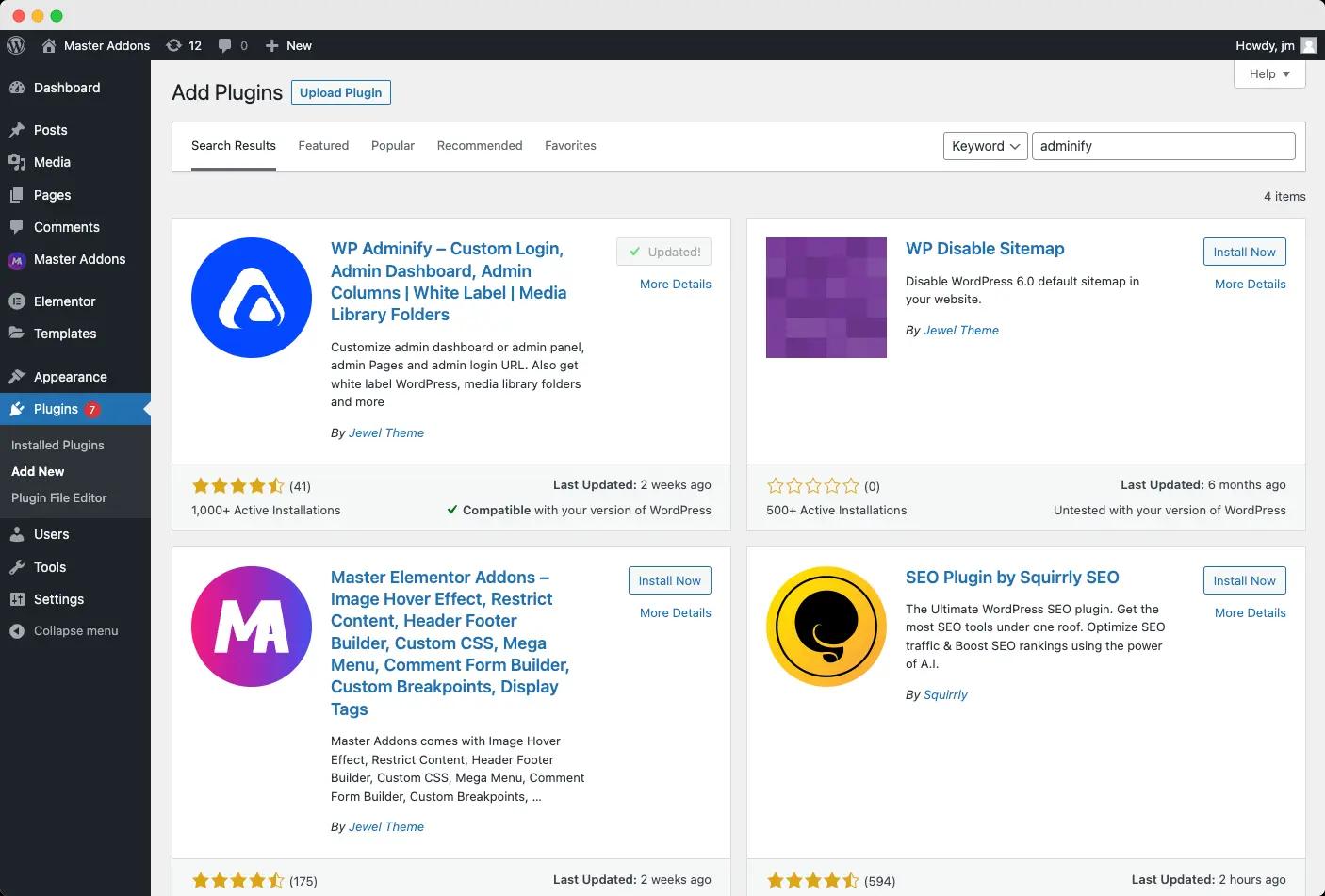
Search for "WP Adminify", install, and activate. The free version has everything you need for this.
Step 2: Navigate to Security Settings
Once activated, go to WP Adminify → Security in your WordPress dashboard.
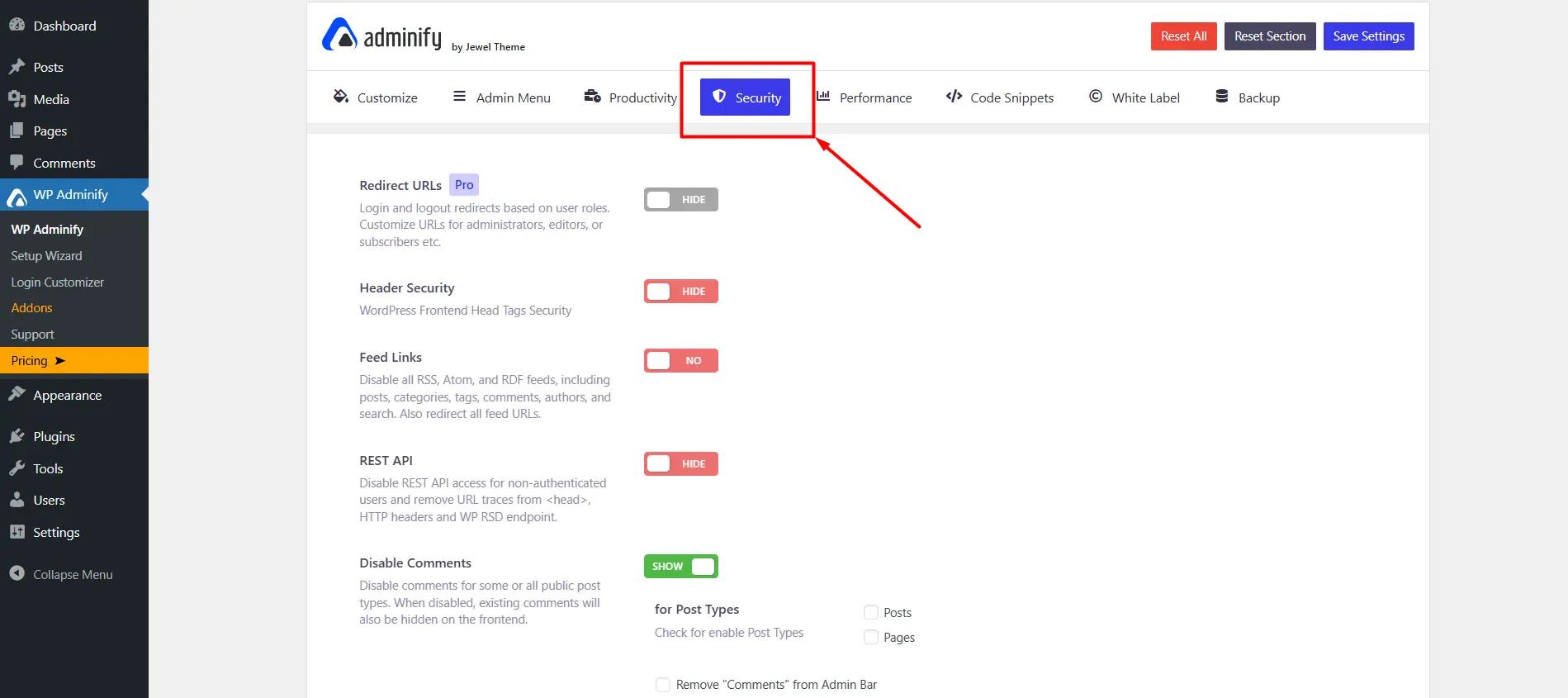
You'll see all security-related options. Scroll down to the comments section.
Step 3: Enable "Remove Website Field"
Find the option labeled "Remove website Field (URL) from comment form template" and check the box.
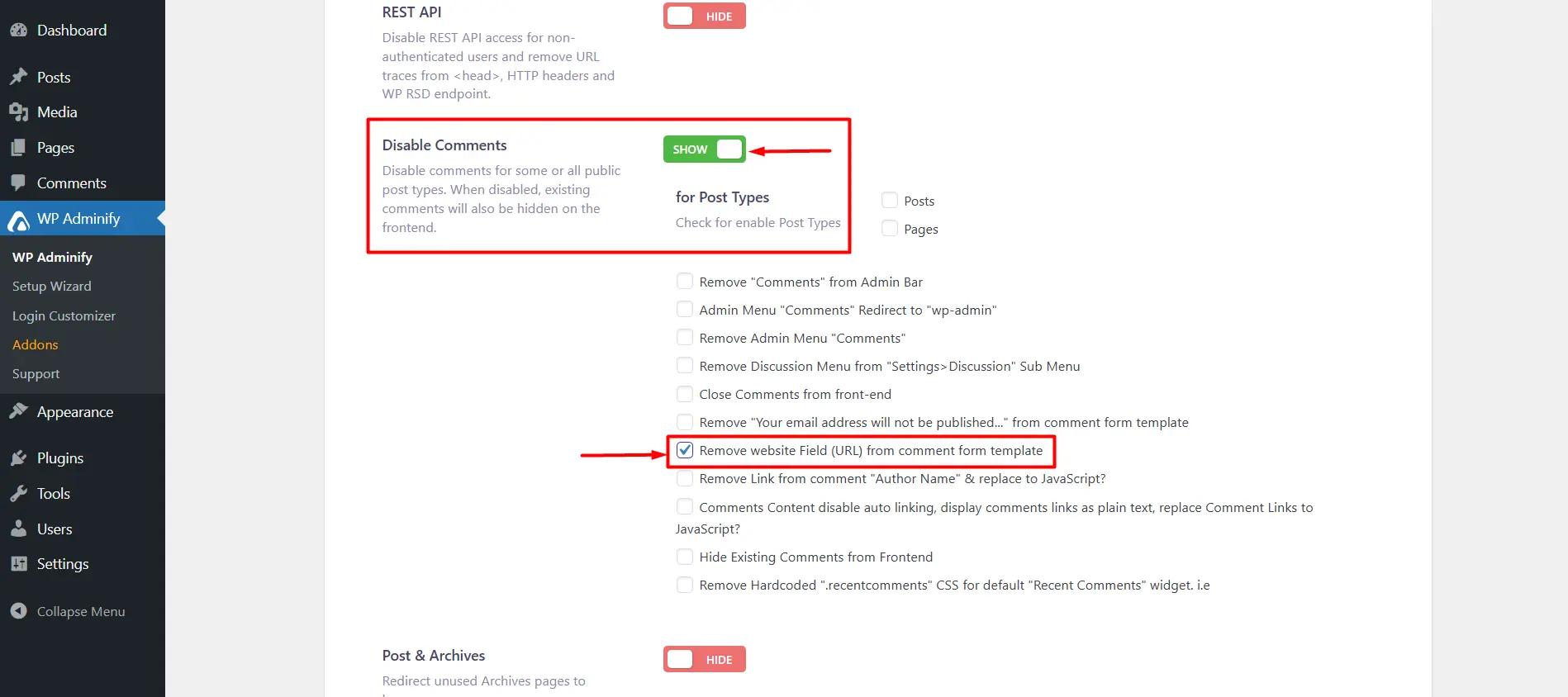
Click Save Settings at the top.
Done. Reload your site and check the comment form - the website field is gone.
Method 2: Remove Website Field Without Plugin (Code Method)
If you prefer code over plugins, add this snippet to your theme's functions.php file or a site-specific plugin:
add_filter('comment_form_default_fields', 'remove_comments_url_field');
function remove_comments_url_field($fields) {
    if (isset($fields['url'])) {
        unset($fields['url']);
    }
    return $fields;
}
Where to add the code:
- Option A: Child theme's
functions.php(recommended - survives theme updates) - Option B: Site-specific plugin (use Code Snippets or similar)
- Option C: Main theme's
functions.php(not recommended - lost on theme update)
⚠️ Important: If you add code directly to your theme's functions.php, it will be lost when you update the theme. Use a child theme or site-specific plugin to make it permanent.
What Happens After You Remove the Website Field?
Here's what changes:
- ✅ Spam comments drop 80-90% - spammers can't get their backlinks
- ✅ Comment quality improves - genuine users still comment normally
- ✅ SEO health improves - no more spammy outbound links hurting your ranking
- ✅ Less moderation time - spend time on content, not spam cleanup
What about existing comments? Old comments with website links stay as-is. This only affects new comments submitted after you make the change.
Got Questions About Removing the Website Field? Here Are the Answers
Will removing the website field from comments affect my SEO?
No, removing the website field won't hurt your SEO. In fact, it often improves it. Search engines may consider excessive spammy links in comments as a negative signal. Keeping the URL field open can lead to low-quality outbound links. And this might harm your site's ranking over time. Removing it ensures your comment section stays clean and free from unnecessary link spam. which ultimately benefits your SEO health.
What happens to old comments that already have a website link?
Removing the website field only affects new comments submitted after the change. Existing comments with website links will remain as they are unless you manually edit or delete them.
Which is better: removing the website field with a plugin or code?
It depends on your comfort level. If you're a beginner or don't want to deal with code, using WP Adminify is the easiest and safest option. you just mark a checkbox, and it's done. If you're an advanced user who prefers to keep things lightweight and avoid extra plugins, the code method is a great alternative. Both options achieve the same result, so it comes down to personal preference.
Can I re-enable the website field later if I change my mind?
Absolutely. If you used WP Adminify, simply uncheck the option in the settings and save changes. If you used the code method, just remove or comment out the code from your functions.php file. The website field will instantly return to your comment form. This flexibility makes it easy to test both approaches and see what works best for your audience.
Does removing the website field work with all WordPress themes?
Yes, both methods work with any WordPress theme that uses the default comment form. Some highly customized themes may have custom comment forms - in that case, you may need to adjust the code slightly. But for 99% of themes, this works out of the box.
Will this break my comment form or affect user experience?
No. The comment form will still work normally - users can still leave name, email, and comment. They just won't see the website URL field. Most genuine commenters don't use it anyway, so UX actually improves (fewer fields = less friction).
Final Thoughts
The website field in WordPress comments is a spam magnet. Removing it takes 2 minutes and saves you hours of moderation.
Quick recap:
- Install WP Adminify (free)
- Go to WP Adminify → Security
- Check "Remove website Field from comment form"
- Save settings
- Watch spam comments drop 80-90%
Your comment section will be cleaner, your SEO will be healthier, and you'll spend less time fighting spam.
Need help? Drop a comment below if you run into issues. We're here to help.
Want more WordPress tips? Check out our blog for guides on dashboard customization, white labeling, and plugin comparisons.