

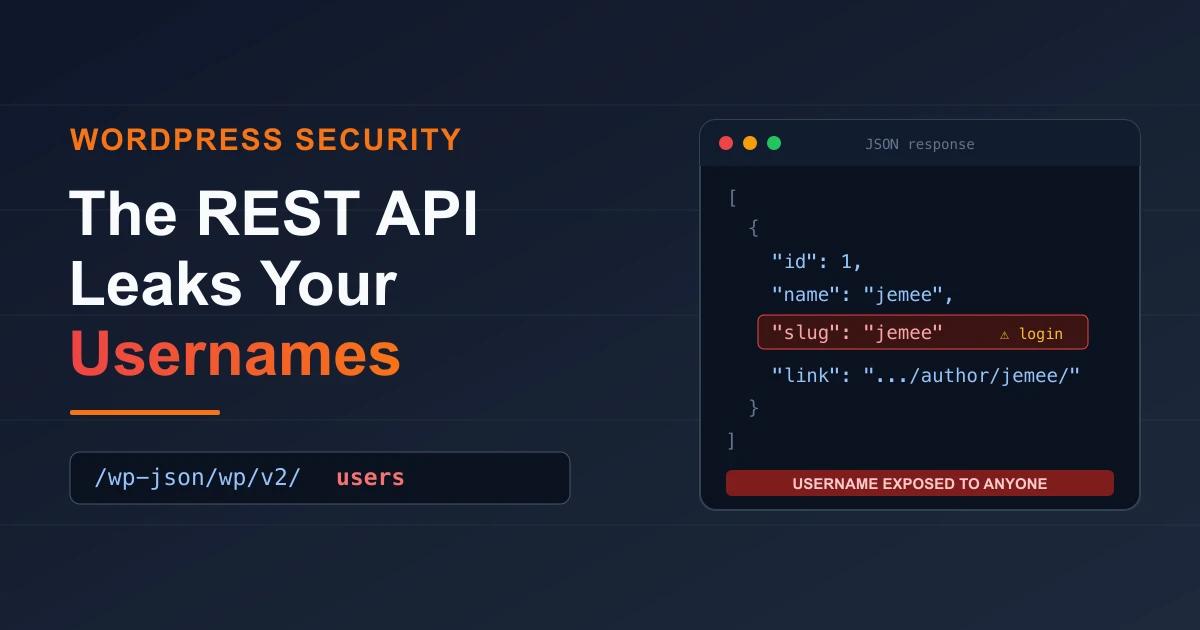

Type yoursite.com/wp-json/wp/v2/users into any browser and hit enter. On a default WordPress install, you'll usually get back a block of JSON listing every author on the site: display names, IDs, and a slug that on most sites is the exact username someone types to log in. No password. No login. No tooling. WordPress hands your author list to anyone who asks, and the endpoint is on out of the box. This guide walks through how the leak works, why a leaked username is a real security problem and not a cosmetic one, and how to close it. You get both routes: a couple of lines of code, or a single toggle in WP Adminify's security panel.
What is the WordPress REST API?
The WordPress REST API is a built-in interface that lets applications read and write your site's data over HTTP as JSON, instead of loading full web pages. It has shipped enabled by default on every install since WordPress 4.7 (December 2016), living under the /wp-json/ path. The block editor, mobile apps, headless front ends, and a lot of plugins lean on it to fetch posts, pages, media, and users.
That's the useful half. The catch is that a few of these endpoints are readable by visitors who aren't logged in at all. The users endpoint is the one this article cares about. It exists so a headless site can display author bylines, but the side effect is that it publishes your author list to the open internet. If you run a normal blog or brochure site that never calls the API from an outside app, you get the exposure and none of the benefit.
The full endpoint reference lives in the official WordPress REST API Users handbook. Worth knowing: listing users is documented, intended behaviour, not a bug. That's the reason most site owners never think to close it.
How the REST API leaks your usernames
User enumeration through the REST API means pulling a site's valid account names from a public endpoint without logging in. On WordPress it happens two ways, and both work in a plain browser.
The full author list
Request the collection endpoint and you get back every user who has published content:
https://yoursite.com/wp-json/wp/v2/usersThe response is a JSON array. Three fields per author do the damage:
id- the numeric user ID. User 1 is usually the original admin.name- the public display name.slug- the author slug. On most sites this is identical to the actual login username, because WordPress builds the slug from the username unless someone changes it by hand.
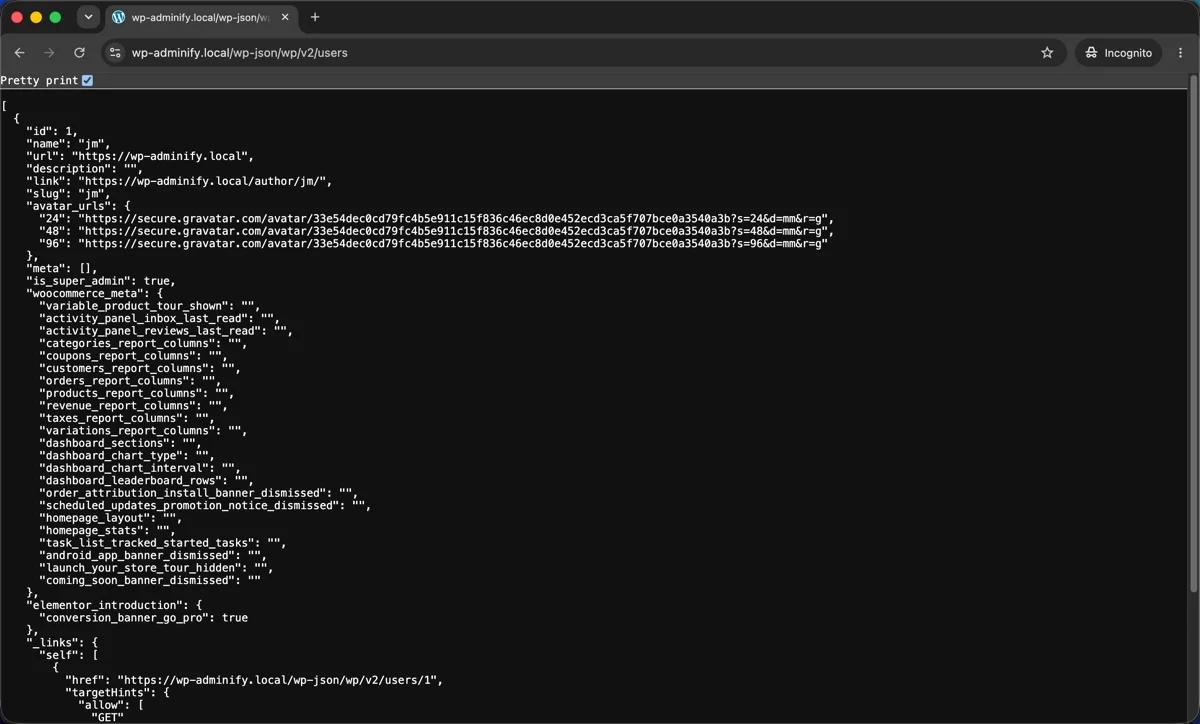
The screenshot above was taken in a private browser window with nobody logged in. The endpoint returns "id": 1, "name": "jemee", and the one that matters, "slug": "jemee", plus an author link of /author/jemee/. The slug is the leak. Here jemee is the real login username for the site's first admin. An attacker no longer has to guess whether "admin," "jemee," or "editor2" exists. The API confirms it, for free.
Probing a single user by ID
Even when the collection endpoint is partly locked down, you can often still query IDs one at a time:
https://yoursite.com/wp-json/wp/v2/users/1
https://yoursite.com/wp-json/wp/v2/users/2
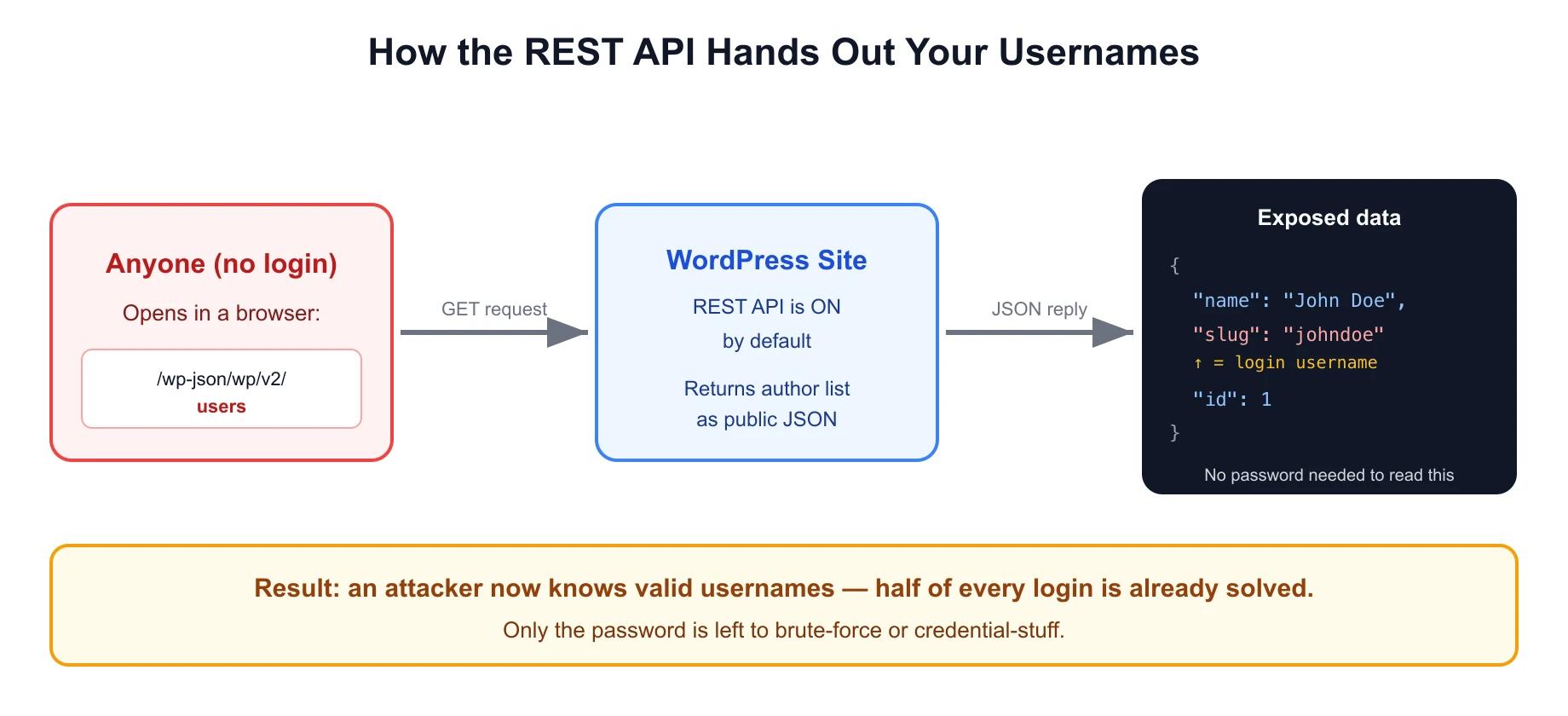
Walk the IDs from 1 upward and you map out the accounts request by request. It's trivial to script. A short loop pulls every username on a site in seconds. Here's the round trip:
Why a leaked username is a real security risk
The common reaction is "so what, the username isn't the password." True, but it misses how account attacks actually run. A WordPress login needs two secrets: a username and a password. The REST API gives away the first one, which turns a two-unknown problem into a one-unknown problem.
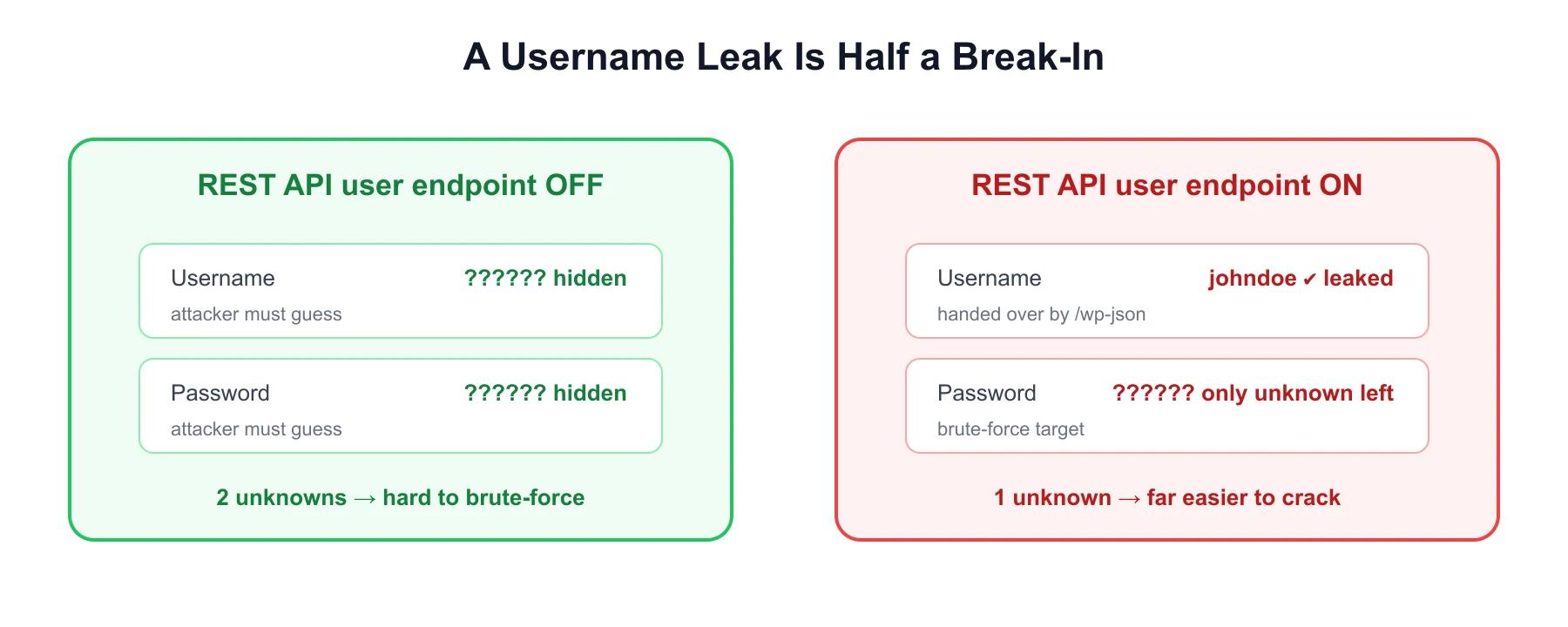
Here's what a confirmed username buys an attacker:
- Targeted brute-force attacks. Instead of guessing username and password together, they lock the username and hammer the password field alone. Automated tools chew through millions of passwords much faster against a known account.
- Credential stuffing. Billions of email and password pairs float around from old breaches. If your username matches a login someone reused elsewhere, a confirmed valid username tells the attacker exactly which stuffing lists to run.
- Spear-phishing. Real display names and roles make a "your account needs verification" email far more convincing to the exact person who can approve it.
- Admin targeting. User ID 1 is nearly always the founding administrator, so that's the account attackers go after first.
None of this guarantees a breach on its own. But hardening is mostly about taking away free wins, and a public username list is one of the easiest wins there is. Pair the leak with a weak password or no two-factor authentication, and the risk stops being theoretical.
Other ways WordPress exposes usernames
The REST API is the loudest leak, not the only one. Close it and leave these open and you've locked the front door while the side door stays ajar:
- Author archive enumeration. Visit
yoursite.com/?author=1and WordPress redirects to/author/realusername/, printing the login name in the URL. Bump the number and you enumerate users the same way the API does. - oEmbed endpoint. The
/wp-json/oembed/1.0/embedendpoint returns anauthor_namefor a given post URL, which tells you who wrote each piece. - Login error messages. Default WordPress replies "The password you entered for the username johndoe is incorrect," which confirms johndoe is a valid account.
So treat username exposure as one problem with a few outlets, not a single endpoint to patch.
Fix it with code (functions.php)
If you're comfortable editing theme files, two hooks shut the main leaks. Drop this in your child theme's functions.php or a site-specific plugin.
First, pull the users endpoints from the REST API for anyone who isn't logged in:
// Block REST API user enumeration for unauthenticated requests
function adminify_block_rest_user_enum( $endpoints ) {
    if ( isset( $endpoints['/wp/v2/users'] ) ) {
        unset( $endpoints['/wp/v2/users'] );
    }
    if ( isset( $endpoints['/wp/v2/users/(?P<id>[\d]+)'] ) ) {
        unset( $endpoints['/wp/v2/users/(?P<id>[\d]+)'] );
    }
    return $endpoints;
}
add_filter( 'rest_endpoints', 'adminify_block_rest_user_enum' );
Next, kill the ?author=N archive redirect so the URL trick stops working:
// Block ?author=N author enumeration
function adminify_block_author_enum() {
    if ( is_admin() ) {
        return;
    }
    if ( isset( $_GET['author'] ) && is_numeric( $_GET['author'] ) ) {
        wp_redirect( home_url(), 301 );
        exit;
    }
}
add_action( 'template_redirect', 'adminify_block_author_enum' );
Common issue: if the block editor starts throwing "cannot load user data" errors after you add the first snippet, the filter is stripping the endpoint for logged-in editors too. Wrap the unset() calls in if ( ! is_user_logged_in() ) so authenticated users keep API access and only the public loses it. The cost of the code route is maintenance. Every snippet is one more thing to retest on each WordPress core update, and one typo white-screens the site.
Fix it with WP Adminify (no code)
If you'd rather not touch functions.php, WP Adminify gives you the same protection as a single toggle in its security module. The exact path:
- In your WordPress dashboard, open WP Adminify > Settings.
- Select the Security tab from the module list.
- Find the REST API section and flip its master switch to SHOW to reveal the options.
- Tick Disable REST API. This blocks REST API access for non-authenticated users and strips the API URL traces from your
<head>, HTTP headers, and the WP RSD endpoint, which closes the enumeration hole without breaking the editor for logged-in users. - Optionally tick Remove "X-Powered-By:..." from Server Response HTTP headers to hide server fingerprinting details as well.
- Click Save Settings in the top right. Adminify keeps showing a "You have unsaved changes, save your changes!" banner until you do, and the toggle isn't live until it's saved.
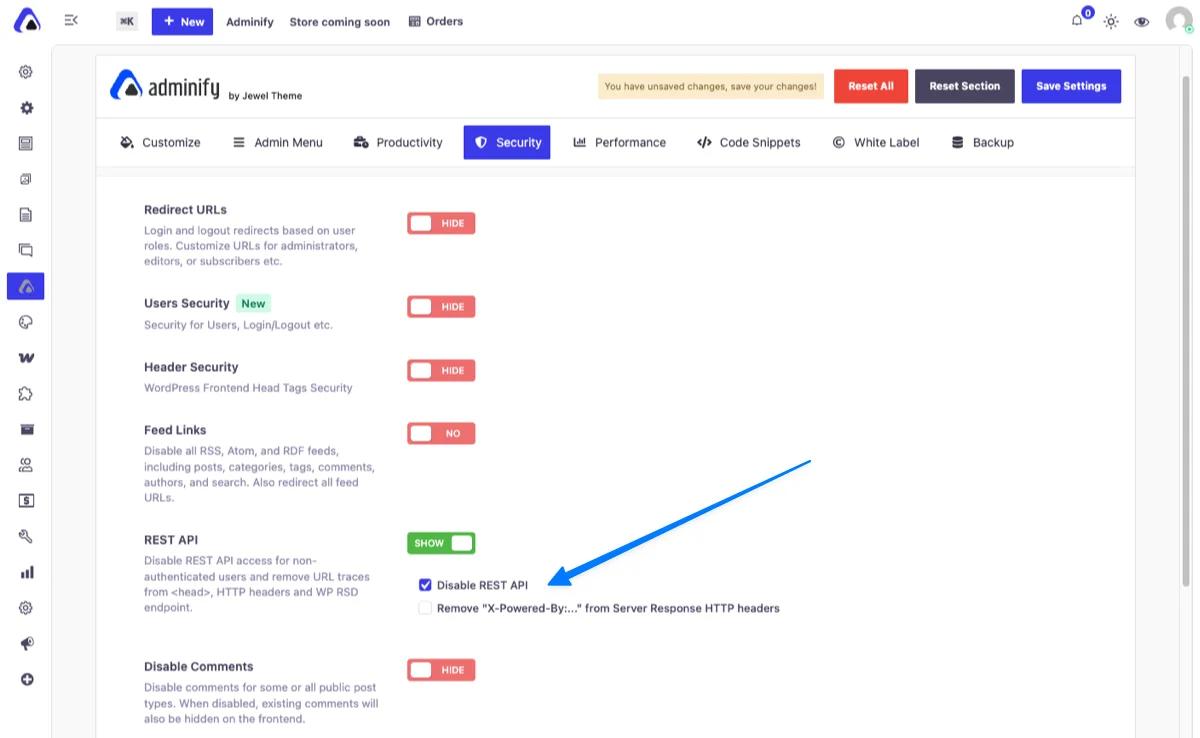
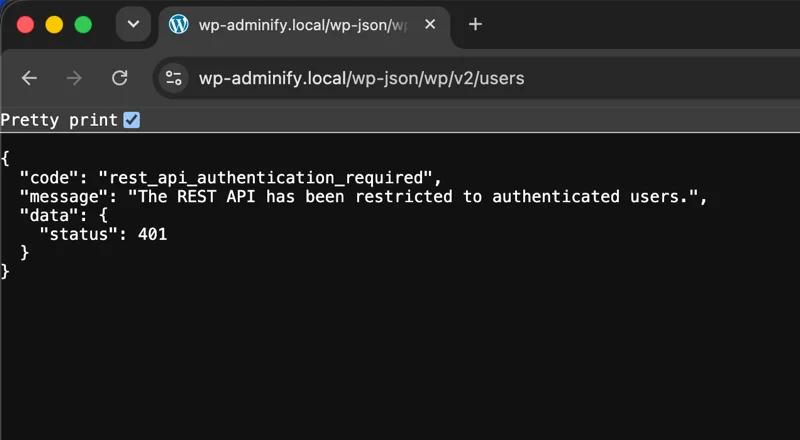
Because Adminify only disables the API for non-authenticated visitors, the block editor, your logged-in team, and any authenticated integrations keep working. The public just stops receiving the user list. Save it, then reload yoursite.com/wp-json/wp/v2/users in a private window. Instead of the JSON author list, the endpoint now returns an error:
{
  "code": "rest_api_authentication_required",
  "message": "The REST API has been restricted to authenticated users.",
  "data": {
    "status": 401
  }
}
The 401 status and that message are the confirmation. The slug jemee, the author list, and the ID probe all stop responding to anonymous visitors, and your logged-in editor still has full access.
How the two routes stack up:
| Factor | functions.php code | WP Adminify toggle |
|---|---|---|
| Setup time | ~15 min + testing | Under 1 minute |
| Risk of breaking the site | Syntax error can white-screen | None, reversible toggle |
Blocks ?author=N too | Only with a second snippet | Covered by the security module |
| Survives theme switch | No (lives in theme) | Yes (plugin-level) |
| Non-developer friendly | No | Yes |
The security tab keeps related hardening in one place: changing the login URL, disabling XML-RPC, and controlling the Heartbeat API. That's the point of turning one plugin on instead of stacking a single-purpose plugin for each gap.
Should you disable the REST API entirely?
Be deliberate here. The REST API is genuinely useful, and switching it off blindly breaks things. Disable public access when:
- Your site is a normal blog, portfolio, or business site that no outside app talks to.
- You don't run a headless front end, a companion mobile app, or a third-party service that reads your content over the API.
- You want to shrink the attack surface and stop username enumeration.
Keep it on, and lock down only the users endpoint, when:
- You run a headless or decoupled setup (Next.js, Gatsby, a mobile app) that fetches content through
/wp-json/. - A plugin or outside integration depends on public API reads. Contact forms, some SEO tools, and page builders sometimes do.
The safe middle ground is exactly what Adminify's "disable for non-authenticated users" option does. Authenticated requests still flow, so the editor and legitimate integrations keep working, and anonymous enumeration stops. One more step worth doing whatever you decide about the API: if your author slug still matches your login, change the WordPress username or set a distinct display name so the two never line up. The full security feature set covers the rest of the hardening toggles.
WordPress REST API Security FAQs
Does the WordPress REST API expose passwords?
No. The REST API never returns passwords or password hashes to unauthenticated requests. It exposes usernames, display names, and user IDs through the users endpoint. The risk is that a confirmed username removes half of what an attacker needs, which makes password-guessing attacks much more effective.
Will disabling the REST API break my WordPress site?
It can if you're careless about it. The block editor and plenty of plugins use the API internally. The safe move is to disable it only for non-authenticated (logged-out) visitors, which is what WP Adminify's Disable REST API option does. Logged-in users and the editor keep full access while anonymous enumeration is blocked.
How do I check if my usernames are already leaking?
Open an incognito window and visit yoursite.com/wp-json/wp/v2/users. If you see JSON with name and slug values, your usernames are public. Then test yoursite.com/?author=1. If it redirects to a /author/username/ URL, that's leaking too.
Is the author slug always the same as the login username?
Not always, but often. WordPress builds the author slug from the username by default, so unless you or a security plugin changed it, the leaked slug is your real login name. Setting a different display name and nickname doesn't change the slug on its own.
Does disabling REST API help SEO or performance?
A little. Removing the API's URL traces from your and HTTP headers trims a bit of markup and hides server fingerprinting, but the real payoff is security, not ranking or speed. Treat it as a hardening step, not an SEO tactic.
Conclusion
The REST API leaks usernames because a public, unauthenticated endpoint was built to serve author data, and on most sites that data includes the exact login names attackers want. The upside is that closing the hole is quick:
- The
/wp-json/wp/v2/usersendpoint and the?author=Nredirect both hand valid usernames to anyone. - A leaked username turns a two-secret login into a one-secret target, which powers brute-force and credential-stuffing attacks.
- You can block enumeration with a couple of
functions.phphooks, or with one toggle in a security plugin. - Disable public API access only if no outside app depends on it. Otherwise restrict it to authenticated users.
If flipping a switch beats maintaining code for you, WP Adminify's Security module disables REST API access for non-authenticated users and cleans the related traces from your head and headers in one click. The full WP Adminify security toolkit closes the rest of the common WordPress leaks in the same spot.
Closing off enumeration is one piece of a dashboard you actually control. If you are tidying the admin more broadly - menus, widgets, roles, and branding - the full WordPress dashboard customization guide walks through every method, and agencies handing finished sites to clients should read the white label WordPress guide next.
Your email address will not be published