


WordPress is the most used CMS (Content Management System) right now in 2025. Because it's one of the easiest CMS to use after they introduced Gutenberg blocks back in December 6, 2018 in WordPress version 5.0.
But, easy doesn't always mean less work. Doing the same thing over and over again to maintain your website is hectic. And how do I know this? Because I manage more than 5 websites on a regular basis.
Jumping to sections frequently can be a bit of hassle. Why so? With loading speed and time doesn’t always stay the same, and for larger websites this loading time might increase on the backend. And this will surely hamper your workflow and might distract from the thing you were planning to do.
So, what can be a solution? Our developers brainstormed and came up with a brilliant idea. A floating menu!
Yes, a floating Quick Menu in WordPress dashboard can help you with solving the issue quite easily. WP Adminify brings you the Quick Menu and today I am going to tell you all about it.
So, let's continue before I get distracted into the void.
What Is the WP Adminify Quick Menu for WordPress?
So, you’re here for more information? Duh! Okay Okay let me tell you. The WordPress Quick Menu is a floating dashboard menu in the WordPress backend.
Didn’t quite get that? Okay, let me explain. It's a floating pop up menu that lets you pin your most used pages, links or paths. It’s like a widget style icon at the bottom right of your dashboard. It stays hidden and silent until you hover your mouse over it. Once you do, it reveals your customized menu items. Which you have previously set from the WP Adminify’s Quick Menu settings.
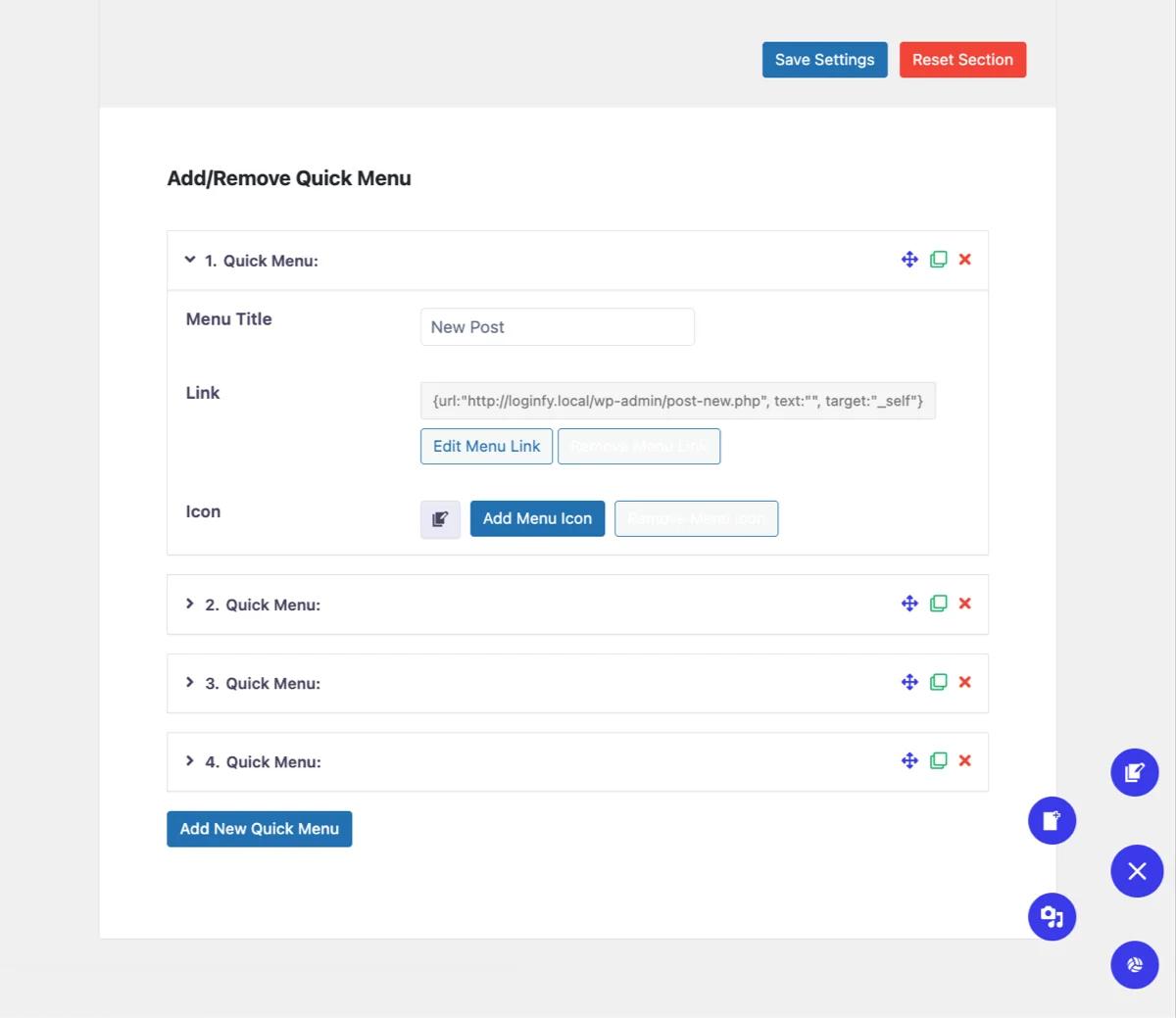
The cool thing is that you can add unlimited menu items and organize them as per your needs. But, if you hear me out, don’t overdo stuff. Keep the quick menu items minimal and use only the most useful URLs, paths or links for easier navigation.
With WP Adminify’s Quick Menu, you can:
- Add unlimited quick-access links
- Use icons for visual navigation
- Supports internal or external URL
- Set link target to same tab or new tab.
Oh, I forgot to mention that it supports every theme and plugin available in WordPress. Full compatibility means better response.
Why Is a Quick Menu in WordPress Dashboard Useful?
So, there are a few major reasons, you will have to suffer if you’re using WordPress. Let me note down and share them all.
Limited Navigation: If you’re writing posts in the full-screen editor, the default WordPress interface restricts quick access to other admin areas. For example, going to the default WordPress media library. WP Adminify’s quick menu solves this by providing instant navigation options without leaving the editor.
Time-Consuming Menu Search: Suppose you own a company. THus, you need to maintain a site. And as I’ve mentioned earlier, you’ll need multiple plugins to fulfill your needs. And because of that WordPress dashboards can become crowded with menus and submenus. Searching for a specific setting or page will be tough. The quick menu gives you instant access to important links in just a click.
Customization Limitations: The default WordPress admin menu offers limited customization. The Quick Menu gives you the freedom to customize your navigation. It saves you time while adding icon based quick navigation with a floating menu.
WP Adminify gives you a modern age solution that helps you with easier navigation. While keeping it friendly and customizable.
Key Features of the WordPress Quick Menu by WP Adminify
Let’s see what features WP Adminify gives you with the quick menu.
- Floating Sticky Menu: Always visible and accessible on any admin page, including editors and plugin settings.
- Unlimited Custom Menu Items: Add as many quick links as you want, with the ability to edit titles, URLs, and icons.
- Rich Icon Library: Choose from over 300 icons including WordPress Dashicons, Themify, and Simple Line Icons to visually identify menu items quickly.
- Link Target Control: Customize how each menu item opens, enhancing multitasking.
- Menu Duplicator: Easily clone existing menus or menu items to speed up setup and maintain consistency across sites or user roles.
How to Create WP Adminify Quick Menu in WordPress Dashboard
Now, let me give you a quick guide on how you can create and use the WP Adminify Quick Menu in WordPress. The setup is very simple.
Firstly, you need to install and activate the WP Adminify plugin. I’ve written a documentation about how to install and activate WP Adminify. Check it out to get a step by step guide, in case you forgot how to do it.
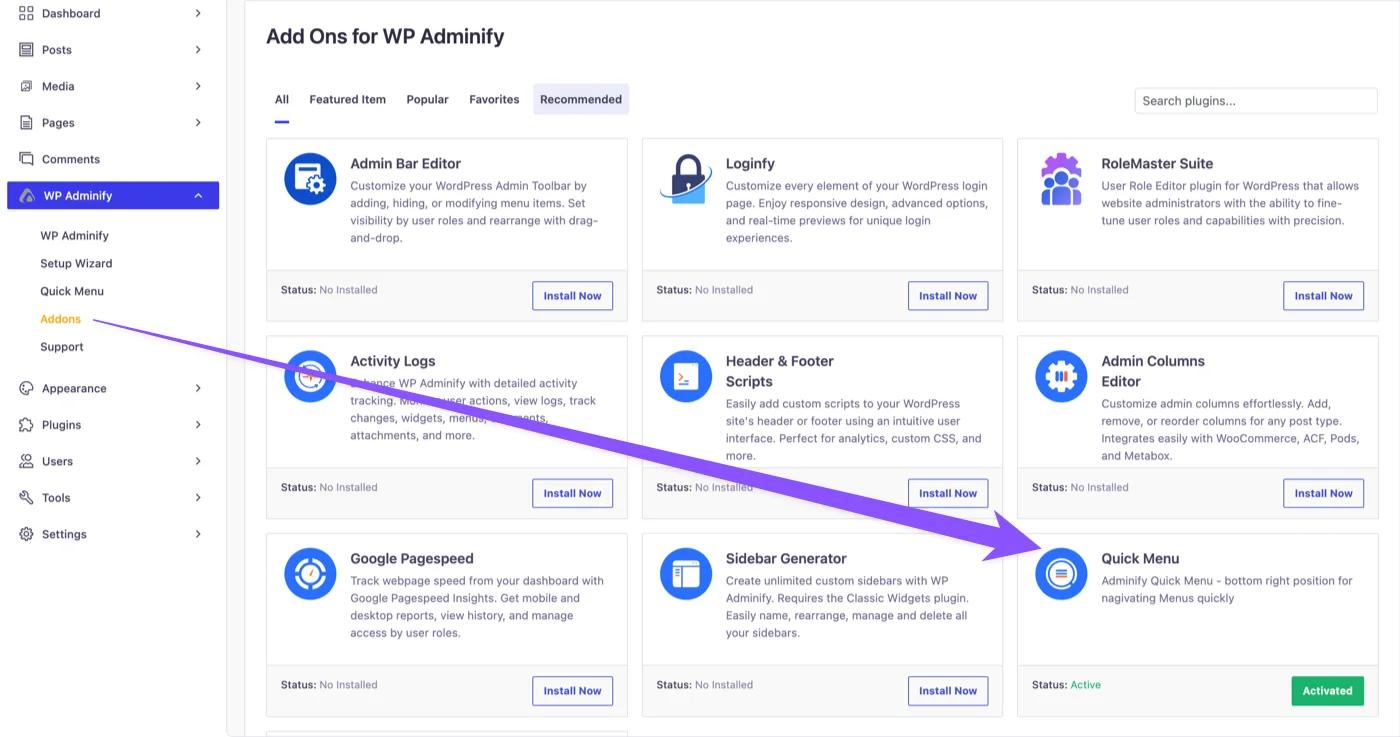
Then, you need to enable the Quick Menu addon. Just go to this path: WP Adminify → Addons. Look for the Activity Log and click to install it.
WP Adminify has some more addons. Be sure to check them all by clicking here. You’ll be surprised to learn how much customization you can do.
Now, go to this path: WP Adminify → Quick Menu from the WordPress Dashboard. You will see 3 (three) sample menu items are already added by default. You can easily modify or remove them.
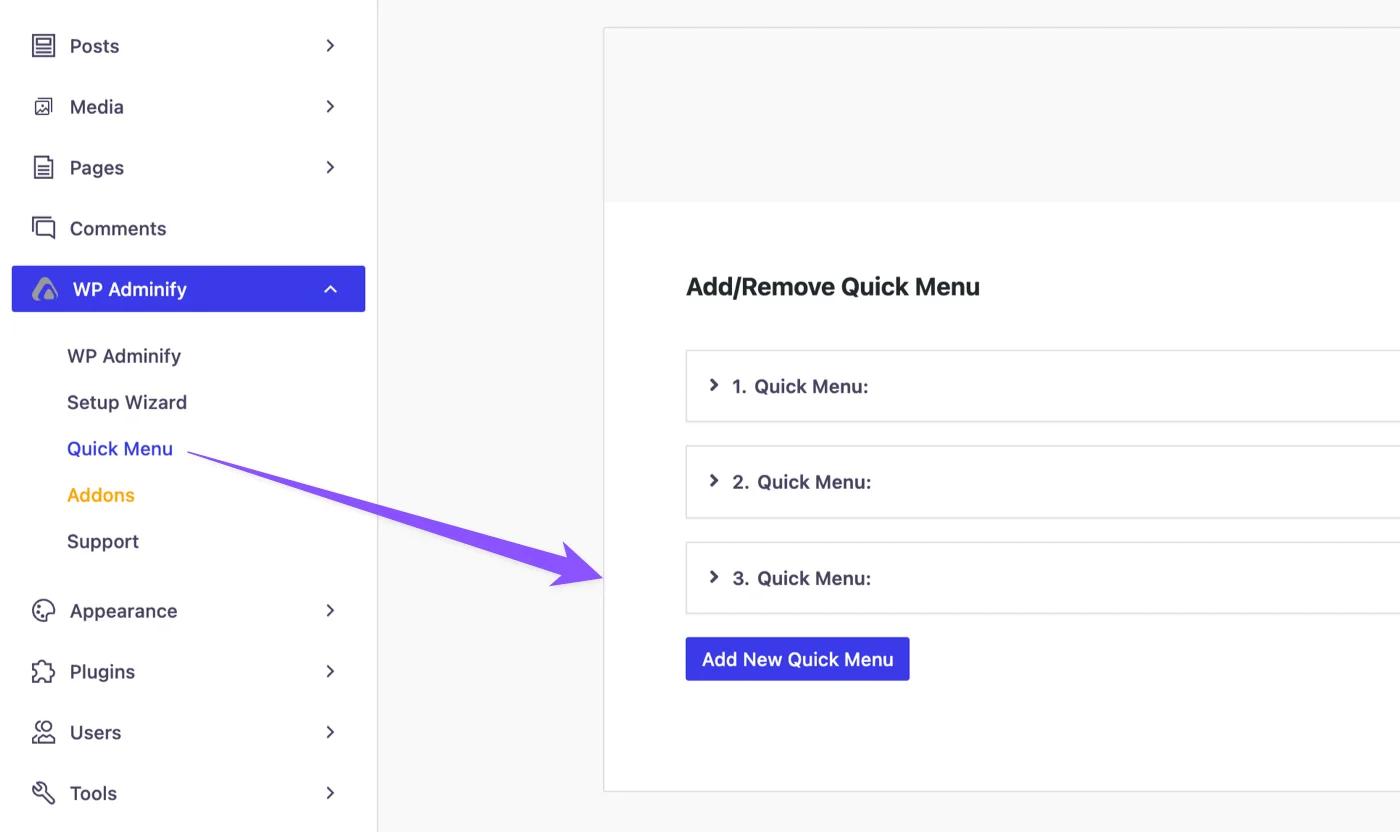
Also, if you have a PRO version of Quick Menu, you can add unlimited menu items by clicking the “Add New Quick Menu” button.
Get your copy of the Quick Menu Premium Version Now!
Okay, let me continue how you can customize the quick menu. All you need to do is to click on an existing menu item to expand it. Once expanded, you can do the following customization:
- Set a Menu Title (Name of the menu)
- Add a URL (Link of the menu)
- Select an icon from the built-in library
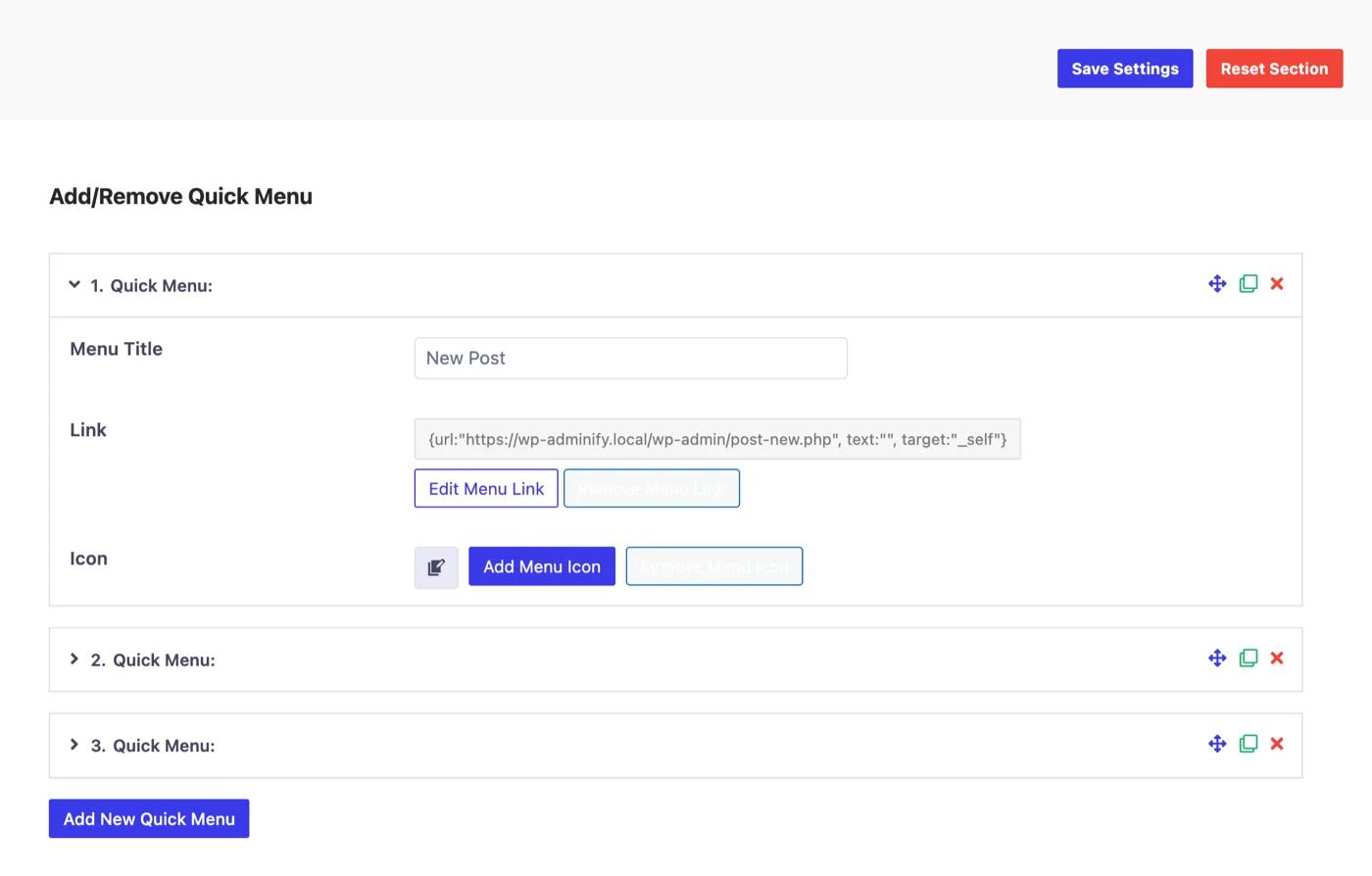
Also, you can easily copy and delete any existing menu with the dedicated buttons. You can also sort menu items with the menu dragger.
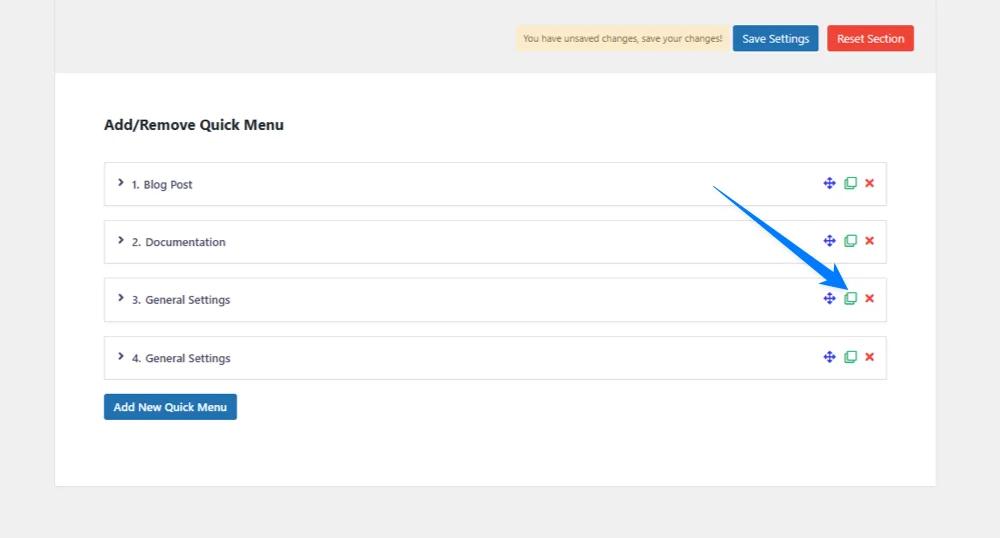
Once you’re done with your setup, don’t forget to click the Save Settings button to enable it. The quick menu should appear in your dashboard by now. But if it isn't, just refresh the page and it will come alive.
We also have a step by step step documentation for the settings. Be sure to check it out too!
Get Quick Menu PRO | Read Full Documentation
Our developers made the setup process very easy. You won’t require any coding skills. We are bound to serve every client, no matter developers or first time users. We always try to make it accessible for all WordPress users across the globe.
What are the Benefits of WP Adminify’s WordPress Quick Menu?
We have asked our users who are using this feature, and here’s what they told us:
- It improves productivity by reducing clicks
- No more time wasted searching for userful pages.
- Gives a stable performance without slowing down the admin panel.
- Full compatibility with the latest WordPress versions and all themes+plugins.
Here’s how different types of users can get benefit from:
Developers
- Instant access between settings, tools, and dev pages.
- Pin commonly used plugin or theme panels.
- Speed up troubleshooting and testing workflows.
- Reduce repetitive clicks when switching environments.
- Organize custom dev tools and staging URLs in one place.
Content Farms
- Rapid access to post editors, media, and categories.
- Create quick links for bulk publishing.
- Cut down time spent navigating multiple sites.
- Assign separate quick menus for different content roles.
- Increased navigation speed with fewer dashboard delays.
Agencies and Freelancers
- Build client-specific quick links for easier onboarding.
- Reduce dashboard clutter and support requests.
- Save time by duplicating menus across projects.
- Centralize external tools like analytics or CRM links.
- Improve client UX with a simplified, guided dashboard.
Conclusion
Okay, now you’ve reached the end of this article. The WP Adminify’s Wordpress Quick Menu isn’t just some fancy add-on. It’s a smart, time-saving solution built for real WordPress users who deal with the dashboard lags daily.
It brings everything you need into one place. No more digging through endless menus. No more wasting time waiting for pages to load. Just click and get things done faster.
And the best part? It’s super easy to set up. Install, customize, save and it's ready.
So if you’re someone who values speed, and gets bored of the endless loading, WP Adminify’s Quick Menu is your new best friend. Try it once, and it’ll be your everyday things just like Ash’s Pikachu.
Your email address will not be published