
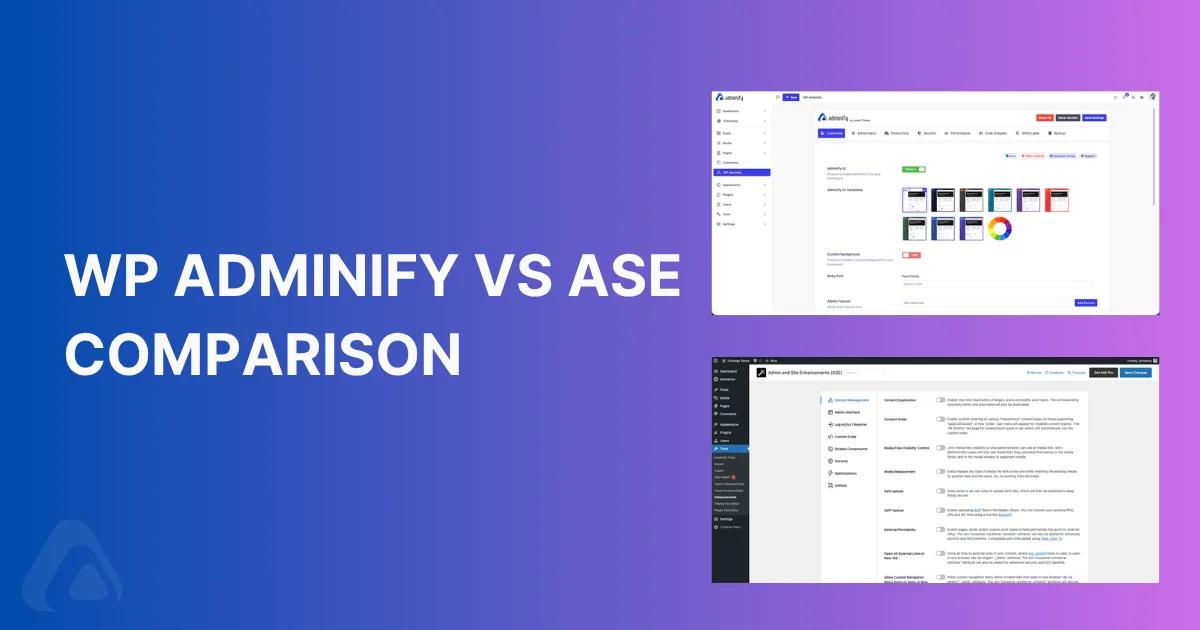

Short answer: WP Adminify is the better pick if you want a visually branded WordPress dashboard - custom UI templates, dark mode, drag-and-drop menu editor, and a pixel-perfect login page for client dashboards. ASE is the better pick if you want a backend toolkit - 57 free modules that replace a dozen single-purpose plugins (2FA, CAPTCHA, code snippets, form builder, custom post type and taxonomy registration).
Both plugins shipped their last update this month (the current version of WP Adminify is 4.1.10 on April 11, ASE 8.6.2 on April 13, 2026), so you're not choosing between an abandoned project and an active one. You're choosing between two philosophies of what a WordPress dashboard plugin should do - and this post will simplify that decision. To help you choose the right WordPress plugin, I've organized the features you need side-by-side, compared pricing, and flagged where each tool lands for WordPress development, site management, and custom WordPress dashboard work.
I build the WP Adminify plugin as part of the Pixar Labs team, so I'm biased - but I've also installed ASE on three client sites this year to stress-test the comparison. This post is the head-to-head I wish existed when clients ask "which one should I buy?"
WP Adminify vs ASE at a Glance
| WP Adminify | ASE (Admin and Site Enhancements) | |
|---|---|---|
| Best for | Agencies, white-label dashboards, branded client experiences | Plugin consolidation, backend hardening, developer workflow |
| Founded | 2021 | 2022 |
| Latest version | 4.1.10 (Apr 11, 2026) | 8.6.2 (Apr 13, 2026) |
| Author | Liton Arefin | Bowo |
| Free modules | 60+ in the free version | 57 free modules |
| Pro modules | Addons incl. Loginfy, Activity Logs, RoleMaster Suite | 17 Pro-only + 31 with Pro extensions |
| Dark mode | Yes (with auto-schedule) | No |
| UI templates / skins | Light, Dark, Gradient, Glass | None |
| Drag-and-drop menu editor | Yes | Reorder only (no new custom menu items in free) |
| Login page customizer | Loginfy - template-based designer | Pro-only, simpler |
| Media folders | Yes (native drag-and-drop) | Media Categories (Pro) |
| Activity log | Yes (via addon) | No |
| Quick Menu / Spotlight search | Yes | No |
| Pricing (Personal) | $49/yr | $39/yr |
| Lifetime deal | Available | $99–$599 LTD tiers |
Verdict at a glance: If your first thought is "how does my admin look," pick WP Adminify. If your first thought is "how many plugins can I delete," pick ASE.
What is WP Adminify?
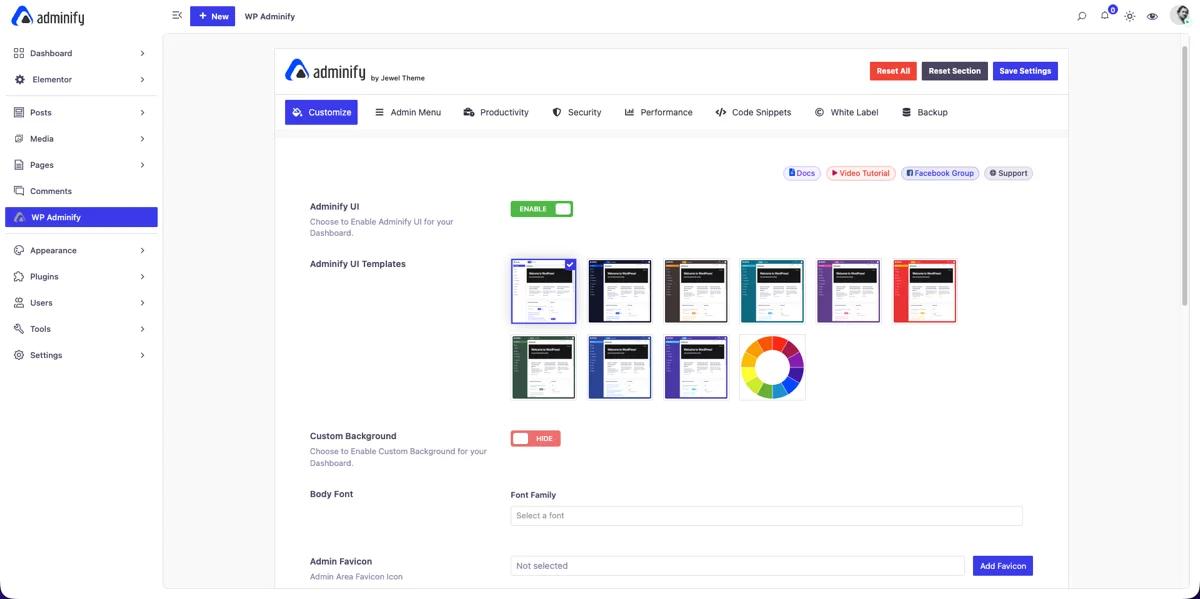
WP Adminify is a WordPress admin customizer and plugin designed for agencies and freelance developers who ship a wordpress site to clients. It's the go-to plugin for anyone who needs to optimize your wordpress admin without writing a single line of code. The point of the plugin is not to add features for site visitors - it's to transform the WordPress admin experience so the person logging in (you, your team, or your client) spends less time hunting and more time working.
WP Adminify provides a single admin page where you control every module. The free version on the WordPress.org plugin directory ships with over 60 features: admin menu editor, admin bar editor, dashboard widget control, dark mode, login page tweaks, and the full white-label foundation. WP Adminify includes a drag-and-drop dashboard widget panel that lets you add custom RSS or iframe widgets, plus native tools to customize admin columns for every post type. The Pro version of WP Adminify unlocks deeper addons like Loginfy (template-based login designer for the wordpress login experience), Activity Logs, RoleMaster Suite, and admin columns editing for WooCommerce and any custom post type.
Who WP Adminify is built for
- WordPress agencies handing sites to non-technical clients
- Freelance developers who want a branded admin instead of the default WordPress look
- Power users running multi-site networks who want a consistent admin experience
- WooCommerce store owners managing products through custom admin columns
What WP Adminify is not
- It's not a security plugin. There's no 2FA module, no brute-force limiter, no malware scanner. Pair it with a dedicated security plugin.
- It's not a form builder. You still need Gravity Forms, Fluent Forms, or WPForms.
What is ASE (Admin and Site Enhancements)?
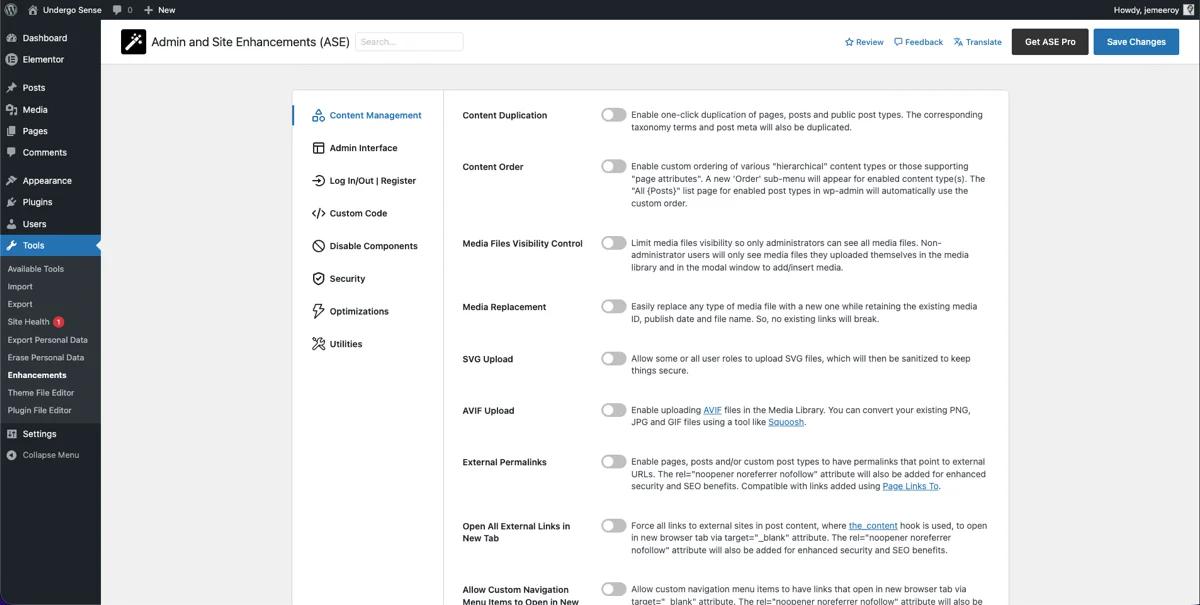
ASE stands for "Admin and Site Enhancements," and the name gives away the philosophy - it's not one tool, it's dozens stuffed into a single plugin. Built and maintained by a single developer named Bowo since October 2022, ASE has shipped 276 releases (as of version 8.6.2) and sits at 200,000+ active installations with a perfect 5.0 rating across 403 reviews on WordPress.org.
The pitch: instead of installing separate plugins for duplicate posts, SVG upload, custom admin CSS, limit login attempts, CAPTCHA, 2FA, redirect manager, code snippets, file manager, and a form builder, you install ASE once and toggle the modules you need. Users in the WordPress subreddit routinely report replacing 10–14 plugins with it.
ASE's other selling point: it's the most-cited WordPress admin enhancement plugin in Reddit threads, consistently praised in "adminify is good but..." posts where commenters suggest ASE as a complement. The plugin offers dozens of toggles in one Settings panel, which is a real productivity enhancement for anyone who customizes the wordpress admin weekly.
ASE module categories
- Content Management - custom content types, content duplication, media categories, SVG and AVIF upload, external permalinks
- Admin Interface - clean admin bar, hide notices, admin menu organizer, admin columns manager, wider admin menu
- Log In / Log Out - change login URL, login page customizer (Pro), login redirects by role, last login column
- Custom Code - code snippets manager (CSS/JS/HTML/PHP), custom admin CSS, insert head/body/footer code
- Disable Components - disable Gutenberg, comments, REST API, feeds, embeds, updates, author archives
- Security - limit login attempts, CAPTCHA (ALTCHA/reCaptcha v2-v3/Cloudflare Turnstile), 2FA with TOTP, email obfuscation
- Optimizations - image upload control with WebP conversion, revisions control, heartbeat control
- Utilities - SMTP email delivery, form builder (Pro), file manager (Pro), maintenance mode, password protection, redirect manager
Who ASE is built for
- Developers trying to cut their plugin count for performance
- Site owners who want a single Settings panel for dozens of admin tweaks
Feature-by-Feature Comparison
| Feature | WP Adminify | ASE |
|---|---|---|
| Admin menu editor (drag & drop) | ✅ Full drag-and-drop with role rules | ⚠️ Organizer (reorder, rename, hide); add custom items in Pro |
| Admin menu custom icons | ✅ Dashicons + SVG upload | ⚠️ Pro only |
| Admin bar editor | ✅ Full editor (addon) | ✅ Clean Up + Custom Elements (Pro) |
| Dashboard UI templates (skins) | ✅ Light/Dark/Gradient/Glass | ❌ None |
| Dark mode (admin) | ✅ Auto-schedule + per-user | ❌ Not included |
| Custom dashboard widgets | ✅ Text, RSS, iframe, Video, Script | ⚠️ Disable only |
| Welcome panel removal | ✅ | ✅ |
| Hide admin notices | ✅ | ✅ |
| Admin columns editor | ✅ (addon) with ACF/MetaBox/Pods | ⚠️ Admin Columns Manager (Pro) with ACF/Meta Box |
| Custom admin CSS / JS | ✅ | ✅ |
| Custom admin footer text | ✅ | ✅ |
| Login page customizer | ✅ Loginfy - 16+ templates | ⚠️ Pro only, simpler |
| Change login URL | ✅ | ✅ |
| Login / logout redirects by role | ✅ | ✅ (separate URL per role in Pro) |
| White label WordPress | ✅ Deep (logo, title, admin bar, favicon, footer) | ⚠️ Admin Logo in Pro |
| Rebrand the plugin itself (for agencies) | ✅ Agency plan | ❌ |
| Media library folders | ✅ Native | ⚠️ Media Categories (Pro) |
| Duplicate posts / pages / CPTs | ✅ | ✅ (role restriction in Pro) |
| Activity log | ✅ Addon | ❌ |
| Google PageSpeed in dashboard | ✅ Addon | ❌ |
| User role editor | ✅ RoleMaster Suite | ⚠️ View Admin as Role + Multiple User Roles |
| Disable comments globally | ✅ | ✅ |
| Heartbeat control | ✅ | ✅ |
| Quick Menu (Spotlight-style search) | ✅ | ❌ |
The pattern you're seeing: WP Adminify wins on presentation and UI transformation; ASE wins on breadth of backend utilities and security. Few features overlap exactly, which is why a lot of agencies end up using both.
Dashboard Customization and Dark Mode
This is the most visible difference between the two plugins, and usually the one that makes the decision for agencies.
WP Adminify ships four UI templates out of the box - Light, Dark, Gradient, and Glass morphism - that completely replace the default WordPress admin skin. I switched a client's dashboard to the Glass template last month and the client's exact words were "wait, is this still WordPress?" You can set custom primary colors, custom admin fonts (the Inter typeface renders well on retina screens), and toggle light/dark mode per user, with optional auto-scheduling that follows sunrise/sunset or system preference. If you need to create custom dashboard layouts for different user roles, WP Adminify lets you drop custom dashboard widgets into each role's view - a simple workflow to customize the admin for editors, subscribers, and WooCommerce customers separately.
ASE doesn't touch the admin's visual design at all. The wordpress admin area still looks like vanilla WordPress after you install ASE - because ASE's design goal is to add utility without imposing an aesthetic. If you're running a dev site and you want dark mode badly, pair ASE with a dedicated dark-mode plugin, because ASE won't do it. ASE also doesn't offer dashboard UI skins or custom admin bar themes; its enhancements are functional, not visual.
Bottom line for this category: WP Adminify is the only choice if you care about visual branding. ASE is fine if you're happy with the default WordPress look.
Related reading: WP Adminify Dashboard Customization and Dark Mode feature.
Admin Menu Editor: Drag-and-Drop vs Organizer
Both plugins reorder the WordPress admin menu. The difference is how far they go.
WP Adminify's admin menu editor
- Full drag-and-drop interface - grab a menu item, drop it in a new position
- Drag a submenu out to promote it to a top-level menu
- Drag a menu out to the "Hidden" column to remove it
- Add custom menu items to create custom admin pages that point to internal WordPress admin URLs, external URLs, or custom admin pages built with Elementor or Gutenberg
- Role-based visibility: show "Posts" to editors, hiding admin items like "Plugins" from subscribers, restrict "Settings" to admins only
- Custom Dashicons or uploaded SVG icons per menu item
- Separators and dividers for visual grouping
ASE's admin menu organizer
- Reorder the existing menu (drag-and-drop)
- Rename menu items
- Hide items
- Adding new custom menu items, always-hiding items for specific roles, and submenu reordering are Pro-only features
For a simple "hide Plugins from subscribers" task, ASE free handles it. For a full custom client dashboard where "Posts" becomes "Articles," "Media" becomes "Assets," and a new "Client Brief" menu links to an Elementor page, you want WP Adminify's admin menu editor. Among WordPress dashboard plugins, this is the clearest functional gap between the two - ASE's free organizer is adequate for reordering; WP Adminify is built to customize admin navigation end to end.
Related: Admin Menu Editor feature page.
Login Page Customizer: Loginfy vs ASE Pro
If you've ever handed off a client site and watched the client log in to /wp-login.php and see a WordPress logo instead of their brand, you know why this module matters.
WP Adminify's Loginfy is a pre-built template library. It's the customizer most agencies use to deliver a branded dashboard for clients alongside a matching login screen. You pick from 16+ login page designs, upload a background image (or slideshow), set your logo, tweak the form's width, border radius, button hover color, and typography - all through a point-and-click UI. You can drop in custom CSS for the last 5% of polish. It's the same approach as page builders like Elementor: start from a template, customize, save.
ASE's Login Page Customizer is Pro-only and takes a different route. It's a flat form with color pickers and a logo upload - simpler, faster to configure, but without templates to start from. You get to a branded login page, just less dramatically.
If the login page is going to be a talking point in your client pitch, Loginfy wins. If you just want the client's logo instead of the WordPress logo, ASE Pro is enough.
White Label WordPress: Who Does It Better?
White labeling is where the agency audience lives. Both plugins try to remove WordPress branding, but the depth differs.
WP Adminify white label covers:
- WordPress admin bar logo replacement and custom admin bar styling (WP Adminify's admin bar editor is an addon in the free version)
- Admin menu logo
- Browser tab title (replace "WordPress" with your brand)
- Admin footer text (remove "Thank you for creating with WordPress")
- Custom favicon for the admin area
- Rebrand the "Howdy" greeting
- Dashboard and login page branding (via Loginfy)
- Rebrand the WP Adminify plugin itself (Agency plan - show your agency's name and logo instead of ours in the plugin list and settings)
ASE's white-label footprint:
- Admin Logo module (Pro) - adds your logo to the admin bar or top of the admin menu
- Custom admin footer text
- Site identity on the login page (uses WordPress's native site icon)
ASE's approach is minimal - it adds a logo and changes the footer. WP Adminify treats white label as a strategy, not a toggle. If your agency's selling point is "we build WordPress sites that don't look like WordPress," the difference is substantial.
Related: White Label feature page and Plugin White Label (agency rebrand).
Security Tools
This is the category where ASE genuinely wins, and I'll say it plainly even as the WP Adminify author: if security-hardening matters to you, ASE has the deeper toolkit.
What ASE offers
- Limit Login Attempts (free) - blocks IPs after N failed attempts
- CAPTCHA Protection (Pro) - integrates ALTCHA (self-hosted, GDPR-compliant, free), Google reCaptcha v2 and v3, and Cloudflare Turnstile across login, password reset, registration, and comment forms (WooCommerce-compatible)
- Two-Factor Authentication (Pro) - TOTP authenticator apps, recovery codes, email-based 2FA, per-role grace periods
- Disable XML-RPC - protects against XML-RPC brute force and DDoS
- Obfuscate Author Slugs - prevents
?author=1username enumeration - Disable REST API for unauthenticated users (Pro) with route-level exclusions
What WP Adminify offers
- Change the login URL (e.g.,
/custom-sluginstead of/wp-login.php) - which stops 95% of automated bot login attempts - Login / Logout redirects by user role
- Disable XML-RPC and restrict REST API access (limited)
- Clean up
<head>- remove generator tags, RSD links, WLW manifests
WP Adminify treats security as a layer, not the main event. ASE treats it as a core module category. If you're evaluating plugins purely on security depth, ASE wins. If you want a branded admin with baseline security and plan to run a dedicated security plugin like Wordfence or Solid Security alongside it, WP Adminify is fine.
Productivity Add-ons
Here's where the two plugins have the least overlap - they each carved out different productivity corners.
WP Adminify's unique productivity features
- Quick Menu - a Spotlight-style keyboard-shortcut command palette. Press a hotkey, type "pages," jump straight to the pages list. Install-on-every-site-level useful if you manage WordPress full-time.
- Activity Logs (addon) - every admin action, login, plugin activation, option change logged with the user, date, and IP. Critical for multi-user sites and site users audits.
- Google PageSpeed Insights inside the dashboard - run PSI without leaving WordPress.
- RoleMaster Suite - full user role editor (create, clone, edit capabilities)
- Media Library Folders - drag-and-drop folder organization for the WordPress media library
- Duplicate Post / Page / CPT - one-click clone
- Admin Color Scheme customization - override the default admin color scheme per user
ASE's unique productivity features
- Form Builder (Pro) - full-featured form builder with 33 field types including NPS, Likert, Matrix, entry management, auto-responder, webhooks to Zapier/n8n
- File Manager (Pro) - a WordPress admin file manager with folder tree navigation and code editing
- Code Snippets Manager (Pro) - CSS, SCSS, JS, HTML, PHP snippets with syntax highlighting and safe mode (replaces the Code Snippets plugin)
- Custom Content Types (Pro) - custom post types, taxonomies, field groups, options pages with Gutenberg + Elementor + Bricks + Oxygen compatibility (ACF Pro alternative)
- Media Categories (Pro)
- SMTP Email Delivery - replaces separate SMTP plugins
- Image Upload Control with WebP conversion (Pro) - resize + convert on upload
- Redirect Manager (Pro) - wildcards, regex
If you're building sites that use custom post types, custom forms, and custom redirects, ASE consolidates those into one plugin. WP Adminify doesn't try to compete in those areas.
Related: Admin Columns Editor, Activity Logs, Media Folders.
Pricing Comparison
| Tier | WP Adminify | ASE |
|---|---|---|
| Free version | 60+ features | 57 modules |
| Entry Pro (annual) | $49–79 (Personal, 1 site) | $39/yr (single site) |
| Mid Pro (annual) | $129/yr (Business, 3 sites + multisite) | Tiered up to $499/yr |
| Agency annual | $249–299/yr (50 sites, rebrand plugin) | - |
| Lifetime deals | Available (check pricing page) | $99 (3 sites) / $149 (10) / $199 (25) / $299 (50) / $399 (100) / $599 (200) |
| Support window | Priority for Pro | 1 year on LTD, then support plan |
| Money-back guarantee | 14 days | Standard |
What this means in practice:
- For a single site, ASE is cheaper ($39 vs $49-79/yr).
- For an agency managing 10+ client sites, ASE's $149 lifetime deal is aggressive - but it doesn't include the UI transformation and branding depth that usually justifies the upsell to clients.
- For a multisite network, WP Adminify officially supports multisite on the Business plan; ASE "works in user reports" but isn't officially supported.
- For plugin rebranding (your agency's logo in the plugin list), only WP Adminify's Agency plan offers it.
Performance and Compatibility
Both plugins are built with modular architecture - you enable only the modules you need, and disabled modules don't load.
WP Adminify loads scripts only on the admin side (not the frontend), so site speed for visitors stays untouched - your site without WP Adminify's admin overhead on public pages is identical in speed. The Adminify settings panel itself is lightweight. Tested against PHP 8.3 and WordPress 6.7+. Compatible with Elementor, Gutenberg, WooCommerce, and most page builders. The Jewel Theme / Pixar Labs team actively patches security issues - for example, CVE-2024-8959 was fixed in the changelog within 48 hours of disclosure.
ASE is explicitly marketed as "lightweight" and the review threads back that up - users consistently mention replacing 10+ plugins without a visible slowdown. Requires PHP 5.6+ (broad compatibility) and tested up to WordPress 6.9.4. Works with Gutenberg, block themes, Bricks, Breakdance, Oxygen, Elementor. ASE does NOT officially support multisite.
Compatibility caveat: Both plugins modify the admin menu and admin bar. If you run both at once, enable the admin menu editor in ONE plugin - not both - or you'll get conflicting order changes. Same rule for admin notices: pick one plugin to manage admin notices and turn the feature off in the other.
When to Choose WP Adminify
Among WordPress dashboard plugins available today, including alternatives like Ultimate Dashboard and UiPress, pick WP Adminify if two or more of these apply:
- You're an agency building client sites and your brand shows up in the admin (logo, footer, login screen, plugin list)
- You need dark mode for your own sanity during late-night work sessions
- You care about admin design - templates, custom fonts, custom colors
- You need a drag-and-drop menu editor with role-based visibility out of the box in the free tier
- You want a client dashboard that doesn't look like vanilla WordPress
- You manage WordPress full-time and want a Spotlight-style Quick Menu for keyboard navigation
- You already have a security plugin (Wordfence, Solid Security, Sucuri) and don't need 2FA/CAPTCHA from your admin customizer
When to Choose ASE
Pick ASE if two or more of these apply:
- You need custom post types, taxonomies, and field groups (ACF Pro alternative)
- You build sites with custom forms and want a bundled form builder
- You want image upload control with WebP conversion
- You don't care about admin visual design - vanilla WordPress is fine
Can You Use Both Together?
Yes, with caveats. I've run both plugins on the same WordPress installation for testing and they coexist - as long as you don't enable overlapping modules simultaneously.
Safe combinations I've tested:
- WP Adminify for dashboard UI templates + admin menu editor + Loginfy login page. ASE for 2FA + CAPTCHA + limit login attempts + custom post types + form builder.
- WP Adminify for Activity Logs + Quick Menu + white label. ASE for SMTP + code snippets + image optimization.
Disable one of each pair to avoid conflicts:
- Admin menu editor - pick WP Adminify's (more powerful) and disable ASE's Admin Menu Organizer
- Admin bar customization - pick one
- Login page customizer - pick one
- Admin notices management - pick one
- Change login URL - pick one
My own rule of thumb: use WP Adminify for everything user-facing (how it looks, white label, menus, login) and ASE for everything backend (security, content types, forms, code snippets, SMTP). They complement each other more than they compete.
Question came from real WP Adminify Customers
What's the main difference between WP Adminify and ASE?
WP Adminify focuses on visual transformation of the WordPress admin - UI templates, dark mode, drag-and-drop menu editor, branded login page, white labeling. ASE focuses on plugin consolidation - it ships 57 free modules that replace dozens of single-purpose plugins for security, content types, forms, code snippets, and SMTP. Different goals, different winners depending on what you need.
Is ASE free forever, or do I need Pro?
ASE's free version on WordPress.org is genuinely feature-complete - 57 modules including limit login attempts, change login URL, disable Gutenberg, disable REST API, SMTP email, heartbeat control, and more. ASE Pro unlocks 17 additional modules (form builder, file manager, code snippets, custom post types, 2FA, CAPTCHA, WebP conversion). Start with the free version; upgrade when you hit a wall.
Does WP Adminify slow down WordPress?
No. WP Adminify loads its scripts only on admin pages (/wp-admin URLs), not on the frontend that visitors see. Your site speed, Core Web Vitals, and Largest Contentful Paint for visitors are unaffected. The admin itself loads quickly because modules are lazy-loaded - if you disable the admin columns editor, its code never loads.
Can WP Adminify replace ASE?
Partially. WP Adminify covers admin menu editor, admin bar editor, login customizer, white labeling, dashboard UI, dark mode, media folders, activity log, and admin columns. It doesn't cover 2FA, CAPTCHA, custom post types, form building. If you use ASE mainly for the UI modules, WP Adminify replaces it. If you use ASE for content architecture, WP Adminify doesn't.
Do WP Adminify and ASE conflict with each other?
Not by default, but disable overlapping modules. If both plugins try to reorder the admin menu, you'll get inconsistent order. Pick WP Adminify for admin menu editing (it's deeper), disable ASE's Admin Menu Organizer, and you're fine. Same rule for admin bar, login URL change, and admin notices management - pick one plugin to own each of these areas.
Which plugin is better for WordPress agencies?
WP Adminify - specifically because of plugin white-labeling (rebrand the plugin itself with your agency's name on the Agency plan), deeper login page customization, UI templates, and official multisite support. ASE is better for agencies doing performance cleanups where the goal is to rip out 12 plugins per site and bill the time savings. Many agencies run both.
Does ASE work with multisite?
Not officially. ASE's WordPress.org page states multisite is unsupported. Users report it works when activated per-subsite, but not network-activated. WP Adminify officially supports multisite on the Business and Agency plans.
Does WP Adminify or ASE have dark mode?
WP Adminify includes a full scheduled dark mode for the WordPress admin, with automatic time-based switching and per-user preferences. ASE (Admin and Site Enhancements) does not include a dark mode, so if a modern dark admin interface matters to you or your clients, WP Adminify is the better fit.
Is WP Adminify or ASE better for white labeling client sites?
WP Adminify is better for white labeling. It rebrands the entire admin - logo, the Howdy greeting, the footer, the login page (16 templates), and even the plugin list itself through plugin white label - which is ideal for agencies handing dashboards to clients. ASE focuses on backend utility modules rather than full client-facing white label branding.
Which is better for a branded login page, WP Adminify or ASE?
WP Adminify, through its built-in Loginfy module, offers 16 login templates with live customization for branded client login screens. ASE Pro includes a lighter login page option, but WP Adminify gives noticeably more design control.
Final Verdict
There's no universal winner here. The plugins solve different problems.
If I had to make the decision for a new agency onboarding 30 client sites this quarter, I'd install WP Adminify on every site (for white label, menu editor, login page, dark mode, and admin top bar customization) and ASE on sites where clients specifically need security hardening, custom post type registration, or form building. That's roughly what I actually do - and it's why WP Adminify's approach to customize the wordpress admin lives next to ASE's backend toolkit on my production sites without conflicts.
If budget forces a single pick: pick the one that solves your biggest pain. If your clients keep asking "why does the admin look like this," pick WP Adminify. If your clients keep asking "why do we have 15 plugins slowing down the site," pick ASE. If you can't decide, install both free versions today, disable overlapping modules, and use them side-by-side.
Next step: Try WP Adminify free from the WordPress.org directory, or compare the Pro plans here.
Your email address will not be published