

Slow websites are frustrating. Or we can say Diabolical.
Slow websites makes visitors frustrated. And mostly the SEO rankings go down making business fall apart.
But what if I tell you that speeding up your WordPress site doesn’t have to be a headache?
We’ve spent over a decade in the WordPress industry and tried every trick in the book under WordPress performance optimization.
There are many tips and tricks to you'll see when you search. But the valid question is, is there a simpler and faster solution in reality?
My answer is YES!
We developed WP Adminify so that you don’t have to struggle through online forums trying to find speed hacks.
Let's look at how you can use WP Adminify to improve WordPress website speed.
What Is WordPress Performance Optimization? (Updated August 2026)
WordPress performance optimization is the work of reducing how much your site does on each request so pages load faster and your Core Web Vitals stay green. The biggest levers, in order of impact, are fast hosting, page and object caching, image optimization, a lean plugin set, a current PHP version, and a clean database. WP Adminify handles the script, style, and dashboard-cleanup layer from one panel. If it's specifically the WordPress admin that drags rather than the whole site, read our guide on why your WordPress admin is slow.
Why WordPress Performance Optimization Is Important
Here’s a damning statistic: On average for every extra second your website takes to load your conversion rates fall by 2.11%.
Now think about your own site.
Every extra second it takes to load could mean losing potential customers or readers.
Speeding up WordPress site isn’t just about keeping people happy; it’s about survival.
A fast website ranks higher on Google. Which leads to getting more conversions, and increased traffic.
So, let me tell you how to optimize your WordPress website with WP Adminify.
How Do You Optimize WordPress Performance? The 7 Core Levers (2026)
Beyond any single plugin, WordPress performance optimization comes down to seven levers you control: hosting, caching, images, your plugin set, PHP version, your database, and a CDN. Fix them roughly in that order of impact. Here is what each one does and how to get it right in 2026, before you fine-tune the asset layer with WP Adminify.
1. Start With Fast, Right-Sized Hosting
Hosting sets your ceiling; no plugin can rescue an overloaded shared server. Aim to keep server response time (TTFB) under roughly 200ms. Pick a host with enough CPU and RAM for your traffic, SSD or NVMe storage, and a modern stack. For busy or commercial sites, managed WordPress or VPS hosting usually beats budget shared plans.
2. Add Page and Object Caching
Caching is the single biggest software win. Page caching stores a ready-built HTML copy so your server skips rebuilding the page on every visit, while object caching (Redis or Memcached) reuses repeated database query results. Together they cut TTFB sharply. A dedicated caching plugin or your host's built-in cache handles both layers for you.
3. Compress, Resize, and Lazy-Load Images
Images are usually the heaviest bytes on a page. Serve them in modern formats such as WebP or AVIF, at the dimensions they actually display, then compress them so quality stays high and file size drops. WordPress lazy-loads images natively since version 5.5; an image-optimization plugin automates the format conversion and compression at scale.
4. Keep PHP Current (8.3 or Greater)
Updating PHP is a free speed and security win most sites skip. WordPress.org recommends PHP 8.3 or greater, and newer versions run the same code noticeably faster than PHP 7.4, which reached end of life in November 2022 and no longer receives security fixes. Test on staging, then switch versions from your host's dashboard.
5. Audit and Trim Your Plugins
It is not the number of plugins that slows you down, it is what each one loads on every request. Plugins that inject scripts, styles, or database queries site-wide are the real drag. Audit which ones load everywhere, remove anything unused, and consolidate several single-purpose tools into one; WP Adminify replaces a whole stack of admin and cleanup tweaks.
6. Clean and Optimize Your Database
Over time your database fills with post revisions, expired transients, spam, and orphaned metadata that bloat queries. Periodically remove old post revisions, clear expired transients, and optimize tables. A lean database shortens query time on every page load, and the effect is largest on dynamic, logged-in pages like WooCommerce carts and the admin.
7. Use a CDN and Measure Core Web Vitals
A CDN serves static files from a location near each visitor, cutting latency for a global audience. Then measure the outcome with Core Web Vitals, Google's field metrics: aim for LCP under 2.5s, INP under 200ms, and CLS under 0.1, assessed at the 75th percentile of real visits. Google PageSpeed Insights shows where you stand today, and WP Adminify's built-in PageSpeed addon lets you run those checks and track your mobile and desktop scores over time from inside wp-admin. To switch it on, create a free Google PageSpeed Insights API key and paste it into WP Adminify.
Which Lever Fixes Which Symptom?
| Symptom you see | Most likely cause | First fix to try |
|---|---|---|
| Slow server response / high TTFB | Weak hosting, no page cache | Better hosting + page caching |
| Slow largest image / poor LCP | Large unoptimized images | WebP or AVIF + compression + lazy-load |
| Sluggish clicks / poor INP | Heavy JavaScript on the page | Defer and reduce JS, trim plugins |
| Layout jumps / poor CLS | Missing image dimensions, injected content | Set width and height, reserve space |
| The admin specifically is slow | Bloated database, Heartbeat, too many plugins | Clean the database, limit Heartbeat, audit plugins |
If it is specifically the dashboard that drags rather than the whole site, work through why your WordPress admin is slow next. Once the fundamentals above are in place, the WP Adminify performance settings below trim the remaining asset-layer weight from one panel.
How Do You Measure WordPress Performance? (Tools and Benchmarks)
You measure WordPress performance with two kinds of data: field data from real visitors (via the Chrome User Experience Report) and lab data from a simulated test. Google ranks on field data, so start with PageSpeed Insights, then use lab tools to reproduce and fix whatever it flags.
Always test before you change anything and again after each fix — otherwise you're optimizing blind. If the front end tests well but the dashboard still drags, the bottleneck is server-side: see why your WordPress admin is slow and profile the queries and PHP behind it before touching the theme.
| Tool | What it measures | Best for |
|---|---|---|
| PageSpeed Insights | Field Core Web Vitals (CrUX) plus a lab Lighthouse score | Your official, ranking-relevant snapshot |
| Lighthouse (Chrome DevTools) | Lab performance, accessibility, and SEO | Debugging one page as you edit it |
| GTmetrix | Request waterfall, load time, and page size | Spotting heavy assets and slow requests |
| WebPageTest | Multi-location runs, filmstrip, and TTFB | Deep, repeatable diagnostics |
| Query Monitor | Database queries, slow PHP, and hook timing | Finding what makes the admin slow |
What Core Web Vitals scores should you aim for?
Google grades each metric at the 75th percentile of your real users, so 75% of visits must hit "good" for a page to pass. Aim for the green column:
| Metric | Good | Needs improvement | Poor |
|---|---|---|---|
| Largest Contentful Paint (LCP) | 2.5s or less | 2.5–4s | Over 4s |
| Interaction to Next Paint (INP) | 200ms or less | 200–500ms | Over 500ms |
| Cumulative Layout Shift (CLS) | 0.1 or less | 0.1–0.25 | Over 0.25 |
Time to First Byte (TTFB) isn't itself a Core Web Vital, but it's the earliest warning of a slow server — web.dev recommends keeping it under 800ms. A high TTFB on WordPress almost always traces back to missing caching, a bloated plugin stack, or under-powered hosting — the first three levers above. When the numbers are healthy across a full test, keep them there with the WP Adminify performance tools.
What Are the Different Types of WordPress Caching?
Caching stores a ready-made copy of work WordPress would otherwise repeat on every request, so the server does less and pages arrive faster. It is not one setting — it is several layers, and each removes a different bottleneck. Stacking them is how you turn a sluggish site into one that passes Core Web Vitals.
| Cache type | What it stores | Biggest win |
|---|---|---|
| Page caching | The full HTML of a rendered page | Skips PHP and database work on every visit — the largest TTFB drop |
| Browser caching | Static assets on the visitor’s device | Repeat visits reuse local files instead of re-downloading them |
| Object caching (Redis or Memcached) | Results of repeated database queries | Speeds up dynamic, logged-in, and admin pages that skip page cache |
| Opcode caching (OPcache) | Compiled PHP bytecode | Cuts PHP execution time site-wide; on by default in modern PHP |
| CDN caching | Copies of assets at edge locations worldwide | Shorter distance to the visitor means lower latency |
Which caching type should you enable first?
Start with page caching — it delivers the biggest speed gain for the least effort and fixes the most common complaint, a slow first byte on anonymous traffic. Once the front end is fast, add object caching if your dashboard, cart, or logged-in pages still drag, because those pages deliberately bypass the page cache. OPcache usually ships enabled on PHP 8.x, so you rarely touch it, and a CDN pays off most when your audience is spread across regions.
One caveat trips up almost everyone: the wp-admin area is never page-cached, so a heavily cached front end can hide a painfully slow back end. If that sounds familiar, diagnose it separately — see why your WordPress admin is slow and lean on object caching plus a lighter dashboard rather than another front-end plugin.
How Much Does Your Hosting Plan Affect WordPress Speed?
Hosting sets the ceiling on how fast your site can ever be. It decides your Time to First Byte, how many PHP workers can answer requests at once, and how much memory each process gets. No plugin fully compensates for underpowered hardware — caching and image optimization reduce the load, but a server that responds slowly when idle will still respond slowly under traffic. If you have optimized everything and speed is still capped, hosting is usually the reason.
| Hosting type | How it behaves | Best for |
|---|---|---|
| Shared hosting | Cheapest tier; CPU and memory are shared, so response times spike when neighboring sites get busy | Small, low-traffic sites on a tight budget |
| VPS | A guaranteed slice of CPU and RAM; faster and more predictable, but expects some server management | Growing sites that want control and headroom |
| Managed WordPress hosting | A tuned stack with server-level caching and updates handled for you | Store owners and agencies who want speed without server ops |
| Dedicated or cloud | A whole server or scalable cloud resources you can grow on demand | High-traffic, revenue-critical sites |
Signs you have outgrown your hosting
Watch for a rising Time to First Byte, a dashboard that lags whenever traffic climbs, intermittent 500 or timeout errors, and PHP memory-limit warnings. When those appear despite caching and a trimmed plugin stack, moving to a stronger tier does more than any single tweak. Once the server is solid, keep the software side lean too — compare what the performance and admin tools in WP Adminify Pro add on top of good hosting so both layers pull in the same direction.
7 WordPress Performance Optimizations Using WP Adminify
I've gathered some interesting and effective ways to upgrade your website speed using WP Adminify's optimization settings.
These aren’t just random tips. These performance optimization technique will make your website super fast. So, let's get started.
1. Remove Unnecessary Scripts and Styles
Think of your site like a backpack. The more junk you carry, the slower you move.
WP Adminify helps you lighten the load:
Remove Dashicons for Public Visitors:

Unless you’re a logged-in user, Dashicons serve no purpose. Turn them off for frontend visitors under WP Adminify > Performance.
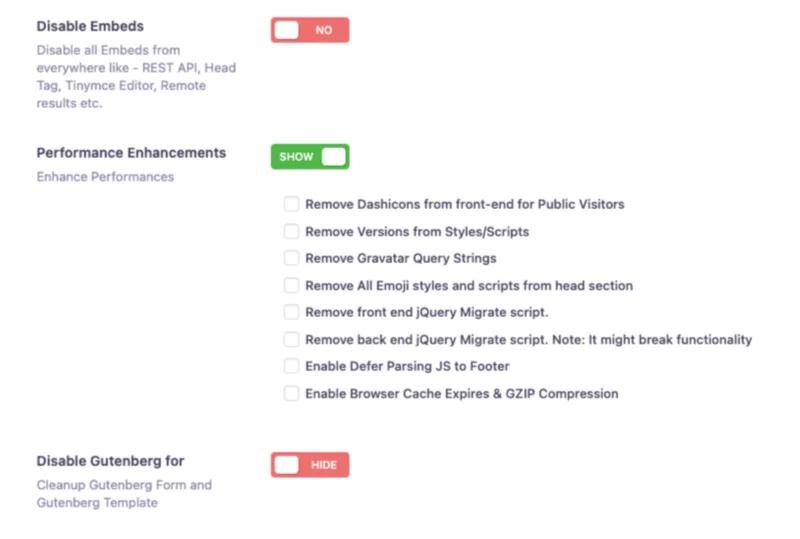

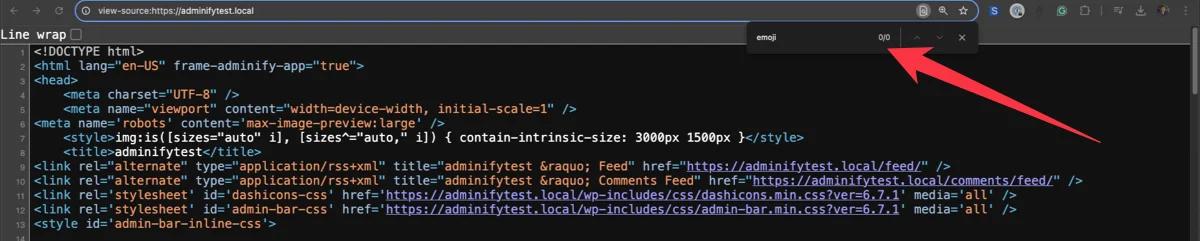
Disable Emoji Scripts:
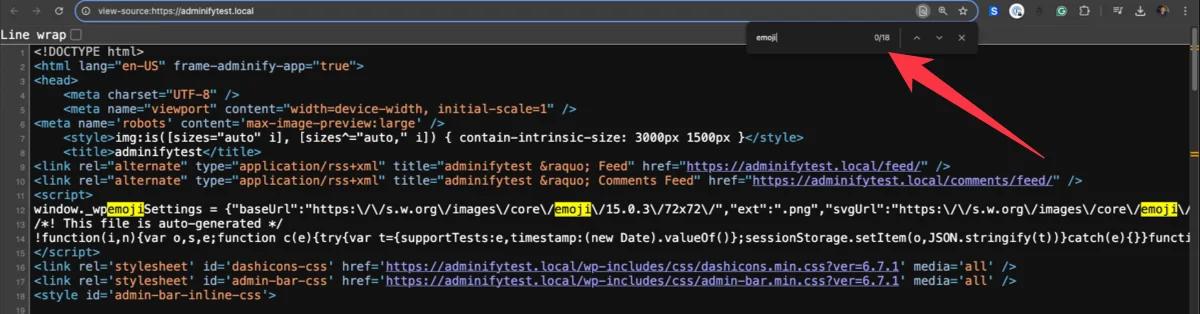
Emojis are fun, but the scripts they load? Not so much. Disable them to shave precious milliseconds off your load time.
Remove jQuery Migrate:
If your plugins don’t rely on outdated jQuery, disable this script to cut down on unnecessary processing.
3. Defer JavaScript for Faster Page Loads
JavaScript is essential, but it’s also a resource hog.
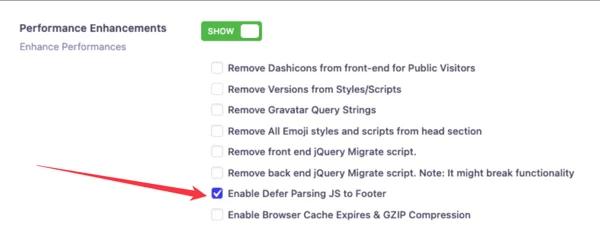
WP Adminify lets you defer parsing JavaScript to the footer, so your critical content loads first.
Just go to WP Adminify > Performance and toggle the "Defer Parsing JS to Footer" option. Boom, faster site.
4. Clean Up the Head Section: Less Clutter, More Speed
Your site’s head section often becomes a dumping ground for unnecessary elements. WP Adminify can help you declutter by:
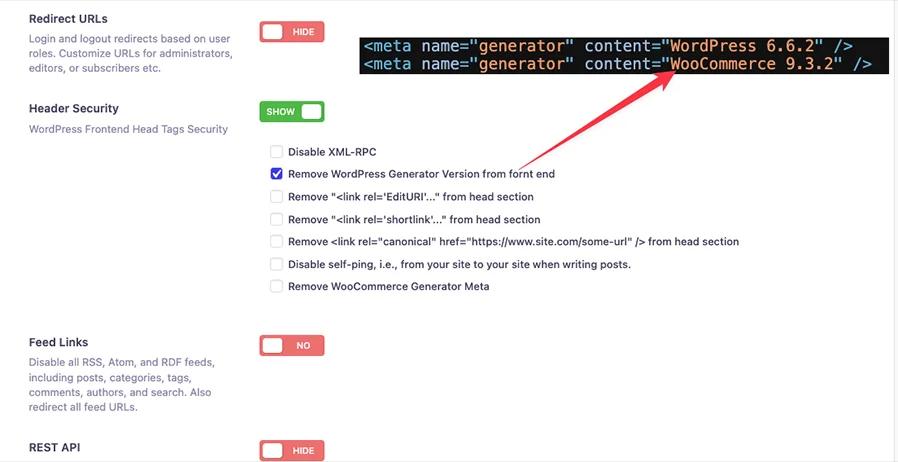
Removing WordPress Generator Version and other metadata that serves no real purpose.
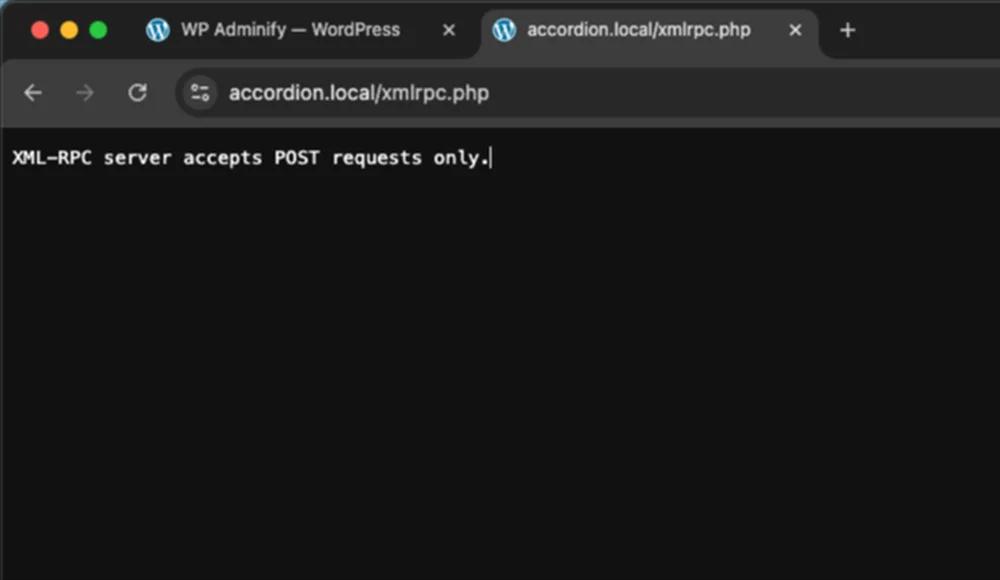
Disabling XML-RPC and limiting REST API access to authenticated users.
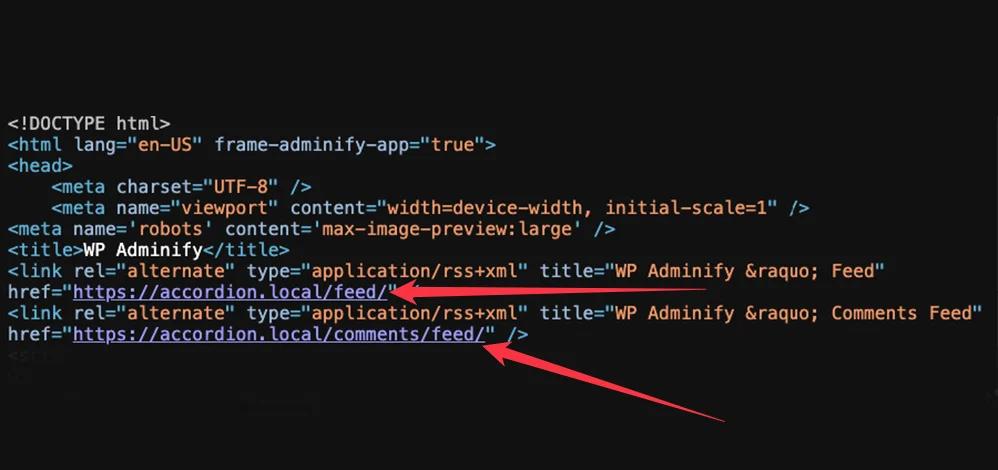
Cutting out redundant feed links to reduce server requests.
Head to WP Adminify > Security to activate these options. Some scripts do belong in the head, like analytics and verification tags. Learn how to insert code in your WordPress header without stuffing it into theme files.
5. Kick Gutenberg Scripts to the Curb (If You’re Not Using It)
Gutenberg is great for some users, but if you’re using a different page builder, its scripts and styles are just dead weight. WP Adminify allows you to:
Disable Backend Gutenberg Scripts for posts and pages.
Plus, Remove Frontend Gutenberg Styles to streamline CSS loading.
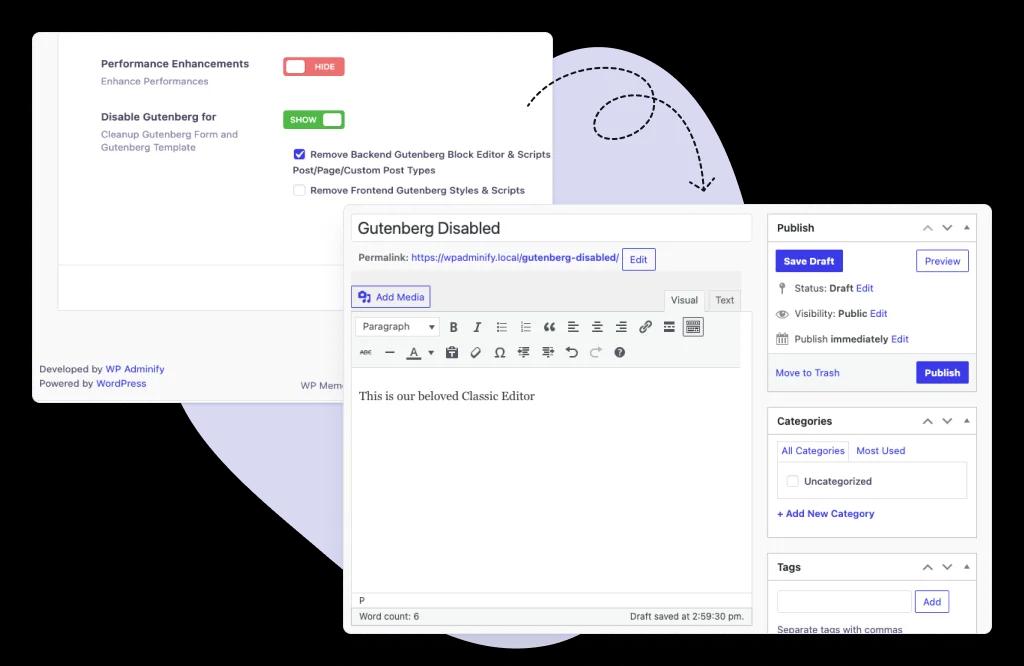
These settings are under WP Adminify > Performance.
6. Disable Embeds: Say Goodbye to Slow External Requests
Every time someone embeds a video or tweet, it adds extra requests to your site. With WP Adminify, you can:
Completely disable embeds to prevent external scripts from slowing down your site.
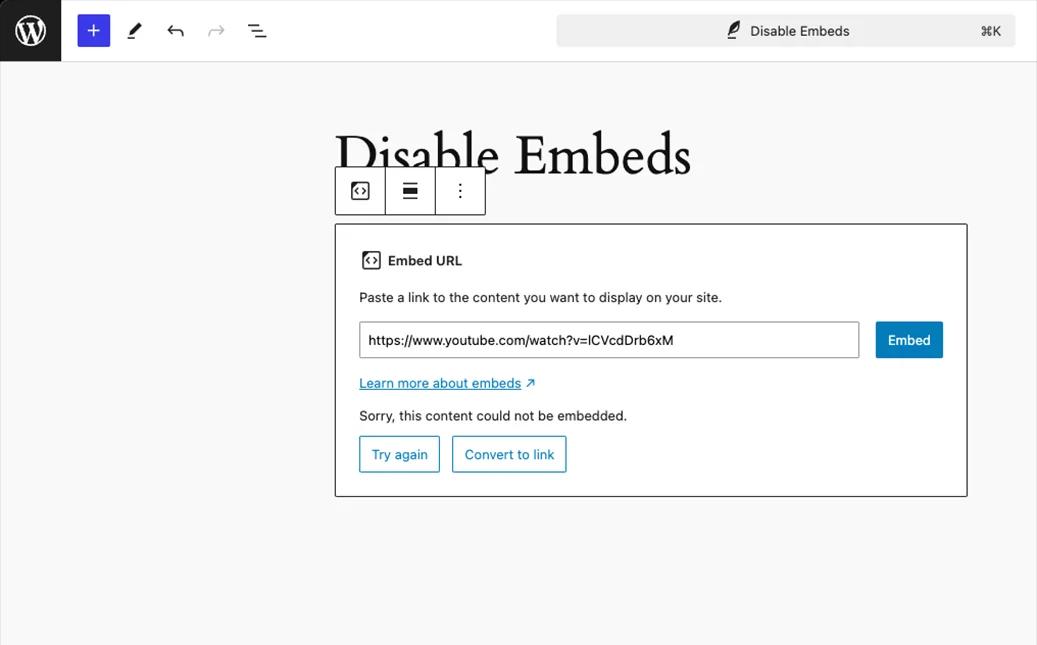
Stop REST API embed results from being processed unnecessarily.
Find this feature under WP Adminify > Performance.
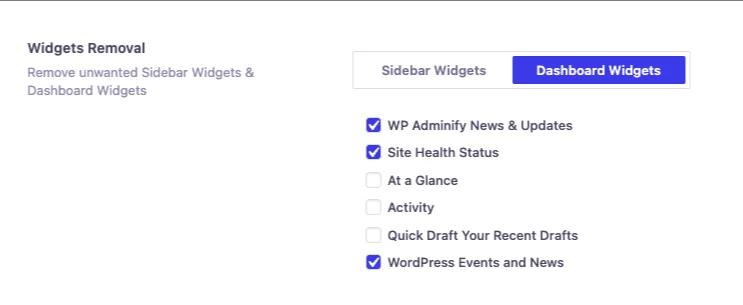
7. Declutter Your Dashboard and Widgets
Unused widgets not only waste space but also consume resources. WP Adminify lets you:
Remove Dashboard Widgets to keep your admin area lean and mean.
Turn off Sidebar Widgets to avoid unnecessary queries and script loads.
To find this feature just go to WP Adminify > Productivity. Scroll to the bottom.
Pro Tips with WP Adminify Pro
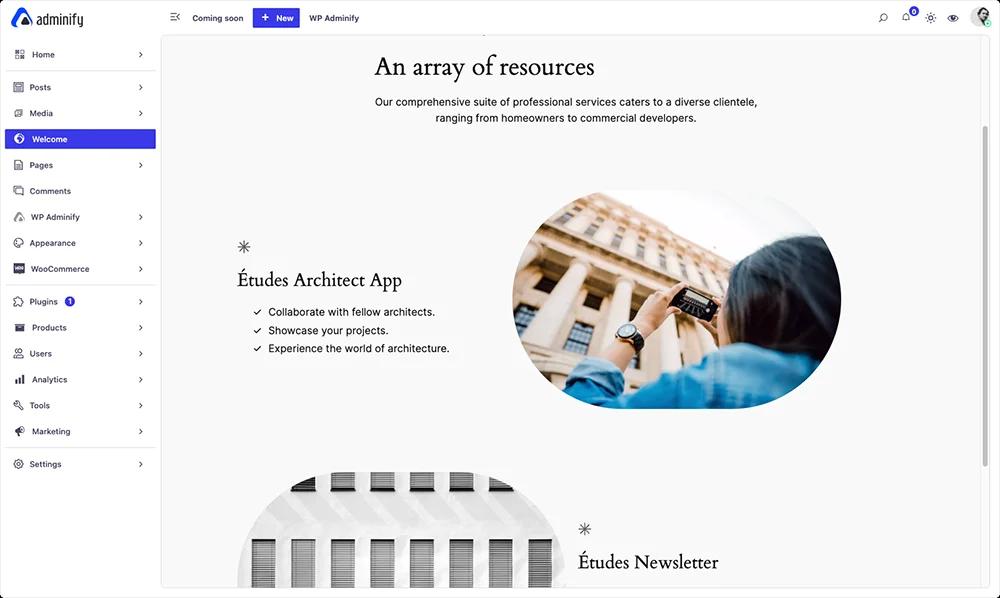
WP Adminify's free version is plenty capable of resolving any WordPress site speed issues on its own but if you're looking for some serious speed, WP Adminify Pro has you covered:
Custom Admin Pages:
Replace heavy default pages with lightweight custom ones using your favorite page builder.
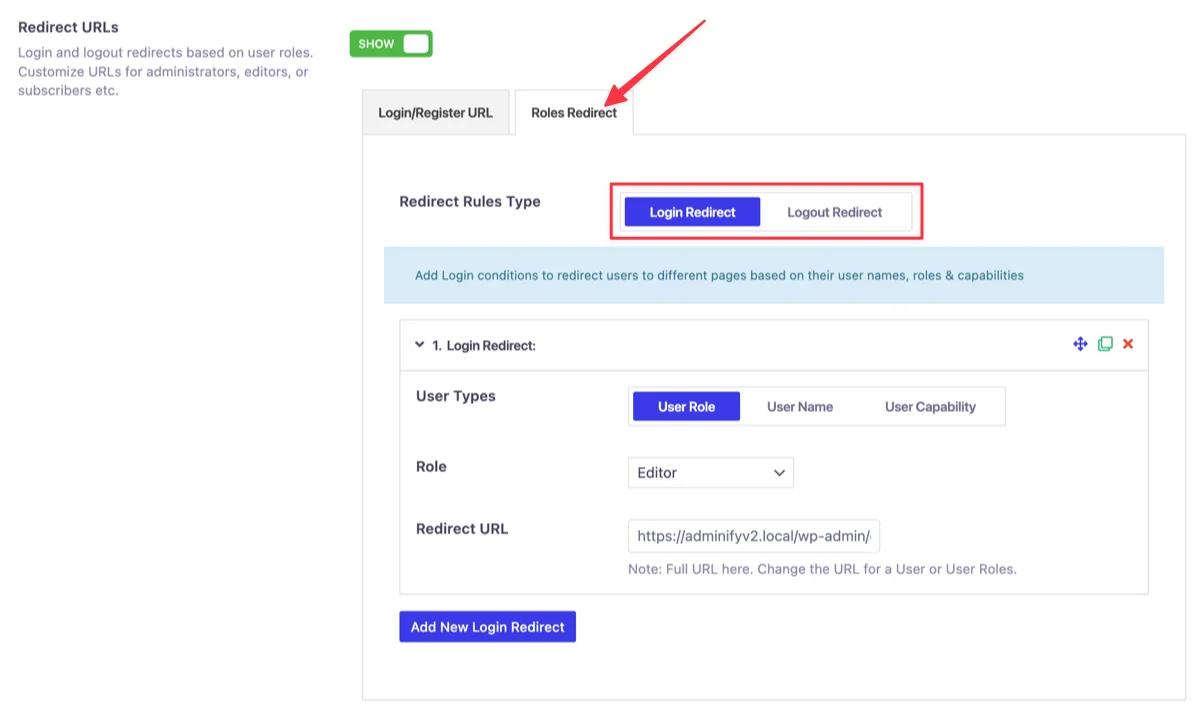
Login/Logout Redirects:
Redirect users based on roles to skip unnecessary loading of default admin screens.
Hide Update Notices:
Clean up your admin area to focus on what matters most. Hide admin notices to improve loading speed across your dashboard.

There are many more such features in WP Adminify that you can use to achieve pro levels of productivity and output on your WordPress dashboard as well as website.
WordPress Performance Best Practices: A Quick Checklist
These WordPress performance best practices distill the whole guide into a checklist you can act on. Work through them in order and re-run a speed test after each change so you can see which one actually moved the needle. Small, measured steps beat one big rewrite every time — and they keep improving performance without breaking the site.
- Pick a capable hosting provider — it caps your server performance and page load time before any plugin runs.
- Keep WordPress core, themes, and plugins updated; outdated code is a common source of performance issues.
- Resize and lazy-load images so heavy media never blocks the first paint.
- Enable page and object caching, and add a content delivery network if your audience is global.
- Run regular database cleanup so bloat and stale data stop dragging queries.
- Trim unused plugins and scripts to cut requests and speed up WordPress.
- Track real performance metrics with a speed test tool before and after every change.
WordPress Performance FAQs
How do I speed up my WordPress website?
Start with fast, well-resourced hosting, then add a caching plugin for page cache and browser caching. Compress and lazy-load images, trim unused plugins, defer JavaScript, and keep PHP current. A CDN shortens load time for distant visitors. WP Adminify removes emoji, Dashicons, jQuery Migrate, and Gutenberg assets so there's simply less to load.
Does WP Adminify improve WordPress performance?
Yes, on the front-end asset layer. It strips Dashicons and emoji scripts for visitors, defers JavaScript to the footer, disables jQuery Migrate and embeds, cleans the head section, and turns off Gutenberg assets when you use another builder. It complements a caching plugin and good hosting rather than replacing them.
Why is WordPress very slow?
A slow WordPress site usually comes down to weak shared hosting, no caching, oversized unoptimized images, too many heavy plugins, an outdated PHP version, or a bloated database. Run PageSpeed Insights to see which resource hurts your load time most, then fix the biggest offender before the smaller ones.
Does caching really make WordPress faster?
Yes, dramatically. A caching plugin stores a ready-made copy of each page so your server skips rebuilding it on every visit, and browser caching keeps static files local so repeat visitors don't re-download them. Pair page cache with object caching and a CDN for the largest, most consistent speed gains.
Do too many plugins slow down WordPress?
It's not the count, it's what each plugin loads. Plugins that add scripts, styles, or database queries on every page are the real drag. Audit which ones load site-wide, deactivate anything unused, and replace several single-purpose tools with one multi-feature plugin like WP Adminify to cut overhead.
Ready to Optimize Your WordPress Website?
Performance optimization should be easy. And WP Adminify surely excels in that.
WP Adminify gives everything you need to make your site faster and more efficient. Everything inside just a single plugin.
And performance optimization is just one of the things WP Adminify gives you. There’s extensive features that go into dashboard customization, productivity, security to name a few.
You can try the demo to get a clearer picture of all the features or even just download the free version which is packed to the brim with features as well.
However to get the maximum benefits of WP Adminify the Pro is a no brainer. Learn why WP Adminify Pro is more powerful than ever.
Your email address will not be published