

WP Adminify
How to Add Custom CSS and JS in WordPress?


Table of Contents
The default WordPress admin dashboard has unnecessary elements. And it makes it slow to work with and hard to navigate. WP Adminify solves these issues with its Advanced code snippets.
Let’s show you how you can also do it.
Step 1: Go to Code Snippets in WP Adminify
Go to the following path to access code snippets options:
WP Adminify > Code Snippets
Step 2: How to Add Custom CSS/JS in the Admin Dashboard
You’ll see 2 tabs in this section.
- Admin Scripts
- Frontend Scripts
To add custom CSS/JS in the WordPress admin dashboard, stay on the “Admin scripts” tab.
You’ll see 2 separate fields to add your custom codes:
- Custom CSS
- Custom JavaScript
In the Custom CSS box, enter the CSS code you want to apply only to the admin panel.
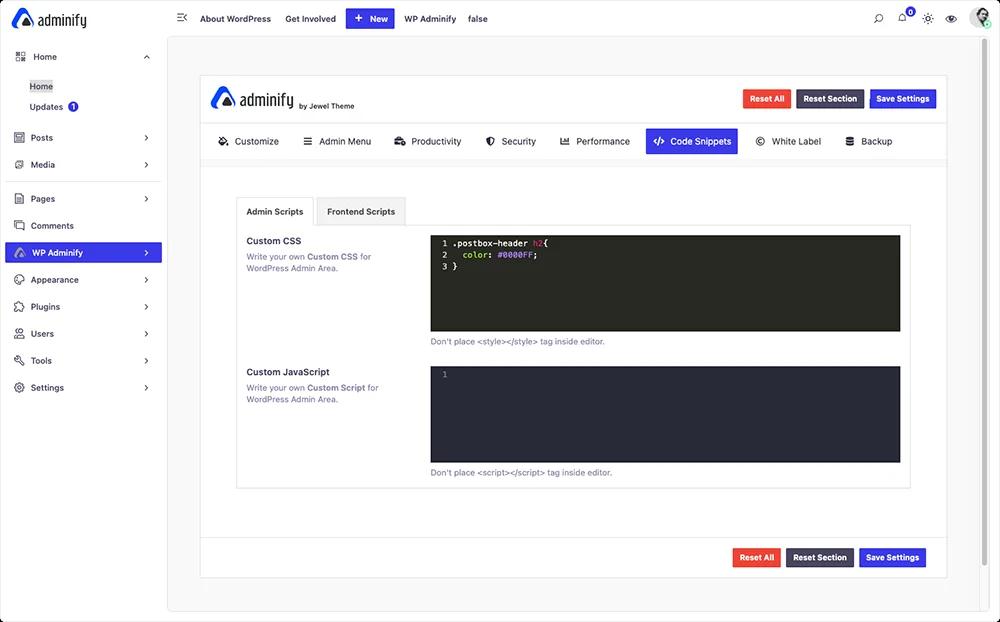
Similarly for JS code, use the Custom JavaScript box.
Note: Don't place <style></style> tag inside the editor.
Learn more about Frontend styles and script here. You can also place tracking scripts and meta tags site-wide. Our guide on how to add code to the head tag in WordPress shows where each snippet belongs.
Didn’t find what you were looking for? Get in touch!
Updated on Aug 8, 2026
Was this helpful to you?