


WP Adminify
How to Enable Header Security in WordPress?


Table of Contents
WP Adminify gives you further control to remove/hide options for increased security. Here’s how to do it.
Step 1: Access Header Security Settings
First, go to the following path: WP Adminify > Security. Now, find the setting labeled as “Header Security” and enable it.
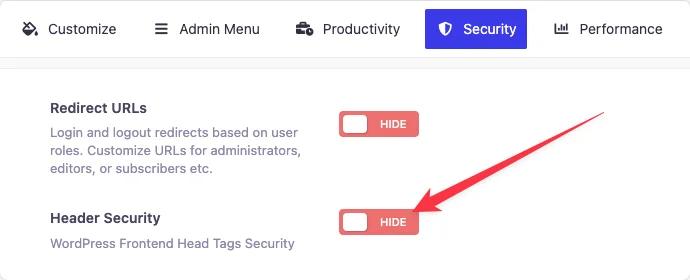
You will get the following options with a checkbox for easier selection:
- Disable XML-RPC
- Remove WordPress Generator Version from front end
- Remove "<link rel='EditURI'..." from head section
- Remove "<link rel='shortlink'..." from head section
- Remove <link rel="canonical" href="https://www.site.com/some-url" /> from head section
- Disable self-ping, i.e., from your site to your site when writing posts.
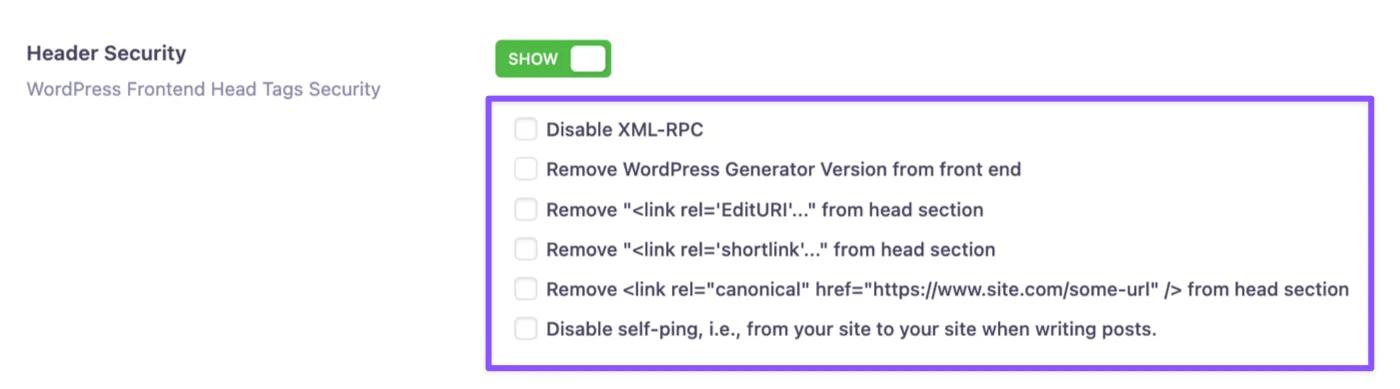
Here’s a short description of what each of these does.
- Disable XML-RPC: Blocks outdated access points to boost site security.
- Hide WordPress Version: Removes version info to reduce hack risks.
- Remove EditURI Link: Cuts unnecessary remote editor metadata.
- Remove Shortlink Tag: Cleans up header by skipping short URL tags.
- Remove Canonical Tag: Removed the canonical URLs from the header section.
- Disable Self-Ping: Stops your site from pinging itself on internal links.
Step 2: Save the Settings
After you’re done with the section, click the “Save Settings” button to apply it. We are going to demonstrate some of our header security features in the following videos-
Disable XML-RPC:
Remove WordPress Generator Version:
Remove "<link rel='EditURI'…" from head section:
Remove "<link rel='shortlink'…" from head section:
WP Adminify supports a lot of popular plugins like WooCommerce, Rank Math, Yoast SEO, Visual composer and much more. You will dynamically get many more options to remove these plugin generator version from your site header. If you need to add code to your WordPress header instead, like an analytics or verification tag, WP Adminify handles that too.
Didn’t find what you were looking for? Get in touch!
Updated on Aug 8, 2026
Was this helpful to you?