

WP Adminify
How to disable comments in WordPress website?


Table of Contents
WP Adminify plugin offers you the ability to Disable comments on both frontend and backend. You can hide all options for comments from backend and frontend as well.
Step 1: Enable the option for Disable Comments
Navigate to security > disable comments option and enable the switcher.
Step 2: Disable comments for selected post type
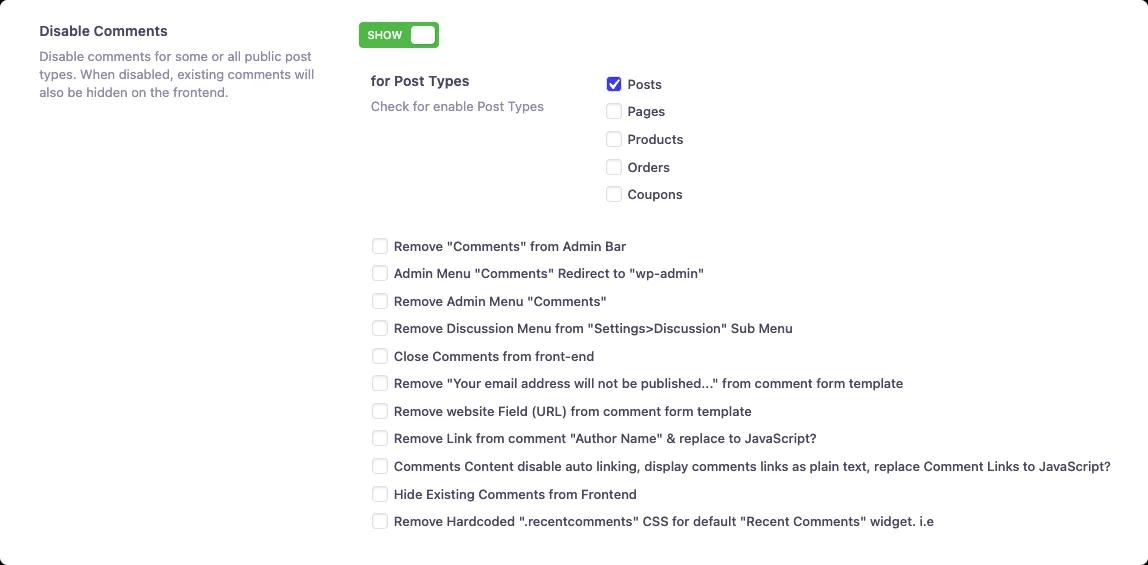
Select all available post types first where you like to disable comments.
Step 3: Check options that you like to implement
This is the last option where you have to choose all necessary option that seems required to your Dashboard for disabling comments. The available featured mentioned bellow -
- Remove "Comments" from Admin Bar
- Admin Menu "Comments" Redirect to "wp-admin"
- Remove Admin Menu "Comments"
- Remove Discussion Menu from "Settings>Discussion" Sub Menu
- Close Comments from front-end
- Remove "Your email address will not be published..." from comment form template
- Remove website Field (URL) from comment form template
- Remove Link from comment "Author Name" & replace to JavaScript?
- Comments Content disable auto linking, display comments links as plain text, replace Comment Links to JavaScript?
- Hide Existing Comments from Frontend
- Remove Hardcoded ".recentcomments" CSS for default "Recent Comments" widget. I.e
All options are properly explained after selecting your preferred option make sure to save the settings and reload your page. The Remove Admin Menu "Comments" option is covered in more depth in our tutorial on how to hide the Comments menu from the WordPress admin panel.
Didn’t find what you were looking for? Get in touch!
Updated on Aug 8, 2026
Was this helpful to you?