


WP Adminify
Hide Screen Options and Help Tab in WordPress Dashboard


Table of Contents
Follow these steps to hide the Screen Options and Help tabs in the WordPress dashboard using WP Adminify.
Step 1: Access Productivity Settings
First, go to the following path:
WP Adminify > Productivity
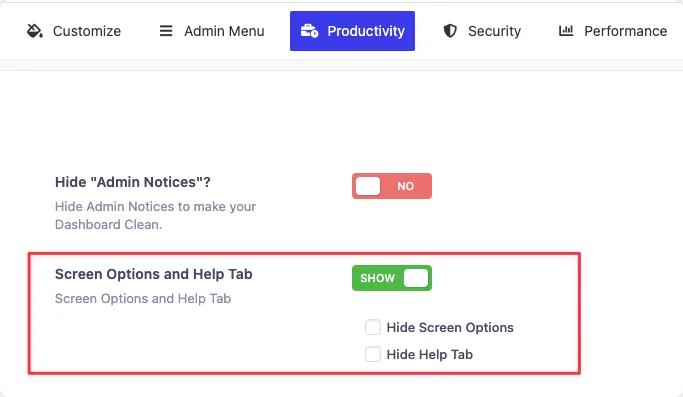
Step 2: How to Hide Screen Options and Help Tab
Find the settings labeled as “Screen Options and Help Tab”. Click the button beside it. It’ll turn green and the text will change to show.
Then you will see the following options with checkbox:
- Hide Screen Options
- Hide Help Tab
Mark the checkbox next to each option you want to hide. This will remove the respective tab from all admin pages.
Step 4: Save the Settings
After setting your preferences, click the “Save Settings” button to apply the changes.
Didn’t find what you were looking for? Get in touch!
Updated on Jul 16, 2026
Was this helpful to you?