

WordPress Admin Menu Editor: Drag, Drop & Customize in Minutes
Remove unwanted Menu items and stay organized
A WordPress admin menu editor lets you reorder, rename, restyle and hide items in the wp-admin sidebar without writing code. WP Adminify does all of it: drag an item into a new position, rename its label, swap its icon, hide it from chosen user roles, then style the menu with your own colors, fonts and spacing. A horizontal admin menu layout is included.
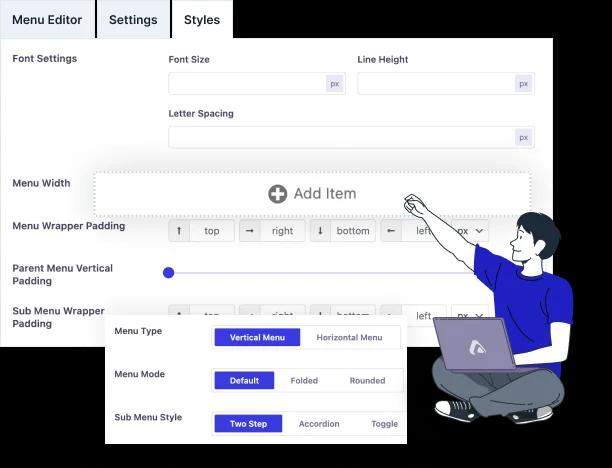
What does the Admin Menu Editor offer?
We strongly condemn the fact that you will love the modern UI of our plugin option panel. We have tried to cover limitless features within this Admin Menu editor feature. Explore the following key points and you will find it useful for your daily use case.
Create Custom Admin Menu
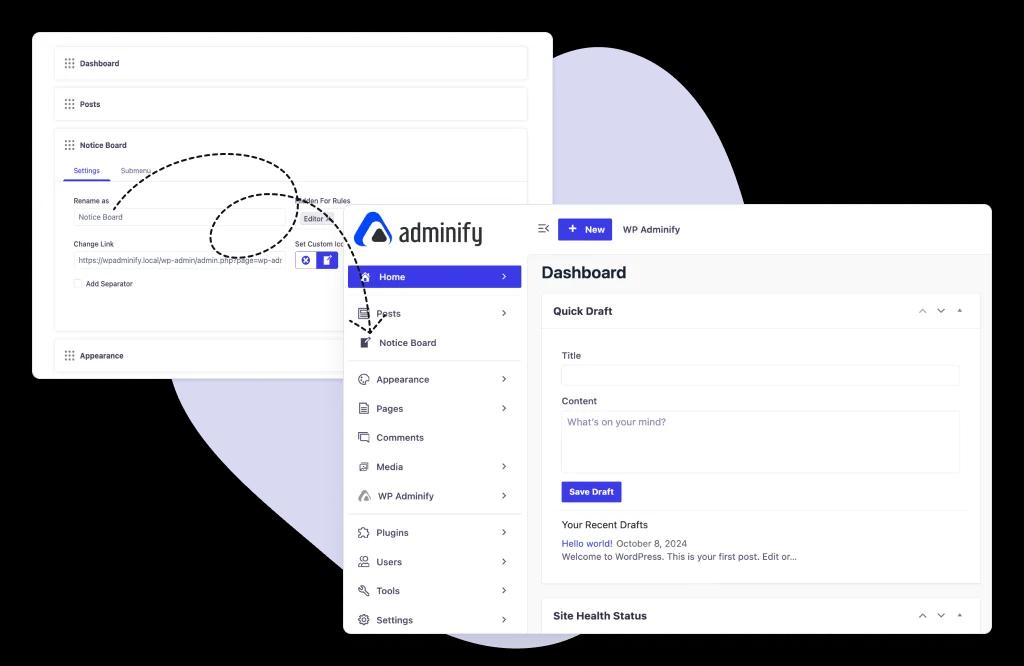
You can create a custom admin menu and insert tem text, url, define icon, and much more.It works for both primary menu and submenu items. We also have custom Admin page feature which will help you to design a perfect admin page with any page builder.
Drag and Drop Menu items
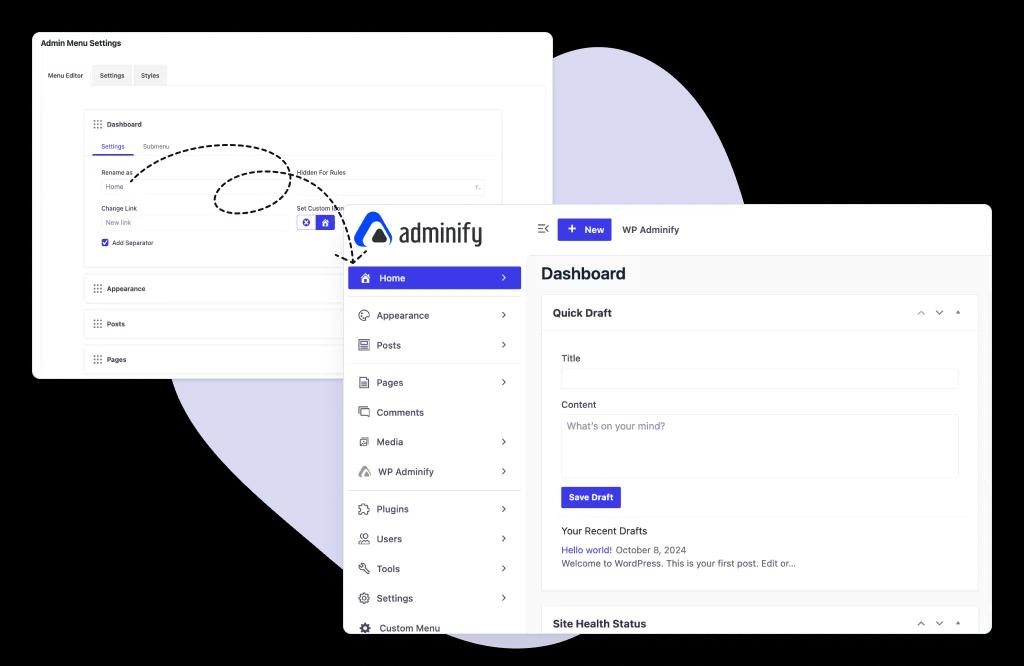
You can drag and drop main menu or submenu items without any hassle. This can help you to organize your different menu items in one group. EX: You can sort all your SEO related menu items in a group.
Hide for a specific user role
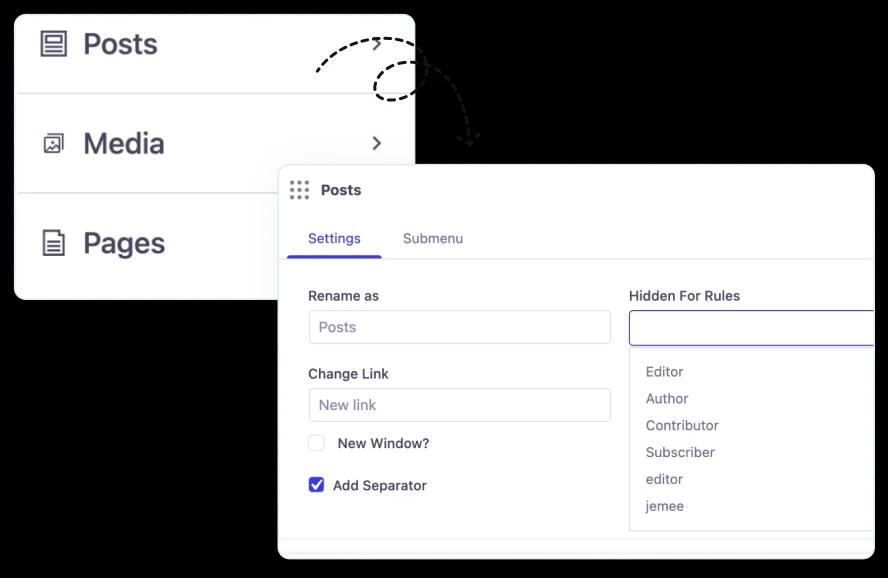
That’s one of the most popular features of our Admin Menu editor. You can dynamically control who is able to access your admin menu items with a user role or user name. Also with the help of our rolemaster suite addon, you can create different types of user roles and control the permissions.
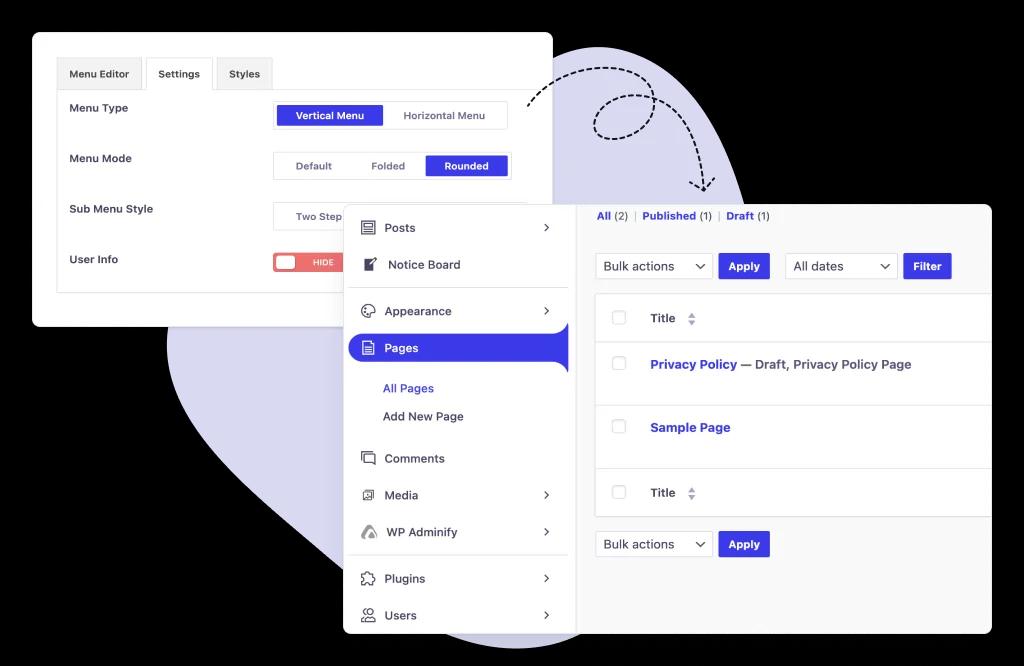
Customize admin menu styles
There are different types of menu styles like folded, accordion, toggle, and much more. With the combination of our menu mode, type, and styles - you can create a unique admin menu for your Dashboard.
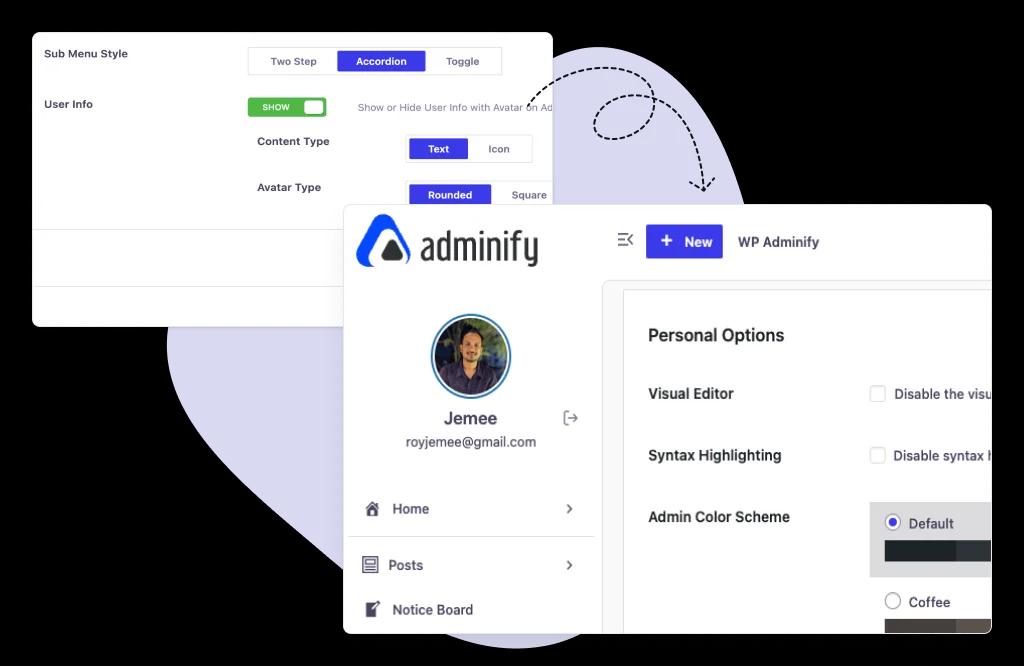
User information in the Admin Menu
Showcase the logged-in user information at the top right corner of your WordPress Admin panel. Here you can showcase the user avatar, name, email, and log out icon.
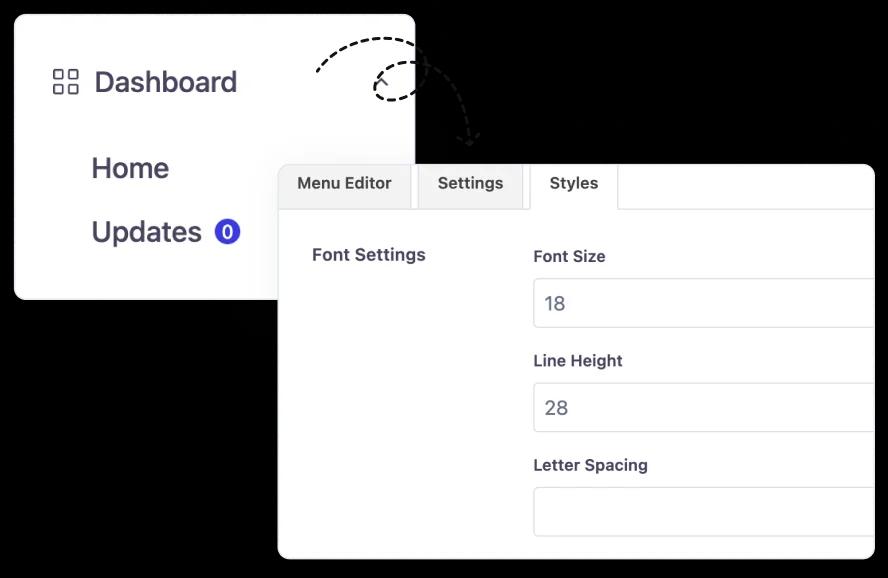
Change the font Style
Get rid of the default style and do some customization in the Admin menu font style. This can make your dashboard look more pleasant.
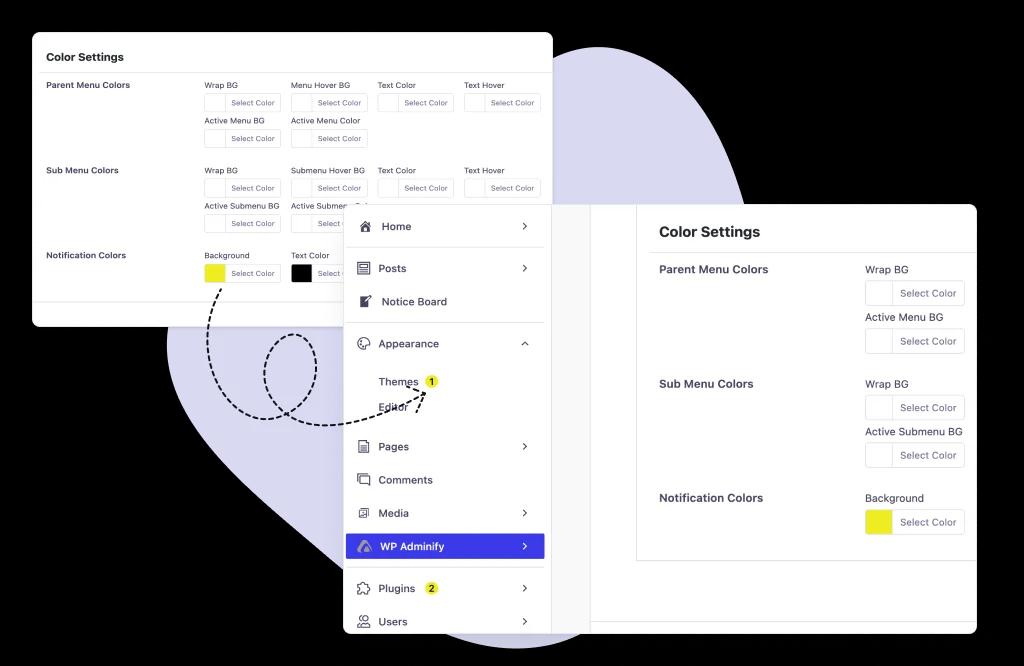
Color customization
Customize the menu wrapper, font, hover, and link colors based on your preference. Change the parent menu, submenu, and user info colors.
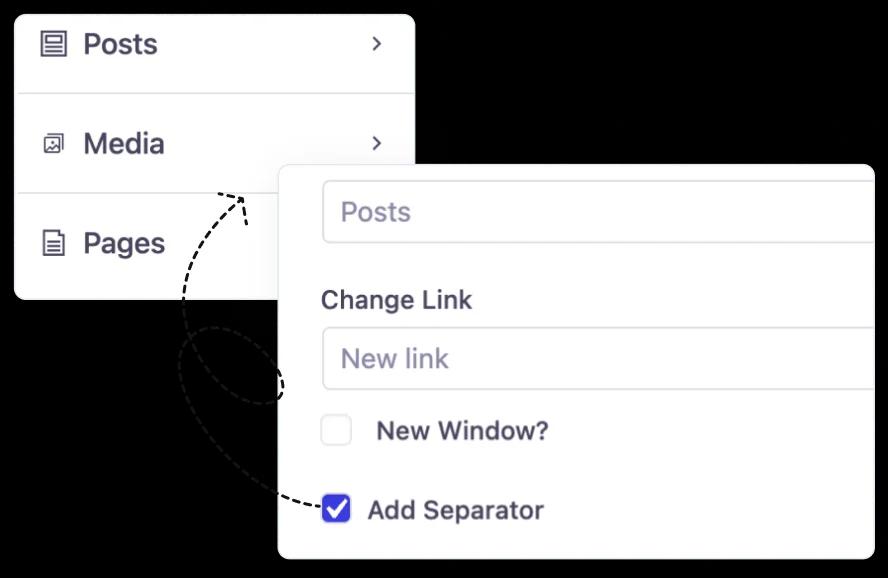
Add Custom separator
Separator plays a vital role in organizing your existing menu items properly inside the admin menu area. WordPress doesn’t provide the option to add a custom separator by default. We have brought this feature for our pro users so that they can move their admin menu style to next level.
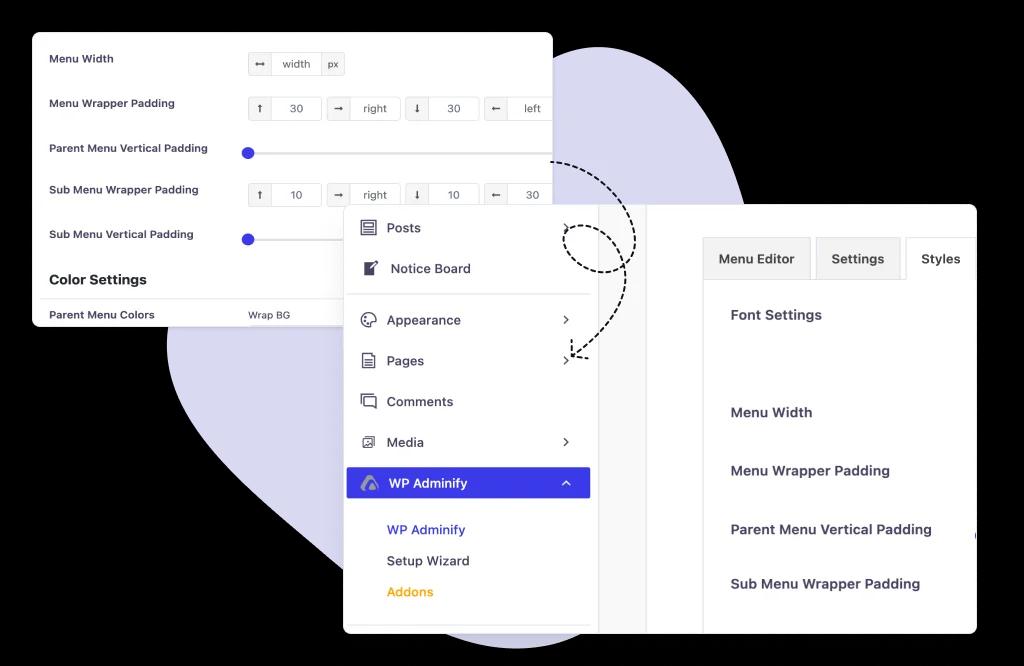
Padding Adjustments
After doing all of the stuff, you may have wondered if there is any way to increase the gap between each menu item. To resolve this use case we have introduced the Padding Adjustments option for Admin menu editor.
WP Adminify vs. the Admin Menu Editor plugin
If reordering and hiding menu items is all you need, the standalone Admin Menu Editor plugin handles it well - it's active on over 300,000 WordPress sites. WP Adminify gives you the same drag-and-drop control, then adds menu styling, admin bar editing, and white labeling, so you're not stacking four plugins to clean up one dashboard. (Updated July 2026)
| WP Adminify | Admin Menu Editor | |
| Drag and drop menu items into a new order | ||
| Rename menus, change icons and URLs | ||
| Hide a menu item from a user role | Roles or usernames, per item | Required role/capability (per-role in Pro) |
| Style the admin menu (colors, fonts, padding, separators) | ||
| Menu layouts and a user information block in the menu | ||
| Edit the WordPress admin bar (toolbar) | ||
| White label the whole dashboard for clients | ||
| Free version on WordPress.org |
When is the standalone Admin Menu Editor the better choice?
Choose it when the dashboard menu is the only thing you want to touch and you don't care how it looks. It's focused and mature, with deep permission rules. Choose WP Adminify when the menu is one part of a bigger cleanup - you also want a styled menu, a tidy admin bar, and a white-labeled dashboard your clients recognise as yours.
Either way, an admin menu editor is one layer of a larger job. Our WordPress dashboard customization guide walks through the rest, and the step-by-step menu editor tutorial shows the workflow inside WP Adminify.
How do you edit the menu in WordPress?
There are two different menus people mean by this, and they live in completely different places. The site navigation menu (the one visitors see in your header or footer) is edited under Appearance > Menus on a classic theme, or in the Site Editor under Appearance > Editor > Navigation on a block theme. The admin menu (the black sidebar you and your clients look at all day) is not editable in core WordPress at all. That is the one an admin menu editor changes.
With WP Adminify, open Adminify > Menu Editor, drag any item into a new position, click it to rename the label, pick a different icon, point it at another URL, or hide it from selected roles. Save once and every user with that role sees the new layout on their next page load. Nothing is written to your theme, so switching themes later does not undo the work.
Can you reorder the WordPress admin menu without code?
Yes. Drag and drop is the whole workflow in a menu editor, and it survives plugin updates because the order is stored as a setting rather than patched into a file. The code route exists too: you hook custom_menu_order and menu_order in a filter and return an array of menu slugs in the order you want. It works, but you have to know that Posts is edit.php, Media is upload.php, and that a plugin adding its own top-level page tomorrow will land wherever it likes unless you update the array again.
Reordering is usually step one of a bigger cleanup. Once the menu makes sense, most people move on to the widgets, the admin bar, and the login screen. Our WordPress dashboard customization page covers that full picture, and the menu editor walkthrough shows each screen in order.

“The plugin is stable and does not affect performance, which is a significant advantage. ”

@gdimitrov
WordPress.org
"This plugin is very great: works fine, gives a very nice look to the WordPress Dashboard”

@peopleinside
WordPress.org
"This plugin lets me transform the UI, user-friendly, and fast, essential for a modern website backend."

Sascha Donelasci
Web Design Agency
“Support has been responsive and helpful, truly putting the customer first” , a rare quality these days.

Louis J Gleason
Developer & Creator
“I am totally blown away with all that WPAdminify can do! ALREADY WAY BEYOND EXPECTATIONS!!"

@shezoom
Startup
“Lot of functionalities and ability to, customize admin & login on WordPress, active support & updates.”

@Myllio
WordPress.org
Personal
47.40
/ Year- 1 Website
- Multisite Support
- "WP Adminify" Branding Removal
- Replace 50+ Plugins
- Client-Ready Dashboard
- 1 Year Support and Updates
- Custom Dashboard Widget
- Easy Menu Search
- Admin Menu Editor
Business
64.50
/ Year- 5 Websites
- Multisite Support
- "WP Adminify" Branding Removal
- Replace 50+ Plugins
- Client-Ready Dashboard
- 1 Year Support and Updates
- Custom Dashboard Widget
- Easy Menu Search
- Admin Menu Editor
Agency
112.05
/ Year- Multisite Support
- "WP Adminify" Branding Removal
- Replace 50+ Plugins
- Client-Ready Dashboard
- 1 Year Support and Updates
- Custom Dashboard Widget
- Easy Menu Search
- Admin Menu Editor
Lifetime Bundle
799.00
/ Lifetime- Use on up to Unlimited Websites
- Lifetime Updates and Support
 WP Adminify
 Loginfy
 WP Spotlight
 Header and Footer Scripts
 Quick Menu
 Admin Bar Editor
 Admin Columns Editor
Admin menu editor FAQs
What is a WordPress admin menu editor?
An admin menu editor is a plugin that changes the WordPress dashboard's left-hand menu without code. You can drag menu items into a new order, rename them, swap the icons, point them at a different URL, add a new menu of your own, and hide items from specific user roles - all from one settings screen.
How do I hide admin menu items for a specific user role?
Open the WP Adminify admin menu editor, click the menu item you want to hide, then choose the roles or usernames under “Hidden for” and save. That item disappears for those users. Editors and subscribers get a cleaner dashboard while your own admin menu stays exactly as it was.
Does hiding a menu item block access to that page?
No. Hiding a menu item removes it from view - it doesn't remove the capability behind it, so a user who knows the direct URL can still load the screen. If you need to genuinely block access, change what that user role is allowed to do as well as hiding the menu item.
Can I edit the WordPress admin menu without a plugin?
Yes - remove_menu_page() and add_menu_page() in a small custom plugin will reorder and hide menus. That's fine for one or two changes, but you're back in the code every time a plugin adds a menu item. Here's the custom admin menu walkthrough if you'd rather do it by hand.
Is WP Adminify's admin menu editor free?
Yes. The admin menu editor ships in the free WP Adminify plugin on WordPress.org - drag-and-drop ordering, renaming, and role-based hiding are all included. Pro unlocks the deeper styling and layout options. The pricing page lists exactly what each plan gives you.
Can I rename WordPress admin menu items?
Yes. Click the item in the WP Adminify admin menu editor and type a new label, so Posts can read Blog and Media can read Images. Submenu items rename the same way. The underlying slug and capabilities stay untouched, so links and permissions keep working; only the wording your clients read changes.
Get Started with WP Adminify Today
We offer the best WordPress Dashboard Customization and maintenance feature to our users.
Rebrand the admin panel of personal or clients Dashboard within minutes.